

Most SEO tools tell you what already happened. They show you last month's rankings, last quarter's search volume, and keywords your competitors owned six months ago.
I wanted something different.
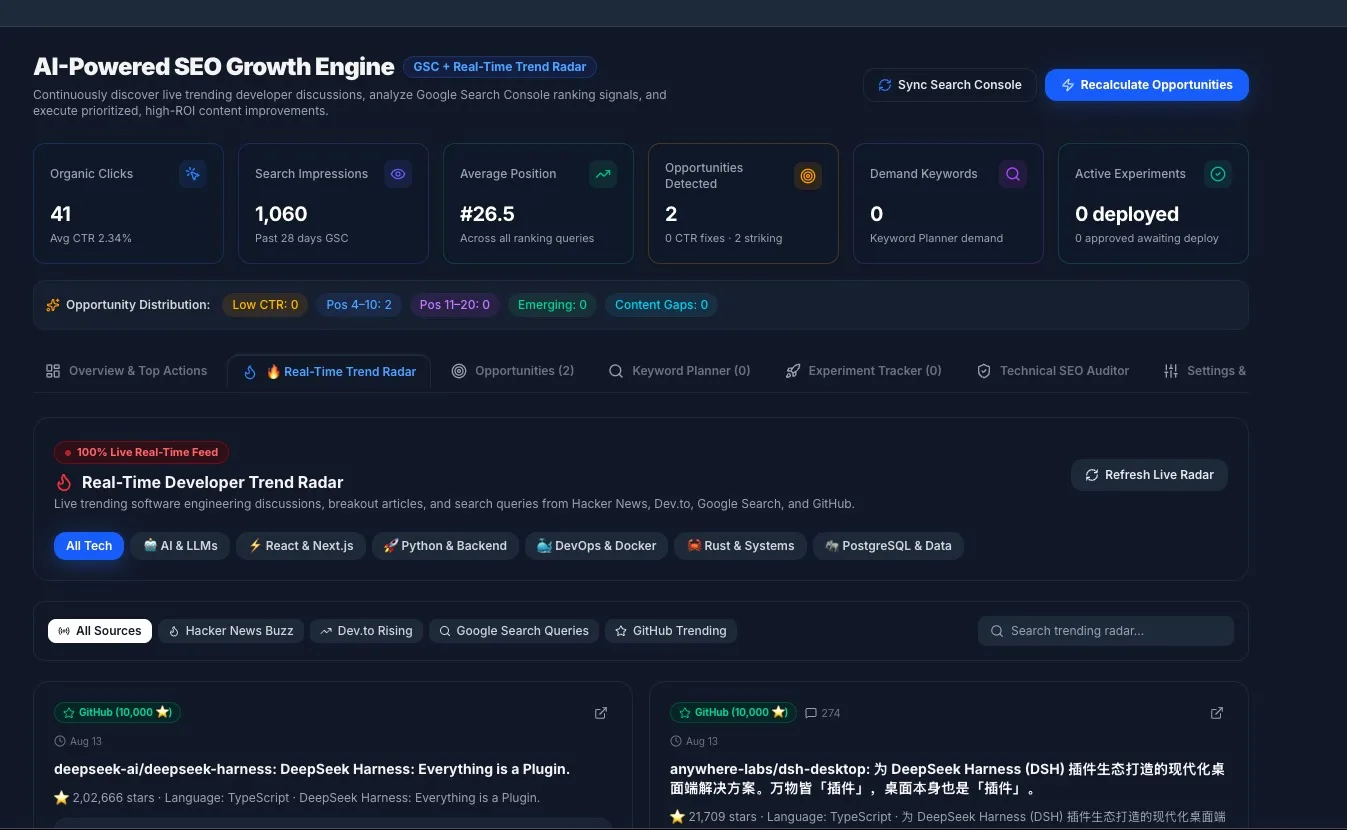
I wanted to look at what developers are talking about right now — the Hacker News thread with 700 points, the Dev.to post with 150 reactions, the search-query patterns appearing around a topic, the GitHub repository that has quickly attracted thousands of stars — and instantly turn those signals into blog content briefs I can execute on immediately.
So I built it. Here's how.
The Problem: Fresh Websites Have Zero Historical Data
When you launch a new developer blog or technical publication, Google Search Console (GSC) is practically empty. You might have a handful of impressions for your brand name and a few long-tail queries that nobody else searches for.
The typical SEO workflow looks like this:
flowchart LR
    A["Publish Content"] --> B["Wait 3-6 Months"]
    B --> C["GSC Shows Data"]
    C --> D["Analyze Keywords"]
    D --> E["Find Opportunities"]
    E --> F["Write More Content"]
    F --> B
This is a cold-start loop. You're waiting for data that depends on traffic you don't have yet.
The question became: What if I could bypass the cold-start entirely by pulling real-time demand signals from the places developers actually hang out?
The Architecture: Four Live Streams, One Unified Radar
The system I built aggregates live or recent data from four primary developer platforms into a single, queryable radar feed. The radar uses observed source signals rather than inventing engagement metrics. The separate keyword-discovery engine can also use model-generated estimates, but those are treated as estimates rather than measured search data.
flowchart TD
    subgraph External["Live Data Sources"]
        HN["Hacker News Algolia API"]
        DT["Dev.to Articles API"]
        GS["Google Autocomplete API"]
        GH["GitHub Search API"]
    end

    subgraph Backend["NestJS Backend"]
        TS["SeoTrendingService"]
        Cache["In-Memory Cache - 5min TTL"]
        AI["SeoAiService - Groq LLM (GPT-OSS 120B)"]
        DB[("PostgreSQL")]
    end

    subgraph Frontend["Next.js Frontend"]
        Radar["Real-Time Trend Radar Tab"]
        Cards["Trending Topic Cards"]
        CTA["Write Blog on This Button"]
        Opps["Opportunities Table"]
    end

    HN --> TS
    DT --> TS
    GS --> TS
    GH --> TS
    TS --> Cache
    Cache --> Radar
    Radar --> Cards
    Cards --> CTA
    CTA --> AI
    AI --> DB
    DB --> Opps
The key architectural decision: live streams are cached in-memory, but content decisions are persisted to PostgreSQL. The radar shows you what's hot right now; once you decide to write about something, it becomes a permanent, trackable content opportunity with a full AI-generated content brief.
Data Source #1: Hacker News Front Page
Hacker News is arguably the most concentrated source of developer attention on the internet. A front-page post can attract substantial developer attention within hours.
I use the Algolia HN Search API to pull the current front page:
private async fetchHackerNewsTrends(): Promise<RealTrendingItem[]> {
  const res = await fetch(
    'https://hn.algolia.com/api/v1/search?tags=front_page&hitsPerPage=25',
    { headers: { 'User-Agent': 'ZyVopSeoRadar/1.0' } },
  );

  const data = await res.json();

  return data.hits
    .filter((h) => h.title && h.points > 20)
    .map((h) => {
      // Extract real tags from HN Algolia _tags field
      // (filters out generic 'story', 'front_page', 'author_xyz')
      const rawTags = Array.isArray(h._tags)
        ? h._tags.filter((t) => !t.startsWith('author_') && t !== 'story' && t !== 'front_page')
        : [];
      const tags = rawTags.length > 0 ? rawTags : ['Tech', 'Engineering'];

      return {
        title: h.title,
        source: 'HACKER_NEWS',
        url: h.url || `https://news.ycombinator.com/item?id=${h.objectID}`,
        summary: `${h.points} points · ${h.num_comments || 0} comments`,
        tags,
        score: h.points,
        commentsCount: h.num_comments,
        publishedAt: h.created_at, // Real ISO timestamp from HN
        suggestedAngle: `Write an engineering deep dive addressing "${h.title}"...`,
      };
    });
}
The points > 20 filter is simply a practical noise threshold for the feed. A post with 700 points and 400 comments is a strong signal of visible community attention, although it does not by itself prove search demand.
What this gives you: Real-time awareness of what the developer community is debating right now. Topics like "Htmx 4.0", "GLM-5.3 is now open-weight", or "GUIs should be fully keyboard-driven" — these are the conversations you can join with a well-timed deep-dive article.
Data Source #2: Dev.to Trending Articles
Dev.to's top=7 feed surfaces popular articles from the previous 7 days. Unlike Hacker News (which skews toward links and discussions), Dev.to content is written by developers for developers — tutorials, opinion pieces, and how-to guides.
private async fetchDevToTrends(): Promise<RealTrendingItem[]> {
  const res = await fetch(
    'https://dev.to/api/articles?per_page=30&top=7',
    { headers: { 'User-Agent': 'ZyVopSeoRadar/1.0' } },
  );

  const data = await res.json();

  return data.map((d) => ({
    title: d.title,
    source: 'DEV_TO',
    url: d.url,
    summary: d.description,
    tags: d.tag_list,
    score: d.positive_reactions_count,
    commentsCount: d.comments_count,
    suggestedAngle: `Write a comprehensive, code-rich guide on "${d.title}"...`,
  }));
}
What this gives you: Validated content formats. If "10 Git Commands You'll Wish You Knew Earlier" has 178 reactions, you know that listicle-format developer productivity content resonates. You can write a more comprehensive version, targeting the same search intent with deeper technical substance.
Data Source #3: Google Autocomplete (Search-Intent Signal)
This is the most directly actionable signal for query discovery. Google Autocomplete reflects real searches, but its predictions can also depend on language, location, trending interest, and past searches. It is useful for discovering query patterns and emerging search intent, but it is not a direct search-volume metric. Google documents these factors here.
private async fetchGoogleSearchTrends(): Promise<RealTrendingItem[]> {
  const seedTerms = [
    'Next.js 15', 'AI agents', 'FastAPI', 'TypeScript',
    'PostgreSQL', 'Docker', 'DeepSeek R1', 'Rust programming',
  ];

  const results: RealTrendingItem[] = [];

  for (const term of seedTerms) {
    const url = `https://suggestqueries.google.com/complete/search` +
      `?client=chrome&q=${encodeURIComponent(term)}`;
    const res = await fetch(url, {
      headers: { 'User-Agent': 'Mozilla/5.0' },
    });
    const data = await res.json();

    // data[1] contains the autocomplete suggestions
    for (const query of data[1].slice(1, 4)) {
      results.push({
        title: query.trim(),
        source: 'GOOGLE_SEARCH',
        url: `https://www.google.com/search?q=${encodeURIComponent(query)}`,
        summary: `Google Autocomplete prediction for "${term}" — a search-intent signal, not a volume metric`,
        score: 0,            // No engagement score — autocomplete is a signal, not a post
        publishedAt: null,   // Query signal — there is no "published date"
      });
    }
  }

  return results;
}
An important design decision here: Google Autocomplete items have no engagement score or verified search-volume number. Unlike a Hacker News post (which has real points) or a Dev.to article (which has real reactions), an autocomplete suggestion is a search-intent signal. I deliberately set score: 0 and publishedAt: null instead of faking numbers — the frontend handles these cases with distinct labels ("Live Search Demand" and "Live Query") so the user knows exactly what kind of signal they're looking at.
For example, querying "Next.js 15" might return:
next.js 15 server actionsnext.js vs reactnext.js latest versionnext.js tutorial
These are query patterns Google is surfacing around the seed topic. Writing a comprehensive article targeting a phrase such as "next.js 15 server actions" may align with emerging search intent, but the autocomplete result itself is not proof of current search volume.
What this gives you: Query discovery based on current autocomplete signals, without pretending those signals are equivalent to measured keyword volume.
Data Source #4: GitHub Breakout Repositories
New open-source projects with large star counts shortly after creation can signal emerging developer interest in a technology, pattern, or tool. The current query surfaces recently created repositories and sorts them by current star count; it does not yet measure star-growth velocity over time.
private async fetchGithubTrending(): Promise<RealTrendingItem[]> {
  const oneMonthAgo = new Date(Date.now() - 30 * 86400000)
    .toISOString().split('T')[0];

  const url = `https://api.github.com/search/repositories` +
    `?q=created:>${oneMonthAgo}&sort=stars&order=desc&per_page=12`;

  const res = await fetch(url, {
    headers: {
      'User-Agent': 'ZyVopSeoRadar/1.0',
      Accept: 'application/vnd.github.v3+json',
    },
  });

  const data = await res.json();

  return data.items.map((repo) => ({
    title: `${repo.full_name}: ${repo.description}`,
    source: 'GITHUB',
    url: repo.html_url,
    summary: `⭐ ${repo.stargazers_count.toLocaleString()} stars · ${repo.language}`,
    tags: [repo.language, 'Open Source', 'GitHub Trending'],
    score: Math.min(Math.round(repo.stargazers_count / 10), 1000),
    suggestedAngle: `Write a technical review or getting-started walkthrough...`,
  }));
}
What this gives you: An early publishing opportunity. A getting-started guide for a newly popular repository can give you a head start while search results are still relatively sparse, but it does not guarantee rankings.
The Backend: NestJS Service with In-Memory Caching
All four data sources are fetched concurrently using Promise.allSettled(). This means a timeout or failure in one source doesn't block the others — you always get results from whichever sources respond.
sequenceDiagram
    participant UI as Frontend
    participant GQL as GraphQL Resolver
    participant SVC as SeoTrendingService
    participant Cache as In-Memory Cache
    participant HN as Hacker News API
    participant DT as Dev.to API
    participant GG as Google Suggest API
    participant GH as GitHub API

    UI->>GQL: getLiveTrendingRadar(category)
    GQL->>SVC: getLiveTrendingRadar()
    SVC->>Cache: Check cache (5min TTL)
    alt Cache Hit
        Cache-->>SVC: Return cached items
    else Cache Miss
        par Fetch All Sources
            SVC->>HN: GET front_page
            SVC->>DT: GET top articles
            SVC->>GG: GET autocomplete
            SVC->>GH: GET trending repos
        end
        HN-->>SVC: HN items
        DT-->>SVC: DevTo items
        GG-->>SVC: Google queries
        GH-->>SVC: GitHub repos
        SVC->>Cache: Store merged results
    end
    SVC-->>GQL: SeoTrendingRadarResult
    GQL-->>UI: Trending items array
The 5-minute in-memory cache (Map<string, CachedRadar>) prevents hammering external APIs on every dashboard refresh while keeping the data fresh enough for near-real-time editorial decision-making.
The Conversion Pipeline: From Trending Topic to Content Brief
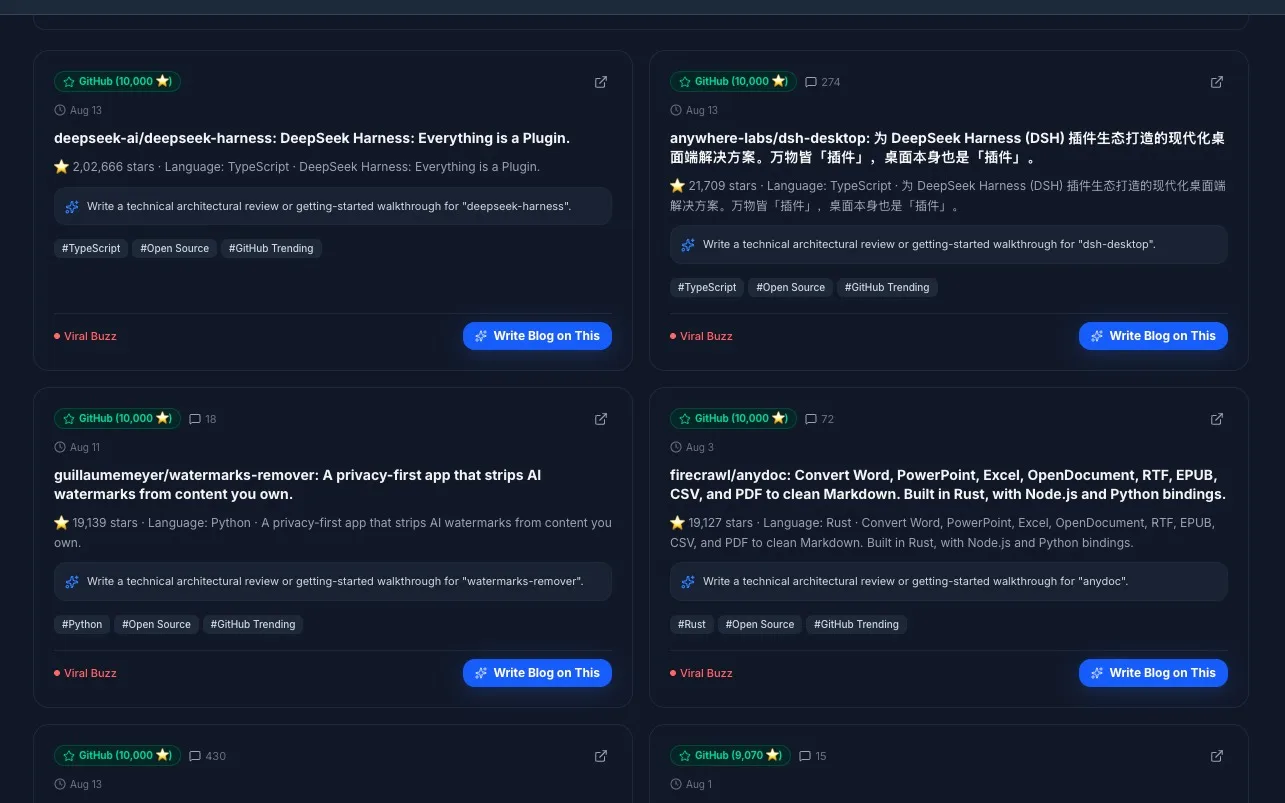
The most powerful part isn't the radar itself — it's what happens when you click "Write Blog on This".
flowchart LR
    START(["Write Blog on This"]) --> DETECTED["DETECTED"]
    DETECTED -->|"AI content brief generated"| ANALYZED["ANALYZED"]
    ANALYZED -->|"Brief ready for review"| RECOMMENDED["RECOMMENDED"]
    RECOMMENDED -->|"User approves topic"| APPROVED["APPROVED"]
    APPROVED -->|"Blog draft written"| IMPLEMENTED["IMPLEMENTED"]
    IMPLEMENTED -->|"Published to site"| DEPLOYED["DEPLOYED"]
    DEPLOYED -->|"GSC performance data collected"| MEASURED["MEASURED"]

    classDef trigger fill:#162033,stroke:#4b6b91,color:#fff,stroke-width:1px
    classDef state fill:#1e2b3d,stroke:#52739c,color:#fff,stroke-width:1px
    classDef final fill:#19352c,stroke:#4d9277,color:#fff,stroke-width:1px

    class START trigger
    class DETECTED,ANALYZED,RECOMMENDED,APPROVED,IMPLEMENTED,DEPLOYED state
    class MEASURED final
When you click the button, the system:
Creates a permanent
SeoOpportunityrecord in PostgreSQL withtype: CONTENT_GAP,priority: HIGH, andactionType: CREATE_PAGE.Triggers the
SeoAiServicewhich sends the topic to Groq'sopenai/gpt-oss-120bmodel to generate a full content brief.Returns an AI Content Brief containing:
Recommended SEO title and H1
Complete article structure with section headings
Key questions the article should answer
Required original value (code samples, benchmarks, diagrams)
Internal linking suggestions
Suggested call-to-action
The opportunity then appears in the Opportunities tab, where it flows through the full lifecycle: DETECTED → ANALYZED → RECOMMENDED → APPROVED → IMPLEMENTED → DEPLOYED → MEASURED.
Once the blog is published and deployed, the system can pull its Google Search Console performance data and compare impressions, clicks, CTR, and position deltas over 7-day and 30-day windows.
The GraphQL API Layer
The entire system is exposed through two GraphQL operations:
Query: Live Trending Radar
query GetLiveTrendingRadar($category: String) {
  getLiveTrendingRadar(category: $category) {
    lastUpdated
    items {
      title
      source
      url
      summary
      tags
      score
      commentsCount
      publishedAt
      suggestedAngle
    }
  }
}
Mutation: Convert to Content Opportunity
mutation ConvertTrendingToOpportunity(
  $title: String!
  $tags: [String]
  $source: String
  $url: String
) {
  convertTrendingToOpportunity(
    title: $title
    tags: $tags
    source: $source
    url: $url
  ) {
    id
    targetQuery
    opportunityScore
    priority
    status
    contentRecommendation {
      contentBrief {
        recommendedTitle
        recommendedH1
        suggestedStructure
        questionsToAnswer
        requiredOriginalValue
      }
    }
  }
}
Both operations are protected by GqlAuthGuard and RolesGuard with @Roles('ADMIN'), ensuring only authenticated administrators can access the radar and create content opportunities.
The Frontend: A Real-Time Dashboard Tab
The frontend is a Next.js 16 React component that provides:
Source filtering — Toggle between All Sources, Hacker News, Dev.to, Google Search, and GitHub
Category filtering — Filter by AI & LLMs, React & Next.js, Python & Backend, DevOps, Rust, or PostgreSQL
Search — Full-text search across titles, tags, and summaries
Source badges — Color-coded indicators showing where each trending item originated, with real engagement metrics (HN points, Dev.to reactions, GitHub star counts)
Relative timestamps — Each card shows when the item was published ("23h ago", "2d ago") or "Live Query" for Google Autocomplete items that have no publish date
Dynamic engagement labels — Instead of a static "High Viral Potential" on every card, each item gets a label based on its actual score:
Viral Buzz (≥500 points/reactions) — red
High Engagement (≥200) — orange
Rising Interest (≥50) — green
Emerging Topic (<50) — gray
Live Search Demand (Google Autocomplete) — blue
Suggested writing angles — Content angle suggestions tailored to each trending topic
One-click conversion — The "Write Blog on This" button that triggers the full content brief pipeline
The timeAgo() helper formats real ISO timestamps from each API into human-readable relative dates:
function timeAgo(dateStr: string | null | undefined): string {
  if (!dateStr) return 'Live Query';
  const seconds = Math.floor((Date.now() - new Date(dateStr).getTime()) / 1000);
  if (seconds < 60) return 'just now';
  if (seconds < 3600) return `${Math.floor(seconds / 60)}m ago`;
  if (seconds < 86400) return `${Math.floor(seconds / 3600)}h ago`;
  if (seconds < 604800) return `${Math.floor(seconds / 86400)}d ago`;
  return new Date(dateStr).toLocaleDateString('en-US', { month: 'short', day: 'numeric' });
}
The component uses Next.js Server Actions for the data flow. When the radar loads, fetchLiveTrendingRadarAction is called, which hits the backend GraphQL endpoint. When a user clicks "Write Blog on This", convertTrendingToOpportunityAction persists the opportunity and triggers AI analysis — all through Server Actions without any client-side GraphQL setup.
The Hybrid Keyword Discovery Engine
Alongside the real-time radar, the system includes a keyword discovery engine that works without requiring Google Ads API credentials — a common blocker for independent developers and small publications.
flowchart LR
    subgraph Input["User Input"]
        Seeds["Seed Keywords"]
    end

    subgraph Discovery["Discovery Engine"]
        GAds{"Google Ads API Available?"}
        Suggest["Google Autocomplete"]
        LLM["Groq LLM - GPT-OSS 120B"]
    end

    subgraph Output["Results"]
        KW["Keyword Records in PostgreSQL"]
        Opps["Content Gap Opportunities"]
    end

    Seeds --> GAds
    GAds -->|Yes| KW
    GAds -->|No / Failed| Suggest
    Suggest --> LLM
    LLM --> KW
    KW --> Opps
If Google Ads credentials are configured and working, the system uses the official Keyword Planner API. If they're not available, it falls back to:
Google Autocomplete — Fetching suggested queries for each seed keyword
Groq AI — Expanding those queries and classifying intent. Any volume, CPC, competition, or trend figures produced by the LLM are estimates, not measured Google keyword metrics.
The fallback produces keyword ideas that can be actionable for research, but any LLM-generated search-volume figures are estimates and should not be treated as measured demand. Each keyword is saved to the seo_keywords table, and the opportunity engine can create CONTENT_GAP opportunities for keywords that meet the configured threshold when a trustworthy avgMonthlySearches value is available.
The Data Model
The content opportunity lifecycle is tracked across three main entities:
erDiagram
    SeoOpportunity {
        uuid id PK
        string targetQuery
        enum opportunityType
        float opportunityScore
        enum priority
        enum actionType
        enum status
        int demandVolume
        jsonb aiAnalysis
        jsonb contentRecommendation
        timestamp createdAt
    }

    SeoKeyword {
        uuid id PK
        string keyword
        int avgMonthlySearches
        enum competition
        enum intent
        jsonb monthlyTrends
        timestamp lastSyncedAt
    }

    SeoAction {
        uuid id PK
        uuid opportunityId FK
        string targetQuery
        enum actionType
        enum status
        jsonb baselineMetrics
        jsonb metrics7d
        jsonb metrics30d
        timestamp deployedAt
    }

    SeoOpportunity ||--o{ SeoAction : "generates"
    SeoKeyword ||--o{ SeoOpportunity : "creates content gaps"
The SeoOpportunity entity stores the full AI analysis and content recommendation as JSONB columns, making them queryable and flexible without requiring schema migrations for every new field the AI model returns.
Lessons Learned
1. Promise.allSettled() Over Promise.all()
External APIs are unreliable. GitHub might rate-limit you. Hacker News might be slow. Using Promise.allSettled() means you always get results from the sources that responded, instead of failing entirely because one source timed out.
2. In-Memory Cache for Live Feeds, PostgreSQL for Decisions
The radar feed changes every few minutes. Caching it for 5 minutes in memory prevents excessive API calls while keeping the data fresh. But once a user decides "I want to write about this topic," that decision is persisted permanently. The radar is ephemeral; content strategy is persistent.
3. Math.round() Before PostgreSQL Integer Columns
A subtle bug taught me this the hard way. TypeORM @Column({ type: 'int' }) columns in PostgreSQL strictly reject floating-point numbers. If you calculate impressions * 1.5 = 109.5 and try to save it, PostgreSQL throws invalid input syntax for type integer: "109.5". Always wrap computed values with Math.round() before saving to integer columns.
4. Google Ads Test Accounts Return Bucketed Ranges
Depending on account access and API response, Google Ads Keyword Planner metrics may be returned as ranges rather than exact values; use the values provided by the API rather than inventing precision. For a developer blog, the AI + Google Suggest fallback can still be useful for discovery when measured Keyword Planner data is unavailable.
5. Cannibalization Detection Needs High Thresholds
On a new site, nearly every query appears on multiple pages because you have so few pages. With a threshold of impressions >= 1, every single query was flagged as a "cannibalization alert." Raising the threshold to impressions >= 200 && urls.length > 1 eliminated the false positives entirely.
6. Never Fake Engagement Metrics
My first version hardcoded score: 350 on every Google Autocomplete result to make them appear alongside Hacker News posts (which have real point counts of 200-800). This was misleading — it made autocomplete suggestions look like they had engagement they didn't have, and it broke the sorting logic by inflating Google items above genuinely viral HN posts.
The fix was simple: set score: 0 for autocomplete items and handle the display differently in the frontend. Google Autocomplete signals are valuable for a completely different reason (search intent) than HN posts (community validation). They shouldn't compete on the same axis. The frontend now shows "Live Search Demand" in blue for these items instead of trying to rank them by a fake score.
The Tech Stack
Layer | Technology |
|---|---|
Backend Framework | NestJS 11 + Fastify |
Database | PostgreSQL + TypeORM |
API | GraphQL (Apollo) |
AI / LLM | Groq SDK ( |
Frontend | Next.js 16 + React 19 |
Search Console | Google Search Console API |
Live Data | Hacker News Algolia API, Dev.to API, Google Autocomplete, GitHub Search API |
Caching | In-memory Map with 5-minute TTL |
Styling | Vanilla CSS with dark/light mode support |
What's Next
The radar currently streams and displays. The next evolution is to add:
Automated daily digests — A BullMQ job that runs the radar every morning and emails the top 10 trending topics with pre-generated content briefs
Trend velocity scoring — Tracking how fast a topic is accelerating across sources (a topic trending on HN, Dev.to, AND Google simultaneously gets a higher signal score)
Competitor content gap analysis — Cross-referencing trending topics against what competitors have already published to find uncovered angles
Auto-draft generation — Using the AI content brief to generate a full first draft that goes straight into the CMS as a review-ready post
Try It Yourself
The entire system is built with publicly available APIs. You don't need any paid API keys to get started:
Hacker News:
https://hn.algolia.com/api/v1/search?tags=front_pageDev.to:
https://dev.to/api/articles?per_page=30&top=7Google Autocomplete:
https://suggestqueries.google.com/complete/search?client=chrome&q=YOUR_TERMGitHub:
https://api.github.com/search/repositories?q=created:>DATE&sort=stars
The value isn't in the individual data sources — it's in aggregating them into a single decision interface and connecting that interface to a content pipeline that turns attention signals into published articles.
Stop relying entirely on yesterday's SEO data. Use live community and search signals to find what is emerging now.
Comments(0)
Join the discussion by logging into your account.
No comments yet. Be the first to comment!