
I Built DockDash to Monitor My Homelab Without Giving Up Version Pinning
I run around 30 to 40 services in my homelab.
Over time, I ended up using several tools to keep track of everything. One for network discovery, another for uptime monitoring, another for Docker management, and yet another to tell me when container images had changed.
All of those tools were useful, but I wanted something different. I wanted one place where I could see my services, understand how they were connected, monitor their health, and, most importantly, know when real version updates were available.
That is why I started building DockDash.

The service list provides a searchable overview of health, versions, ports, certificates, and available updates.
The problem with monitoring only image digests
The main reason I created DockDash was update monitoring.
Many Docker dashboards detect updates by comparing the digest of the locally running image with the digest currently published under the same tag. This works well when you use a floating tag such as latest.
For example:
image: nginx:latest
When the publisher replaces the image behind latest, the digest changes and the dashboard can tell you that an update is available.
I prefer to pin my services to specific versions:
image: nginx:1.25
Version pinning makes deployments more predictable and reproducible. I know which version is running, and an unexpected upstream change cannot silently alter my environment.
The problem is that digest-only monitoring does not tell me when nginx:1.26 or nginx:1.27 becomes available. The digest behind 1.25 may never change, so everything appears up to date even though newer versions have been released.
There are tools such as WhatsUpDocker, Cup, and Cupdate that address parts of this problem, but I wanted the update information to be integrated with the rest of my homelab monitoring.
Updates with the version and changelog attached
DockDash looks at the tag of the image you are actually running.
When the tag contains a recognizable version, it searches the registry for compatible tags and compares their numeric version components. Instead of displaying a generic “new image available” message, it can show something like:
1.25 → 1.26
It also attempts to find the source repository and retrieve the matching GitHub release notes.
Now I can see that an update exists and read what changed before deciding whether I want to deploy it.
For floating tags such as latest, stable, or dev, DockDash falls back to digest comparison. Both workflows are supported, but version pinning is no longer an obstacle to update monitoring.

An update includes the actual version change and its release notes.
More than an update checker
Once update monitoring was working, I kept adding the other things I wanted to see in the same dashboard.
DockDash can discover containers from one or more Docker hosts and scan configured network ranges for other services. Discovered services can then be monitored and arranged on an interactive canvas.
DockDash now includes:
Semantic-version-aware container update monitoring
Changelogs for available versions
An interactive map for services, hosts, ports, and their relationships
Docker and network service discovery
Health checks with 1, 7, and 30-day history
CPU, memory, network, and disk I/O monitoring
Apprise notifications for failures, recoveries, updates, and resource thresholds
Container start, stop, and restart controls
Live container logs
A container filesystem browser and text editor
An interactive terminal inside containers
Kubernetes discovery, logs, terminal access, file browsing, metrics, and pod recreation
TLS certificate health, expiration, fingerprint, and deployment monitoring
OIDC authentication
Multiple themes and English/Brazilian Portuguese interfaces
I find the topology canvas particularly useful because a normal container list does not always communicate how the services in a homelab relate to each other.

The topology view makes the relationships between homelab services easier to understand.
Monitoring TLS certificates
DockDash also monitors the TLS certificates presented by HTTPS services.
Automated certificate renewal is great, but automation can still fail. Credentials expire, API keys get rotated, permissions change, deployment jobs stop working, and sometimes the certificate installed on a service is not the one you expected.
I ran into this myself. I had several machines independently obtaining certificates through Let's Encrypt, and on a couple of occasions the automated process silently failed after a secret expired. I only discovered the problem when the certificate was already expired.
I see certificate monitoring in the same way as uptime monitoring. I do not expect it to fail every day. I just want to know when it does. The alert tells me when the automation has stopped working or the deployed result is not what I expected.
DockDash can inspect HTTPS services and display:
Certificate expiration
Issuer and serial number
Trust and validity state
Certificate fingerprint
Renewal and recovery events
It can send Apprise alerts when certificates are expiring, invalid, renewed, recovered, unexpectedly changed, or no longer match the expected certificate.
CertVault handles renewal; DockDash verifies the result
DockDash optionally integrates with my other project, CertVault. I built CertVault to centralize ACME certificate issuance and renewal instead of keeping provider credentials and separate certificate automation on every host.
The projects have separate jobs. CertVault issues and renews certificates. DockDash connects to each service and checks what it is actually presenting.
A successful renewal does not mean the certificate was successfully deployed. The new certificate may exist in CertVault while a service continues presenting the old one because a sync, restart, or deployment step failed. DockDash spots that difference and alerts me before the old certificate expires.
Why checking certificate fingerprints matters
Checking only whether a certificate is valid is not enough for this. A service could present a different certificate that is valid and has not expired, but is still not the certificate I intended to deploy.
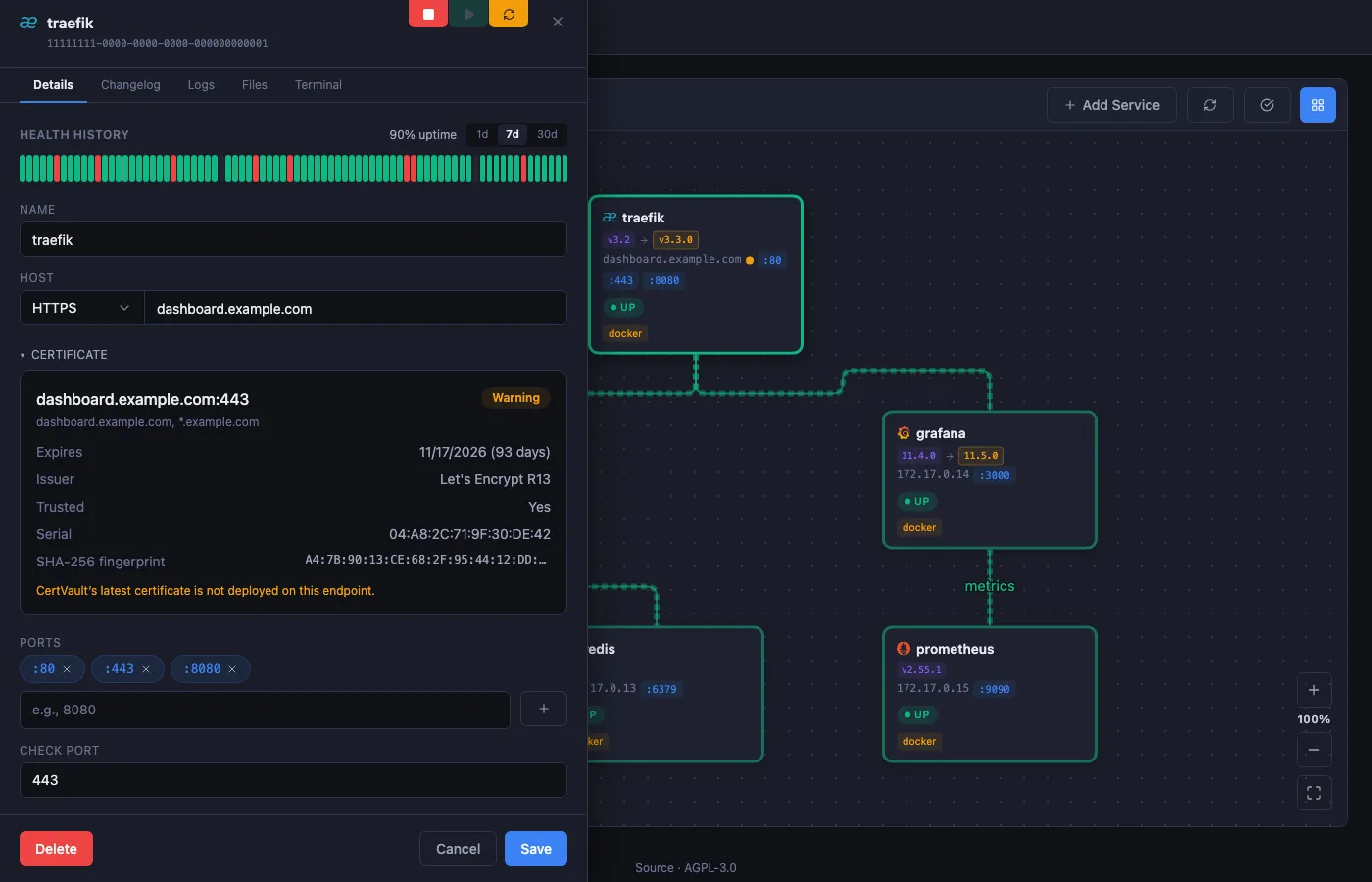
DockDash compares the live certificate fingerprint with the certificate stored in CertVault. This checks the exact certificate, not just its expiration date or trust chain. A mismatch can point to a configuration mistake, a failed deployment, or an unexpected certificate replacement. It can also warn me if a valid but unauthorized certificate is being presented, which could indicate a man-in-the-middle risk.
That is how the two projects fit together. CertVault renews the certificate. DockDash makes sure the correct certificate reached the correct service and stayed there.

DockDash checks the certificate presented by the live service and compares it with CertVault.
The project is still evolving
DockDash started because I wanted a better way to manage and monitor the services in my own homelab. It is now becoming a more general monitoring layer for Docker services, Kubernetes workloads, network devices, updates, resources, and certificates.
It is open source under the AGPL-3.0 license, and I would really appreciate feedback, especially from people with larger Docker environments or Kubernetes clusters.
You can find the project here:
Thanks for reading ;)
Comments (0)
Join the discussion by logging into your account.