
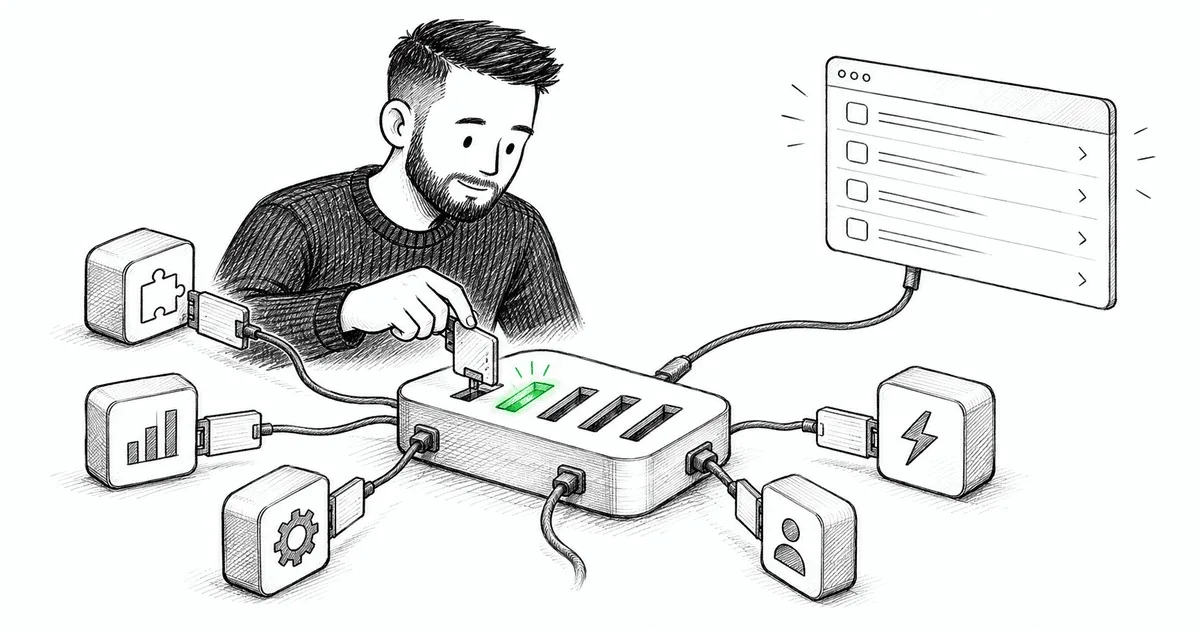
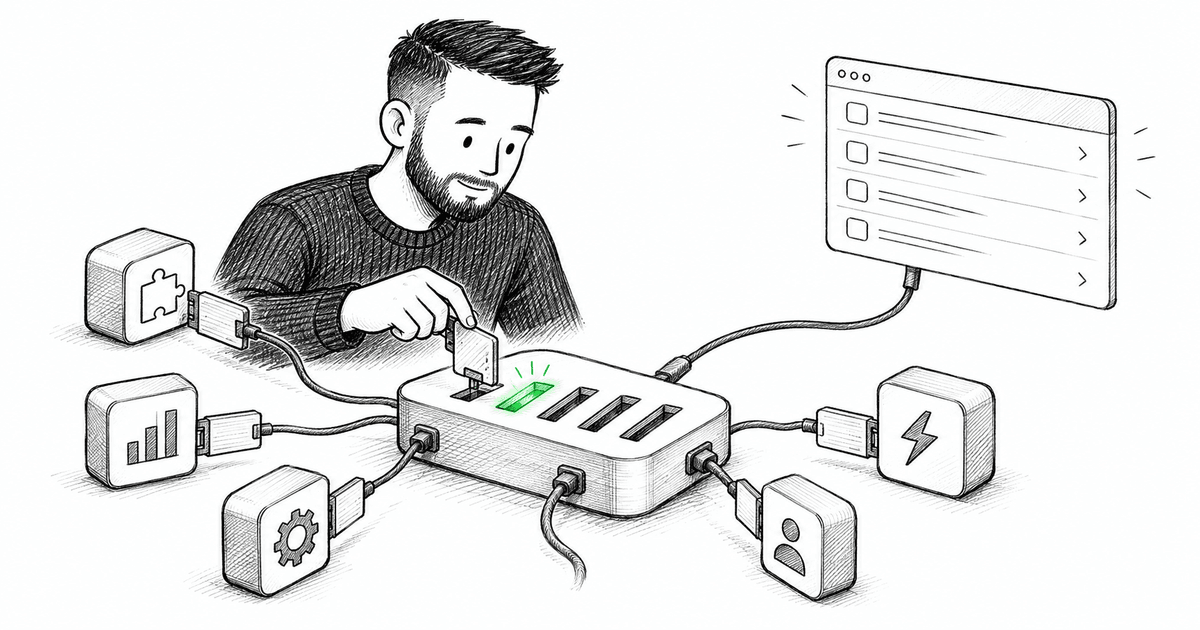
The theming article ended on a move from how an app looks to how power users drive it. The command palette — the Cmd+K menu that fuzzy-searches everything you can do — is the poster child for a piece of UI that people build as a widget and should build as an architecture. The difference shows up fast, and it's the difference between a palette that stays useful and one that quietly lies about what the app can do.
Here's the trap. You install a nice palette component, drop a modal in, and fill it with a hardcoded list of actions: "New file," "Toggle dark mode," "Go to settings." It demos beautifully. Then someone adds a feature with its own toolbar button, forgets to also add it to the palette, and now the palette is missing things. Someone renames an action in a menu but not in the palette. Six months in, the palette is a stale, hand-maintained duplicate of logic that already exists elsewhere in the app. The modal was never the hard part. The hard part is that the palette needs to know everything the app can do — and so do the menus, and the keyboard shortcuts, and the toolbar.
A command is a first-class object
The reframe is to stop thinking about a search modal and start thinking about commands as data. A command is a real object: an id, a title, some keywords, the thing it does, and optionally whether it's currently allowed and what shortcut triggers it.
interface Command {
  id: string;
  title: string;
  keywords?: string[];        // for fuzzy search: "theme", "appearance"...
  group?: string;             // "File", "View", "Navigation"
  shortcut?: string;          // "mod+k"
  isEnabled?: () => boolean;  // context-aware availability
  run: () => void;            // the actual behavior
}
Once a command is data, the interesting shift happens: the palette stops owning actions and starts rendering them. This is the same instinct as headless components — separate the behavior (what the command does) from the presentation (how it's listed) — and the same instinct as the typed event catalog — one declared source of truth instead of scattered strings.
The registry is the single source of truth
The center of the whole design is a registry: one place every command is registered, and every surface that needs to know "what can the app do?" reads from it.
class CommandRegistry {
  private commands = new Map<string, Command>();

  register(command: Command): () => void {
    this.commands.set(command.id, command);
    return () => this.commands.delete(command.id); // features clean up their own
  }

  all(): Command[] {
    return [...this.commands.values()].filter((c) => c.isEnabled?.() ?? true);
  }

  run(id: string) {
    this.commands.get(id)?.run();
  }
}

export const commands = new CommandRegistry();
Now features contribute commands instead of the palette knowing about features:
// in the editor feature — it announces what it can do, and to whom it doesn't care
commands.register({
  id: 'file.new',
  title: 'New File',
  group: 'File',
  shortcut: 'mod+n',
  run: () => editor.createFile(),
});
Notice the direction of the dependency. The editor feature depends on the registry (a stable, shared thing); the palette depends on the registry; the two features never depend on each other. That's the dependencies-point-the-right-way rule holding: everything points at a shared abstraction, nothing reaches sideways. Add a feature, it registers its commands, and the palette shows them with zero changes to the palette. Remove the feature, its cleanup runs, the commands vanish. Nothing drifts because nothing was duplicated.
One dispatcher, not scattered key handlers
The keyboard shortcuts fall out of the same registry, and this is where you avoid another mess. The naive approach sprinkles onKeyDown handlers across a dozen components, each checking for its own combo — the same scatter problem the event bus and analytics articles warned about, just with keystrokes. Instead, one global listener resolves keys against the registry:
useEffect(() => {
  const onKeyDown = (e: KeyboardEvent) => {
    const combo = toCombo(e); // "mod+n", "mod+k", etc.
    const command = commands.all().find((c) => c.shortcut === combo);
    if (command) {
      e.preventDefault();
      command.run();
    }
  };
  window.addEventListener('keydown', onKeyDown);
  return () => window.removeEventListener('keydown', onKeyDown);
}, []);
One place owns the mapping from keys to commands. Shortcut conflicts become detectable (two commands claiming mod+k is now a thing you can check for, instead of a mystery). And because isEnabled gates all(), a shortcut simply does nothing when its command isn't valid in the current context — no scattered guard clauses.
The palette is just a view over the registry
And now the part everyone thought was the whole feature is the easy part. The palette is a thin view: read the registry, fuzzy-match the query against titles and keywords, render the list, run the chosen command.
function CommandPalette() {
  const [query, setQuery] = useState('');
  const results = useMemo(
    () => fuzzyFilter(commands.all(), query), // search titles + keywords
    [query],
  );
  return (
    <Dialog>
      <input value={query} onChange={(e) => setQuery(e.target.value)} placeholder="Type a command…" />
      <ul>
        {results.map((c) => (
          <li key={c.id} onClick={() => { commands.run(c.id); }}>
            {c.title}
            {c.shortcut && <kbd>{c.shortcut}</kbd>}
          </li>
        ))}
      </ul>
    </Dialog>
  );
}
Because commands are data, you get things for free that would be painful to hand-maintain: search across everything, a "keyboard shortcuts" help screen (just render the registry grouped by group), and an honest answer to "what can I do here?" that's always current because it's generated, never authored twice.
The reframe
The command palette is a systems problem wearing a UI costume — the same shape as theming. The visible artifact (a search modal, a color toggle) is trivial; the value is entirely in the architecture behind it (a command registry, a token system). Build either one as a widget and it rots, because you end up maintaining the same truth in several places and they drift apart. Build it as a single source of truth that many surfaces read from, and the palette, the menus, and the shortcuts can never disagree — because there's only one thing for them to agree with.
That's the through-line of this whole look-and-feel stretch: the parts of an app that seem like polish are usually boundaries in disguise, and the teams that treat them as boundaries end up with UI that scales instead of UI that quietly lies. Next the series turns to the last piece of this cluster — code-splitting, and the deceptively hard question of what to actually cut so the app loads fast without fracturing into a thousand lazy chunks you can't reason about.
If your app has a command palette, open it and then open your main menu side by side. If they don't list the same capabilities, you've got two sources of truth drifting apart — tell me how far they've diverged, because that gap is the whole argument for a registry.
Comments(0)
Join the discussion by logging into your account.
No comments yet. Be the first to comment!