
Why Your Scraper Needs an API Layer
At some point every scraper outgrows its original script form. Maybe you want to trigger scraping from a dashboard. Maybe a frontend team needs to query scraped data. Maybe you're building a product — a rank tracker, a price monitor, a lead generation tool — and users need to submit URLs and get results back.
The moment your scraper needs to serve multiple callers, run on a schedule, handle concurrent requests, or return results asynchronously, you need to wrap it in a proper API.
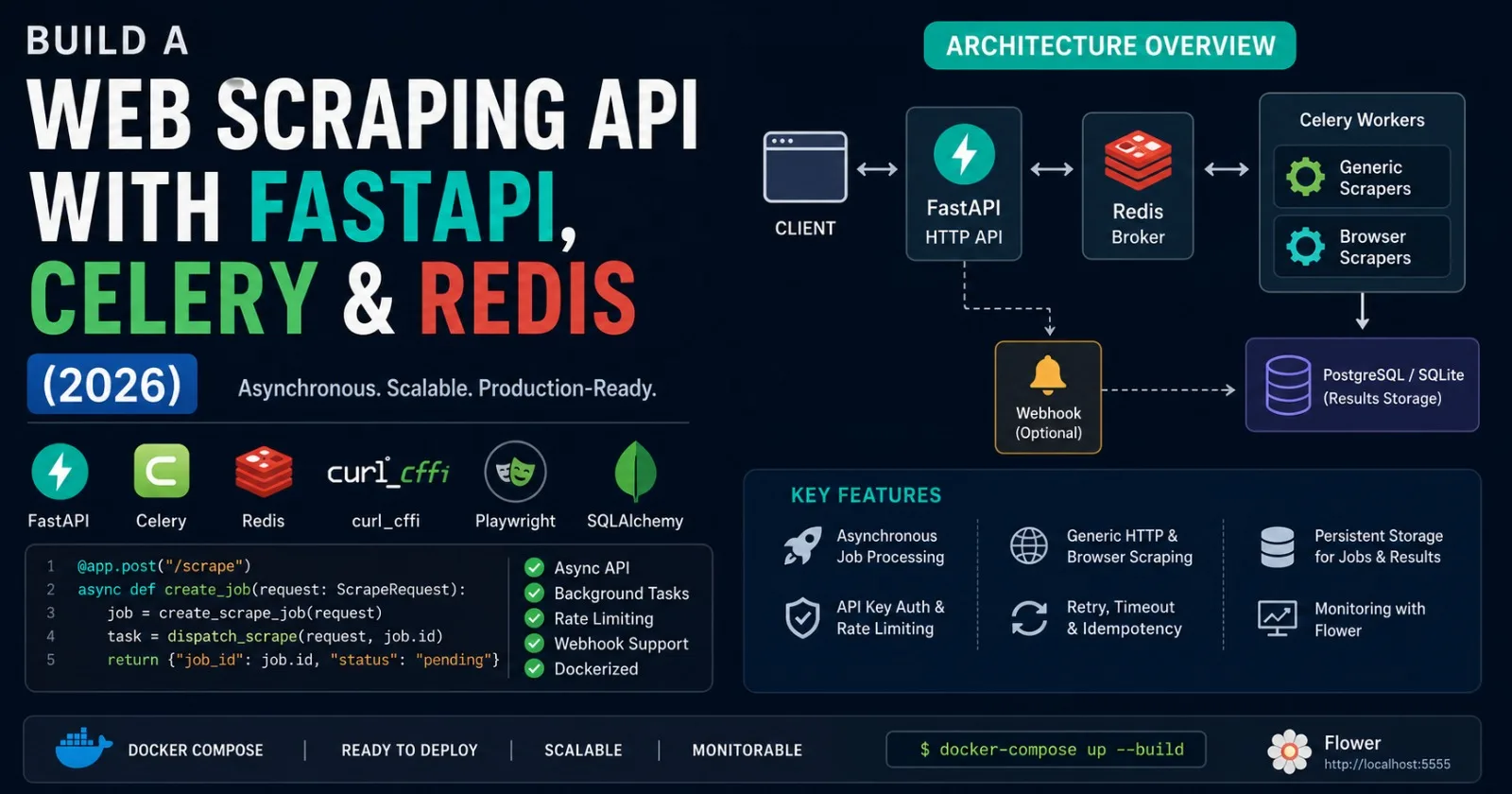
In this practical approach, we'll build a scraper wrapped in a web API powered by FastAPI to scrape and deliver data on demand — implementing FastAPI web services with asynchronous request handling, configuring real-time data scraping with caching and webhook support, and handling concurrent requests with rate limiting for scalable scraping API endpoints.
The stack we'll build is a proven pattern:
Client → FastAPI (HTTP layer) → Redis (task queue) → Celery Workers (scraping)
                                      ↓
                              PostgreSQL / SQLite (results storage)
FastAPI handles HTTP requests and returns immediate job IDs. Redis acts as the message broker. Celery workers run the actual scraping in the background. Results are stored in a database and fetched when the client polls.
This architecture means: your API never blocks, workers can scale horizontally, failed jobs retry automatically, and your scraping logic is completely decoupled from your HTTP layer.
Project Structure
scraping_api/
├── app/
│   ├── __init__.py
│   ├── main.py          # FastAPI application
│   ├── models.py        # SQLAlchemy models
│   ├── schemas.py       # Pydantic request/response schemas
│   ├── database.py      # DB connection
│   ├── tasks.py         # Celery scraping tasks
│   ├── scrapers/
│   │   ├── __init__.py
│   │   ├── generic.py   # Generic HTTP scraper
│   │   └── browser.py   # Playwright scraper
│   └── middleware/
│       ├── ratelimit.py  # Rate limiting
│       └── auth.py       # API key auth
├── worker.py            # Celery worker entrypoint
├── requirements.txt
├── docker-compose.yml
└── .env
Step 1: Install Dependencies
pip install fastapi uvicorn celery redis httpx \
            beautifulsoup4 sqlalchemy aiosqlite \
            python-dotenv pydantic slowapi
# requirements.txt
fastapi==0.115.0
uvicorn[standard]==0.30.0
celery[redis]==5.4.0
redis==5.0.1
httpx==0.27.0
beautifulsoup4==4.12.3
lxml==5.2.2
sqlalchemy==2.0.30
aiosqlite==0.20.0
python-dotenv==1.0.1
pydantic==2.7.0
slowapi==0.1.9
flower==2.0.1
Step 2: Database Models
# app/models.py
from sqlalchemy import Column, String, Float, Text, DateTime, Integer, Enum
from sqlalchemy.orm import DeclarativeBase
from datetime import datetime, timezone
import enum, uuid

class Base(DeclarativeBase):
    pass

class JobStatus(str, enum.Enum):
    PENDING   = "pending"
    RUNNING   = "running"
    SUCCESS   = "success"
    FAILED    = "failed"
    RETRYING  = "retrying"

class ScrapeJob(Base):
    __tablename__ = "scrape_jobs"

    id           = Column(String, primary_key=True, default=lambda: str(uuid.uuid4()))
    url          = Column(String, nullable=False)
    scraper_type = Column(String, default="generic")   # "generic" | "browser"
    status       = Column(String, default=JobStatus.PENDING)
    created_at   = Column(DateTime, default=lambda: datetime.now(timezone.utc))
    started_at   = Column(DateTime, nullable=True)
    completed_at = Column(DateTime, nullable=True)
    api_key      = Column(String, nullable=True)
    error        = Column(Text, nullable=True)
    retry_count  = Column(Integer, default=0)

class ScrapeResult(Base):
    __tablename__ = "scrape_results"

    id         = Column(String, primary_key=True, default=lambda: str(uuid.uuid4()))
    job_id     = Column(String, nullable=False, index=True)
    url        = Column(String, nullable=False)
    title      = Column(String, nullable=True)
    content    = Column(Text, nullable=True)
    html_len   = Column(Integer, nullable=True)
    status_code= Column(Integer, nullable=True)
    scraped_at = Column(DateTime, default=lambda: datetime.now(timezone.utc))
    metadata_  = Column(Text, nullable=True)   # JSON string for extra fields
Step 3: Pydantic Schemas
# app/schemas.py
from pydantic import BaseModel, HttpUrl, Field
from typing import Optional, List
from datetime import datetime
from app.models import JobStatus

class ScrapeRequest(BaseModel):
    url:          HttpUrl
    scraper_type: str    = Field("generic", pattern="^(generic|browser)$")
    css_selectors: Optional[dict] = None   # {"title": "h1", "price": ".price"}
    wait_for:     Optional[str]  = None    # CSS selector to wait for (browser mode)
    webhook_url:  Optional[HttpUrl] = None # POST results here when done

    model_config = {"json_schema_extra": {
        "example": {
            "url": "https://books.toscrape.com/",
            "scraper_type": "generic",
            "css_selectors": {"title": "h1", "books": ".product_pod h3 a"}
        }
    }}

class BulkScrapeRequest(BaseModel):
    urls:         List[HttpUrl]
    scraper_type: str = "generic"
    css_selectors: Optional[dict] = None

class JobResponse(BaseModel):
    job_id:   str
    status:   JobStatus
    url:      str
    created_at: datetime
    message:  str = "Job queued successfully"

class JobStatusResponse(BaseModel):
    job_id:      str
    status:      JobStatus
    url:         str
    created_at:  datetime
    started_at:  Optional[datetime]
    completed_at: Optional[datetime]
    retry_count:  int
    error:        Optional[str]

class ScrapeResultResponse(BaseModel):
    job_id:     str
    url:        str
    title:      Optional[str]
    content:    Optional[str]
    html_len:   Optional[int]
    status_code: Optional[int]
    scraped_at: datetime
    data:       Optional[dict]   # Parsed CSS selector results
Step 4: The Scraping Logic
# app/scrapers/generic.py
import httpx
import asyncio
import random
from bs4 import BeautifulSoup
from curl_cffi.requests import AsyncSession
from datetime import datetime, timezone
from typing import Optional

HEADERS = {
    "User-Agent": (
        "Mozilla/5.0 (Windows NT 10.0; Win64; x64) "
        "AppleWebKit/537.36 Chrome/120.0.0.0 Safari/537.36"
    ),
    "Accept-Language": "en-US,en;q=0.9",
    "Accept": "text/html,application/xhtml+xml,*/*;q=0.8",
}

async def scrape_generic(
    url: str,
    css_selectors: Optional[dict] = None,
    max_retries: int = 3
) -> dict:
    """
    Generic HTTP scraper using curl_cffi for TLS impersonation.
    Returns title, content, status_code, and any custom selector results.
    """
    for attempt in range(max_retries):
        try:
            async with AsyncSession(impersonate="chrome120") as session:
                r = await session.get(url, headers=HEADERS, timeout=20)

            result = {
                "url":         url,
                "status_code": r.status_code,
                "html_len":    len(r.text),
                "scraped_at":  datetime.now(timezone.utc).isoformat(),
                "data":        {},
            }

            if r.status_code != 200:
                result["error"] = f"HTTP {r.status_code}"
                return result

            soup = BeautifulSoup(r.text, "lxml")

            # Extract title
            title_el = soup.find("title")
            result["title"] = title_el.get_text(strip=True) if title_el else None

            # Extract body text (clean)
            for tag in soup(["script", "style", "nav", "footer", "header"]):
                tag.decompose()
            result["content"] = soup.get_text(separator=" ", strip=True)[:5000]

            # Apply custom CSS selectors if provided
            if css_selectors:
                for key, selector in css_selectors.items():
                    elements = soup.select(selector)
                    result["data"][key] = [
                        el.get_text(strip=True) for el in elements
                    ] if len(elements) > 1 else (
                        elements[0].get_text(strip=True) if elements else None
                    )

            return result

        except Exception as e:
            wait = 2 ** attempt + random.random()
            if attempt < max_retries - 1:
                await asyncio.sleep(wait)
            else:
                return {
                    "url":        url,
                    "status_code": None,
                    "error":      str(e),
                    "scraped_at": datetime.now(timezone.utc).isoformat(),
                    "data":       {},
                }
# app/scrapers/browser.py
import asyncio
import random
from playwright.async_api import async_playwright
from playwright_stealth import stealth_async
from datetime import datetime, timezone
from typing import Optional

async def scrape_browser(
    url: str,
    css_selectors: Optional[dict] = None,
    wait_for: Optional[str] = None,
) -> dict:
    """
    Playwright-based browser scraper for JavaScript-rendered pages.
    """
    async with async_playwright() as p:
        browser = await p.chromium.launch(
            headless=True,
            args=["--no-sandbox", "--disable-blink-features=AutomationControlled"]
        )
        context = await browser.new_context(
            user_agent="Mozilla/5.0 (Windows NT 10.0; Win64; x64) Chrome/120",
            viewport={"width": 1280, "height": 800}
        )

        # Block unnecessary resources
        await context.route(
            "**/*.{png,jpg,gif,woff,woff2}",
            lambda route: route.abort()
        )

        page = await context.new_page()
        await stealth_async(page)

        result = {
            "url": url,
            "scraped_at": datetime.now(timezone.utc).isoformat(),
            "data": {},
        }

        try:
            await page.goto(url, wait_until="domcontentloaded", timeout=30000)

            if wait_for:
                await page.wait_for_selector(wait_for, timeout=10000)
            else:
                await asyncio.sleep(random.uniform(1.5, 3.0))

            result["title"]       = await page.title()
            result["status_code"] = 200
            result["html_len"]    = len(await page.content())

            # Apply CSS selectors
            if css_selectors:
                for key, selector in css_selectors.items():
                    elements = await page.query_selector_all(selector)
                    texts = [await el.inner_text() for el in elements]
                    result["data"][key] = texts if len(texts) > 1 else (
                        texts[0] if texts else None
                    )

        except Exception as e:
            result["error"]       = str(e)
            result["status_code"] = None

        finally:
            await browser.close()

    return result
Step 5: Celery Tasks
# app/tasks.py
import asyncio
import json
from celery import Celery
from datetime import datetime, timezone
from app.scrapers.generic import scrape_generic
from app.scrapers.browser import scrape_browser
import httpx

# Celery app — connects to Redis as broker and result backend
celery_app = Celery(
    "scraping_api",
    broker="redis://localhost:6379/0",
    backend="redis://localhost:6379/1",
)

celery_app.conf.update(
    task_serializer       = "json",
    result_serializer     = "json",
    accept_content        = ["json"],
    result_expires        = 3600,        # Results expire after 1 hour
    task_acks_late        = True,        # Only ack after task completes
    worker_prefetch_multiplier = 1,      # One task per worker at a time
    task_track_started    = True,
    task_soft_time_limit  = 60,          # Warn after 60s
    task_time_limit       = 90,          # Kill after 90s
    # Route browser tasks to a dedicated queue
    task_routes           = {
        "app.tasks.scrape_url_task":         {"queue": "generic"},
        "app.tasks.scrape_browser_task":     {"queue": "browser"},
        "app.tasks.scrape_bulk_task":        {"queue": "bulk"},
    },
)

def run_async(coro):
    """Run an async coroutine from a sync Celery task."""
    loop = asyncio.new_event_loop()
    try:
        return loop.run_until_complete(coro)
    finally:
        loop.close()


@celery_app.task(
    bind=True,
    name="app.tasks.scrape_url_task",
    max_retries=3,
    default_retry_delay=30,
    autoretry_for=(Exception,),
    retry_backoff=True,
)
def scrape_url_task(
    self,
    job_id: str,
    url: str,
    css_selectors: dict = None,
    webhook_url: str = None,
):
    """
    Celery task: scrape a single URL using the generic HTTP scraper.
    Automatically retries up to 3 times on failure.
    """
    from app.database import SessionLocal
    from app.models import ScrapeJob, ScrapeResult, JobStatus

    db = SessionLocal()
    try:
        # Mark job as running
        job = db.query(ScrapeJob).filter(ScrapeJob.id == job_id).first()
        if job:
            job.status     = JobStatus.RUNNING
            job.started_at = datetime.now(timezone.utc)
            db.commit()

        # Run the scraper
        result = run_async(scrape_generic(url, css_selectors))

        # Save result
        scrape_result = ScrapeResult(
            job_id      = job_id,
            url         = url,
            title       = result.get("title"),
            content     = result.get("content"),
            html_len    = result.get("html_len"),
            status_code = result.get("status_code"),
            metadata_   = json.dumps(result.get("data", {})),
        )
        db.add(scrape_result)

        # Update job status
        if job:
            job.status       = JobStatus.SUCCESS if result.get("status_code") == 200 \
                               else JobStatus.FAILED
            job.completed_at = datetime.now(timezone.utc)
            job.error        = result.get("error")
        db.commit()

        # Fire webhook if configured
        if webhook_url:
            run_async(_fire_webhook(webhook_url, job_id, result))

        return {"job_id": job_id, "status": "success"}

    except Exception as exc:
        if job:
            job.status      = JobStatus.RETRYING
            job.retry_count = (job.retry_count or 0) + 1
            db.commit()
        db.close()
        raise self.retry(exc=exc, countdown=2 ** self.request.retries)

    finally:
        db.close()


@celery_app.task(name="app.tasks.scrape_browser_task", max_retries=2)
def scrape_browser_task(
    job_id: str,
    url: str,
    css_selectors: dict = None,
    wait_for: str = None,
    webhook_url: str = None,
):
    """Celery task: scrape with Playwright browser."""
    from app.database import SessionLocal
    from app.models import ScrapeJob, ScrapeResult, JobStatus

    db = SessionLocal()
    try:
        job = db.query(ScrapeJob).filter(ScrapeJob.id == job_id).first()
        if job:
            job.status     = JobStatus.RUNNING
            job.started_at = datetime.now(timezone.utc)
            db.commit()

        result = run_async(scrape_browser(url, css_selectors, wait_for))

        scrape_result = ScrapeResult(
            job_id      = job_id,
            url         = url,
            title       = result.get("title"),
            content     = None,
            html_len    = result.get("html_len"),
            status_code = result.get("status_code"),
            metadata_   = json.dumps(result.get("data", {})),
        )
        db.add(scrape_result)

        if job:
            job.status       = JobStatus.SUCCESS
            job.completed_at = datetime.now(timezone.utc)
        db.commit()

        if webhook_url:
            run_async(_fire_webhook(webhook_url, job_id, result))

        return {"job_id": job_id, "status": "success"}
    finally:
        db.close()


async def _fire_webhook(webhook_url: str, job_id: str, data: dict):
    """POST results to a webhook URL when a job completes."""
    async with httpx.AsyncClient() as client:
        try:
            await client.post(
                webhook_url,
                json={"job_id": job_id, "result": data},
                timeout=10
            )
        except Exception as e:
            print(f"Webhook delivery failed for {job_id}: {e}")
Step 6: The FastAPI Application
# app/main.py
import json
from typing import List, Optional
from fastapi import FastAPI, Depends, HTTPException, Header, Request
from fastapi.middleware.cors import CORSMiddleware
from fastapi.responses import JSONResponse
from slowapi import Limiter, _rate_limit_exceeded_handler
from slowapi.util import get_remote_address
from slowapi.errors import RateLimitExceeded
from sqlalchemy.orm import Session

from app.database import get_db, engine
from app.models import Base, ScrapeJob, ScrapeResult, JobStatus
from app.schemas import (
    ScrapeRequest, BulkScrapeRequest,
    JobResponse, JobStatusResponse, ScrapeResultResponse
)
from app.tasks import scrape_url_task, scrape_browser_task

# Create all tables
Base.metadata.create_all(bind=engine)

# Rate limiter — 60 requests per minute per IP
limiter = Limiter(key_func=get_remote_address)
app     = FastAPI(
    title="Python Scraping API",
    description="Production-grade web scraping as a service",
    version="1.0.0",
)
app.state.limiter = limiter
app.add_exception_handler(RateLimitExceeded, _rate_limit_exceeded_handler)
app.add_middleware(
    CORSMiddleware,
    allow_origins=["*"],
    allow_methods=["*"],
    allow_headers=["*"],
)

# Simple API key auth
VALID_API_KEYS = {"dev-key-123", "prod-key-456"}   # In prod: load from DB or env

def verify_api_key(x_api_key: str = Header(...)):
    if x_api_key not in VALID_API_KEYS:
        raise HTTPException(status_code=401, detail="Invalid API key")
    return x_api_key


# ── Endpoints ─────────────────────────────────────────────────

@app.get("/health")
async def health():
    return {"status": "ok", "version": "1.0.0"}


@app.post("/scrape", response_model=JobResponse, status_code=202)
@limiter.limit("30/minute")
async def submit_scrape_job(
    request: Request,
    payload: ScrapeRequest,
    db: Session = Depends(get_db),
    api_key: str = Depends(verify_api_key),
):
    """
    Submit a URL for scraping. Returns a job_id immediately.
    Poll /jobs/{job_id} for status, /jobs/{job_id}/result for data.
    """
    job = ScrapeJob(
        url          = str(payload.url),
        scraper_type = payload.scraper_type,
        api_key      = api_key,
    )
    db.add(job)
    db.commit()
    db.refresh(job)

    # Dispatch to appropriate Celery queue
    task_kwargs = {
        "job_id":       job.id,
        "url":          str(payload.url),
        "css_selectors": payload.css_selectors,
        "webhook_url":  str(payload.webhook_url) if payload.webhook_url else None,
    }

    if payload.scraper_type == "browser":
        task_kwargs["wait_for"] = payload.wait_for
        scrape_browser_task.apply_async(
            kwargs=task_kwargs,
            queue="browser",
            task_id=job.id
        )
    else:
        scrape_url_task.apply_async(
            kwargs=task_kwargs,
            queue="generic",
            task_id=job.id
        )

    return JobResponse(
        job_id     = job.id,
        status     = JobStatus.PENDING,
        url        = str(payload.url),
        created_at = job.created_at,
    )


@app.post("/scrape/bulk", status_code=202)
@limiter.limit("5/minute")
async def submit_bulk_scrape(
    request: Request,
    payload: BulkScrapeRequest,
    db: Session = Depends(get_db),
    api_key: str = Depends(verify_api_key),
):
    """Submit multiple URLs at once. Returns list of job_ids."""
    if len(payload.urls) > 50:
        raise HTTPException(400, "Max 50 URLs per bulk request")

    job_ids = []
    for url in payload.urls:
        job = ScrapeJob(url=str(url), scraper_type=payload.scraper_type, api_key=api_key)
        db.add(job)
        db.commit()
        db.refresh(job)

        scrape_url_task.apply_async(
            kwargs={"job_id": job.id, "url": str(url), "css_selectors": payload.css_selectors},
            queue="bulk",
        )
        job_ids.append(job.id)

    return {"submitted": len(job_ids), "job_ids": job_ids}


@app.get("/jobs/{job_id}", response_model=JobStatusResponse)
async def get_job_status(job_id: str, db: Session = Depends(get_db)):
    """Check the status of a scrape job."""
    job = db.query(ScrapeJob).filter(ScrapeJob.id == job_id).first()
    if not job:
        raise HTTPException(404, f"Job {job_id} not found")
    return job


@app.get("/jobs/{job_id}/result", response_model=ScrapeResultResponse)
async def get_job_result(job_id: str, db: Session = Depends(get_db)):
    """Fetch the scraped data for a completed job."""
    job = db.query(ScrapeJob).filter(ScrapeJob.id == job_id).first()
    if not job:
        raise HTTPException(404, f"Job {job_id} not found")

    if job.status not in (JobStatus.SUCCESS, JobStatus.FAILED):
        raise HTTPException(202, f"Job is still {job.status}")

    result = db.query(ScrapeResult).filter(ScrapeResult.job_id == job_id).first()
    if not result:
        raise HTTPException(404, "No result found for this job")

    return ScrapeResultResponse(
        job_id      = job_id,
        url         = result.url,
        title       = result.title,
        content     = result.content,
        html_len    = result.html_len,
        status_code = result.status_code,
        scraped_at  = result.scraped_at,
        data        = json.loads(result.metadata_ or "{}"),
    )


@app.get("/jobs")
async def list_jobs(
    status:  Optional[str] = None,
    limit:   int           = 20,
    offset:  int           = 0,
    db:      Session       = Depends(get_db),
):
    """List all scrape jobs with optional status filter."""
    query = db.query(ScrapeJob)
    if status:
        query = query.filter(ScrapeJob.status == status)
    total = query.count()
    jobs  = query.order_by(ScrapeJob.created_at.desc()).offset(offset).limit(limit).all()
    return {"total": total, "jobs": jobs}


@app.delete("/jobs/{job_id}")
async def cancel_job(job_id: str, db: Session = Depends(get_db)):
    """Cancel a pending job."""
    job = db.query(ScrapeJob).filter(ScrapeJob.id == job_id).first()
    if not job:
        raise HTTPException(404, f"Job {job_id} not found")
    if job.status != JobStatus.PENDING:
        raise HTTPException(400, f"Cannot cancel a {job.status} job")

    from app.tasks import celery_app as celery
    celery.control.revoke(job_id, terminate=True)
    job.status = JobStatus.FAILED
    job.error  = "Cancelled by user"
    db.commit()
    return {"message": f"Job {job_id} cancelled"}
Step 7: Database Setup
# app/database.py
from sqlalchemy import create_engine
from sqlalchemy.orm import sessionmaker
import os

DATABASE_URL = os.getenv("DATABASE_URL", "sqlite:///./scraping_api.db")

engine = create_engine(
    DATABASE_URL,
    connect_args={"check_same_thread": False} if "sqlite" in DATABASE_URL else {}
)
SessionLocal = sessionmaker(autocommit=False, autoflush=False, bind=engine)

def get_db():
    db = SessionLocal()
    try:
        yield db
    finally:
        db.close()
Step 8: Docker Compose
# docker-compose.yml
version: "3.9"

services:
  redis:
    image: redis:7-alpine
    ports:
      - "6379:6379"
    healthcheck:
      test: ["CMD", "redis-cli", "ping"]
      interval: 5s
      timeout: 3s
      retries: 5

  api:
    build: .
    command: uvicorn app.main:app --host 0.0.0.0 --port 8000 --reload
    ports:
      - "8000:8000"
    environment:
      - DATABASE_URL=sqlite:///./scraping_api.db
      - REDIS_URL=redis://redis:6379/0
    depends_on:
      redis:
        condition: service_healthy
    volumes:
      - .:/app

  worker_generic:
    build: .
    command: celery -A app.tasks.celery_app worker -Q generic -c 8 --loglevel=info
    environment:
      - REDIS_URL=redis://redis:6379/0
    depends_on:
      - redis
    volumes:
      - .:/app

  worker_browser:
    build: .
    command: celery -A app.tasks.celery_app worker -Q browser -c 2 --loglevel=info
    environment:
      - REDIS_URL=redis://redis:6379/0
    depends_on:
      - redis
    volumes:
      - .:/app

  worker_bulk:
    build: .
    command: celery -A app.tasks.celery_app worker -Q bulk -c 4 --loglevel=info
    environment:
      - REDIS_URL=redis://redis:6379/0
    depends_on:
      - redis
    volumes:
      - .:/app

  flower:
    build: .
    command: celery -A app.tasks.celery_app flower --port=5555
    ports:
      - "5555:5555"
    depends_on:
      - redis
Step 9: Using the API
Start everything:
docker-compose up --build
Submit a scrape job:
# Submit a scrape job
curl -X POST http://localhost:8000/scrape \
  -H "Content-Type: application/json" \
  -H "X-API-Key: dev-key-123" \
  -d '{
    "url": "https://books.toscrape.com/",
    "scraper_type": "generic",
    "css_selectors": {
      "title": "h1",
      "books": ".product_pod h3 a"
    }
  }'

# Response:
# {"job_id": "abc-123", "status": "pending", "url": "https://..."}

# Check status
curl http://localhost:8000/jobs/abc-123

# Get results when complete
curl http://localhost:8000/jobs/abc-123/result
Python client:
import httpx
import time

BASE = "http://localhost:8000"
KEY  = "dev-key-123"

def scrape(url: str, selectors: dict = None) -> dict:
    """Submit a scrape job and poll until complete."""
    r = httpx.post(
        f"{BASE}/scrape",
        json={"url": url, "scraper_type": "generic", "css_selectors": selectors},
        headers={"X-API-Key": KEY}
    )
    job_id = r.json()["job_id"]

    # Poll for completion
    for _ in range(30):
        status_r = httpx.get(f"{BASE}/jobs/{job_id}")
        status   = status_r.json()["status"]
        if status in ("success", "failed"):
            break
        print(f"  Status: {status}...")
        time.sleep(2)

    # Fetch result
    result_r = httpx.get(f"{BASE}/jobs/{job_id}/result")
    return result_r.json()

result = scrape(
    "https://books.toscrape.com/",
    selectors={"books": ".product_pod h3 a"}
)
print(f"Title: {result['title']}")
print(f"Books found: {len(result['data'].get('books', []))}")
Bulk scrape:
# Submit 20 URLs at once
urls = [f"https://books.toscrape.com/catalogue/page-{i}.html" for i in range(1, 21)]

r = httpx.post(
    f"{BASE}/scrape/bulk",
    json={"urls": urls, "scraper_type": "generic"},
    headers={"X-API-Key": KEY}
)
print(f"Submitted {r.json()['submitted']} jobs")
print(f"Job IDs: {r.json()['job_ids'][:3]}...")
Step 10: Monitoring with Flower
Flower dashboard provides real-time monitoring of your task queue system. Open http://localhost:5555 to see:
Live task execution graph
Worker status and load
Task success/failure rates
Queue depths per queue
Task history and retry counts
For production alerting, add Prometheus metrics:
# Add to requirements.txt: celery-prometheus-exporter
# Then scrape http://worker:9808/metrics with Prometheus
Production Checklist
Replace SQLite with PostgreSQL (
DATABASE_URL=postgresql://...)Store API keys in database with rate limits per key
Add request logging with structlog
Set
task_time_limitandtask_soft_time_limitper task typeConfigure dead-letter queue for permanently failed tasks
Add Redis Sentinel or Cluster for HA Redis
Run behind Nginx with TLS termination
Set
CELERY_WORKER_CONCURRENCYper queue based on task typeAdd Sentry for error tracking
Expose
/metricsendpoint for Prometheus
FAQ
Q: Why use Celery instead of FastAPI BackgroundTasks? FastAPI's BackgroundTasks runs in the same process as the web server — if the server restarts, running tasks are lost. Celery with Redis persists tasks in the broker, supports retries, scales across multiple machines, and provides monitoring via Flower. For any serious scraping API, Celery is the right choice.
Q: How many concurrent scrapers can I run? Generic HTTP scrapers (curl_cffi/httpx) are cheap — a single worker can handle 8–16 concurrent tasks. Browser scrapers (Playwright) are expensive — limit to 2 per worker and 1 worker per CPU core. Scale horizontally by adding more worker containers.
Q: How do I handle proxy rotation in the task layer? Pass a proxy parameter through the task kwargs, or implement proxy selection inside the scraper using a ProxyPool class that round-robins or selects randomly on each task invocation.
Comments(0)
Join the discussion by logging into your account.
No comments yet. Be the first to comment!