
Sooner or later, every growing system needs its services to talk to each other without waiting on one another. An order is placed, and now inventory, billing, email, and analytics all need to know. Calling each service directly makes them tightly coupled and fragile. The standard answer is asynchronous messaging: a service drops a message somewhere durable, and others pick it up when they’re ready.
But “somewhere durable” can mean two quite different things: a message queue or an event stream. They look similar on a whiteboard, they are often mentioned in the same breath, and teams regularly pick the wrong one. In this post, we’ll explain how each works, compare them side by side, look at how the boundary is blurring (Kafka now has queue-style consumption, and RabbitMQ now has streams), and finish with a practical way to choose.
The Core Difference
Here is the idea in one sentence each:
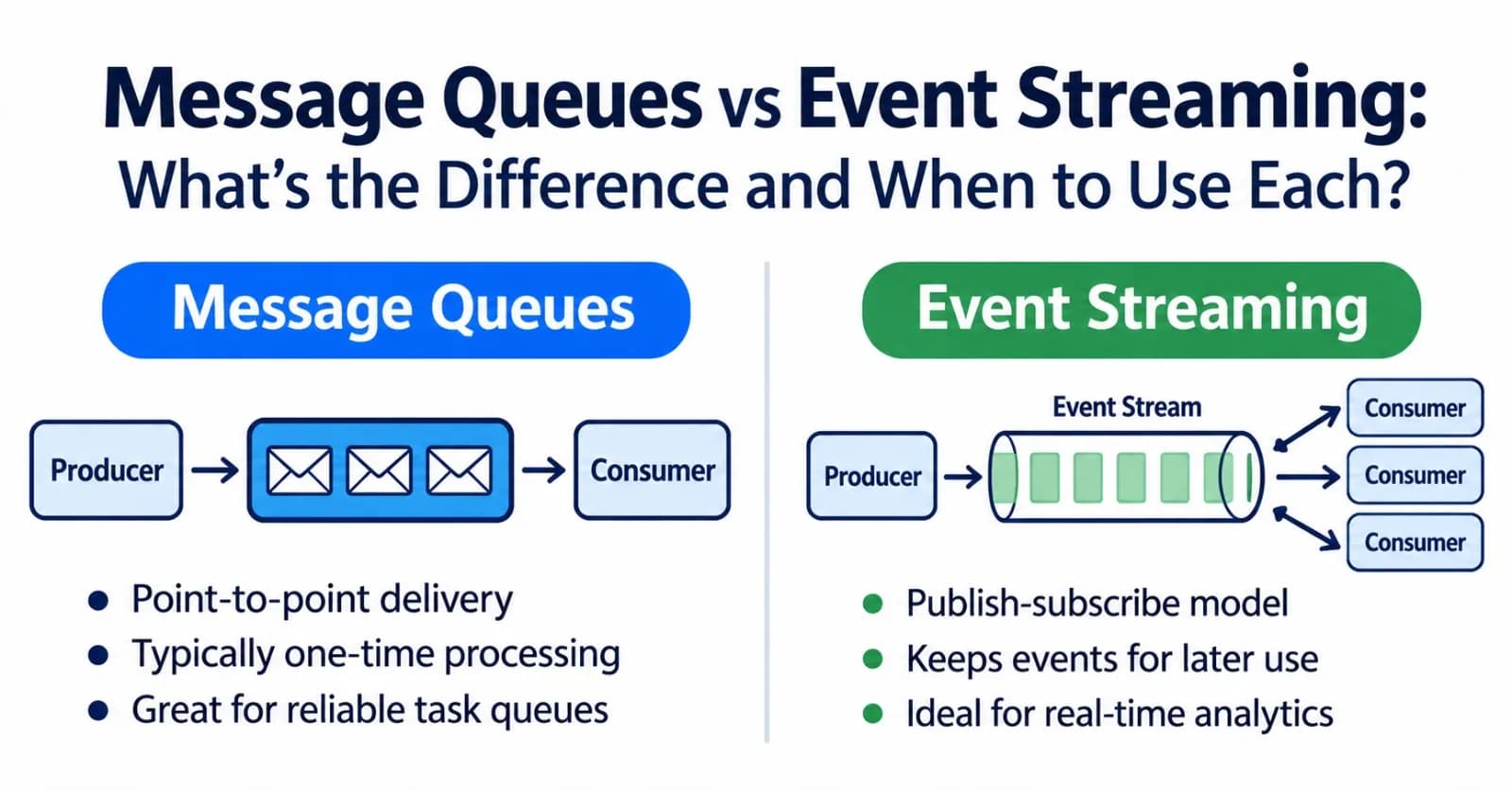
A message queue hands each message to one consumer to be processed, then discards it. It is a to-do list: once a task is done, it’s crossed off.
An event stream is a durable, ordered log of events that any number of consumers can read, at their own pace, and re-read later. It is a ledger: entries stay on the books until they expire.
flowchart TB
    subgraph QUEUE["Message queue"]
        direction LR
        QP[Producer] --> Q[(Queue)]
        Q -->|"one worker per message"| QW1[Worker 1]
        Q --> QW2[Worker 2]
    end
    subgraph STREAM["Event stream"]
        direction LR
        SP[Producer] --> L[(Log)]
        L -->|"all groups get all events"| G1[Group A: billing]
        L --> G2[Group B: analytics]
    end
    QUEUE ~~~ STREAM
What Is a Message Queue?
A queue sits between producers and consumers. Producers add messages, and consumers take them off. The key behaviors are:
Competing consumers: if several workers listen to one queue, each message goes to only one of them, so adding workers spreads the load.
Acknowledgements: a consumer confirms when it has finished a message. Until then, the broker keeps it safe and can hand it out again if the consumer crashes or times out.
Deletion after success: once acknowledged, the message is gone.
Dead-letter queues: messages that keep failing are moved aside so they don’t block everything else.
sequenceDiagram
    participant P as Producer
    participant Q as Queue
    participant W as Worker
    P->>Q: Send message
    Q->>W: Deliver (hidden from other workers)
    alt Processed successfully
        W->>Q: Ack
        Note over Q: Message deleted
    else Failed or timed out
        Q->>W: Redeliver (to this or another worker)
        Note over Q: Too many attempts:<br/>dead-letter queue
    end
Queue brokers also tend to ship rich per-message features out of the box, such as routing rules, priorities, delayed delivery, and time-to-live.
Examples: RabbitMQ, ActiveMQ, Amazon SQS, and Azure Service Bus.
Strengths
Simple mental model: send work, process it, done
Per-message acknowledgement, retry, and dead-lettering
Easy to scale consumers up and down
Great for smoothing out traffic spikes, because the queue absorbs bursts while workers drain it at their own speed
Weaknesses
Once a message is consumed, it’s gone. You can’t replay it for a new consumer or to fix a bug
Several independent consumers need the same message? You need extra plumbing such as fan-out exchanges or topic-plus-queue setups
Ordering is only guaranteed in narrow cases, and parallel consumers or retries can reorder messages
Best for: background jobs, task distribution, order processing workflows, email and notification sending, and load leveling.
Here is what a dead-letter setup looks like on Amazon SQS, where the redrive policy says “after 5 failed receives, move the message to the dead-letter queue”:
{
  "deadLetterTargetArn": "arn:aws:sqs:us-east-1:123456789012:orders-dlq",
  "maxReceiveCount": 5
}
What Is Event Streaming?
An event stream is an append-only log. Producers write events to the end, and the log keeps them for a configured retention period, whether that’s hours, days, or longer. Consumers don’t remove anything. Each one simply tracks its own position (an offset) in the log.
The log is split into partitions so it can scale. Events with the same key (for example, the same customer ID) land in the same partition, which preserves their order. Consumers are organized into consumer groups: within a group, each partition is read by one consumer, while every group independently receives all the events.
flowchart LR
    P[Producers] --> T0[Partition 0]
    P --> T1[Partition 1]
    subgraph GA["Group A: billing"]
        A1[Consumer 1]
        A2[Consumer 2]
    end
    subgraph GB["Group B: analytics"]
        B1[Consumer 1]
    end
    T0 --> A1
    T1 --> A2
    T0 -.-> B1
    T1 -.-> B1
In the diagram, Group A splits the two partitions between its consumers (solid arrows), while Group B has a single consumer that reads both (dotted arrows).
Because events aren’t deleted on read, two powerful things become possible. A brand-new consumer can start from the beginning and catch up on history. And a consumer that had a bug can rewind and reprocess.
flowchart LR
    E0["offset 0<br/>(oldest)"] --> E1["offset 1"] --> E2["offset 2"] --> E3["offset 3"] --> E4["offset 4<br/>(newest)"]
    CB["Group B:<br/>rewound"] -.-> E1
    CA["Group A:<br/>caught up"] -.-> E4
Examples: Apache Kafka, Kafka-compatible platforms such as Redpanda, Amazon Kinesis Data Streams, Apache Pulsar, and Azure Event Hubs.
Strengths
Replay and reprocessing, because events remain available until retention expires
Many independent consumers over the same data without extra wiring
Ordering per key, plus very high throughput through partitioning
A natural fit for stream processing, event sourcing, and change data capture
Weaknesses
With classic consumer groups, parallelism is capped by the number of partitions
Progress is tracked per partition (an offset), not per message, so one slow or failing record can hold up everything behind it in that partition
More concepts to learn and operate: partitions, offsets, rebalancing, retention, and lag
Retention costs: keeping lots of events for a long time takes storage
Best for: event-driven architectures, event sourcing, change data capture, real-time analytics, audit trails, and feeding data to many downstream systems.
Retention and partitions are configured per topic. For example, in Kafka:
kafka-topics.sh --bootstrap-server localhost:9092 \
  --create --topic orders \
  --partitions 6 --replication-factor 3 \
  --config retention.ms=604800000
That creates a six-partition topic that keeps events for seven days.
Side-by-Side Comparison
Aspect | Message queue | Event streaming |
|---|---|---|
Core idea | Deliver each message to a consumer, then discard it | Keep an ordered log that consumers read at their own pace |
After consumption | Message is removed once acknowledged | Event stays until retention expires |
Replay | Generally not possible | Yes, by moving a consumer’s position back |
Multiple consumers | Competing consumers share the work; fan-out needs extra setup | Each consumer group independently gets every event |
Ordering | Per queue, but weakened by parallel consumers and retries | Per partition (usually per key) |
Scaling | Add consumers | Add partitions and consumers |
Progress tracking | Per-message acknowledgement | Per-partition offset (classic consumer groups) |
Routing and extras | Rich built-in features: routing, priorities, delays, TTL | Topics and keys; richer logic lives in consumers or stream processors |
Typical use | Tasks, jobs, workflows | Events, data pipelines, analytics, audit |
Examples | RabbitMQ, ActiveMQ, Amazon SQS, Azure Service Bus | Kafka, Redpanda, Kinesis, Pulsar, Event Hubs |
Where the Lines Blur
The old rule of thumb was “queues for tasks, streams for events, and don’t use Kafka as a queue.” That advice is now only partly true, because the two worlds have been borrowing from each other.
Kafka now has queue semantics. Share groups (from KIP-932, “Queues for Kafka”) let many consumers cooperatively read from the same partition, with per-record acknowledgement and counting of delivery attempts. The feature went from early access in Kafka 4.0, to preview in 4.1, to production-ready in Apache Kafka 4.2 (February 2026). Unlike a classic consumer group, a share group can have more consumers than partitions.
flowchart TB
    subgraph CG["Consumer group: one consumer per partition"]
        direction LR
        P1[Partition 0] --> C1[Consumer 1]
        P2[Partition 1] --> C2[Consumer 2]
        P3[Partition 2] --> C3[Consumer 3]
    end
    subgraph SG["Share group: consumers can outnumber partitions"]
        direction LR
        PP[Partition 0] --> S1[Consumer 1]
        PP --> S2[Consumer 2]
        PP --> S3[Consumer 3]
    end
    CG ~~~ SG
It is still Kafka underneath, though. Records stay in the log, so other groups can read them independently, and the topic’s retention policy still applies. The Kafka documentation recommends share groups when records are processed one at a time rather than as part of an ordered stream. In other words, the log is the same; what changes is how a group reads it.
RabbitMQ now has streams. Alongside its classic queues and Raft-based quorum queues, RabbitMQ offers streams: append-only logs with retention and replay, available inside the same broker. That covers fan-out and replay use cases that once pushed teams to run Kafka next to RabbitMQ.
Other platforms mix both models. Apache Pulsar, for example, lets consumers choose a subscription type, from exclusive and failover (stream-like) to shared (queue-like). And on AWS, SNS plus SQS gives queue-style fan-out, while Kinesis is the streaming option.
The practical takeaway: pick based on the semantics your consumers need (replay, fan-out, per-message handling), not on the product name, and check what your platform and version actually support.
Delivery Guarantees, Ordering, and Idempotency
Whichever model you choose, a few realities apply.
Assume at-least-once delivery. If a consumer crashes after doing the work but before acknowledging it (or committing its offset), the message will be delivered again. Design consumers to be idempotent, so handling the same message twice has the same effect as handling it once.
Be skeptical of “exactly-once.” Some systems offer exactly-once processing within certain boundaries, such as Kafka’s transactions for read-process-write between topics, but effects on external systems (databases, payment providers, emails) still need idempotency.
Ordering and parallelism pull in opposite directions. The more consumers you add, the weaker the ordering guarantees tend to be. Streams preserve order per partition key. Queues usually need a feature like message groups to keep related messages in order.
A minimal idempotent handler looks like this:
def handle(event):
    if already_processed(event.id):    # skip duplicates
        return
    apply_changes(event)
    mark_processed(event.id)           # ideally in the same transaction
How to Choose
Start from what your consumers need, not from the technology:
flowchart TD
    A[What do consumers need?] --> Q1{"Need to replay or reprocess past events?"}
    Q1 -->|Yes| ST1[Event streaming]
    Q1 -->|No| Q2{"Do many independent consumers need the same events?"}
    Q2 -->|Yes| ST2[Event streaming, or a queue with fan-out]
    Q2 -->|No| Q3{"Mainly handing tasks to workers?"}
    Q3 -->|Yes| MQ1[Message queue]
    Q3 -->|No| Q4{"High volume, ordered by key, or stream processing?"}
    Q4 -->|Yes| ST3[Event streaming]
    Q4 -->|No| MQ2[Message queue is usually simpler]
A few extra rules of thumb:
If you need per-message routing, priorities, or delayed delivery, a queue broker gives you these natively.
If you need an audit trail or the ability to rebuild state, you want a log.
If you already run Kafka and your queue needs are modest, share groups may save you from running a second system. If your queue needs are heavy on routing and per-message controls, a dedicated queue broker may still fit better.
If your team is small and the need is background jobs, a managed queue is often the lowest-effort choice.
Using Both Together
Plenty of systems use both, each for what it does best: a stream as the backbone for business events, and queues for executing work.
flowchart TB
    OS[Order service] -->|"publishes OrderPlaced"| ES[(Event stream)]
    ES --> AN[Analytics pipeline]
    ES --> FD[Fraud detection]
    ES --> FU[Fulfillment service]
    FU -->|"one job per package"| JQ[(Job queue)]
    JQ --> W1[Packing worker 1]
    JQ --> W2[Packing worker 2]
Analytics and fraud detection read the same events independently, and can replay them when models change. The fulfillment service turns each event into discrete jobs that workers claim one at a time.
Common Pitfalls
Treating a stream like a task queue without the right tools. With classic consumer groups, one slow record blocks the partition behind it, and you can’t easily give a single failing record to someone else. Use share groups, or a queue.
Treating a queue like a system of record. Once messages are consumed, they’re gone. If you may need to replay or audit, use a log.
Skipping idempotency. Duplicates will happen. Plan for them from day one.
Under-partitioning, or picking a bad key. In a stream, partitions cap consumer parallelism, and a hot key can overload one partition.
No dead-letter or retry limit. A single poison message can loop forever and block progress.
Ignoring lag and queue depth. Monitor how far consumers are behind. It’s your earliest warning.
Forgetting retention costs. Keeping everything forever is easy to configure and expensive to store. Retention is a decision, not a default. For reference, SQS retains messages for up to 14 days, while Kinesis can retain data for up to 365 days.
Final Thoughts
Message queues and event streams solve different problems. A queue answers, “Who should do this task?” A stream answers, “What happened, and who needs to know, now or later?” Use a queue when you’re distributing work and each message should be handled once and forgotten. Use a stream when events are facts worth keeping, sharing with many consumers, and possibly replaying.
The boundary is softer than it used to be, with Kafka gaining queue semantics and RabbitMQ gaining streams, so choose by the behavior you need and verify what your platform supports today. And when in doubt, start with the simpler option for your actual requirement. You can always add the other one when a concrete need shows up.
Do you use a queue, a stream, or both in production, and what made you choose? Share your experience in the comments.
Comments(0)
Join the discussion by logging into your account.
No comments yet. Be the first to comment!