
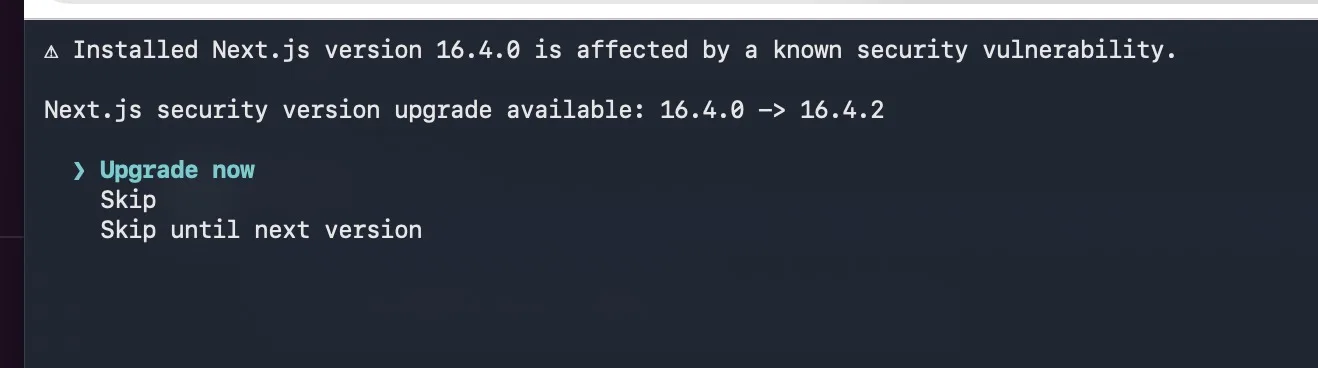
Your terminal stops you with a prompt like this: “Installed Next.js version 16.4.0 is affected by a known security vulnerability. Next.js security version upgrade available: 16.4.0 -> 16.4.2.” It then offers three choices: Upgrade now, Skip, and Skip until next version. It’s tempting to dismiss that like routine audit noise. Don’t. This one is real, and two of the issues behind it are rated critical.
What happened
Vercel shipped an out-of-band security update on October 14, 2026, including two fixes delayed from September by upstream dependencies. It landed in 16.4.1 and 15.5.28, and 16.4.2 followed on October 15 with Turbopack and documentation fixes. Releases before 16.4.1 on the 16 line, and before 15.5.28 on the 15 line, are affected, including 16.4.0.
The three issues
1. GHSA-673q-mjm6-r5xr: remote code execution via "use cache". Apps using the App Router with Cache Components can let an unauthenticated remote attacker run code when a "use cache" function returns multiple typed arrays. The Next.js team says there is no known workaround, and that you should upgrade immediately even if your app has no similar functions. The React team has a related upstream advisory (GHSA-xqc2-xf4c-x3h3).
2. CVE-2026-96889 / GHSA-2464-fhr4-w9xw: remote code execution in the Image Optimization API (SVG). A memory-related bug in an upstream library used for image optimization can lead to unauthenticated remote code execution when Next.js runs on glibc-based Linux. The Next.js team’s write-up frames it as an Image Optimization API issue when using SVG. Both this and the "use cache" issue carry a CVSS 4.0 score of 9.5 out of 10.
3. GHSA-p3m5-59mp-jv5r: CPU exhaustion via Server Actions. Crafted requests aimed at App Router apps with at least one Server Action can cause excessive CPU usage. The Next.js team rates it High severity. The excessive CPU usage blocks other requests in the same process, which is what makes it a denial of service rather than code execution. Apps on the Pages Router, or apps without Server Actions, aren’t vulnerable. The React team has a related upstream advisory here too (GHSA-h3gv-c5rc-p453).
Am I actually exposed?
How exposed you are depends on your setup. The first bug needs Cache Components and a "use cache" function that returns typed arrays. The second involves SVG handling in image optimization on glibc-based Linux. Debian- and Ubuntu-based container images are glibc-based, so check your base image if you self-host. The third needs the App Router with at least one Server Action.
Even so, “my app probably doesn’t hit it” is a weak reason to wait. The Next.js team says to upgrade immediately even if your app has no similar functions, and there is no known workaround for the first bug. The fix is a patch bump, and an unauthenticated RCE is not something to bet on. The Singapore agency has also urged immediate patching, noting that attackers can exploit these flaws for remote code execution.
How to fix it
Choose Upgrade now in the prompt, or run the install yourself. Any release from 16.4.1 up includes the fixes, and 16.4.2 is the newer patch:
npm install [email protected]
# pnpm add [email protected]
# yarn add [email protected]
On the 15.x line, upgrade to [email protected] instead.
flowchart TD
    A["Terminal flags [email protected]"] --> B["npm install [email protected]"]
    B --> C["Rebuild and redeploy"]
    C --> D["Confirm with npm ls next"]
    D --> E{"Still flagged?"}
    E -- Yes --> F["Check lockfile, workspaces, cached layers"]
    F --> C
    E -- No --> G["Done"]
If you can’t upgrade right away: for the Image Optimization bug only, the workaround is to make sure the sharp package used by Next.js is version 0.35.5 or later. Upgrading Next.js also makes your package manager supply a fixed sharp automatically. This only covers the Image Optimization bug, so treat it as a stopgap.
If it’s still flagged after upgrading
Lockfile: commit the updated lockfile. CI that runs
npm ciinstalls exactly what the lockfile says.Monorepos: more than one workspace may pin its own
nextversion.Docker and CI caches: rebuild without stale layers so the old version isn’t baked into your image.
Verify: run
npm ls nextand confirm you see 16.4.2 (16.4.1 is the minimum fixed version).
Don’t skip the follow-up
Because two of these allow code execution, an internet-facing app that ran 16.4.0 deserves a quick look back. Check logs for unusual traffic, especially around image optimization requests involving SVGs and any Server Action routes, and make sure nothing unexpected is running on your hosts. Whether or not you find anything, patch first and investigate second.
The takeaway
That warning is accurate. Take Upgrade now (or install 16.4.2 yourself; on the 15.x line, use 15.5.28), redeploy, and verify the installed version. It takes a few minutes, and skipping it leaves you on a release with two critical remote-code-execution bugs.
Sources: Next.js security update, Oct 14, 2026 · GHSA-673q-mjm6-r5xr · CSA Singapore advisory · Next.js releases
Comments(0)
Join the discussion by logging into your account.
No comments yet. Be the first to comment!