
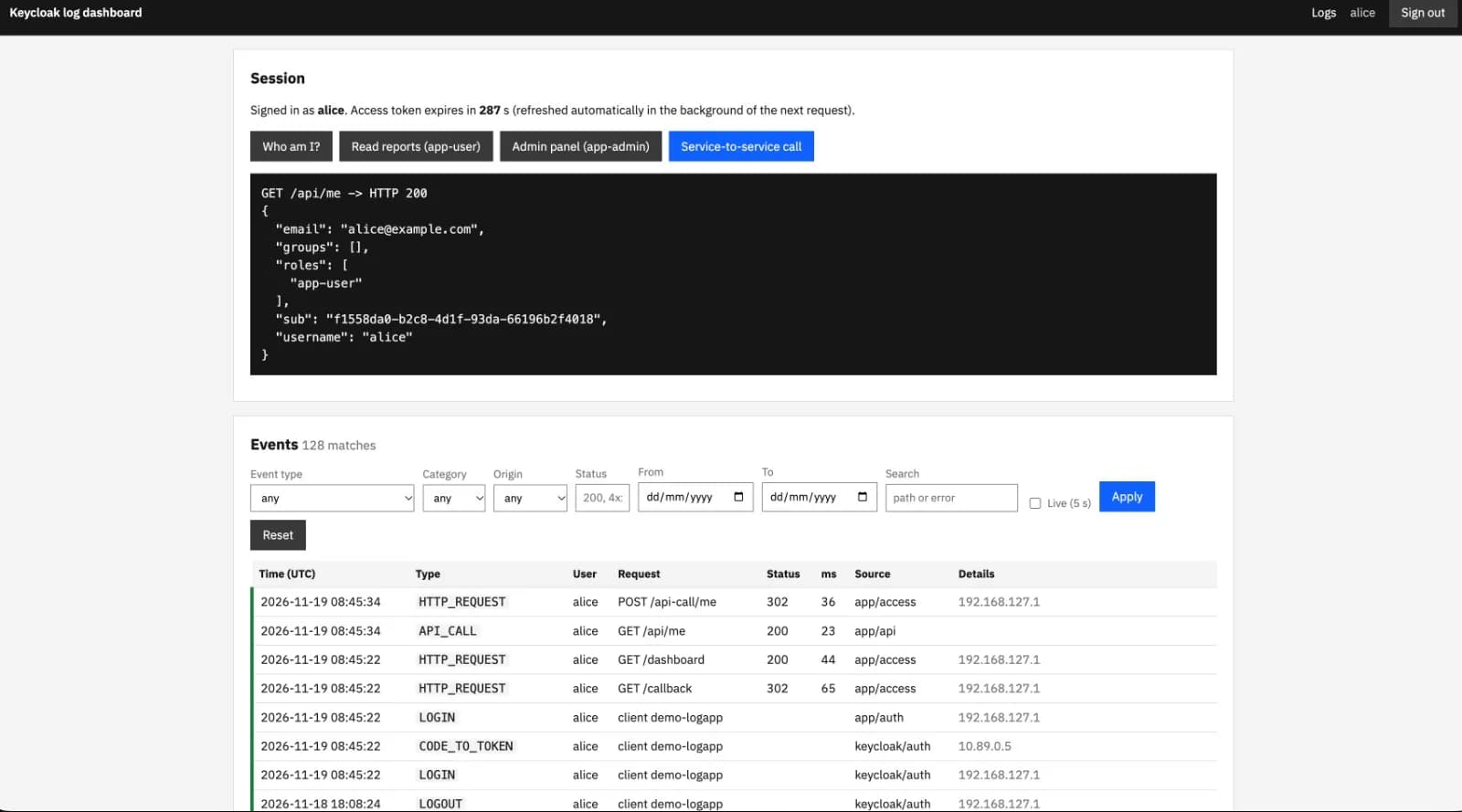
Plug-and-play applications to Keycloak.
Introduction
Modern web applications need secure, standards-compliant authentication, yet building and maintaining identity management from scratch is both risky and time-consuming. By combining Keycloak with a lightweight, framework-agnostic Python connector, you can add enterprise-grade Single Sign-On (SSO) to a web application in roughly 80 lines of integration code.
TL;DR-What is Keycloak?
Keycloak is an open-source Identity and Access Management (IAM) solution aimed at modern applications and services. Instead of embedding login forms, password hashing, multi-factor authentication (MFA), and session tracking directly inside every application you build, Keycloak centralizes these responsibilities into a dedicated identity provider.
Under the hood, Keycloak implements industry-standard protocols:
OpenID Connect (OIDC) & OAuth 2.0: Handles browser-based user authentication via the Authorization Code flow (enhanced with PKCE) as well as machine-to-machine authentication via the Client Credentials grant.
SAML 2.0: Supports legacy enterprise integrations alongside modern OIDC clients.
How Keycloak Works and How It Is Used
Keycloak organizes security boundaries into Realms. A realm manages a set of users, credentials, roles, and groups, completely isolated from other realms. Within a realm, applications are registered as Clients:
Front-Channel Authentication: When an unauthenticated user visits an application, the app redirects the browser to Keycloak's login page. Keycloak verifies credentials, enforces password policies or MFA, and establishes a centralized SSO session.
Token Issuance: Keycloak redirects the user back to the application with a short-lived authorization code. The application exchanges this code over a secure back-channel for a set of JSON Web Tokens (JWTs): an ID Token (proving who the user is), an Access Token (authorizing downstream API calls), and a Refresh Token (allowing seamless session renewal).
Offline Verification & Policy Enforcement: Downstream APIs and microservices do not need to call Keycloak on every request. Because tokens are cryptographically signed, services can fetch Keycloak's public keys (JWKS) once, cache them, and verify token signatures, issuers, audiences, and expiration timestamps locally.
A Plug-and-Play Use Case
While Keycloak is feature-rich, integrating OIDC flows directly into web frameworks often leads to repetitive boilerplate—handling state parameters to prevent CSRF, generating nonce values, managing PKCE code verifiers, caching JWKS signing keys, and rotating expired tokens.
To solve this, we built a plug-and-play Keycloak Connector paired with a minimal Flask web application. The connector encapsulates the entire OAuth 2.0 / OIDC lifecycle into four clean operations—initialize, login, refresh, and logout—allowing any Python web application to delegate authentication to Keycloak right out of the box.
Implementation
Architecture Overview
The solution separates protocol mechanics from web framework routing. Your web application owns the HTTP session and browser redirects, while KeycloakConnector handles discovery, cryptography, retries, and token validation.

Core Modules
KeycloakConfig: Reads and validates environment variables (KEYCLOAK_SERVER_URL,KEYCLOAK_REALM,KEYCLOAK_CLIENT_ID, etc.) at startup so misconfigurations fail fast.KeyStore&HttpClient(discovery.py): Fetches the OIDC discovery document (.well-known/openid-configuration), verifies the realm issuer, and caches public signing keys (JWKS) with automatic handling for key rotation (kid).KeycloakConnector(connector.py): Implements the Authorization Code flow with S256 PKCE,stateandnonceverification, RFC 9207issvalidation, token refreshing, and RP-initiated logout.LoginRequest&TokenSet(tokens.py): Immutable, serializable value objects designed to be stored cleanly in a server-side session without leaking secrets into logs.
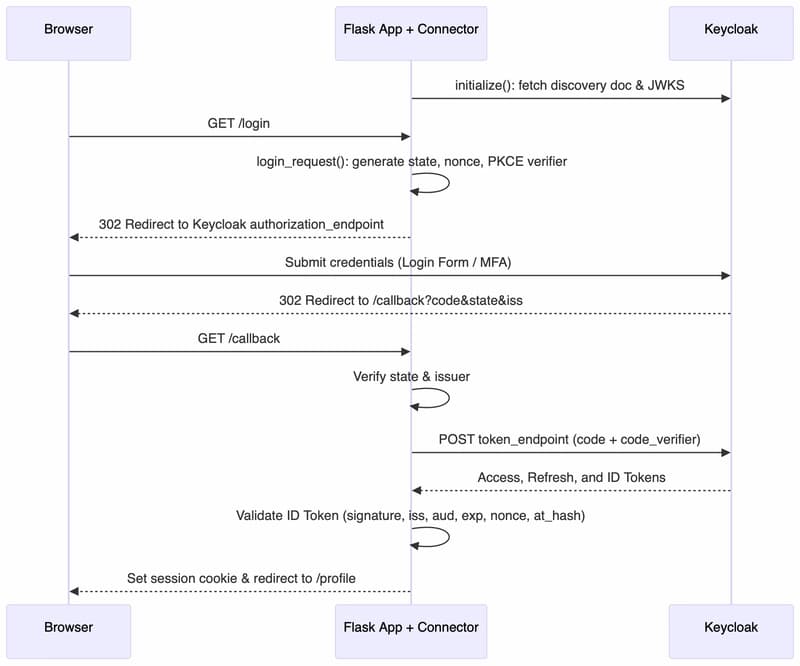
End-to-End Authentication Sequence
Code Walkthrough
1. Initializing the Connector and Login Flow
At startup, the connector loads Keycloak's discovery metadata and warms its signing-key cache. When a user visits /login, login_request() generates cryptographic parameters (state, nonce, and a PKCE code_verifier) and builds the authorization URL:
# From connector.pydef login_request(self, *, login_hint: str | None = None, prompt: str | None = None,
                  scopes: tuple[str, ...] | None = None, extra_params: Mapping[str, str] | None = None
                  ) -> LoginRequest:
    state, nonce = random_token(), random_token()
    verifier = generate_verifier() if self.config.use_pkce else None
    params: dict[str, str] = {
        "client_id": self.config.client_id,
        "response_type": "code",
        "redirect_uri": self.config.redirect_uri,
        "scope": " ".join(scopes or self.config.scopes),
        "state": state,
        "nonce": nonce,
    }
    if verifier:
        params.update(code_challenge=challenge_s256(verifier), code_challenge_method="S256")
    # ... optional parameters appended ...
    url = f"{self._keys.endpoint('authorization_endpoint')}?{urlencode(params)}"
    return LoginRequest(url=url, state=state, nonce=nonce, code_verifier=verifier)
Enter fullscreen mode Exit fullscreen mode
2. Handling the Callback and Validating Tokens
When Keycloak redirects back to /callback, handle_callback() protects against CSRF and mix-up attacks by verifying state and iss in constant time before exchanging the authorization code for tokens and validating the ID token claims:
# From connector.pydef handle_callback(self, params: Mapping[str, str], login: LoginRequest | Mapping[str, Any]) -> TokenSet:
    if not isinstance(login, LoginRequest):
        login = LoginRequest.from_session(login)
    if params.get("error"):
        raise AuthorizationError(params["error"], params.get("error_description"))
    received_state = params.get("state") or ""
    if not received_state or not hmac.compare_digest(received_state, login.state):
        raise StateMismatchError("state of the callback does not match the login request")
    if params.get("iss") and params["iss"] != self.config.issuer:
        raise StateMismatchError("issuer of the callback does not match the configured realm")
    code = params.get("code")
    if not code:
        raise AuthorizationError("invalid_response", "callback carries neither code nor error")
    return self.exchange_code(code, login)
Enter fullscreen mode Exit fullscreen mode
3. Plugging It Into a Flask Application
With the connector handling the OIDC protocol details, the Flask application (flask_app.py) only needs a few concise routes and a @login_required decorator that automatically refreshes expiring access tokens via kc.ensure_fresh():
# From flask_app.pykc = connector or KeycloakConnector(KeycloakConfig.from_env()).initialize()

def login_required(view):
    """Redirect anonymous users to /login; refresh the access token when it is about to expire."""
    @wraps(view)
    def wrapper(*args, **kwargs):
        if "tokens" not in session:
            return redirect(url_for("login"))
        try:
            tokens = kc.ensure_fresh(TokenSet.from_dict(session["tokens"]))
        except RefreshError:
            session.clear()
            return redirect(url_for("login"))
        session["tokens"] = tokens.to_dict()
        return view(tokens, *args, **kwargs)
    return wrapper

@app.get("/login")def login():
    request_ = kc.login_request()
    session["login"] = request_.to_session()
    return redirect(request_.url)

@app.get("/callback")def callback():
    pending = session.pop("login", None)
    tokens = kc.handle_callback(request.args, LoginRequest.from_session(pending))
    session["tokens"] = tokens.to_dict()
    return redirect(url_for("profile"))

@app.get("/profile")@login_requireddef profile(tokens: TokenSet):
    claims = kc.validate_access_token(tokens.access_token)
    return jsonify(
        user=tokens.claims.get("preferred_username"),
        roles=claims.get("realm_access", {}).get("roles", []),
        access_token_expires_in=round(tokens.expires_in(time.time()))
    )

@app.get("/logout")def logout():
    tokens = TokenSet.from_dict(session["tokens"]) if "tokens" in session else None
    session.clear()
    return redirect(kc.logout_url(tokens))
Enter fullscreen mode Exit fullscreen mode
By exporting five environment variables (KEYCLOAK_SERVER_URL, KEYCLOAK_REALM, KEYCLOAK_CLIENT_ID, KEYCLOAK_CLIENT_SECRET, and KEYCLOAK_REDIRECT_URI), the application immediately supports full SSO login, offline JWT signature verification, automatic token refresh, and single sign-out.
Conclusion
Everything is in place: Keycloak manages user identities, security policies, and token issuance, while the plug-and-play Python connector bridges the OAuth 2.0 / OIDC protocol directly into our web application. With discovery caching, PKCE protection, automatic token rotation, and RP-initiated logout all wired up and verified, the authentication layer is complete and ready to protect your routes.
Thanks for reading 🔌
Links
Code repository for this post: https://github.com/aairom/keycloak-implementation
Keycloak: https://www.keycloak.org/
Comments(0)
Join the discussion by logging into your account.
No comments yet. Be the first to comment!