
The short version: scriptc compiles ordinary TypeScript into a self-contained native binary — no Node.js, no V8, and no JavaScript engine embedded by default in the static output. A small CLI can come out at roughly 170–200KB and start in a few milliseconds, which is dramatically lighter than Node's Single Executable Application. But the pure-native story has limits: published JavaScript dependencies, any-typed code, and other dynamic constructs can require the embedded QuickJS runtime. Before you refactor anything, run scriptc coverage on your codebase. The pitch lands. The ecosystem catch is real.
Verified August 20, 2026: scriptc is under active development, so compiler coverage, benchmark results, and platform support may change quickly.
What scriptc Actually Is
Vercel Labs published scriptc in July 2026 as an Apache 2.0 open-source project. The project is still in an early, fast-moving stage, so repository activity and GitHub-star counts can change quickly. The pitch is simple: write the same TypeScript you already run on Node, run scriptc build app.ts -o app, and get a native executable that requires no runtime on the target machine.
No annotations or separate language dialect are required for the basic workflow. The project targets ordinary TypeScript and supports a documented subset of Node.js APIs, while unsupported or dynamic constructs may require --dynamic or fail compilation.
// No changes required to your existing TypeScript
import { readFileSync } from "fs";

const filePath = process.argv[2];
const content = readFileSync(filePath, "utf8");
const lines = content.split("\n");

console.log(`File: ${filePath}`);
console.log(`Lines: ${lines.length}`);
console.log(`Words: ${lines.flatMap(l => l.split(/\s+/).filter(Boolean)).length}`);
# Build and run
$ scriptc build wc.ts -o wc
$ ./wc package.json
File: package.json
Lines: 23
Words: 47For a fully static build, the resulting binary does not need a bundled JavaScript runtime or a node_modules directory at runtime. The project documents very small static binaries, although real applications can be larger depending on the code and dependencies.
The Three-Tier Compilation Model
scriptc's design decision that makes the rest of the system coherent is the explicit three-tier classification. Every construct in your program lands in exactly one tier, and that tier is a contract.
Tier 1 — Compiled statically (the default)
The static tier compiles supported TypeScript and documented Node.js APIs to native code without embedding a JavaScript engine. scriptc uses differential testing against Node across its test corpus, comparing stdout, stderr, and exit codes byte-for-byte. The project also documents a limited set of deliberate divergences from Node, so “compatible” is more accurate than “identical in every case.”
Tier 2 — Dynamic (opt-in with --dynamic****)
When code cannot be compiled statically — npm dependencies that ship only compiled JavaScript rather than TypeScript source, or code that uses any types — you can opt in to embedding QuickJS-ng, a compact JavaScript engine at roughly 620KB. Values crossing the static/dynamic boundary are validated at runtime. Dynamic mode grows the binary from ~200KB to approximately 3MB.
Tier 3 — Rejected at compile time
Everything else fails the build with a specific SCxxxx error code, a code frame showing exactly where the problem is, and in most cases a rewrite suggestion. Nothing is ever silently miscompiled. Silent degradation is the failure mode scriptc is explicitly designed to avoid.
The tier system gives you a clearer deployment contract. A static build contains native code without the embedded JavaScript engine; dynamic builds explicitly include the runtime needed for dynamic code. The coverage tooling helps identify where those dynamic boundaries occur.
How the Pipeline Works Under the Hood
The Tier 1 compilation path looks like this:
TypeScript source
       ↓
  tsc (the real TypeScript compiler, for type checking)
       ↓
  Typed intermediate representation (IR)
       ↓
  C code generation (--backend c) or LLVM IR (default)
       ↓
  clang / LLVM optimizer
       ↓
  Native binary (macOS arm64 natively; Linux and Windows via cross-compilation)
The TypeScript type-checking stage matters because scriptc builds on TypeScript's compiler infrastructure rather than inventing a separate TypeScript dialect. Your project still has to satisfy the compiler rules and configuration relevant to the code being compiled; scriptc then adds native code generation on top.
The C backend (--backend c) is useful for inspecting generated code and understanding representation choices. Early community benchmarking and generated-code inspection raised questions about the treatment of JavaScript number values, including cases where they are represented as floating-point values rather than native integers. The default LLVM path goes directly from the typed IR to LLVM bitcode and runs the LLVM optimizer before emitting native machine code.
For Tier 2, the embedded JavaScript engine is quickjs-ng — a maintained fork of Fabrice Bellard's QuickJS. It is small (~620KB), but it is an interpreter, not a JIT. Code executing through it will be meaningfully slower than native code. The boundary between static and dynamic islands is explicit: values crossing in either direction are validated and marshalled through a checked interface.
The Performance Numbers — and What to Trust
Vercel Labs publishes benchmark results comparing scriptc against Node.js, Go, Rust, and Zig on Apple Silicon for representative workloads. The headline numbers for a representative CLI workload:
Metric | Node SEA | scriptc (Tier 1) | scriptc (--dynamic) |
|---|---|---|---|
Binary size | 60–100 MB | ~178–200 KB | ~3 MB |
Startup time | ~35–47 ms | ~2–4 ms | ~2–4 ms |
Peak memory | 67–116 MB | 1–4 MB | 1–4 MB |
Runtime throughput | baseline | ~7.5× slower | slower still |
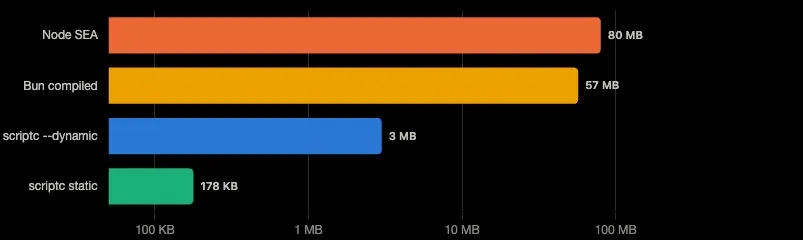
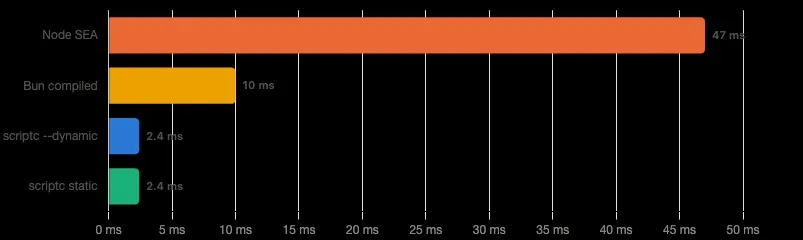
Those first three rows are real. A 200KB binary that starts in 2ms is meaningfully better than anything Node has shipped. For containerized environments, for serverless cold starts, for developer tools that get invoked on every keypress — that size and startup gap matters.
The fourth row is the one to read carefully. A third-party benchmark shared in the Hacker News discussion measured scriptc at about 7.5× slower than Node 24 on one compute-heavy prime-sieve workload, while also finding much faster startup and lower memory use. That is a useful datapoint, not a universal throughput figure. Early generated-code inspection has also raised questions about number representation, so sustained CPU performance should be benchmarked on the workload that matters to you.
What this means practically: scriptc is not a tool for computationally intensive backend services. The startup and binary size wins make it compelling for CLI tools, container scripts, and short-lived serverless functions where cold-start time and memory are the constraint. It is not a drop-in Node.js performance upgrade for Express API servers or data processing pipelines.
The performance table from Vercel also compares against Go, Rust, and Zig startup times. scriptc matches or beats Go on startup latency, which is a real result. But Go's startup overhead primarily comes from garbage collector initialization — not from interpretive overhead — so the comparison requires careful reading.
The npm Ecosystem Collision
This is the part of the scriptc story that deserves more column space than it typically gets.
Many npm packages are published with compiled JavaScript plus .d.ts declaration files rather than their original TypeScript source. That matters for a TypeScript-to-native compiler because declarations provide type information, not executable TypeScript source for the native compilation pipeline.
The practical consequence is that many real-world npm dependencies can trigger the dynamic path because their published package contains JavaScript rather than TypeScript source. That does not mean every package import automatically becomes dynamic; the exact result depends on what the package exposes and what scriptc currently supports. The safe approach is to run scriptc coverage against the actual project.
There is also the any type issue. Dynamic typing is one of the cases scriptc needs to account for when compiling TypeScript ahead of time, but I would avoid putting an unverified repository-wide percentage on it. The more useful question is simply: how many dynamic sites does your own codebase contain, and where do they occur? scriptc coverage is the right tool for answering that.
This is not a flaw in scriptc's design. It is a structural reality of the npm ecosystem that any TypeScript-to-native compiler would face. The design choice that follows from it matters: scriptc makes Tier 2 opt-in. You have to pass --dynamic explicitly. If you don't, imports that need dynamic execution fail the build with an error code and a suggestion. You always know what tier your code is running in.
For many existing Node.js applications, the likely result is mixed: code that fits the static compiler can run natively, while dependencies or constructs outside that subset may require --dynamic or block the build. That can still produce a substantially smaller artifact than a runtime-bundled executable, but the exact size and startup profile depend on the application.
Running scriptc coverage Before You Do Anything Else
scriptc ships a coverage command that is arguably the most practical feature in the entire toolchain for anyone evaluating migration:
$ scriptc coverage server.ts

  statements analyzed    847
  compile statically     612  (72%)

  runs with --dynamic    38 sites (embeds a JS engine, ~620KB — static stays the default)
      ×12  importing 'express' requires the embedded dynamic engine  SC2013
      ×9   importing 'dotenv' requires the embedded dynamic engine  SC2013
      ×7   any-typed return from getConfig() at config.ts:34  SC1041
      ×6   any-typed parameter in parseArgs() at cli.ts:89  SC1041
      ...

  blocked entirely       5 constructs
      eval() at utils/exec.ts:112  SC3001 — remove eval() or use --dynamic
      dynamic import() at plugins/loader.ts:22  SC3002 — refactor to static import
This output tells you three things before you write a single line of migration code: what fraction of your program will actually run as native code, exactly which imports and any sites are forcing the dynamic engine, and what constructs will block compilation entirely. Those second two categories are your migration backlog. Whether that backlog is worth tackling depends on your use case.
For CLI tools written mainly against Node's built-in APIs — fs, path, child_process, net, http — the static ratio can be high enough to make scriptc especially attractive. Rather than assuming a fixed percentage, run scriptc coverage and let the actual report tell you how much of the program stays native.
How scriptc Compares
Versus Node.js Single Executable Application (SEA)
Node's Single Executable Applications bundle the Node.js runtime into the executable. The result is a genuine single binary, but one that weighs 60–100MB and still carries the full startup cost of initializing V8 and the Node runtime. scriptc's static binaries are roughly 400× smaller and start approximately 20× faster. For container images and serverless functions, the difference is not cosmetic — it directly affects cold-start billing and image pull times.
Versus Bun compiled executables
Bun's bun build --compile produces a single executable that bundles Bun's own runtime (implemented primarily in Zig) alongside your code. The result runs closer to 50–60MB and starts in roughly 10ms. Bun's runtime is faster than Node for I/O-heavy workloads, and Bun has deeper npm compatibility than scriptc's static tier will ever achieve. The tradeoff: you're always shipping a runtime, just a smaller and faster one than Node. scriptc's Tier 1 actually produces smaller and faster-starting artifacts. Bun wins on ecosystem compatibility.
Versus Porffor
Porffor (porffor.dev) is a useful comparison because it also targets JavaScript/TypeScript-to-native compilation. Its approach and implementation history differ substantially from scriptc's, so the projects should not be treated as interchangeable benchmarks. Community discussion around scriptc has also raised questions about how quickly its large codebase appeared and how much of the implementation was AI-assisted; those are interesting project-development questions, but they are not themselves proof of compiler correctness or incorrectness.
Versus AssemblyScript
AssemblyScript is a TypeScript-like language that compiles to WebAssembly. It is not TypeScript — it has meaningful semantic differences and does not support most TypeScript's type system features. But it has been production-stable since 2020 and targets a runtime (Wasm) with broad deployment support including edge functions and browser sandboxes. If your goal is "write something TypeScript-adjacent that runs everywhere and is actually production-ready today," AssemblyScript is the more conservative choice. scriptc compiles real TypeScript; AssemblyScript does not.
The AI-Assisted Development Question
The Hacker News thread also raised an unusual development-process question: the repository appeared with a very large initial codebase, and commenters pointed out phrasing in the documentation that looked AI-assisted. Whatever percentage of the implementation was AI-generated, that fact is less important than the observable engineering signals: test coverage, differential testing, bug reports, fixes, generated-code inspection, and performance results.
This is worth examining as a practical question rather than a philosophical one. A compiler has a high correctness bar, a large number of edge cases, and failure modes that are often subtle. Community reviewers have raised concrete questions about numeric representation and about using QuickJS as the dynamic engine. Those concerns are best treated as benchmark and implementation questions to validate against the current release, not as proof that the project is unsound.
The numeric-representation question is worth watching because it can affect CPU-heavy workloads. QuickJS is attractive for the dynamic tier because it is compact, but an interpreter does not provide the same optimization ceiling as a JIT. Neither point makes scriptc unusable; both are reasons to benchmark before adopting it for sustained compute workloads.
What this means for adoption is straightforward: scriptc should be treated as an early-stage tool for critical workloads. That isn't a condemnation — the project is new, and the right question is whether it has been validated enough for your particular risk profile. The community engagement is real, the problem is worth solving, and the architecture is coherent enough to build on. But teams evaluating it for production use should run scriptc coverage on their actual code, benchmark the dynamic-tier paths in their specific workload, and follow the repository's issue tracker before committing to a migration.
Who Should Use scriptc Today
Good fits right now:
CLI tools written against Node's built-in standard library with minimal external dependencies. Think database migration runners, code generators, file processors, deployment scripts. If your TypeScript imports are primarily fs, path, child_process, and your own internal modules — run scriptc coverage and see what the static ratio looks like. If the static share is high, especially with a light dependency graph, that is a strong signal to benchmark the native path.
Docker base images and container scripts where image size is a constraint. Even the --dynamic output at ~3MB is dramatically smaller than any Node or Bun runtime bundle. If you're shipping dozens of small Lambda functions or sidecar containers, that size difference compounds.
Developers evaluating where TypeScript native compilation is heading. scriptc is the most complete working implementation of the idea that exists today. Running it against your code and reading the coverage report teaches you something concrete about how much of your TypeScript is actually statically analyzable. That knowledge is valuable regardless of whether you adopt the tool.
Not a good fit right now:
Express/Fastify API servers with standard npm middleware chains. The dynamic tier will handle your dependencies, but throughput performance on CPU-bound work is meaningfully worse than Node 24, and the ecosystem compatibility story is unresolved.
Any workload where production reliability is non-negotiable and the codebase has not been validated by the team over months of use. The project is weeks old. Treat it accordingly.
Applications with heavy use of eval, dynamic import(), proxies, or other unsupported dynamic behavior need extra care. Some constructs are rejected while others may require the dynamic path; check the current coverage report rather than assuming a fixed rule for every release.
FAQ
Does scriptc support the full Node.js API surface?
No. scriptc supports a documented subset of Node.js APIs, and that surface is still evolving. APIs outside the supported subset may require the dynamic path or fail compilation. Check the current scriptc documentation and coverage report for the exact release you are evaluating.
What happens to my npm dependencies?
Many npm packages ship compiled JavaScript rather than their original TypeScript source, which can limit static compilation. With --dynamic, supported dynamic code can run inside the embedded QuickJS-based runtime. The exact result depends on the dependency and the current compiler release, so scriptc coverage is the best way to see what your project actually needs.
Is the performance actually better than Node?
It depends entirely on the metric. Static binary size and cold-start overhead are scriptc's strongest advantages in the published examples. Sustained runtime throughput can be worse on some compute-heavy workloads; one third-party prime-sieve test measured about 7.5× slower than Node 24. Treat that as a workload-specific datapoint, not a universal ratio. For latency-sensitive CLI tools and short-lived processes, scriptc's startup and artifact-size advantages can be compelling; for sustained compute, benchmark against Node, Bun, Go, Rust, or whatever you would otherwise deploy.
How does this relate to TypeScript 7?
TypeScript's newer compiler work is focused on making TypeScript's own tooling faster; it does not, by itself, turn TypeScript programs into native machine code. scriptc addresses a different layer by taking typed TypeScript and producing native executables. In principle, faster TypeScript compilation could also reduce part of scriptc's build-time overhead.
Can I use this for Electron apps?
Not meaningfully. The Chromium renderer, DOM APIs, and Electron IPC layer are independent of the JavaScript runtime. Compiling your TypeScript business logic to native would not address the size or memory overhead of a typical Electron app, which is dominated by the bundled Chromium. scriptc targets backend and CLI code, not front-end rendering.
What platforms does scriptc support?
The project's platform support is evolving. The current documentation distinguishes native compilation environments from cross-compilation targets, so verify the supported host and target combination for the release you plan to use.
Is the project likely to be maintained?
Vercel Labs projects can evolve quickly, and the long-term maintenance horizon for a new compiler is still unknown. Active repository work is a positive signal, but it is too early to infer long-term support guarantees. For production adoption, evaluate the release cadence, open issues, regression tests, and your own rollback strategy rather than relying on launch-week momentum.
The Bottom Line
scriptc solves a real problem with a coherent architecture. Its strongest promise is not “all TypeScript becomes tiny native code,” but that a meaningful subset can become very small native executables without bundling a JavaScript engine into the static output. For well-typed, dependency-light TypeScript, that is a genuinely interesting capability. For larger Node.js applications, dynamic dependencies and unsupported constructs remain the key adoption questions.
The questions worth watching are straightforward: how much of the numeric representation and code-generation pipeline gets optimized for real workloads, how much npm compatibility can move into the static path, how the dynamic boundary evolves, and whether Vercel maintains the project over the long term. Those answers will matter more than launch-week benchmarks.
What is available is a tool you can install, a coverage command you can run against your actual codebase, and a concrete picture of how much of your program can stay on the native path. My rule of thumb is simple: a high static ratio plus a light dependency graph is a strong reason to benchmark scriptc seriously. A low ratio, deep npm dependencies, or heavy dynamic behavior is a reason to wait. In the middle, benchmark the specific hot paths before deciding.
# Install and check your own code
git clone https://github.com/vercel-labs/scriptc
cd scriptc && npm install && npm run build

scriptc coverage your-cli-tool.ts
Benchmark note: the static startup and binary-size figures in this article come from scriptc's published examples and benchmark material; the 7.5× compute-throughput figure comes from a third-party prime-sieve benchmark shared in the Hacker News discussion. These are workload-specific measurements, not universal performance guarantees. Real application results will vary with code shape, dependencies, target platform, and compiler version. See the scriptc repository and the Hacker News benchmark discussion for the underlying material.
Comments(4)
Join the discussion by logging into your account.
Igor Ganapolsky
The `scriptc coverage` advice is the part worth acting on first. One thing that helped me when evaluating tools like this: gate it in CI, not just once locally. Print the coverage result and the output binary size on every build and fail the job if the QuickJS fallback gets pulled in where you didn't expect it — otherwise a single `any`-typed helper or a dynamic import added months later silently flips you back to an embedded runtime and your 200KB/few-ms startup quietly becomes something else, and nobody notices until a cold-start regression shows up in prod. Also worth pinning the compiler version hard while it's this fast-moving, since coverage rules changing between releases looks identical to your own code regressing.