
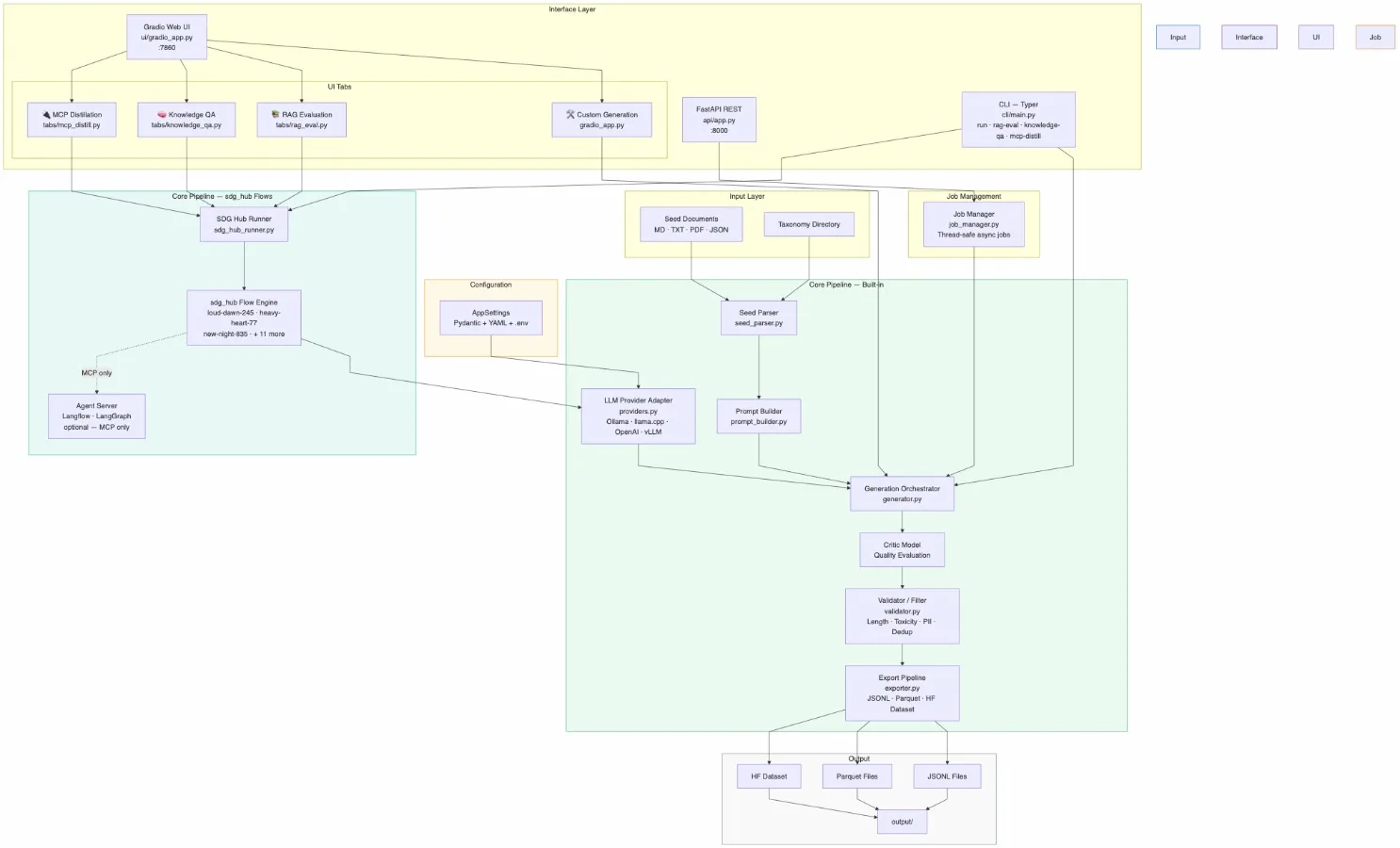
Building a synthetic data generator based on Red Hat's "sdg hub"
Introduction
For a recent initiative, I needed to generate versatile synthetic data to support multiple downstream workflows. While I’ve previously relied on Docling’s Synthetic Data Generator with great results, I wanted to evaluate a tool from Red Hat that caught my eye recently. Drawing inspiration from its core architecture—and tailoring it to my specific pipeline requirements—I built a custom tool that I'll showcase below.
Before diving into what I built, let’s look at the foundation: what exactly is Red Hat's SDG Hub?
TL;DR-What is SDG Hub (Red Hat synthetic data generator hub)?

SDG Hub is an open-source library providing composable blocks and flows for synthetic data generation.
It is a Python framework for building synthetic data generation pipelines. Chain LLM, parsing, transform, filtering, and agent blocks into YAML-defined flows -- then generate training data at scale.
Excerpt from Github;
Get Started
pip install sdg-hubEnter fullscreen mode Exit fullscreen mode
from sdg_hub import FlowRegistry, Flow

# Discover and load a built-in flow
FlowRegistry.discover_flows()flow = Flow.from_yaml(FlowRegistry.get_flow_path("MCP Server Distillation"))

# Configure and run
flow.set_model_config(model="openai/gpt-4o")result = flow.generate(dataset)
Enter fullscreen mode Exit fullscreen mode
See the Quick Start for a full walkthrough, or browse all built-in flows.
SDG Hub is available as a plugin for two coding agents, bringing synthetic data generation directly into your coding workflow.
Claude Code
Via org marketplace (recommended — includes all Red Hat AI plugins):
/plugin marketplace add Red-Hat-AI-Innovation-Team/plugins
/plugin install sdg-hub@Red-Hat-AI-Innovation-Team/plugins
Enter fullscreen mode Exit fullscreen mode
Via this repo directly:
/plugin marketplace add Red-Hat-AI-Innovation-Team/sdg_hub
/plugin install sdg-hub@Red-Hat-AI-Innovation-Team/sdg_hub
Enter fullscreen mode Exit fullscreen mode
From a local clone:
git clone https://github.com/Red-Hat-AI-Innovation-Team/sdg_hub.git
/plugin marketplace add /path/to/sdg_hub
Enter fullscreen mode Exit fullscreen mode
Codex CLI
codex plugin marketplace add Red-Hat-AI-Innovation-Team/plugins
Enter fullscreen mode Exit fullscreen mode
Then install the plugin from the marketplace. See .codex-plugin/INSTALL.md for manual installation.
Once you install the SDG_HUB, it comes with a powerfull command line implementation making it quite easy to generate ad-hoc synthetic data for your requirements.
Implementation
Inspired by the original repository, I adapted the framework to align with Bob and my broader SDLC workflows. The resulting application leverages SDG Hub under the hood while extending its capabilities to match my project’s specific requirements, context, and environment.
SDG App — Based on Red Hat Synthetic Data Generator
A production-ready synthetic data generation pipeline built on Red Hat SDG Hub / InstructLab, featuring:
📄 Multi-format ingestion — Markdown, PDF, DOCX, PPTX, HTML, TXT, JSON/JSONL, images (OCR)
🧠 Taxonomy-driven generation — QA pairs, multi-turn dialogues, instruction pairs
🎓 Teacher-critic loops — quality evaluation with any LLM backend
🛡️ Automated filtering — toxicity, PII detection, deduplication, quality scoring
📦 Flexible export — JSONL, Parquet, Hugging Face Dataset
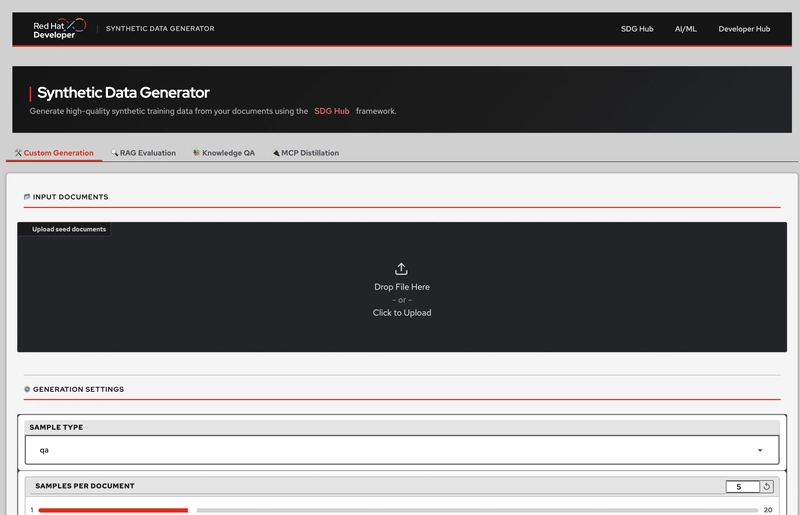
🌐 REST API (FastAPI) + Web UI (Gradio, 4 tabs) + CLI (Typer)
🤖 Local-first — works entirely offline with Ollama or llama.cpp
🔄 16 sdg_hub flows — RAG evaluation, Knowledge QA, MCP distillation, and more
🤝 Bob plugin — pre-built AI assistant commands for this project (
.bob-plugin/)🧠 Claude plugin —
.claude/skills for data-generation, flow-browser, setup-guide, and synthetic-data-generation
Application Architecture
sdg-app/
├── src/sdg_app/
│   ├── core/
│   │   ├── settings.py        # Pydantic configuration (env + YAML)
│   │   ├── seed_parser.py     # Document ingestion (all formats)
│   │   ├── prompt_builder.py  # Prompt engineering
│   │   ├── providers.py       # LLM backend adapters (LiteLLM)
│   │   ├── generator.py       # Generation orchestrator + critic
│   │   ├── validator.py       # Quality / toxicity / PII / dedup filtering
│   │   ├── exporter.py        # JSONL · Parquet · HF Dataset writers
│   │   ├── job_manager.py     # Background job lifecycle management
│   │   ├── flow_runner.py     # sdg_hub flow routing (CLI + API)
│   │   └── sdg_hub_runner.py  # sdg_hub shared execution engine
│   ├── api/                   # FastAPI REST service (:8000)
│   │   └── routes/            # health · jobs · metrics
│   ├── cli/main.py            # Typer CLI (run · serve · ui · config · flows
│   │                          #            rag-eval · knowledge-qa · mcp-distill)
│   ├── ui/
│   │   ├── gradio_app.py      # Gradio web UI (:7860) — 4-tab layout
│   │   └── tabs/              # Per-tab modules
│   │       ├── llm_backend.py # Reusable provider-selector widget
│   │       ├── rag_eval.py    # 🔍 RAG Evaluation tab
│   │       ├── knowledge_qa.py# 📚 Knowledge QA tab
│   │       └── mcp_distill.py # 🔌 MCP Distillation tab
│   └── utils/observability.py # Logging + metrics
├── tests/
│   ├── unit/                  # 137 unit tests
│   └── integration/           # 7 API integration tests
├── flows/                     # Custom sdg_hub YAML flows
├── input/                     # Seed documents (gitignored content)
├── output/                    # Generated datasets (gitignored content)
├── scripts/                   # setup_venv.sh · start.sh · stop.sh · cleanup.sh
├── Docs/                      # Architecture · Quickstart · UserGuide · GapAnalysis
├── .bob-plugin/               # Bob AI assistant plugin for this project
├── .claude/                   # Claude AI assistant plugin (skills + hooks)
│   ├── settings.json          # Hook configuration
│   ├── hooks/                 # commit-on-stop · track-read · verify-gate
│   └── skills/                # data-generation · flow-browser · setup-guide
│       │                      # synthetic-data-generation (+ references/)
├── Dockerfile                 # Multi-stage, Podman-compatible
├── docker-compose.yml         # Podman Compose deployment
├── config.yaml                # Reference configuration (all options)
└── .env.example               # Environment variable template
Enter fullscreen mode Exit fullscreen mode
Component Stack
The application is using the following stack;
Python Application using Gradio framework for the UI (and the rest of it...)
Ollama/llama.cpp for local LLM inference
Docling for document ingestion
Application's Core
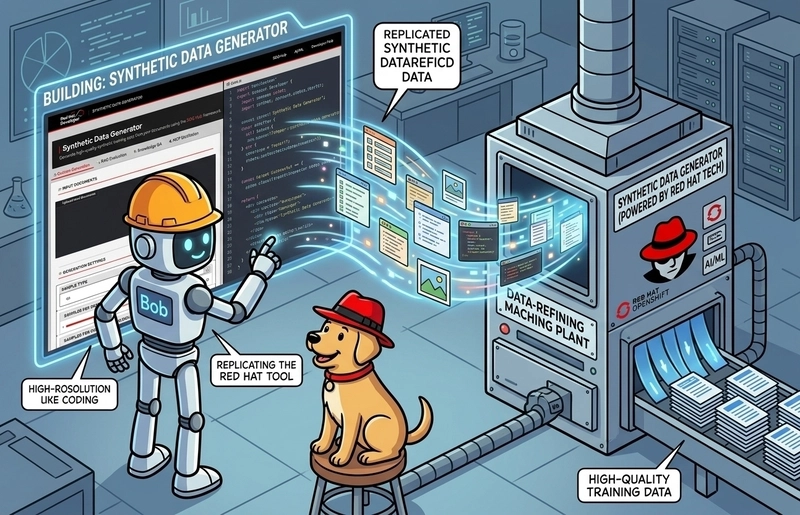
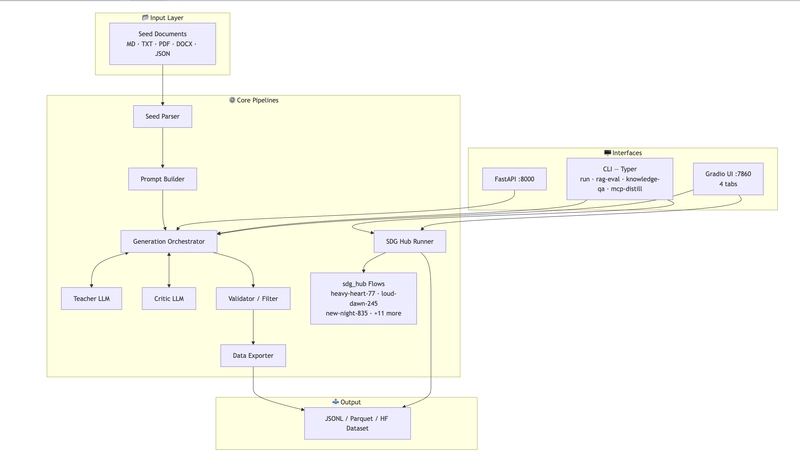
The synthetic data generation framework operates as an asynchronous, decoupled pipeline designed to transform unstructured seed text into verified datasets across multiple formats. Below is a detailed breakdown of the internal mechanics, execution pathways, and validation gates.
Tab | Description | sdg_hub flow |
|---|---|---|
🛠️ Custom Generation | General pipeline: QA, multi-turn, instruction | Built-in |
🔍 RAG Evaluation | Q/A/context triplets for evaluating RAG chatbots |
|
📚 Knowledge QA | Atomic fact extraction + 5 QA pairs per fact |
|
🔌 MCP Distillation | Agent tool-use training data (requires agent server) |
|
Every tab includes a provider selector that auto-fills model, endpoint, and key hint when switching between Ollama, llama.cpp, OpenAI, and Custom/vLLM.
Multi-Stage Generation Orchestration
The system uses GenerationOrchestrator (generator.py) as the primary controller for execution workflows. It translates source material into domain-specific, structured datasets through a systematic transformation process:
Task Distribution: Processes source documents through configurable sample types (e.g., Q&A, instruction-following, multi-turn dialogues).
Critic-in-the-Loop Feedback: If
enable_criticis toggled on, generated candidates pass through a secondary LLM evaluation step (_run_critic). Samples failing the definedcritic_thresholdare pruned immediately to save computational overhead.Downstream Delivery: Successfully critiqued and validated samples are emitted as streamable
GeneratedSampleobjects containing assigned metadata and quality scores.
# Core Orchestration Flow (generator.py)
class GenerationOrchestrator:
    def process_document(self, doc: SeedDocument) -> Iterator[GeneratedSample]:
        for sample_type in self.sample_types:
            raw_samples = self._generate_type(doc, sample_type)
            for raw in raw_samples:
                # Critic Gate: Filter out low-fidelity generations early
                if self.enable_critic and _run_critic(self.critic, doc, raw) < self.critic_threshold:
                    continue

                # Validation Gate: Structural, safety, and content checks
                result = self.validator.validate(raw)
                if result.accepted:
                    yield GeneratedSample(..., quality_score=result.quality_score)
Enter fullscreen mode Exit fullscreen mode
External Flow Delegation & Asynchronous Execution
To support domain-specific workflows without bloating the core orchestrator, the system exposes specialized delegates and asynchronous worker pools:
External Flow Delegation (
sdg_hub_runner.py): Wraps complex external generation flows viarun_sdg_hub_flow_to_file(). This handles specialized task models like RAG evaluation dataset generation (loud-dawn-245) and Model Context Protocol distillation (new-night-835).Asynchronous Lifecycle Management (
job_manager.py): Manages non-blocking dataset creation viaJobManager. Long-running tasks execute inside isolated daemon threads, tracking job states, execution metrics, and generated artifacts without blocking the main runtime process.
Multi-Layer Quality & Safety Engine
The SampleValidator (validator.py) enforces deterministic quality and safety standards before any output is finalized. It applies a strict sequence of validation filters:
Length & Boundary Checks: Rejects truncated, over-length, or structurally malformed generations.
Safety & Compliance Filters: Employs heuristic and classifier checks (
_check_toxicity,_check_pii) to prevent toxic text or Personally Identifiable Information from entering training corpora.Deduplication: Evaluates exact content identity using SHA-256 fingerprinting to eliminate redundancy.
Heuristic Scoring: Computes a overall
quality_scorebased on semantic coherence, dynamic metrics, and formatting integrity. Rejects samples belowmin_quality_score.
# Validation & Quality Filtering (validator.py)
class SampleValidator:
    def validate(self, sample: Dict) -> ValidationResult:
        text = _extract_text(sample)

        # Fast Failure: Reject length anomalies or toxic outputs
        if not self._check_length(text)[0] or not self._check_toxicity(text)[0]:
            return ValidationResult(accepted=False)

        # Compliance Failure: Filter out detected PII
        if self.enable_pii and not self._check_pii(text)[0]:
            return ValidationResult(accepted=False)

        # Scoring & Deduplication: Calculate heuristic quality & check uniqueness
        quality = self._compute_quality_score(text, sample)
        if quality < self.min_quality_score or not self._check_dedup(text)[0]:
            return ValidationResult(accepted=False, quality_score=quality)

        return ValidationResult(accepted=True, quality_score=quality)
Enter fullscreen mode Exit fullscreen mode
Pipeline Summary
Ingestion & Delegation:
JobManagerkicks off thread-isolated tasks, delegating complex pipelines tosdg_hub_runner.pyor sending standard documents directly toGenerationOrchestrator.Generation & Critique: Candidate samples are constructed per task specification and evaluated via an optional LLM Critic.
Validation & Filtering:
SampleValidatorstrips unsafe, duplicate, or low-scoring generations via SHA-256, safety models, and length thresholds.Artifact Export: Accepted samples are assigned quality scores and saved as standardized data artifacts.
REST API
The application exposes a REST API running at http://localhost:8000/docs (with interactive Swagger UI documentation) to control dataset generation, monitor system metrics, and fetch outputs:
Job Execution & Status: Submit new generation workloads (
POST /api/v1/jobs), query the complete job list (GET /api/v1/jobs), or retrieve status and results for a specific run (GET /api/v1/jobs/{id}).Artifact Retrieval: Download generated dataset outputs directly via
GET /api/v1/jobs/{id}/artifact.System Operations: Monitor pipeline operational health (
GET /api/v1/health) and real-time execution metrics (GET /api/v1/metrics).
Method | Endpoint | Description |
|---|---|---|
|
| Service health check |
|
| Submit generation job |
|
| List all jobs |
|
| Job status & results |
|
| Download output file |
|
| Pipeline metrics |
Interactive docs: http://localhost:8000/docs
LLM Implementation
The pipeline supports flexible LLM backend integration across both local and cloud environments through standard .env configuration profiles:
Supported Backends: Choose between local, cost-free runtimes—including Ollama (
ollama/llama3.2athttp://localhost:11434) and llama.cpp (openai/<model>athttp://localhost:9931/v1)—or production-scale endpoints like OpenAI (openai/gpt-4o) and custom hosted vLLM instances (hosted_vllm/<model>).Critical Path Rules: When configuring Ollama, do not append
/v1toSDG_LLM_API_BASE, as doing so breakssdg_hubexecution flows.Setup Reference: Pre-configured environment setups for all three backend profiles are available in
.env.example.
  | Backend                     | Provider   | Model Prefix          | `SDG_LLM_API_BASE`                      |
  | --------------------------- | ---------- | --------------------- | --------------------------------------- |
  | **Ollama** (local, free)    | `ollama`   | `ollama/llama3.2`     | `http://localhost:11434` ← **no `/v1`** |
  | **llama.cpp** (local, free) | `llamacpp` | `openai/<model>`      | `http://localhost:9931/v1`              |
  | **OpenAI** (cloud, paid)    | `openai`   | `openai/gpt-4o`       | `https://api.openai.com/v1`             |
  | **vLLM / Custom**           | `vllm`     | `hosted_vllm/<model>` | `http://your-host/v1`
Enter fullscreen mode Exit fullscreen mode
|
Enter fullscreen mode Exit fullscreen mode
⚠️ Ollama only: do NOT add
/v1to the API base — it breaks sdg_hub flow commands.
Flows
Executing data generation workflows in the application is managed through sdg_hub flows, which structure processing tasks into chained YAML-defined pipeline blocks. The system provides over 14 pre-built flows across seven distinct categories:
Direct Execution: Every flow in the catalog can be triggered directly from the terminal using the command
sdg-app run --flow <flow-id>, or configured interactively within the UI wizard.Dedicated Subcommands: Core workloads feature primary CLI subcommands and direct UI tab integration. Specifically,
heavy-heart-77(sdg-app knowledge-qa) extracts core facts, questions, and responses;loud-dawn-245(sdg-app rag-eval) formats retrieval-augmented generation datasets with questions, responses, and ground truth contexts; andnew-night-835(sdg-app mcp-distill) processes tool-use trajectory data.Specialized Requirements: Advanced pipelines—such as Model Context Protocol (MCP) server distillation (
new-night-835), code evaluation benchmark generation (domain-code-eval), and red teaming prompt generation (major-sage-742)—require additional setup. For example, runningnew-night-835requires a connected agent server (such as LangFlow), whiledomain-code-evalrequires installing sandboxed execution packages likesdg-hub[code]
14+ built-in flows available. Three have dedicated CLI subcommands and UI tabs:
  | Flow ID          | CLI subcommand         | Output                                              |
  | ---------------- | ---------------------- | --------------------------------------------------- |
  | `heavy-heart-77` | `sdg-app knowledge-qa` | `key_fact, question, response`                      |
  | `loud-dawn-245`  | `sdg-app rag-eval`     | `question, response, context, ground_truth_context` |
  | `new-night-835`  | `sdg-app mcp-distill`  | tool-use trajectory data
Enter fullscreen mode Exit fullscreen mode
|
Enter fullscreen mode Exit fullscreen mode
All flows accessible via: sdg-app run --flow <flow-id>
Specific Plugin built for Bob by Bob
To streamline local workflows, the project includes a specialized Bob AI assistant plugin located in the .bob-plugin/ directory that provides pre-built commands, project context, and automated coding conventions directly inside your IDE environment.
Command Capabilities: Streamline operations with dedicated
/sdg-*commands, including execution guides (/sdg-run,/sdg-generate-qa,/sdg-generate-rag), backend switching (/sdg-switch-backend), output inspection (/sdg-inspect-output), debugging (/sdg-debug), API monitoring (/sdg-api), test suite validation (/sdg-test), and custom YAML scaffolding (/sdg-add-flow).Plugin Architecture: Organizes distinct task workflows inside the
commands/directory, provides continuous runtime context viacontext/(project-state.mdandknown-issues.md), and enforces code style alignment throughrules/project-conventions.md.Usage: Open the repository in Bob and invoke any
/sdg-*command in the chat. The assistant automatically ingests the step-by-step instructions from the target command file alongside the project rules without requiring manual context setup each session.
Available commands
Command | What it does |
|---|---|
| Guide through a complete generation run |
| Run Knowledge QA pipeline step-by-step |
| Run RAG Evaluation pipeline step-by-step |
| Switch between Ollama / llama.cpp / OpenAI |
| Read and summarise the latest output file |
| Diagnose and fix pipeline failures |
| Scaffold a new custom sdg_hub YAML flow |
| Run the test suite and explain failures |
| Submit and monitor jobs via the REST API |
Plugin structure
.bob-plugin/
├── README.md               # Project overview and command index
├── commands/               # One Markdown file per /command
│   ├── sdg-run.md
│   ├── sdg-generate-qa.md
│   ├── sdg-generate-rag.md
│   ├── sdg-switch-backend.md
│   ├── sdg-inspect-output.md
│   ├── sdg-debug.md
│   ├── sdg-add-flow.md
│   ├── sdg-test.md
│   └── sdg-api.md
├── context/
│   ├── project-state.md    # Current working state snapshot
│   └── known-issues.md     # Known limitations + workarounds
└── rules/
    └── project-conventions.md  # Coding and project rules for Bob
Enter fullscreen mode Exit fullscreen mode
Conclusion
Inspired by "Red Hat Synthetic Data Generation Hub", and by integrating an extensible orchestration framework (generator.py), asynchronous job execution, and rigorous multi-stage validation (validator.py), this synthetic data generation system offers an end-to-end pipeline tailored for high-quality dataset creation. This application tries to seamlessly bridge localized engine configurations—such as Ollama and llama.cpp—with cloud-native backends, providing robust execution whether driven via the REST API endpoints, the interactive UI flow wizard, or command-line subcommands. Combined with tailored developer tooling like the embedded Bob AI plugin and specialized sdg_hub flows, the architecture provides a scalable, extensible foundation designed to process raw context files into reliable, instruction-tuned corpora with speed and precision.
Thanks for reading 💾
Links
GitHub repository for this blog post: https://github.com/aairom/sysnthetic-data-generator
Red Hat SDG Hub: https://github.com/Red-Hat-AI-Innovation-Team/sdg_hub
Docling Synthetic Data Generator: https://github.com/docling-project/docling-sdg
Comments (0)
Login to post a comment.