
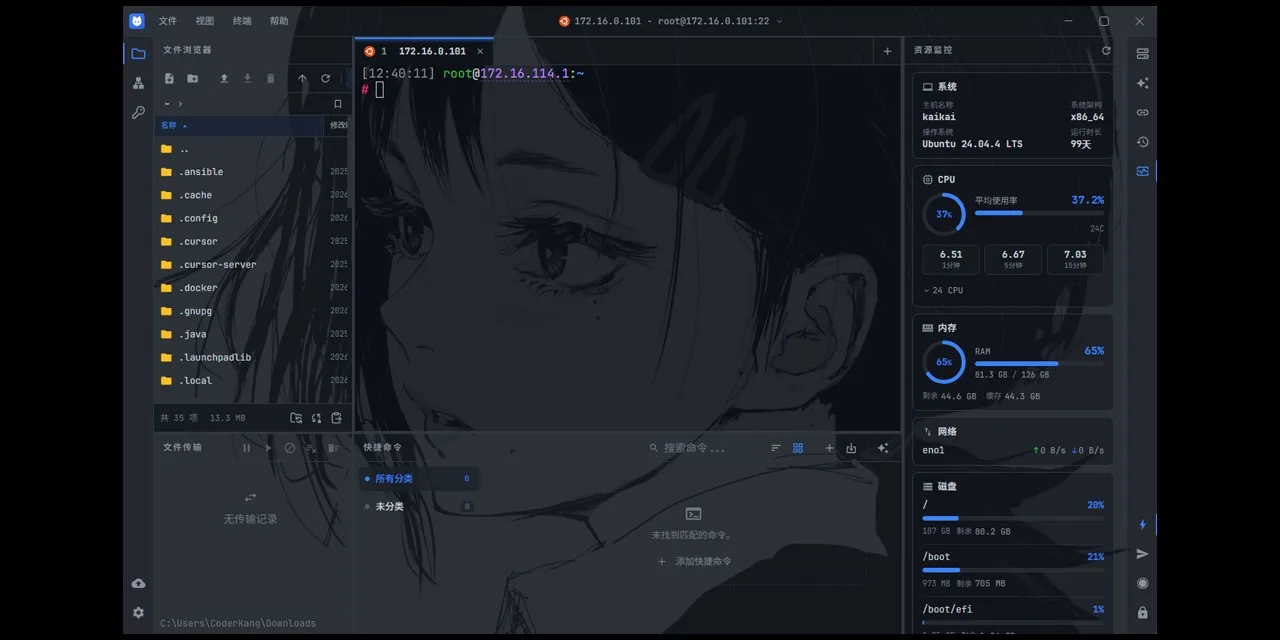
Modern infrastructure work rarely happens in a single terminal window.
A typical day may involve connecting to several Linux servers, editing remote configuration files, checking container status, transferring logs, opening a serial console, managing SSH tunnels, and searching through terminal output.
The tools for these tasks are often fragmented across multiple applications.
That is the problem I wanted to address with NyaTerm.
NyaTerm is an open-source, cross-platform remote terminal workspace built with Tauri, React, and Rust. It combines terminal sessions, remote file management, monitoring, authentication, network tools, AI assistance, and encrypted configuration sync in one desktop application.
Why Build Another SSH Client?
There are already many capable SSH clients.
However, I wanted a tool that treated an SSH connection as more than a terminal window.
When working with a remote server, the terminal is usually only one part of the workflow. I may also need to:
Browse and edit remote files
Upload or download directories
Inspect CPU, memory, disk, GPU, or NPU usage
Manage Docker containers
Check running processes
Create SSH tunnels
Use jump hosts or proxies
Enter OTP codes
Search and explain terminal output
Restore the same workspace on another computer
Switching between unrelated tools adds friction and makes it harder to preserve context.
NyaTerm is designed around the idea of a remote operations workspace. The active connection becomes the center of the workflow, while related tools remain accessible from the same interface.
A Workspace-First Terminal Experience
NyaTerm supports several session types:
SSH
Local terminals
Telnet
Serial connections
Sessions can be organized using tabs, horizontal splits, and vertical splits. This is useful when monitoring several servers at the same time or when one task requires multiple shells.
The workspace also includes features such as:
Session layout restoration
Saved connection folders
A command palette
A quick session switcher
Command history and suggestions
Terminal search
Configurable timestamps and line numbers
Keyword highlighting
Session recording
Synchronized input across multiple terminals
The goal is not to replace the remote shell. NyaTerm provides a structured desktop environment around it.
Remote File Management Without Leaving the Session
File transfer is one of the most common tasks performed after connecting to a server.
NyaTerm includes an integrated SFTP file explorer with support for:
Uploading and downloading files or directories
Multiple file and directory selection
Rename, move, delete, and property operations
Transfer queues
Pause, resume, retry, and cancellation
Configurable transfer concurrency
Duplicate target handling
Timestamp preservation
Automatic synchronization with the terminal working directory
One workflow I especially wanted was remote file editing.
A remote file can be opened in a local editor. NyaTerm watches the local copy and uploads it back when the content changes. Content fingerprinting is used to avoid unnecessary uploads when an editor modifies metadata without changing the actual file content.
This allows developers to keep using their preferred local editor while working with files stored on a remote server.
Security and SSH Compatibility
SSH environments are not always modern or consistent.
Some infrastructure still uses older key exchange algorithms, ciphers, host keys, or authentication methods. Other environments require stricter cryptographic policies.
NyaTerm provides per-connection SSH algorithm settings with three approaches:
Compatible
Secure
Custom
Potentially unsafe algorithms are displayed with security warnings so that compatibility does not silently become the default security posture.
NyaTerm also supports:
Password and private-key authentication
SSH host-key verification
Known-host management
TOTP and HOTP
SOCKS5 and HTTP proxies
ProxyCommand
SSH jump hosts
Local, remote, and dynamic tunnels
X11 forwarding
Master-password-protected storage
Idle application locking
The objective is to support real-world infrastructure while making security trade-offs visible.
Built-In Remote Monitoring
Opening another monitoring platform is not always necessary when troubleshooting a single server.
For SSH sessions, NyaTerm can display remote system information and operational tools directly beside the terminal, including:
CPU, memory, disk, and network information
NVIDIA GPU status
Huawei Ascend NPU status
Running processes
Process signals and priority controls
Docker containers
Docker images, volumes, and networks
Docker Compose projects
These panels are designed for quick inspection and operational tasks. They are not intended to replace a full observability platform such as Prometheus or Grafana.
They provide immediate context while working inside an active session.
AI Assistance Inside the Terminal Context
NyaTerm includes an AI Assistant with two main modes.
Ask mode is designed for individual tasks such as:
Generating a command
Explaining terminal output
Analyzing an error
Suggesting safer alternatives
Agent mode can perform multi-step terminal workflows using an observe, decide, and execute loop.
Commands are presented with structured execution controls and risk information. High-impact operations can require explicit approval rather than being executed automatically.
The assistant can also work with recent terminal output, reducing the need to manually copy large logs into another application.
NyaTerm supports built-in providers, custom model entries, and OpenAI-compatible API endpoints.
AI is optional. The terminal and SSH functionality do not depend on it.
Encrypted Sync and Portable Configuration
Terminal configuration becomes increasingly valuable over time.
Saved hosts, folders, credentials, OTP entries, quick commands, appearance settings, notes, and connection preferences can take significant effort to rebuild.
NyaTerm supports encrypted sync and backup using:
WebDAV
S3-compatible storage
GitHub Gist
Encrypted
.nyaexport files
A master password is required before encrypted sync, backup, import, or export operations.
NyaTerm can also import session definitions from several existing terminal clients, helping users migrate without recreating every connection manually.
Why Tauri, React, and Rust?
NyaTerm uses different technologies for different responsibilities.
React
React is used for the interface and application state.
It provides a practical ecosystem for building settings pages, connection forms, panels, file explorers, transfer queues, monitoring views, and other interactive components.
Tauri
Tauri provides the desktop application layer.
It allows NyaTerm to use a web-based interface while integrating with native desktop capabilities such as windows, system dialogs, file access, the tray, and application updates.
Rust
Rust powers the backend and lower-level operations.
It handles areas such as:
SSH connections
SFTP transfers
Local processes
Serial communication
Terminal backends
Encryption
Network operations
Monitoring data collection
Rust was selected because these parts benefit from strong type safety, predictable performance, and explicit error handling.
The architecture keeps the UI productive to develop while moving sensitive and performance-critical operations into the Rust backend.
Cross-Platform Support
NyaTerm is available for:
Windows 10 and Windows 11
macOS
Linux
Packages include Windows installers and a portable ZIP, macOS DMG builds, and Linux packages such as AppImage, DEB, and RPM.
Homebrew and AUR installation options are also available.
What Changed in NyaTerm v1.2.0?
The v1.2.0 release continued expanding NyaTerm from an SSH client into a broader remote operations workspace.
Recent work includes:
Remote GPU and NPU monitoring
A built-in notes panel
Multiple-directory upload support
Expanded workspace and session management
Improvements to file transfer and remote editing
Additional localization and UI refinements
Development is active, and community reports frequently influence the roadmap.
Open Source and Community Feedback
NyaTerm is available under the MIT License.
The project is still evolving, and there are many areas that can be improved. Compatibility issues are especially difficult because SSH servers, operating systems, network devices, serial devices, and terminal applications can behave differently.
Bug reports with logs and reproducible steps are extremely valuable.
Contributions are also welcome in areas such as:
Rust backend development
React interface development
SSH and terminal compatibility
Documentation
Localization
Packaging
Testing on different platforms and devices
Try NyaTerm
You can learn more about NyaTerm through the project website and documentation:
Website: nyaterm.app
Documentation: nyaterm.app/docs
GitHub: github.com/nyakang/nyaterm
NyaTerm began as an attempt to build a terminal client that matched my own daily workflow.
It is gradually becoming a more complete workspace for developers, system administrators, DevOps engineers, and anyone who regularly works with remote systems.
Feedback, issues, and contributions are welcome.





Comments(0)
Join the discussion by logging into your account.
No comments yet. Be the first to comment!