
A sub-agent demonstration implementation with IBM Bob
Introduction
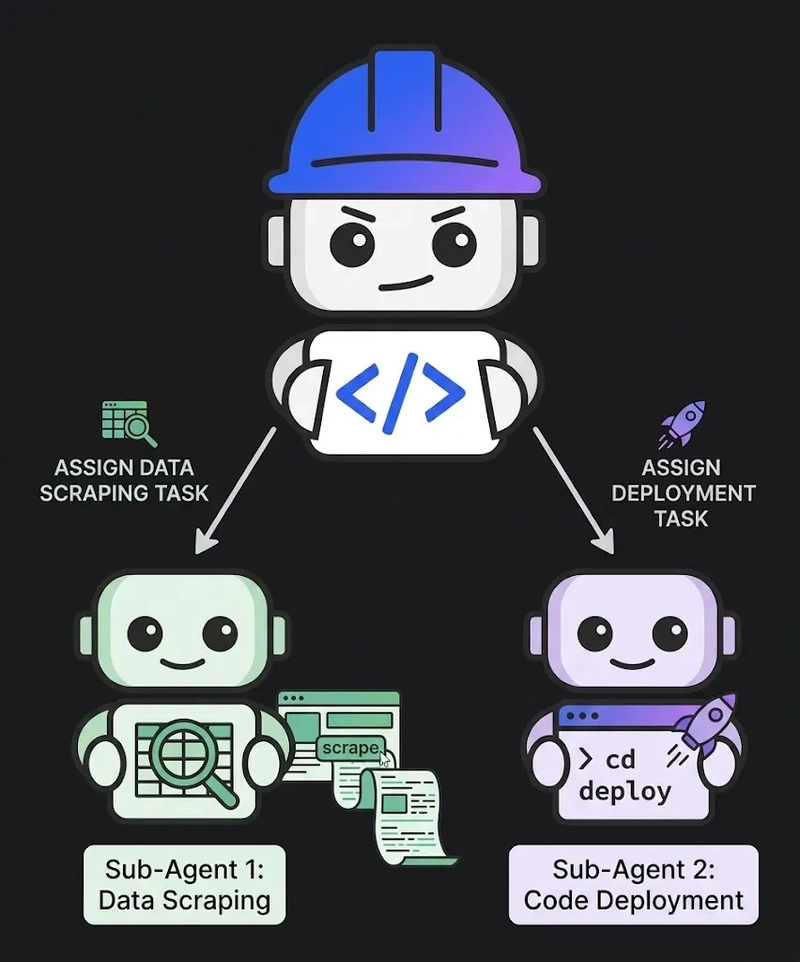
Large Language Model (LLM) agents excel at multi-step tasks when focused on tight scope and explicit goals. However, as tasks expand, single-agent systems suffer from context window saturation, tool confusion, and non-deterministic behavior.
To solve this, modern LLM architectures employ Sub-Agents: isolated, specialized agents spawned by a parent orchestrator to solve individual sub-problems. In this post, we explore a lightweight, framework-agnostic Python implementation demonstrating how an orchestrator agent delegates complex codebase documentation generation to two distinct sub-agents.
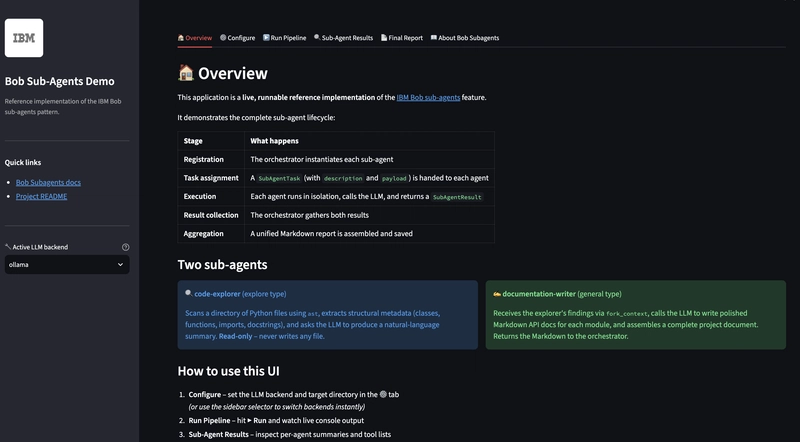
The demonstration implemented is meant to showcase the following points;
Understanding Sub-Agent Lifecycles: How isolation, strict parameter passing (
SubAgentTask), and unified results (SubAgentResult) prevent state corruption.Context Partitioning (
**fork_context**): Why passing forward selective context payloads improves accuracy and reduces token usage over shared context windows.Pluggable LLM Abstractions: How to decouple agent logic from model backends (Ollama, llama.cpp, OpenAI) via factory callables.
Implementation and Architecture Overview
The system consists of three main roles across five core Python modules:
subagents-demo/src/
├── models.py                     # Shared DTOs (SubAgentTask, SubAgentResult)
├── utils.py                      # Abstracted LLM client factory & formatting
├── code_explorer_agent.py        # Sub-Agent 1: "explore" type (read-only AST parsing)
├── documentation_writer_agent.py # Sub-Agent 2: "general" type (Markdown generation)
└── orchestrator.py               # Parent Agent managing lifecycle & aggregation
Enter fullscreen mode Exit fullscreen mode
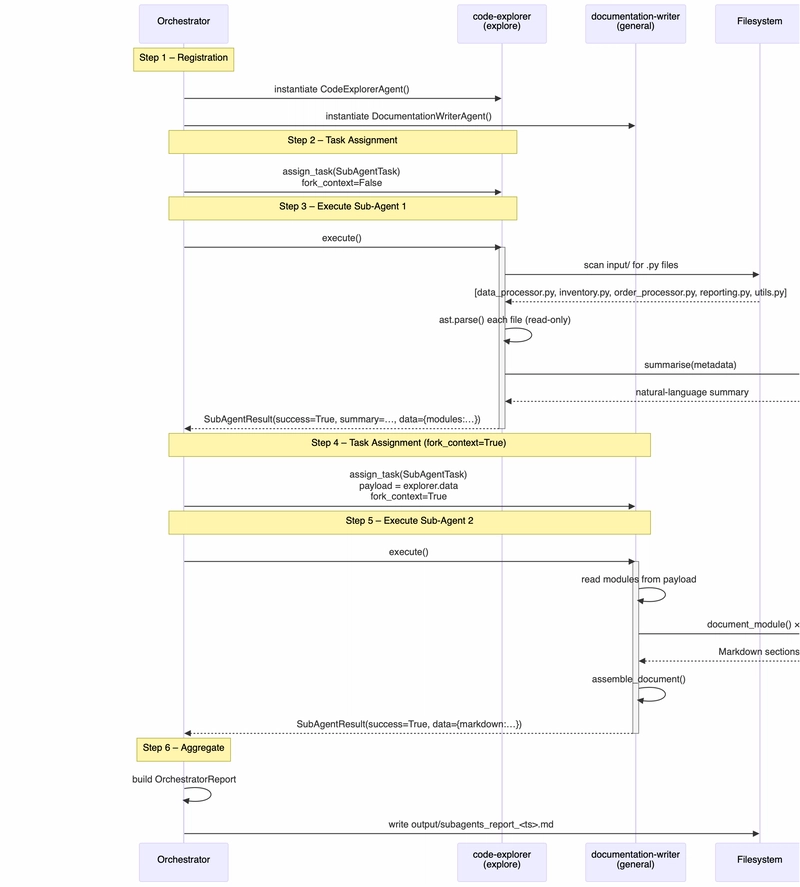
High-Level System Flow
## The Sub-Agent Lifecycle
Every sub-agent in this pattern transitions through four strict phases, ensuring total state isolation and predictable execution:
Core Implementation Details
In this codebase a sub-agent is a self-contained Python object that:
receives a single, clearly bounded task from the orchestrator (parent agent),
executes that task entirely within its own
execute()method,returns its findings as a
SubAgentResultdataclass, andshares no mutable state with any other agent.
This mirrors the Bob IDE sub-agent concept described at https://bob.ibm.com/docs/ide/features/subagents:
“A new, independent agent is created with its own context window. Bob passes it a description of the focused task to perform. The subagent executes the task using its available tools. The subagent returns a summary of its findings back to Bob.”
The demo implements two concrete sub-agents — one of the explore type (read-only codebase analysis) and one of the general type (documentation generation) — and one orchestrator that manages them sequentially.
What sub-agents are NOT in this codebase
They are not OS processes, threads, or coroutines. They are synchronous Python class instances called sequentially within a single process.
They do not have independent network identities or message queues.
They do not share Python object references — the only channel of communication is the
SubAgentTaskthe orchestrator hands in and theSubAgentResultthe sub-agent hands back.
Data Transfer Objects (models.py)

Communication between agents is strictly controlled using explicit Data Transfer Objects (DTOs) rather than shared memory or global state:
"""
models.py – Shared data-transfer objects used by the orchestrator and both sub-agents.

These lightweight dataclasses mirror the conceptual model described in the Bob
sub-agents documentation:

  • SubAgentTask   – what the orchestrator hands off to a sub-agent
  • SubAgentResult – what a sub-agent hands back to the orchestrator
  • OrchestratorReport – the unified output the orchestrator assembles
"""

from __future__ import annotations

from dataclasses import dataclass, fieldfrom datetime import datetimefrom typing import Any@dataclassclass SubAgentTask:
    """
    Encapsulates a focused, self-contained task that the orchestrator delegates
    to a sub-agent.  Mirrors the 'description' parameter passed when Bob spawns
    a subagent (see: https://bob.ibm.com/docs/ide/features/subagents).

    Attributes
    ----------
    agent_id : str
        Logical name of the sub-agent being targeted.
    task_type : str
        Short label for the category of work (e.g. "explore", "general").
    description : str
        Full natural-language description of the work to perform.
    fork_context : bool
        When True the sub-agent receives the orchestrator's accumulated context
        (mirrors the fork_context flag in the Bob spawn_subagent call).
    payload : dict[str, Any]
        Arbitrary data the sub-agent may need (file paths, config, etc.).
    """

    agent_id: str
    task_type: str          # "explore" | "general"
    description: str
    fork_context: bool = False
    payload: dict[str, Any] = field(default_factory=dict)@dataclassclass SubAgentResult:
    """
    Encapsulates the summary a sub-agent returns to the orchestrator after it
    finishes its isolated work.

    Attributes
    ----------
    agent_id : str
        Identifies which sub-agent produced this result.
    success : bool
        True when the sub-agent completed without error.
    summary : str
        Human-readable summary of what was accomplished (the 'results back to
        the main conversation' as described by the Bob documentation).
    data : dict[str, Any]
        Structured output produced by the sub-agent.
    error : str | None
        Error message when success is False.
    duration_seconds : float
        Wall-clock time the sub-agent spent on its task.
    tools_used : list[str]
        Names of tools the sub-agent invoked during execution.
    """

    agent_id: str
    success: bool
    summary: str
    data: dict[str, Any] = field(default_factory=dict)
    error: str | None = None
    duration_seconds: float = 0.0
    tools_used: list[str] = field(default_factory=list)@dataclassclass OrchestratorReport:
    """
    The unified output the orchestrator assembles by aggregating every
    sub-agent result.  This is written to the output/ directory as a
    timestamped Markdown file.

    Attributes
    ----------
    generated_at : datetime
        Timestamp of report generation.
    target_directory : str
        Codebase directory that was analysed.
    results : list[SubAgentResult]
        One entry per sub-agent that ran.
    unified_documentation : str
        Final Markdown documentation produced by aggregation.
    total_duration_seconds : float
        Sum of all sub-agent durations.
    """

    generated_at: datetime
    target_directory: str
    results: list[SubAgentResult] = field(default_factory=list)
    unified_documentation: str = ""
    total_duration_seconds: float = 0.0

    # ── convenience helpers ───────────────────────────────────────────────────

    @property
    def all_succeeded(self) -> bool:
        return all(r.success for r in self.results)

    @property
    def failed_agents(self) -> list[str]:
        return [r.agent_id for r in self.results if not r.success]
Enter fullscreen mode Exit fullscreen mode
Read-Only Code Exploration Agent (code-explorer_agent.py)
The CodeExplorerAgent is a specialized, read-only agent (explore type). It scans directory structures, parses files using Python's native ast module, extracts structural metadata (classes, methods, imports), and requests a natural-language summary from the LLM without modifying any files:
"""
code_explorer_agent.py – Sub-Agent 1: "explore" type

Responsibility
--------------
This sub-agent is responsible for **read-only codebase exploration**.
It mirrors the 'explore' sub-agent type described in the Bob IDE documentation:
  "Read-only codebase exploration, runs on a lighter model.
   Best for: Searching and summarising code, finding relevant files,
   understanding structure."
  (https://bob.ibm.com/docs/ide/features/subagents#subagent-types)

Lifecycle (per Bob documentation)
----------------------------------
1. REGISTRATION  – The orchestrator instantiates the agent and sets its task.
2. TASK ASSIGNMENT – The orchestrator calls `assign_task()` with a SubAgentTask.
3. EXECUTION     – `execute()` runs in an isolated context:
                   it scans the target directory, collects Python file metadata,
                   and uses the LLM to summarise the code structure.
4. RESULT RETURN – `execute()` returns a SubAgentResult summary back to the
                   orchestrator, which uses it to continue the main flow.

Isolation guarantee
-------------------
This agent does NOT write any files and does NOT share state with the
documentation-writer agent.  It only returns a summary + structured data.
"""

def execute(self) -> SubAgentResult:
    if self._task is None:
        return SubAgentResult(agent_id=self.agent_id, success=False, summary="", error="No task assigned.")

    start_time = time.monotonic()
    tools_used = []

    try:
        # Step a: Discover files
        tools_used.append("directory_scan")
        target_dir = Path(self._task.payload.get("target_directory", "input"))
        py_files = sorted(target_dir.rglob("*.py"))

        # Step b: AST parsing
        tools_used.append("ast_parser")
        modules = [self._parse_python_file(p) for p in py_files]

        # Step c: LLM summarization
        tools_used.append("llm_summarise")
        summary_text = self._llm_summarise(modules)

        return SubAgentResult(
            agent_id=self.agent_id,
            success=True,
            summary=summary_text,
            data={"files_found": len(py_files), "modules": modules},
            duration_seconds=time.monotonic() - start_time,
            tools_used=tools_used,
        )
    except Exception as exc:
        return SubAgentResult(
            agent_id=self.agent_id,
            success=False,
            summary="",
            error=f"{type(exc).__name__}: {exc}",
            duration_seconds=time.monotonic() - start_time,
            tools_used=tools_used,
        )
Enter fullscreen mode Exit fullscreen mode
Payload-Driven Documentation Writer (documentation_writer_agent.py)
The DocumentationWriterAgent belongs to the general type. Rather than re-reading the filesystem, it processes the structured payload provided in SubAgentTask.payload (implementing fork_context=True):
"""
documentation_writer_agent.py – Sub-Agent 2: "general" type

Responsibility
--------------
This sub-agent is responsible for **generating structured Markdown documentation**
from the code-exploration findings produced by Sub-Agent 1.

It mirrors the 'general' sub-agent type described in the Bob IDE documentation:
  "Full tool access, runs on the default model.
   Best for: Any self-contained task requiring reads, writes, or commands."
  (https://bob.ibm.com/docs/ide/features/subagents#subagent-types)

Lifecycle (per Bob documentation)
----------------------------------
1. REGISTRATION  – Orchestrator instantiates the agent and sets its identity.
2. TASK ASSIGNMENT – Orchestrator calls `assign_task()` with a SubAgentTask
                     that carries the explorer's findings in its payload.
3. EXECUTION     – `execute()` runs in its own isolated context:
                   it calls the LLM to turn raw exploration data into
                   polished per-module documentation, then assembles a
                   full Markdown document.
4. RESULT RETURN – Returns a SubAgentResult containing the Markdown text
                   back to the orchestrator.

Isolation guarantee
-------------------
This agent does NOT re-read the filesystem.  It only consumes the structured
data passed by the orchestrator in the task payload (the 'fork_context'
pattern).  It does NOT share state with the explorer agent.
"""

def execute(self) -> SubAgentResult:
    if self._task is None:
        return SubAgentResult(agent_id=self.agent_id, success=False, summary="", error="No task assigned.")

    start_time = time.monotonic()
    tools_used = []

    try:
        tools_used.append("payload_reader")
        payload = self._task.payload
        modules = payload.get("modules", [])
        project_name = payload.get("project_name", "Unknown Project")
        explorer_summary = payload.get("explorer_summary", "")

        tools_used.append("llm_document")
        module_sections = [self._document_module(m) for m in modules]

        tools_used.append("markdown_assembler")
        markdown = self._assemble_document(project_name, explorer_summary, module_sections, len(modules))

        return SubAgentResult(
            agent_id=self.agent_id,
            success=True,
            summary=f"Generated documentation for {len(modules)} module(s).",
            data={"markdown": markdown, "modules_documented": len(modules)},
            duration_seconds=time.monotonic() - start_time,
            tools_used=tools_used,
        )
    except Exception as exc:
        return SubAgentResult(
            agent_id=self.agent_id,
            success=False,
            summary="",
            error=f"{type(exc).__name__}: {exc}",
            duration_seconds=time.monotonic() - start_time,
            tools_used=tools_used,
        )
Enter fullscreen mode Exit fullscreen mode
Sequential Orchestration (orchestrator.py)
The Orchestrator coordinates task assignment, sequential execution, error capturing, and output writing:
"""
orchestrator.py – Parent / Orchestrator Agent

This module is the heart of the sub-agents demo.  It implements the full
sub-agent lifecycle as described in the Bob IDE documentation:
  https://bob.ibm.com/docs/ide/features/subagents

Orchestrator responsibilities
------------------------------
1. Load configuration and prepare the shared context.
2. REGISTER both sub-agents (CodeExplorerAgent, DocumentationWriterAgent).
3. ASSIGN tasks – each sub-agent receives a focused, non-overlapping task.
4. EXECUTE sub-agents – in this demo they run sequentially; the explorer
   runs first and its output feeds the documentation-writer.
5. COLLECT results – gather SubAgentResult objects returned by each agent.
6. AGGREGATE – combine both results into a single OrchestratorReport and
   write a timestamped Markdown file to the output/ directory.

Sub-agent lifecycle per Bob documentation
------------------------------------------
  • A new, independent agent is created with its own context window.
  • Bob passes it a description of the focused task to perform.
  • The subagent executes the task using its available tools.
  • The subagent returns a summary of its findings back to Bob.
  • Bob uses that summary to continue the main conversation.
"""

# Task Assignment & Execution Flow inside Orchestrator.run()
explorer = CodeExplorerAgent()doc_writer = DocumentationWriterAgent()

# 1. Execute Code Explorer
explorer_task = SubAgentTask(
    agent_id=explorer.agent_id,
    task_type="explore",
    description="Scan target codebase and extract AST metadata.",
    fork_context=False,
    payload={"target_directory": str(self.target_dir)},)explorer.assign_task(explorer_task)explorer_result = explorer.execute()

# 2. Forward Explorer Context to Documentation Writer (fork_context=True)
doc_writer_task = SubAgentTask(
    agent_id=doc_writer.agent_id,
    task_type="general",
    description="Generate Markdown documentation using exploration payload.",
    fork_context=True,
    payload={
        "project_name": PROJECT_NAME,
        "modules": explorer_result.data.get("modules", []),
        "explorer_summary": explorer_result.summary,
    },)doc_writer.assign_task(doc_writer_task)doc_result = doc_writer.execute()
Enter fullscreen mode Exit fullscreen mode
Pluggable LLM Backend Abstraction
To ensure local development flexibility and seamless production deployments, the agents connect to LLMs through a unified client factory (utils.py). The active backend is selected via the LLM_BACKEND environment variable (ollama, llamacpp, or openai):
"""
utils.py – Shared helpers: logging, LLM backend factory, output utilities.

LLM Backend selection
---------------------
Set the environment variable  LLM_BACKEND  to choose a backend:

  LLM_BACKEND=ollama      (default) – Ollama local HTTP API
  LLM_BACKEND=llamacpp    – llama-cpp-python in-process inference
  LLM_BACKEND=openai      – OpenAI Chat Completions API

Each factory returns a callable with signature:
    chat(system_prompt: str, user_message: str) -> str

The callable prints its response to the console so LLM output is always
visible during a run (prefixed with the backend name for clarity).
"""

def get_llm_client(agent_label: str = "agent") -> Callable[[str, str], str]:
    backend = (os.getenv("LLM_BACKEND") or "ollama").lower().strip()

    if backend in ("llamacpp", "llama_cpp", "llama-cpp"):
        return _llamacpp_chat_factory(agent_label)
    elif backend == "openai":
        return _openai_chat_factory(agent_label)
    else:
        return _ollama_chat_factory(agent_label)
Enter fullscreen mode Exit fullscreen mode
Each factory returns a simple chat(system_prompt, user_message) -> str callable, decoupling agent implementations from specific vendor SDKs.
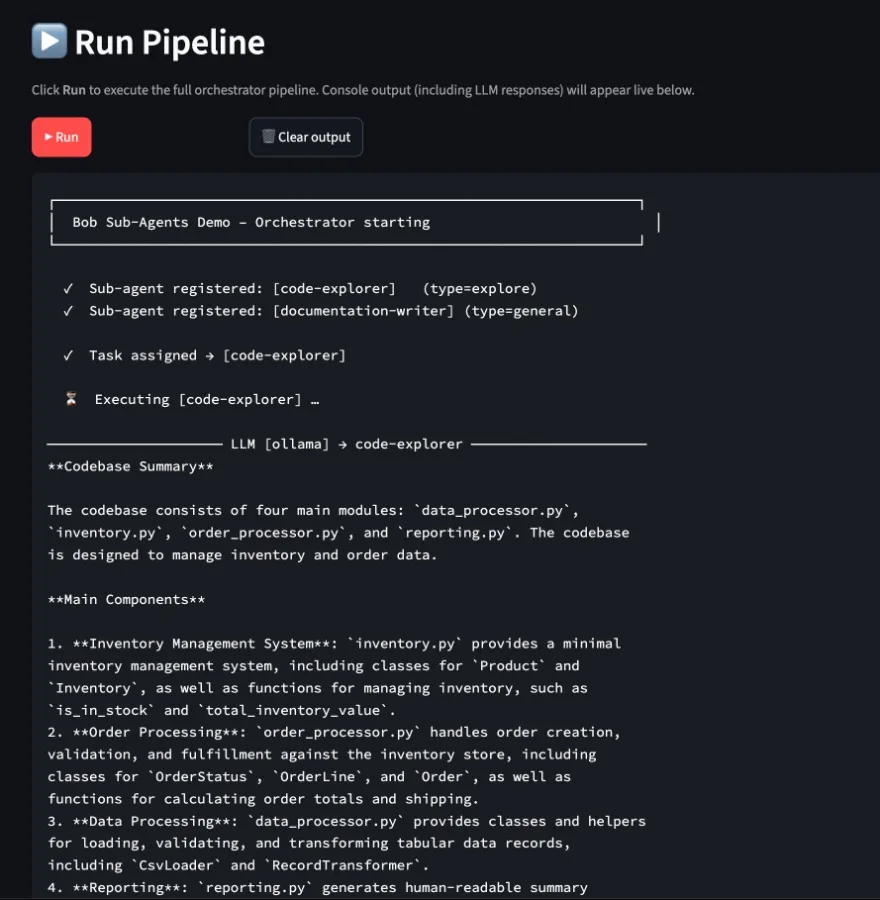
# Sub-Agents Demo – Sample Codebase – API & Module Documentation
> Auto-generated by the **documentation-writer** sub-agent
---
## Project Overview

**Codebase Summary**

The codebase is composed of four primary modules: `data_processor.py`, `inventory.py`, `order_processor.py`, and `reporting.py`, with a utility module `utils.py` providing general-purpose helpers.

**Overall Purpose**

The codebase is designed to manage inventory and process orders, providing a minimal inventory management system. It includes classes and functions for loading, validating, and transforming tabular data records, as well as handling order creation, validation, and fulfilment.

**Main Components**
1. **Data Processor**: `data_processor.py` provides classes and helpers for loading, validating, and transforming tabular data records, represented as plain Python dicts.
2. **Inventory**: `inventory.py` is a minimal inventory management system, including classes for `Product` and `Inventory`, as well as functions for managing inventory, such as `is_in_stock` and `total_inventory_value`.
3. **Order Processor**: `order_processor.py` handles order creation, validation, and fulfilment against the inventory store, including classes for `OrderStatus`, `OrderLine`, `Order`, and `OrderProcessor`.
4. **Reporting**: `reporting.py` generates human-readable summary reports from the inventory and a list of orders, with functions for `inventory_summary`, `orders_summary`, and `full_report`.
5. **Utilities**: `utils.py` provides general-purpose helpers, including string normalization, simple retry logic, and data transformation functions.

**Key Patterns**
1. **Data Transformation**: The codebase uses plain Python dicts to represent tabular data records, with functions like `normalise_keys` and `add_timestamp` transforming the data.
2. **Inventory Management**: The `inventory.py` module provides functions for managing inventory, such as `is_in_stock` and `total_inventory_value`.
3. **Order Fulfillment**: The `order_processor.py` module handles order creation, validation, and fulfilment against the inventory store.

**Notable Dependencies**
1. **CSV**: The `data_processor.py` module uses the `csv` module for loading and parsing CSV files.
2. **Datetime**: The codebase uses `datetime` for date and time manipulation, including `datetime.datetime`.
3. **Dataclasses**: The `inventory.py` and `order_processor.py` modules use `dataclasses.dataclass` for defining classes.
4. **Type Hints**: The codebase uses type hints, including `typing.Any`, `typing.Optional`, and `typing.Callable`.

---
## Module Reference

*5 module(s) documented below.*

### Overview of data_processor.py

Provides classes and helpers for loading, validating, and transforming tabular data records. Records are represented as plain Python dicts, making the module self-contained with no third-party dependencies.

### Classes

#### CsvLoader
Loads CSV data from a file.

*   `__init__(self, filepath, delimiter)`: Initializes the loader with a file path and optional delimiter.
*   `load(self)`: Reads the CSV file and returns all rows as a list of dicts.
*   `filter_empty(self, records, required_field)`: Removes records where *required_field* is blank or missing.

#### RecordTransformer
Transforms and normalizes record data.

*   `__init__(self, records, id_field)`: Initializes the transformer with a list of record dicts and an ID field.
*   `normalise_keys(self)`: Strips whitespace and lowercase every key in every record.
*   `add_timestamp(self, field_name)`: Injects a UTC timestamp string into every record.
*   `drop_field(self, field_name)`: Removes *field_name* from every record, if present.

### Top-level functions

#### summarise(records)
Returns a lightweight summary of a record collection.

*   Returns: A dictionary containing the total record count and a set of field names.

### Notable dependencies
The module relies on the following Python imports:
*   `csv`*   `datetime`*   `typing.Any`
---
**Inventory Management System**
==============================

The `inventory.py` module is a minimal inventory management system used as the target codebase for sub-agent exploration and documentation. It provides a basic framework for managing products, tracking stock levels, and calculating inventory values.

### Classes

#### `Product`
*   **Methods**:
    *   `is_in_stock()`: Returns `True` if there is at least one unit available.
    *   `total_value()`: Returns the total monetary value of all units in stock.

#### `Inventory`
*   **Methods**:
    *   `__init__()`: Initializes the inventory system.
    *   `add_product(product)`: Registers a new product; raises `ValueError` if SKU already exists.
    *   `remove_product(sku)`: Removes and returns a product by SKU, or `None` if not found.
    *   `restock(sku, quantity)`: Increases the quantity of an existing product.
    *   `sell(sku, quantity)`: Decreases product quantity and returns the revenue generated.
    *   `total_inventory_value()`: Returns the combined monetary value of all products.
    *   `low_stock_report(threshold)`: Returns products whose quantity is at or below the threshold.
    *   `__len__()`: Returns the total number of products in the inventory.
    *   `__contains__(sku)`: Returns `True` if the inventory contains a product with the specified SKU.

### Top-level functions
*   `is_in_stock()`: Returns `True` if there is at least one unit available.
*   `total_value()`: Returns the total monetary value of all units in stock.

### Key imports
*   `__future__.annotations`*   `dataclasses.dataclass`*   `dataclasses.field`*   `typing.Optional`
---
## Order Processor Module
The `order_processor.py` module is a Python module that handles order creation, validation, and fulfilment against an Inventory store.

### Classes

#### OrderStatus
The `OrderStatus` class is used to track the status of an order.

#### OrderLine
The `OrderLine` class represents a single line item in an order.

#### Order
The `Order` class represents a complete order with multiple line items.

#### OrderProcessor
The `OrderProcessor` class is responsible for processing orders, including validation and shipment.

### Key Functions

#### line_total
The `line_total` function calculates the total cost of a single line item in an order.

#### add_line
The `add_line` function appends a new line item to an order.

#### order_total
The `order_total` function calculates the total cost of an entire order.

#### cancel
The `cancel` function cancels an order if it has not yet shipped.

#### process
The `process` function validates and fulfils an order.

#### ship
The `ship` function marks a confirmed order as shipped.

#### processed_count
The `processed_count` function returns the number of successfully processed orders.

### Dependencies
The `order_processor.py` module depends on the following key imports:

* `__future__.annotations`* `dataclasses.dataclass`* `dataclasses.field`* `datetime.datetime`* `enum.Enum`* `typing.TYPE_CHECKING`* `inventory.Inventory`
---
## Reporting Module
===============

The `reporting.py` module generates human-readable summary reports from an Inventory and a list of Orders.

## Key Functions
----------------
### `inventory_summary(inventory)`

Produces a plain-text summary of the current inventory state, including:

* Total product count
* Total value
* Low-stock products

### `orders_summary(orders)`

Produces a plain-text summary of a list of orders, grouped by status and reporting aggregate revenue.

### `full_report(inventory, orders)`

Combines inventory and orders summaries into one formatted report, providing a comprehensive overview of the current state.

## Notable Dependencies
----------------------

* `inventory.Inventory`* `order_processor.Order`* `order_processor.OrderStatus`* `datetime.datetime`* `typing.TYPE_CHECKING`
---
## `utils.py` Module Documentation#### Overview

The `utils.py` module provides a collection of general-purpose helpers used across the demo project. It covers four concerns:

*   String normalization
*   Simple retry logic for flaky callables
*   Flat key-value configuration loaded from environment or a dict
*   Miscellaneous utility functions

#### Classes

### `Config` Class

The `Config` class serves as a store for configuration values. It provides methods to initialize with optional default values, load environment variables, retrieve specific values, and convert to a dictionary.

#### Key Methods
*   `__init__(self, defaults)`: Initializes with optional default values.
*   `load_env(self, prefix)`: Imports environment variables into the store.
*   `get(self, key, default)`: Returns the string value for a given key, or a default value if absent.
*   `get_int(self, key, default)`: Returns the integer value for a given key, or a default value if absent or not parseable as an integer.
*   `as_dict(self)`: Returns a shallow copy of the internal store.

#### Top-level Functions

### `slugify(text)`

Converts `text` to a URL/filename-safe slug by:

1.  Lowercasing the text.
2.  Replacing runs of non-alphanumeric characters.

### `truncate(text, max_length, suffix)`

Truncates `text` to `max_length` characters, or returns the original text if it's already within the limit.

### `flatten_dict(nested, sep, prefix)`

Recursively flattens a nested dict into a single-level dict, joining nested keys with the specified separator.

#### Key Parameters
*   `retry(func)`: Calls `func` with `args` / `kwargs`, retrying on failure.

#### Notable Dependencies
*   `os`, `re`, `time`, `typing.Any`, `typing.Callable`, `typing.TypeVar`
---
*Documentation generated by the Sub-Agents Demo orchestrator.*
Enter fullscreen mode Exit fullscreen mode
Conclusion & Key Realizations
Building multi-agent systems using this sub-agent demonstration pattern highlights several architectural takeaways:
State Isolation Prevents Cascading Errors: Keeping sub-agents as synchronous Python objects with no shared mutable state ensures that if a single agent encounters bad inputs or invalid syntax (such as AST parse errors), the outer pipeline catches the failure gracefully without crashing the application context.
Context Efficiency via
fork_context: Rather than forcing every downstream agent to process the entire execution history, passing explicit payloads (fork_context=True) maintains low token usage and prevents attention degradation in complex tasks.Determinism over Complex Frameworks: By leveraging standard Python data structures (
dataclass), AST tools, and structured DTOs, developers gain full control over agent handoffs without relying on heavy external multi-agent orchestrators or opaque background runtimes.
This pattern offers a clean, production-ready blueprint for building deterministic, scalable AI workflows that remain easy to test, inspect, and maintain.
Thanks for reading 🤖🕵️♂️👮♀️
Links
Code repository: https://github.com/aairom/subagent-demo
Sub-Agent Implementation Reference: https://github.com/aairom/subagent-demo/blob/master/subgents-implementation/subagents-demo/Docs/SubAgent_Implementation.md
IBM Bob: https://bob.ibm.com/
Subagents with Bob: https://bob.ibm.com/docs/ide/features/subagents
Comments (0)
Join the discussion by logging into your account.
No comments yet. Be the first to comment!