
Most Angular libraries claim compatibility with multiple Angular versions.
Mine did too.
Then I realized something uncomfortable:
My CI wasn’t validating the package users actually install from npm.
When I started building @ismailza/ngx-api-client, I declared support for Angular 17 and newer.
Like many library authors, I assumed that if the library built successfully and the tests passed, compatibility was covered.
It wasn’t.
The more I looked at my release pipeline, the more I realized my CI was validating something subtly — but importantly — different from what users actually download from npm.
That led me to redesign the compatibility pipeline around a simple principle:
Never validate your source tree. Validate your published artifact.
This article explains why.
The Problem with “Supports Angular X–Y”
Declaring support is easy.
{
  "peerDependencies": {
    "@angular/core": ">=17.0.0"
  }
}
Proving it is much harder.
My workspace always builds against the latest Angular version.
That means the pipeline looked something like this:
Angular 22
    │
    ▼
Library builds
    │
    ▼
CI passes
But what about Angular 17?
Angular 18?
Angular 19?
Angular 20?
Angular 21?
Nothing in my CI answered those questions.
The compatibility range was simply a claim.
Then I Noticed Something Worse
Even if I added a compatibility matrix, I was still testing the wrong thing.
My original pipeline looked like this:
Workspace
    │
    ▼
npm run build
    │
    ▼
dist/
    │
    ▼
Tests
    │
    ▼
Release
    │
    ▼
npm publish
Looks perfectly reasonable.
Except…
The package that ended up on npm wasn’t exactly the same package that CI validated.
During the release workflow I copied files such as:
LICENSE
CHANGELOG.md
into the package.
So CI validated one artifact…
while npm published another.
That sounds minor, but if you’re trying to guarantee package quality, those differences matter.
I wanted CI to validate exactly what users install.
Angular Libraries Have Another Problem
Angular libraries are published using partial compilation.
Instead of shipping fully compiled code, Angular ships partial declarations.
Those declarations are processed later by the Angular linker inside the consuming application.
The pipeline looks like this:
Library
    │
    ▼
Partial compilation
    │
    ▼
npm publish
    │
    ▼
Consumer build
    │
    ▼
Angular Linker
    │
    ▼
Application
This has an important consequence.
My library could successfully:
Compile
Pass unit tests
Pass type checking
…and still fail when a real Angular application tries to build it.
Why?
Because none of those steps actually execute the linker.
That realization completely changed how I thought about compatibility testing.
Type Checking Isn’t Enough
My first instinct was:
“I’ll compile the library against every Angular version.”
That’s useful.
But it only verifies the public TypeScript API.
It tells you nothing about:
Angular linker failures
AOT compilation
Bundling
Runtime dependency injection
Package exports
Those are exactly the things your users rely on.
The Solution: Validate the Packaged Artifact
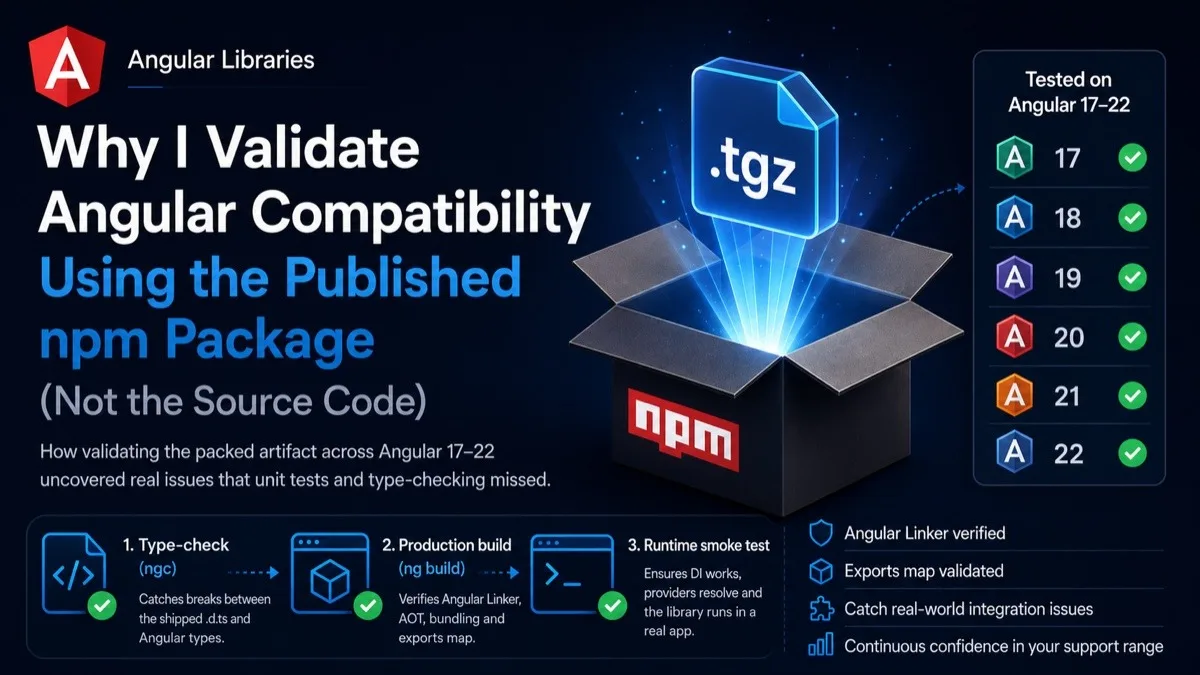
Instead of testing the workspace, I now validate the packed npm artifact.
The pipeline became:
Build library
      │
      ▼
   npm pack
      │
      ▼
 ┌─────────┐
 │ Angular 17    │
 │ Angular 18    │
 │ Angular 19    │
 │ Angular 20    │
 │ Angular 21    │
 │ Angular 22    │
 └─────────┘
Each Angular version installs the tarball exactly as npm would.
That means every compatibility check is performed against the package users actually receive.
Not the source tree.
Not dist/.
The package.
Three Complementary Checks
Each compatibility job performs three different validations.
1. Type Checking (ngc)
First, Angular’s compiler (ngc) compiles a small consumer project.
This catches:
Incompatible type declarations
Public API regressions
Changes between Angular versions
2. Production Build (ng build)
Next, the consumer project performs a production build.
This is arguably the most important step.
It executes:
Angular linker
AOT compilation
Bundling
Tree shaking
A library can pass type checking and still fail here.
The build also verifies that:
Partial declarations were linked
The library wasn’t completely tree-shaken away
The package exports resolve correctly
3. Runtime Smoke Test
Finally, a small runtime test creates a real injector using the packaged library.
It verifies things such as:
provideApi()
Dependency injection
Exported injection tokens
Signal-based loading state
Runtime behavior
This catches failures that neither type checking nor the production build can detect.
Each step validates something different.
Together they provide much stronger confidence than any individual check.
One Surprising Bug
While building this pipeline I discovered a subtle issue.
Angular 20 and later mark TypeScript as an optional peer dependency.
My compatibility fixture initially lived inside the repository.
Node happily resolved TypeScript from the workspace’s own node_modules.
So I wasn’t actually testing Angular 20 with the compiler it expected.
I was testing it with my workspace compiler.
The compatibility test looked correct…
but wasn’t.
The fix was surprisingly simple:
Move the consumer project outside the repository
Install the TypeScript version expected by the installed Angular compiler
Fail if either Angular or TypeScript resolves outside the fixture
That made every compatibility run completely self-contained.
Compatibility Is a Promise
I also changed my peer dependency range.
Instead of:
>=17.0.0the package now declares:
>=17.0.0 <23.0.0Why?
Because compatibility should reflect what is actually verified.
Without an upper bound, Angular 23 would automatically become “supported” the day it is released — even if nobody had tested it.
Now widening support is intentional.
When Angular 23 ships, CI will tell me whether it works.
Only then will I widen the peer dependency range.
CI Should Test What You Publish
One of the most valuable changes wasn’t even the compatibility matrix.
It was making sure:
npm run buildproduces the complete package.
Files like:
LICENSE
CHANGELOG.md
are now staged during the build itself instead of later during the release workflow.
That means the package validated in CI is byte-for-byte equivalent — in terms of contents — to the one that gets published.
No hidden release-only steps.
No surprises.
The Result
Today, every push validates:
The packaged npm artifact
Angular 17–22
Node.js 22 and 24
Type compatibility
Production builds
Angular linker execution
Runtime behavior
Package contents
exports resolution
Compatibility summaries in GitHub Actions
More importantly, compatibility is no longer something I claim.
It’s something my CI continuously verifies.
Final Thoughts
This work started because I wanted to prepare my library for Angular 22.
It ended up changing how I think about validating libraries altogether.
If you’re maintaining an Angular library, my recommendation is simple:
Don’t test your source tree. Test the package your users install.
That small shift catches an entire class of problems that ordinary unit tests and type checking simply cannot see.
The complete implementation — including the GitHub Actions workflow, compatibility matrix, consumer fixtures, runtime smoke tests, and validation scripts — is available in the @ismailza/ngx-api-client repository.
I hope it serves as a useful reference for other Angular library authors building confidence in their compatibility guarantees.
Comments (0)
Login to post a comment.