

ZCode From Zero: Four Fields That Decide Your First Request
The short version
ZCode ships with provider cards that require nothing but an API key. They stop being enough when the key in question is a gateway key that reaches several model families: the cards hardcode an address, a wire protocol and a model set, and none of those match an endpoint the card has never heard of.
The workaround is the custom provider entry, and it comes down to four fields. Base URL takes the gateway root and stops at the domain. API format selects /v1/messages, which determines both the request path and the response schema. The key is a gateway token rather than an account password. The model list holds IDs copied from the console rather than typed from memory.
Two further points carry more weight than the field mapping itself. First, adding a provider does not migrate an open conversation: the session keeps using whatever group it was already pointed at, silently. Second, the three error codes involved do not map to the three mistakes people assume, which is why debugging usually starts in the wrong place.
What the client is actually storing
The settings panel keeps two different objects. A provider is a bundle of connection parameters plus a model list. A conversation is a pointer to one provider. They are edited on different screens and nothing synchronises them automatically.
That distinction explains most of the confusion in the first hour. A provider that appears correctly in the sidebar can be completely unused by the window you are typing in.
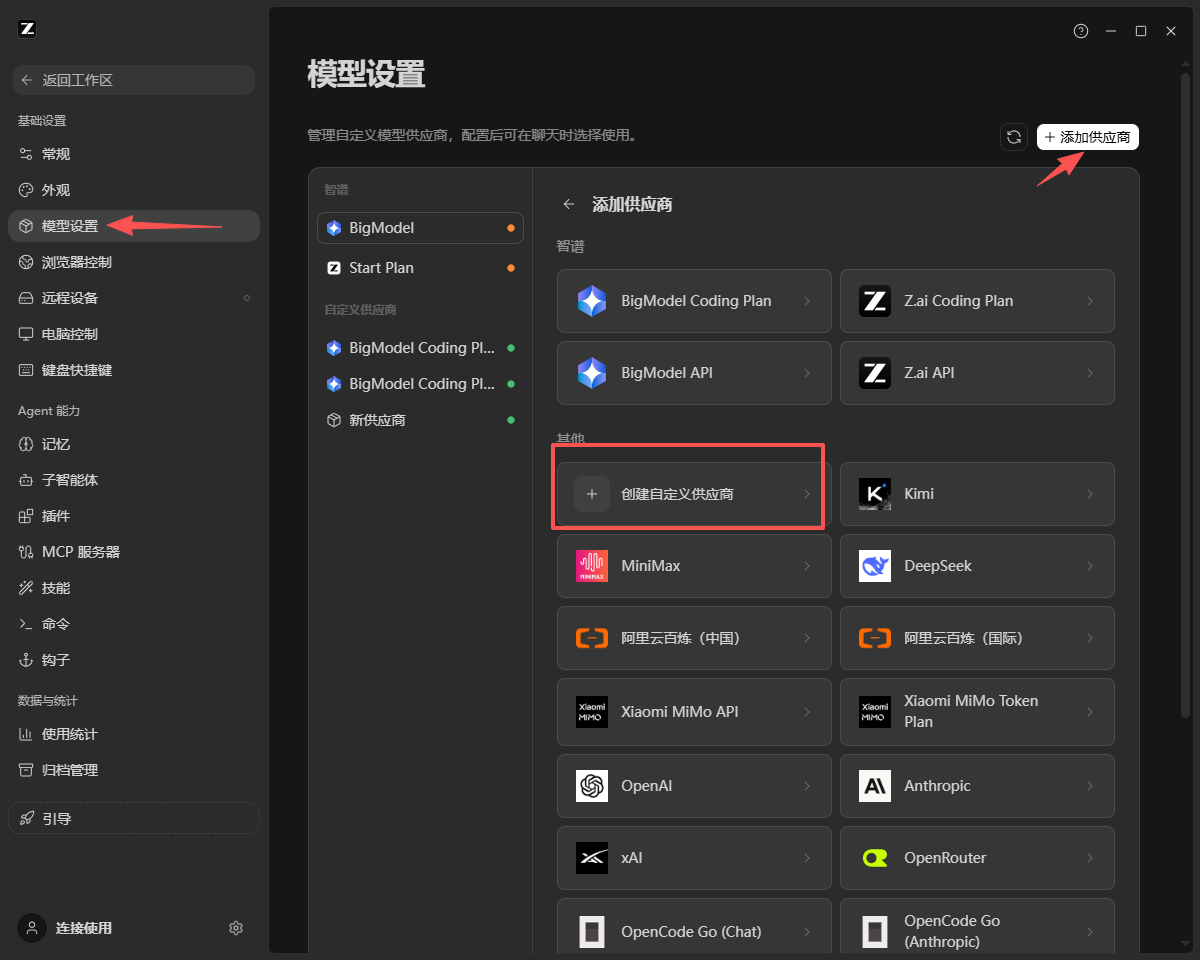
Inside Model settings, Add provider opens a two-part panel. The built-in cards sit on top and ask only for a key. The "Other" row below lists common vendors, and its first entry is the custom provider form. The difference is not capability — it is who owns the connection parameters.
Field by field, with the failure each one causes
| Field | What belongs there | What goes wrong |
|---|---|---|
| Base URL | Gateway root, domain only | Appending /v1 or /messages yields 404 |
| API format | The entry containing /v1/messages |
A protocol mismatch yields 400 or 404, not 401 |
| API key | Gateway token, not the account password | A stray space or truncated tail yields 401 |
| Model list | IDs copied from the console | Typing an ID by hand selects a different model quietly |
The Base URL is the shortest of the four and the most frequently corrupted:
https://api.crazyrouter.com
This client separates address from protocol. The path is derived from the format selector, so writing a path into the address makes two fields describe one thing, and the conflict resolves as a 404.
API format is the field that decides whether requests are well-formed at all. Choosing the /v1/messages entry sets the path and the parser together. Two consequences follow. A mismatch is rejected before authentication, so it returns 400 or 404 rather than 401 — the reverse of the intuitive mapping. And /v1/messages is not interchangeable with /v1/chat/completions; they are different payload shapes, so a correct address cannot rescue a wrong format.
The key field is where a whitespace character behaves exactly like a wrong credential. Consoles usually display the token in full once, at creation, which is also the only moment a copy is guaranteed to be complete.
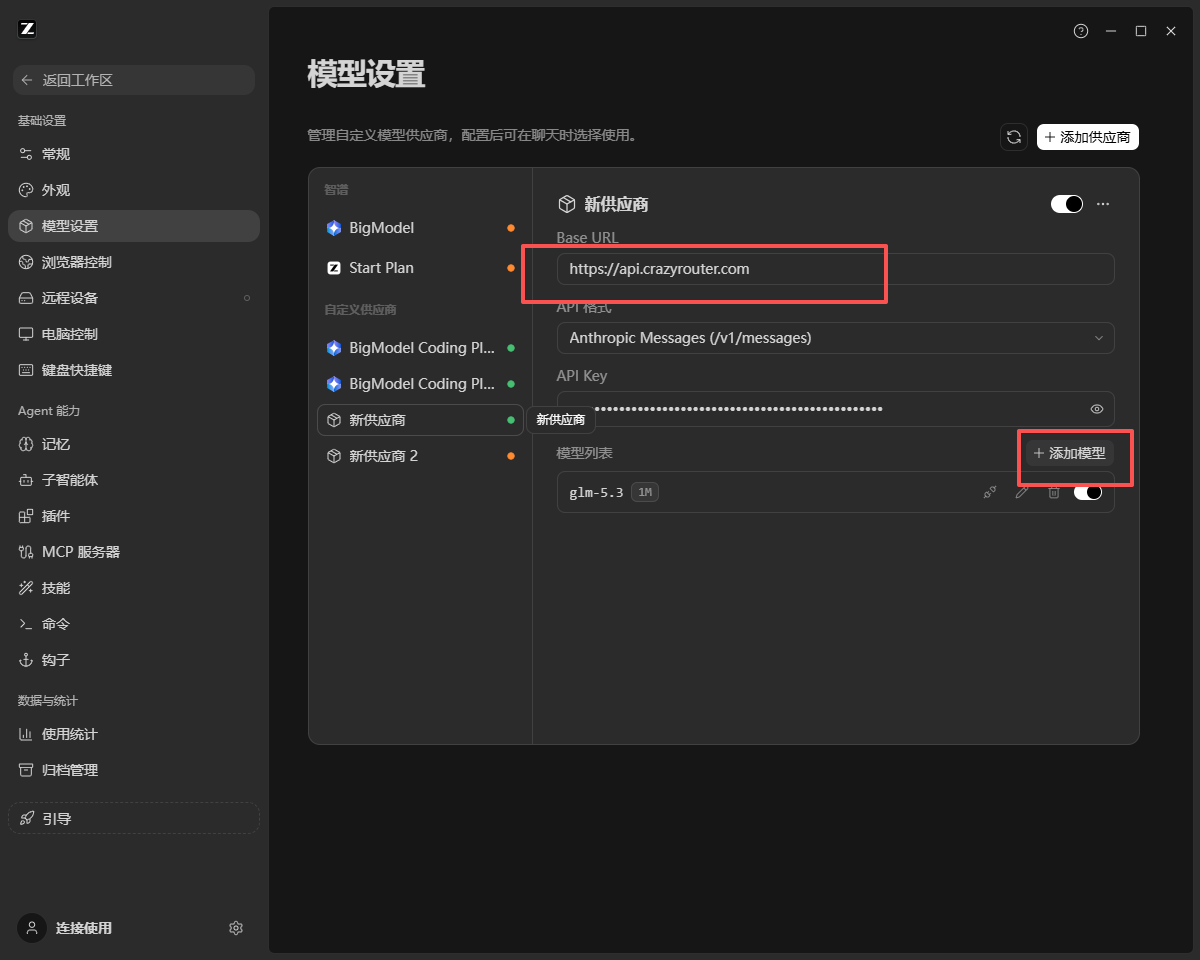
Adding models without adding providers
The model list is what turns a provider from a connection into a menu. Each row is one model ID, and rows under a single provider share the Base URL and the key. The address and the key decide which gateway receives the request; the ID decides which model inside that gateway answers.
This is the practical meaning of "one API, several models": not several providers with one model each, but one provider with several IDs. Adding a row never means re-entering credentials, and removing one is a toggle rather than a deletion.
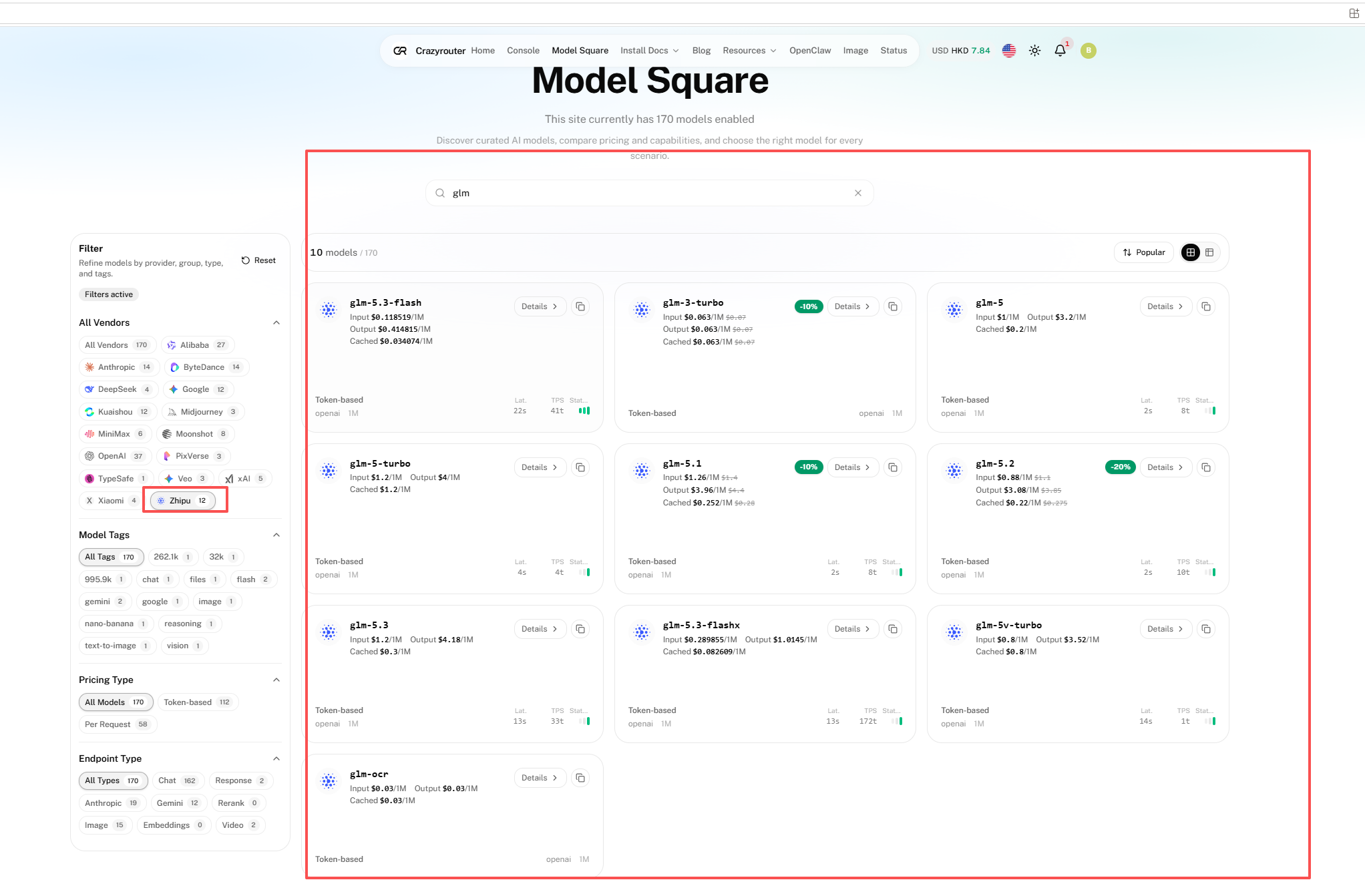
IDs should be copied. The catalog filters as you type; a search for glm narrows 170 models to ten visible rows, and each card carries a copy control beside its details link. Case and suffix both matter, because glm-5.3, glm-5.3-flash and glm-5.3-flashx are three models with different cost and speed profiles. Whether a model is callable at all depends on the permissions attached to the key in the console, not on what the form accepts.
The switch that is not a setting
Saving the form and enabling the provider toggle makes the provider exist. It does not make the current conversation use it.
An open session keeps its existing provider group. The migration happens in the model picker at the bottom of the composer, and until it happens the requests continue to leave with the old credential while the interface looks correctly configured. Nothing errors. The only reliable signal is the model name in the lower right of the composer, which reflects the group actually in use.
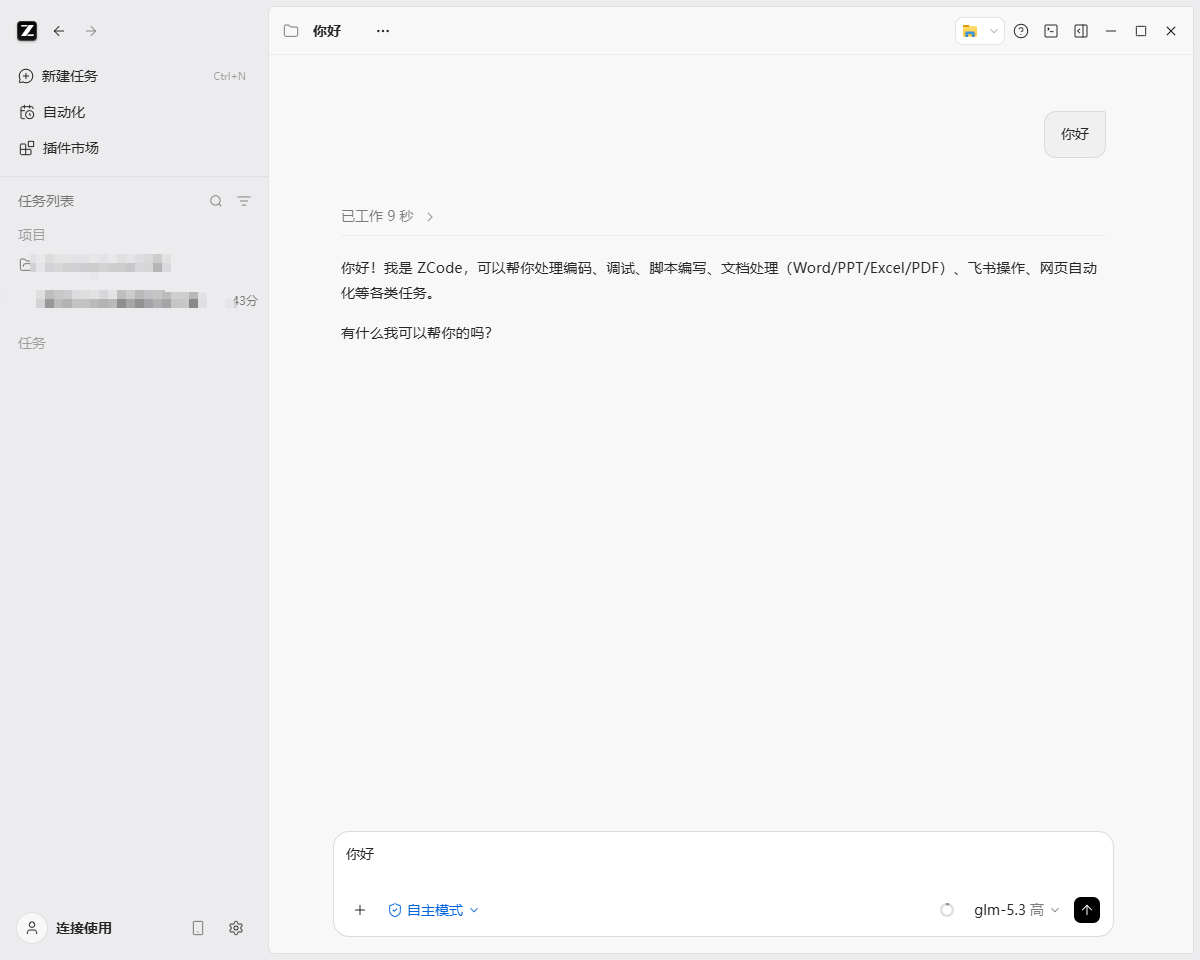
When a model is missing entirely, three checks cover the common causes in order: the provider toggle, the per-model toggle, and whether the form was saved. If all three are correct, leaving settings and returning refreshes the list.
What is verified and what is not
Verified on this machine: the field mapping above, the error codes as mapped in the table, the behaviour of one provider holding several model IDs, and the fact that an open conversation ignores a newly added provider until the group is switched. These were observed on Windows 11 with the October 2026 build, against a single gateway — Crazyrouter in this case — with screenshots captured during the session.
Not verified: whether another gateway maps the same mistakes to the same codes; whether the macOS and Linux builds expose an identical menu hierarchy; and whether the model lineup and context limits hold beyond the dates printed on the vendor's documentation. Model names and parameters in this space change monthly, and the figures quoted here are the ones published at the time of writing: a 1M-token context window and 128K of output for the 5.3 generation, roughly 200 tokens per second for glm-5.3-flashx, a 10 MB image and 50 MB PDF ceiling with a 100-page limit for glm-ocr, a legal-tuned glm-5.3-flashx-legal, and an earlier multimodal entry, glm-5v-turbo, whose limits the card states rather than the documentation. glm-5.3 also reasons at all times, across three effort levels — low, high and max — which the character beside the model name in the composer reflects.
My take
The interesting part of this setup is not that it works. It is that the two most expensive mistakes produce no message that names them.
A format mismatch looks like an address problem, because both share 400 and 404. A conversation left in the wrong group looks like a model outage, because there is nothing to read. The key error is the only one that reports itself honestly, and it is the one people check first.
For a single-vendor user, the built-in cards remain the better trade: fewer parameters, fewer places to be wrong. The custom provider earns its complexity when one credential has to cover several models, because that is when configuration churn turns into a real cost — and when the picker, not the form, becomes the control that matters.
Sources
- ZCode download page and client interface, October 2026 build: https://zcode.z.ai/
- Gateway console and model catalog used for the example: https://crazyrouter.com/
- Model documentation for context limits and variant descriptions (BigModel documentation, checked 2026-10-27).
Comments(0)
Join the discussion by logging into your account.
No comments yet. Be the first to comment!