
The Problem Nobody Wanted to Talk About
For most of the past few years, the conversation around large language models has been dominated by capability benchmarks and API releases. What got less attention was a growing divide: the gap between what the models could do and who could actually run them.
Models like LLaMA 3 70B or DeepSeek-V3 demand enormous amounts of GPU memory — often 140GB or more of VRAM at full precision. The most powerful consumer GPU on the market, NVIDIA's RTX 4090, ships with just 24GB. Most developers have 4GB, 8GB, or 16GB setups. For anyone outside a well-funded research lab or a cloud-compute budget, experimenting with frontier open-source models was simply off the table.
AirLLM changes that.
What Is AirLLM?
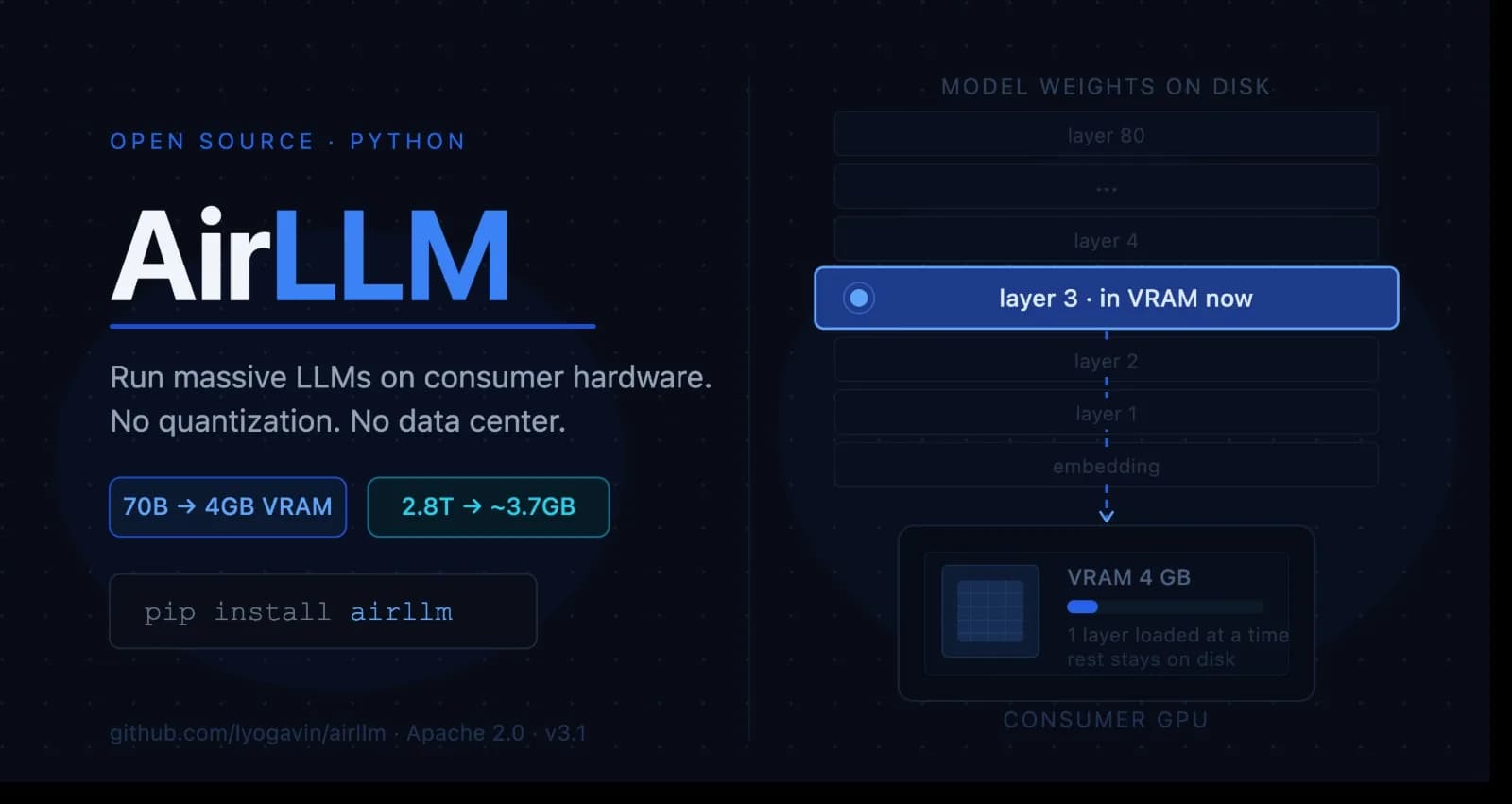
AirLLM is an open-source Python library — built by developer Gavin Li (lyogavin) — that lets you run extremely large language models on consumer-grade hardware with very limited GPU memory. We're talking 70B parameter models on a single 4GB GPU. 405B parameter models on 8GB VRAM. And as of mid-2026, even Kimi K3 (a 2.8 trillion parameter sparse MoE model, the largest open-source model released to date) on under 4GB of VRAM.
No quantization tricks required (though optional compression is available). No accuracy loss from model distillation. No need for a multi-GPU server.
First released in November 2023, AirLLM has rapidly gathered community momentum, crossing 21,000+ GitHub stars and expanding support to include some of the most widely used open model families.
The Core Idea: Layer-by-Layer Inference
The innovation at AirLLM's heart is elegantly simple: instead of loading an entire model into GPU memory at once, it processes the model one transformer layer at a time.
Here's what that looks like under the hood:
AirLLM loads the first transformer layer from disk (or system RAM) into VRAM.
It runs the forward computation for that layer on the input tensor.
It offloads that layer from VRAM.
It loads the next layer and repeats until the full forward pass is complete.
The final output — a probability distribution over the vocabulary — yields the next token.
From the user's perspective, the output is identical to what you'd get from a fully loaded model. The model's weights are never modified, so there's no accuracy compromise baked into the architecture itself.
The technique isn't brand new — sequential layer offloading has appeared in academic research before — but AirLLM made it practical, packaged it cleanly, and put it in the hands of everyday developers.
Key Features
Layer-Wise Streaming Execution — The foundational innovation. Only one layer occupies VRAM at any given moment, making enormous models accessible on minimal hardware.
Optional Block-Wise Quantization — AirLLM v2.0 introduced compression based on block-wise quantization of weights (not activations, which is an important distinction). This can deliver up to a 3x inference speedup with minimal accuracy loss. A 70B model's layer shards drop from ~140GB to ~18GB with 4-bit compression. You can enable it with a single parameter:
model = AutoModel.from_pretrained(
    "meta-llama/Llama-3-70B-Instruct",
    compression='4bit'  # or '8bit'
)
Prefetching — Added in v2.5, this overlaps model loading and computation, squeezing out an additional ~10% speed improvement.
AutoModel API — Since v2.6, AirLLM can automatically detect the model type without you specifying a class manually. It integrates directly with Hugging Face Hub — AutoModel.from_pretrained() handles weight downloading, layer partitioning, and memory orchestration automatically.
Apple Silicon Support — AirLLM supports Apple's M-series chips via the MLX framework. Because M-series chips use unified memory shared between CPU and GPU, MacBook Pro and Mac Studio users can potentially run very large models without hitting the traditional VRAM ceiling.
CPU Inference — Since August 2024, any x86_64 CPU is a valid inference target. Slower, yes — but useful for environments without a GPU.
FP8 Support (v3.0) — June 2026 brought v3.0 with FP8 model precision support, enabling even more efficient inference alongside expanded support for the latest generation of models.
MoE Expert-Level Streaming — For sparse mixture-of-experts models like DeepSeek-V3 and Kimi K3, AirLLM streams individual experts rather than whole layers, meaning only the experts a given token actually routes to are ever loaded.
Supported Models
AirLLM supports a broad range of decoder-only models via Hugging Face compatibility. The current list includes:
LLaMA family (LLaMA 2, 3, 3.1, 3.3, and 4 — including the 405B variant)
Mistral and Mixtral (via AirLLMMixtral)
Qwen, Qwen 2.5, and Qwen3 (including Qwen3-235B, runnable on ~3GB VRAM)
DeepSeek (V2, V3 at 671B on ~12GB VRAM, and R1)
Kimi K3 (2.8T sparse MoE, on ~3.72GB VRAM)
Phi (including Phi-4)
Gemma
ChatGLM, Baichuan, InternLM, Yi
Support has expanded significantly since launch. As of v3.1.0, the library is generally compatible with virtually any popular model on Hugging Face — just pass the repo ID to AutoModel.from_pretrained(). Here's a rough guide to VRAM requirements:
Model | Size | VRAM needed |
|---|---|---|
Qwen3 / Mistral / Phi (~8B) | 8B | ~1–2 GB |
Qwen3-30B / Mixtral (MoE) | 30–47B | ~1–3 GB |
Qwen3-235B (MoE) | 235B | ~3 GB |
LLaMA 3.x 70B (full precision) | 70B | ~4 GB |
LLaMA 3.1 405B | 405B | ~8 GB |
DeepSeek-V3 | 671B | ~12 GB |
Kimi K3 (MoE) | 2.8T | ~3.72 GB |
Getting Started
Installation is a single command:
pip install airllmA minimal working example looks like this:
from airllm import AutoModel

# Load a 70B model — AirLLM handles everything else
model = AutoModel.from_pretrained("meta-llama/Meta-Llama-3-70B-Instruct")

# Use the standard Hugging Face tokenizer
from transformers import AutoTokenizer
tokenizer = AutoTokenizer.from_pretrained("meta-llama/Meta-Llama-3-70B-Instruct")

# Tokenize and generate
inputs = tokenizer("Explain quantum entanglement simply:", return_tensors="pt")
output = model.generate(**inputs, max_new_tokens=200)
print(tokenizer.decode(output[0]))
That's it. No custom CUDA kernels. No manual memory management. If the model is on Hugging Face, AirLLM downloads and partitions it automatically.
Note: Gated models require a Hugging Face token via the hf_token parameter.
The Real Trade-Off: Speed
It wouldn't be honest to write about AirLLM without being direct about this: token generation is slow.
Each layer transfer from disk to VRAM introduces I/O overhead. The speed depends heavily on your storage medium — an NVMe SSD will dramatically outperform a mechanical hard drive — but even under ideal conditions, AirLLM is not competing with optimized inference servers on throughput. It is not the right tool if you need a low-latency chatbot serving many users, or a high-frequency production API.
This is a deliberate trade-off: accessibility over speed. If that trade-off works for your use case, AirLLM is genuinely powerful.
Who Should Use AirLLM?
Researchers on a hardware budget — If you want to probe the internals of a 65B-parameter model on a single consumer GPU without buying enterprise hardware, this is probably the most practical path available.
Privacy-conscious teams — Document analysis pipelines where sending text to a third-party API is off the table due to compliance or data sensitivity. Running locally means your data stays local.
Learners and hobbyists — If you're trying to understand how large transformer architectures behave, AirLLM lets you run and experiment with models you'd otherwise never touch.
Offline evaluation and benchmarking — Comparing model outputs across architectures without spinning up cloud infrastructure.
Who probably shouldn't use it — If you're building a real-time user-facing application, or a service that needs to handle concurrent requests with low latency, tools like vLLM, TensorRT-LLM, or llama.cpp are better choices. AirLLM doesn't compete with them on throughput.
Why It Matters Beyond the Technical Details
There's a broader point here worth sitting with.
The AI landscape has increasingly consolidated around a small number of organizations with enormous GPU clusters. Access to frontier models — even open-weight ones — has often been gated by the hardware required to run them. That reality shapes who gets to experiment, who gets to learn, and ultimately who gets to build.
AirLLM doesn't close that gap entirely. But it meaningfully shifts the boundary. A developer with a mid-range laptop can now load and query a 70B parameter model locally. A small research team without a cloud budget can benchmark model behavior on hardware they already own. A company with strict data residency requirements can run local inference without a six-figure GPU investment.
That kind of democratization is quiet, unglamorous, and genuinely important.
The Road So Far (A Brief Timeline)
Date | Milestone |
|---|---|
November 2023 | Initial release — 70B inference on a 4GB GPU via layer streaming |
December 2, 2023 | v2.0 — Block-wise quantization, 3x speedup; ChatGLM, Qwen, Baichuan, Mistral, InternLM support added |
December 2023 | v2.5 — Prefetching for 10% additional speed; v2.6 — AutoModel API |
December 25, 2023 | v2.8.2 — MacOS support for Apple Silicon (M1/M2/M3) |
April 2024 | LLaMA 3 support — run LLaMA 3 70B on a single 4GB GPU |
July 2024 | LLaMA 3.1 405B support; optional 4-bit/8-bit quantization |
August 18, 2024 | v2.10.1 — CPU inference support (any x86_64 CPU) |
September 21, 2024 | v2.11.0 — Qwen 2.5 support added |
June 30, 2026 | v3.0 — FP8 model support; DeepSeek-V3 (671B) on ~12GB, Qwen3-235B on ~3GB; Llama 3.3/4, Phi-4, DeepSeek R1/V2/V3 added |
July 29, 2026 | v3.1.0 — Kimi K3 (2.8T) support; runs on 3.72GB VRAM — largest open-source model to date |
Final Thoughts
AirLLM is not magic. It doesn't make a 70B model run as fast as a dedicated inference server. What it does do is remove the barrier that said "you need $50,000 of hardware before you can even start."
For researchers, learners, privacy-first teams, and curious developers, that removal is significant. In a field where the hardware gap often determines who gets to participate, tools like AirLLM represent a small but meaningful push toward a more accessible AI ecosystem.
If you've been waiting for the right moment to run a large open-source model locally — this might be it.
Resources
Hugging Face: search for models compatible with AirLLM directly on the Hub
Comments(0)
Join the discussion by logging into your account.
No comments yet. Be the first to comment!