
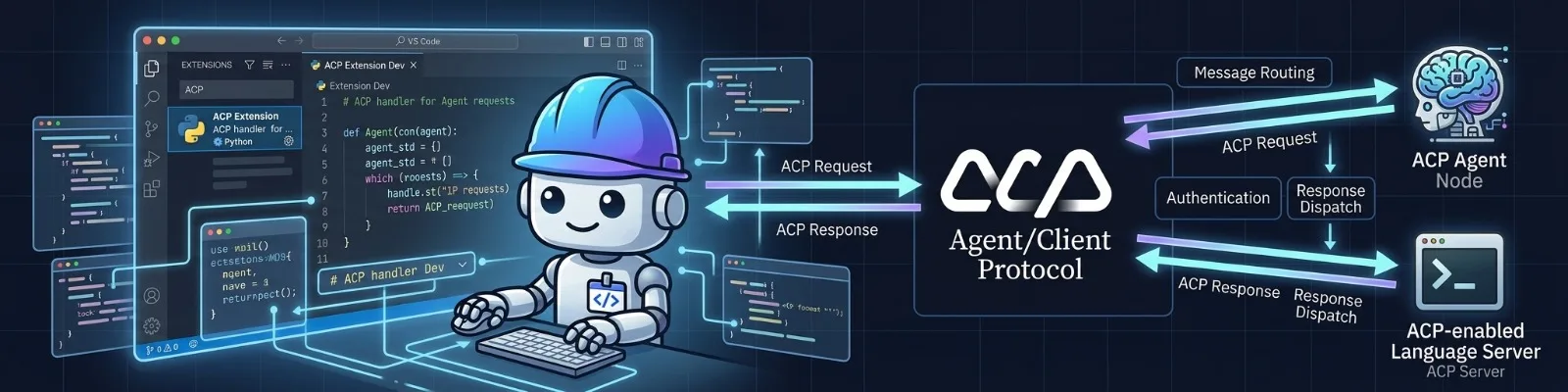
A “test” implementation of ACP for VSCode!
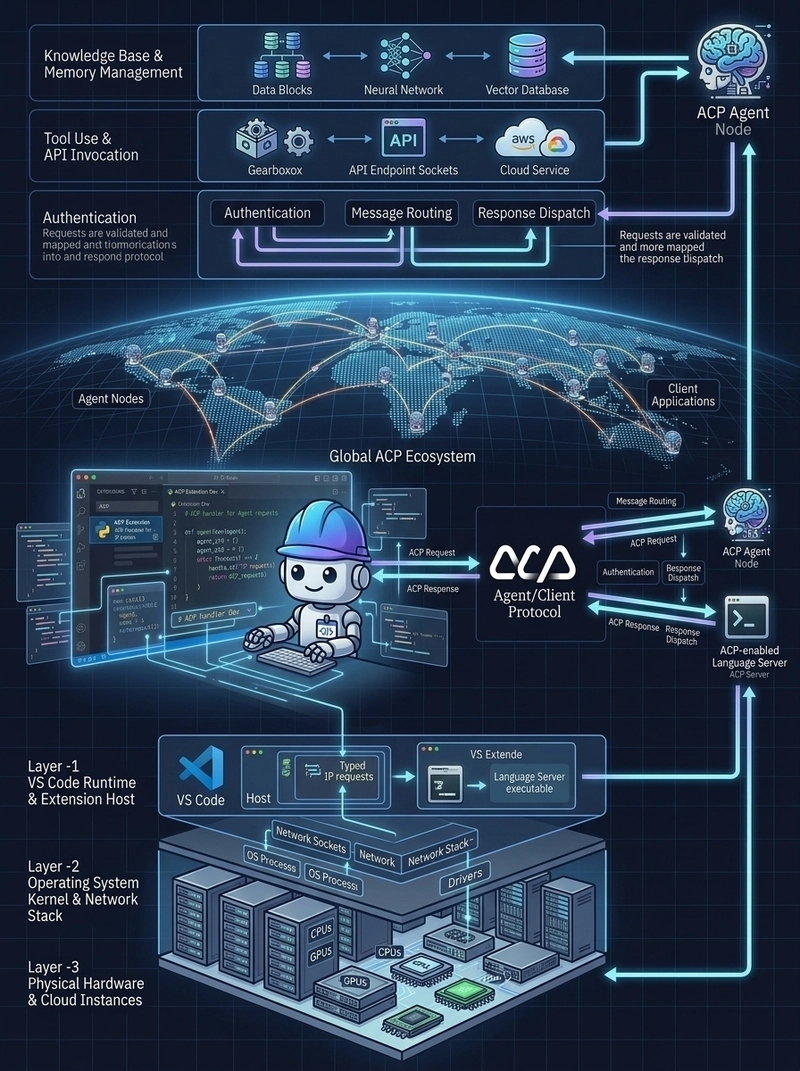
Introduction
The landscape of developer tooling is shifting rapidly from static auto-complete toward dynamic, multi-turn AI agents capable of executing shell commands, reading codebase graphs, and editing files autonomously. However, as the ecosystem of code agents explodes, a clear integration barrier has emerged: How do we connect disparate AI agents to various code editors without writing custom UI integrations for every single combination?
Enter the Agent Client Protocol (ACP).
In this post, I’ll explore what the Agent Client Protocol is, dive deep into our implementation connecting IBM Bob to VS Code (as a test only), inspect the underlying architecture and transport mechanisms, and examine code excerpts straight from the implementation repository.

From official Github repository: The Agent Client Protocol (ACP) standardizes communication between code editors (interactive programs for viewing and editing source code) and coding agents (programs that use generative AI to autonomously modify code).
Originally spearheaded by the team behind the Zed Editor, the Agent Client Protocol (ACP) is an open, agent-agnostic standard designed to decouple AI coding agents from text editors and IDEs.
┌─────────────────────────┐                            ┌─────────────────────────┐
│     Editor / Client     │    JSON-RPC 2.0 over       │        AI Agent         │
│  (VS Code, Zed, etc.)   │ ─────────────────────────► │ (IBM Bob, Claude, etc.) │
│                         │ ◄───────────────────────── │                         │
└─────────────────────────┘      stdin / stdout        └─────────────────────────┘
Enter fullscreen mode Exit fullscreen mode
The Problem ACP Solves
Before ACP, integrating a new agent (like IBM Bob, Claude Code, or Gemini CLI) into VS Code meant writing dedicated webviews, bespoke API callers, custom event streaming logic, and complex state management. If you wanted to support 5 agents across 3 editors, you needed 15 separate integrations.
How ACP Operates
ACP solves this by providing a standardized JSON-RPC 2.0 interface running over stdin/stdout (using Newline-Delimited JSON / NDJSON).
Under ACP:
The Editor is the Client (drives UI rendering, permission modals, workspace selection).
The Agent is the Server (runs as a subprocess, handles LLM calls, maintains conversation state, and invokes tools).
Through standardized RPC methods (initialize, session/new, prompt/send, session/update), the client and agent communicate bidirectionally with native support for real-time streaming, tool execution requests, and user permission gates.
Architecture: How Bob Integrates via ACP
To demonstrate ACP in practice, we built an ACP-compliant integration between IBM Bob and VS Code.
Disclaimer: as of today Bob officially supports the following IDE's using ACP; Zed, IntelliJ, IDEA, Neovim and Xcode. This post's aim to provide a hypothetical implementation of ACP with Bob, this is not a support for VSCode!
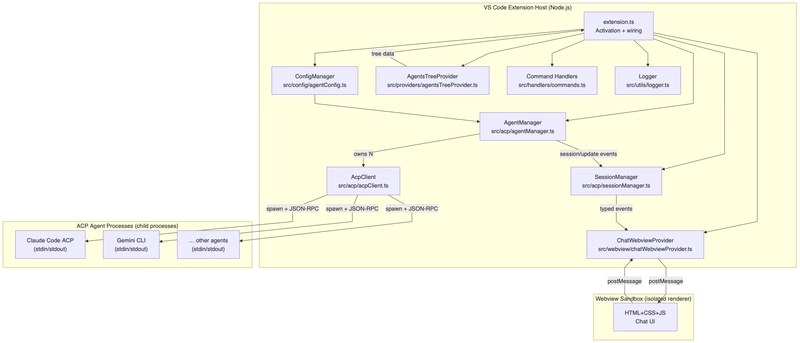
TL;DR-ACP vs. Headless Agent Pattern
When integrating IBM Bob into a workspace or automated pipeline, developers often choose between two integration styles:
Headless Agent Mode (
bob -p "..."): One-shot CLI invocations or raw text output, ideal for headless CI/CD automation or shell scripts.ACP Integration Pattern: A interactive, multi-turn, stateful protocol interface that hooks natively into the editor UI.
┌─────────────────────────────────────────────────────────────────────────┐
│ VS Code Extension Host (Node.js)                                        │
│                                                                         │
│  ┌──────────────────────┐  postMessage  ┌─────────────────────────────┐  │
│  │ ChatWebviewProvider  │ ◄───────────► │ HTML/CSS Chat UI            │  │
│  └──────────┬───────────┘               └─────────────────────────────┘  │
│             │                                                           │
│  ┌──────────▼───────────┐               ┌─────────────────────────────┐  │
│  │     SessionManager   │ ◄───────────► │ AgentsTreeProvider          │  │
│  └──────────┬───────────┘               └─────────────────────────────┘  │
│             │                                                           │
│  ┌──────────▼───────────┐                                               │
│  │      AgentManager    │                                               │
│  └──────────┬───────────┘                                               │
│             │                                                           │
│  ┌──────────▼───────────┐                                               │
│  │       AcpClient      │                                               │
│  └──────────┬───────────┘                                               │
└─────────────┼───────────────────────────────────────────────────────────┘
              │ JSON-RPC 2.0 (NDJSON) over stdin/stdout
              │
┌─────────────▼───────────────────────────────────────────────────────────┐
│ Child Process                                                           │
│                                                                         │
│  ┌───────────────────────────────────────────────────────────────────┐  │
│  │ Bob ACP Adapter (@ibm/bob-acp)                                    │  │
│  └──────────────────────────────────┬────────────────────────────────┘  │
│                                     │ internal                          │
│  ┌──────────────────────────────────▼────────────────────────────────┐  │
│  │ Bob AI Engine (watsonx)                                           │  │
│  └───────────────────────────────────────────────────────────────────┘  │
└─────────────────────────────────────────────────────────────────────────┘
Enter fullscreen mode Exit fullscreen mode
Side-by-Side Comparison
Dimension | ACP (acp-vscode extension) | Headless Bob Shell |
|---|---|---|
Agent target | Any ACP-compliant agent (IBM Bob, Claude, Gemini, etc.) | IBM Bob only |
Protocol | JSON-RPC 2.0 — open standard | Bob Shell CLI — proprietary flags |
Transport | stdin/stdout with framed NDJSON | stdin/stdout as CLI text I/O |
Session model | Stateful multi-turn sessions with | One-shot ( |
Streaming | Native — typed | Not structured; raw stdout text |
Tool calls / permissions | Explicit |
|
Multi-agent | Yes — N simultaneous agent connections | No — one Bob process per invocation |
Interoperability | Vendor-neutral; swap agents without changing client code | IBM Bob-specific |
Authentication |
|
|
Requires VS Code | Yes (runs inside extension host) | No (pure CLI) |
Primary use case | Rich editor UI, streaming chat, multi-agent orchestration | Automation, CI/CD, batch processing, scripting |
When to Use Each
Use the ACP extension when…
You need a persistent, interactive chat UI inside VS Code.
You want streaming partial responses rendered in real-time.
You want to switch between agents (IBM Bob, Claude Code, Gemini CLI, …).
You need structured tool call visibility and permission approval in the UI.
You are building a vendor-neutral integration.
You manage multiple simultaneous conversations.
Use Bob Shell (headless) when…
Automating tasks in bash scripts or CI/CD pipelines.
Batch-processing files without opening VS Code.
Simple one-shot prompts (
bob -p "…").Environments without a desktop / GUI (server, container, CI runner).
You only need IBM Bob, no other agent.
Quick scripted workflows with minimal boilerplate.
In both cases, an API key for Bob should be generated and provided.
# acp-vscode — Environment Variables Example## Copy this file to ".env" and fill in your values.# The ".env" file is in .gitignore and will NEVER be committed.## These variables are referenced in your agent configurations via# the ${env:VAR_NAME} placeholder syntax in VS Code settings.## The extension resolves ${env:VAR_NAME} at process spawn time from the# host shell environment — no secrets are stored in VS Code settings.

# Required to connect to IBM Bob via ACP.# Obtain your key from: https://cloud.ibm.com/iam/apikeys# Set this in your shell profile (~/.zshrc or ~/.bashrc) so VS Code inherits it:#   export IBM_BOB_API_KEY=your-key-here# Alternatively set acp.ibmBobApiKey in VS Code settings (marked secret).IBM_BOB_API_KEY=

# ── IBM watsonx endpoint (optional — defaults to the public watsonx.ai endpoint) ──IBM_BOB_ENDPOINT=
Enter fullscreen mode Exit fullscreen mode
Component Breakdown
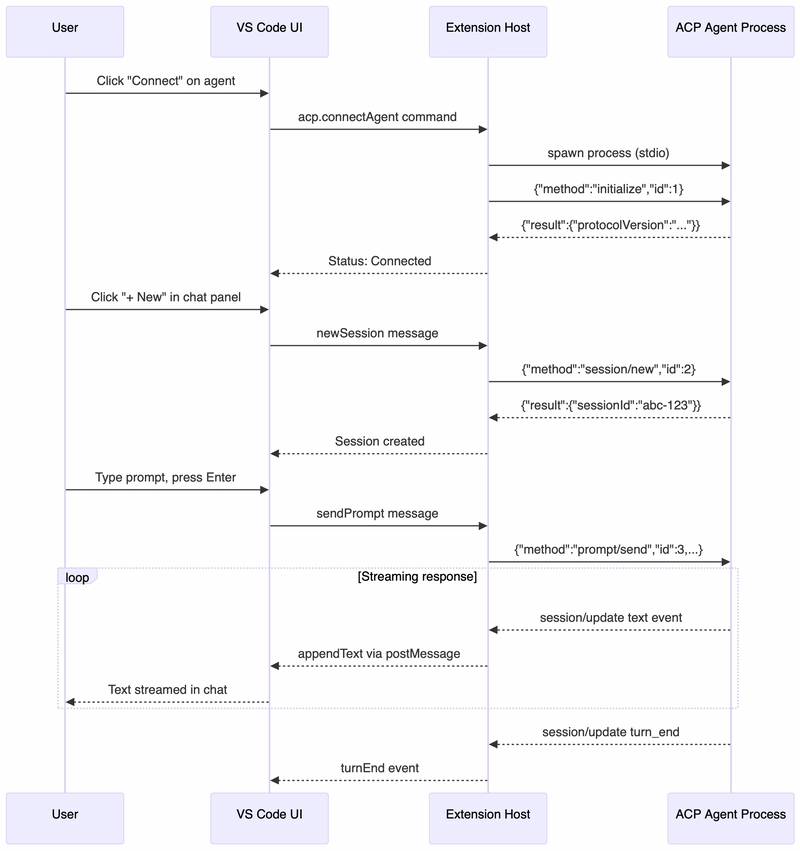
AcpClient(src/acp/acpClient.ts): Spawns and manages the underlying agent subprocess. Handles NDJSON framing, RPC request tracking, and event dispatching.AgentManager(src/acp/agentManager.ts): Coordinates lifecycle across multiple concurrent agent instances.SessionManager(src/acp/sessionManager.ts): Manages in-memory state for multi-turn sessions, handling message histories and permission approvals.ChatWebviewProvider(src/webview/chatWebviewProvider.ts): Renders the editor UI and streams updates via isolated webview channels.
Realization & Code Excerpts
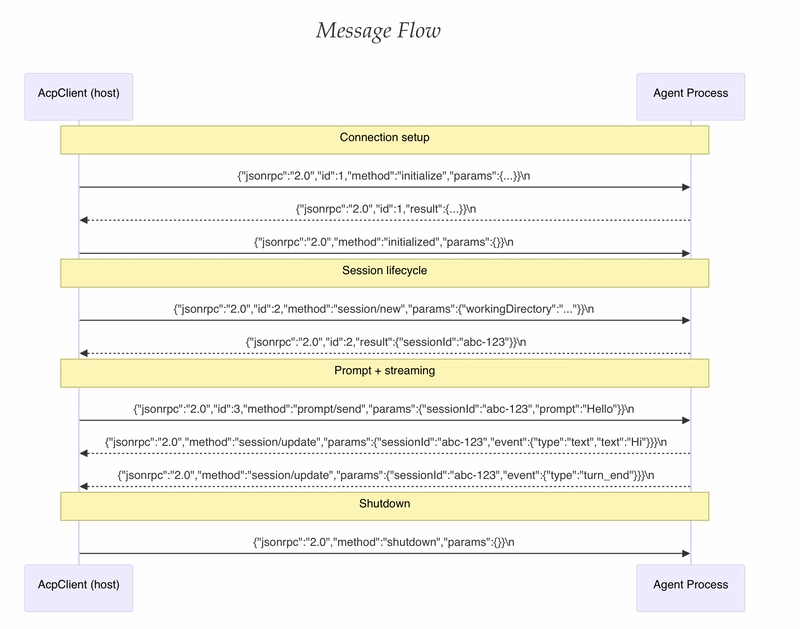
Let’s take a look at the exact TypeScript implementations driving this integration.
NDJSON Transport Buffer & Frame Parsing (
AcpClient): because stdio streams deliver chunked data across arbitrary byte boundaries,AcpClientmaintains a rolling string buffer to extract complete, newline-delimited JSON frames:
// src/acp/acpClient.ts/**
 * acp-vscode — ACP Client Core
 *
 * Manages the lifecycle of a single ACP agent process:
 *   - Spawning and monitoring the child process (stdio transport).
 *   - Framing and dispatching JSON-RPC 2.0 messages (newline-delimited).
 *   - Executing the ACP initialize handshake.
 *   - Exposing typed request/notification helpers used by AgentManager.
 *
 * The client emits typed events via vscode.EventEmitter so that upstream
 * managers and UI providers can react to agent lifecycle and streaming data.
 *
 * Security:
 *   - No credentials are stored or logged by this class.
 *   - env is resolved from ConfigManager (placeholder substitution only).
 *   - The child process inherits the minimal required env subset.
 *
 * @module acp/acpClient
 */

/////private handleStdoutData(chunk: Buffer): void {this.buffer += chunk.toString('utf8');const lines = this.buffer.split('\n');

  // Keep incomplete trailing line in the bufferthis.buffer = lines.pop() ?? '';

  for (const line of lines) {
    const trimmed = line.trim();
    if (!trimmed) continue;

    try {
      const message = JSON.parse(trimmed);
      this.handleMessage(message);
    } catch (err) {
      this.logger.error(`Failed to parse JSON-RPC frame: ${trimmed}`, err);
    }}}
Enter fullscreen mode Exit fullscreen mode
Sending Structured JSON-RPC Requests: sending prompts and requests involves generating sequential IDs and wrapping payloads into typed JSON-RPC 2.0 frames:
// src/acp/acpClient.tspublic sendRequest<T = unknown>(method: string, params: Record<string, unknown>): Promise<T> {return new Promise((resolve, reject) => {
    const id = ++this.requestIdCounter;

    const payload = {
      jsonrpc: '2.0',
      id,
      method,
      params
    };

    // Track pending response promise
    this.pendingRequests.set(id, { resolve: resolve as (val: unknown) => void, reject });

    const messageString = JSON.stringify(payload) + '\n';
    this.process?.stdin?.write(messageString, 'utf8', (err) => {
      if (err) {
        this.pendingRequests.delete(id);
        reject(err);
      }
    });});}
Enter fullscreen mode Exit fullscreen mode
Handling Real-Time Event Streams (
SessionManager): when Bob processes a prompt, it streams structured events (e.g., text generation, thinking traces, or tool calls) throughsession/updatenotifications:
/**
 * acp-vscode — Session Manager
 *
 * Maintains the in-memory state of all ACP sessions across all connected
 * agents. Listens to session/update events from AgentManager and updates
 * session state accordingly.
 *
 * Responsibilities:
 *   - Creating and storing AgentSession objects.
 *   - Appending streaming events (text, thinking, tool calls) to messages.
 *   - Notifying the chat WebviewProvider of state changes.
 *   - Handling permission requests (auto-approve or prompt the user).
 *
 * @module acp/sessionManager
 */////

// src/acp/sessionManager.tspublic handleSessionUpdate(params: { sessionId: string; event: AcpSessionEvent }): void {const session = this.sessions.get(params.sessionId);if (!session) return;

  const { event } = params;

  switch (event.type) {
    case 'text':
      session.appendContent(event.text);
      this._onTextAppended.fire({ sessionId: session.id, text: event.text });
      break;

    case 'thinking':
      session.updateThinking(event.thought);
      this._onThinkingUpdated.fire({ sessionId: session.id, thought: event.thought });
      break;

    case 'tool_call':
      session.registerToolCall(event.toolCallId, event.name, event.args);
      this._onToolCalled.fire({ sessionId: session.id, tool: event });
      break;

    case 'turn_end':
      session.markTurnComplete(event.reason);
      this._onTurnEnded.fire({ sessionId: session.id, reason: event.reason });
      break;

  }}
Enter fullscreen mode Exit fullscreen mode
Conclusion
The Agent Client Protocol (ACP) represents a vital maturation step in the AI engineering ecosystem. By standardizing stdin/stdout messaging through JSON-RPC 2.0, ACP allows developers to decouple AI capabilities from editor visual layers.
By adopting ACP for IBM Bob:
Interoperability: Bob can seamlessly plug into VS Code, Zed, or any client implementing ACP without rewriting agent core logic.
Granular Control: Developers retain native editor visibility into real-time tool execution, reasoning traces, and explicit permission prompts.
Extensibility: Adding new tools, language backends, or agent models requires zero changes to the client transport layer.
Whether you're building custom extension tooling or deploying enterprise AI coding assistants, ACP provides a clean, open foundation for the next generation of developer tools.
Thanks for reading 🤖
Links and references
Code & Implementation Repository:
github.com/aairom/bob-acp-testBob's ACP Documentation: https://bob.ibm.com/docs/shell/features/acp
Agent Client Protocol Documentation: https://agentclientprotocol.com/get-started/introduction
Agent Client Protocol Repository: https://github.com/agentclientprotocol/agent-client-protocol
Comments(2)
Join the discussion by logging into your account.
Igor Ganapolsky
The NDJSON buffer is the part I would not ship as drawn. chunk.toString('utf8') can split a multibyte character across reads, and this.buffer has no cap, so a child that never writes a newline grows it until the extension host dies. Keep the incomplete line with lines.pop(), but decode with a streaming UTF-8 decoder and drop the buffer once it passes a fixed ceiling. On permissions, the comparison table says permission_request is an approve/deny callback, but handleSessionUpdate registers the tool call as soon as the tool_call event arrives. If the child has already started the tool before that notification, the editor modal is a receipt. The gate has to be the client refusing the next stdin frame until the user answers, and a dead webview has to fail closed instead of replaying the last allow.