

Building a ‘Bob’ headless agent!

Introduction
When building developer tools and automated workflows, IBM Bob Shell (bob run) serves as a powerful coding agent. However, because its native design is a one-shot CLI process meant for interactive terminal usage, running it programmatically inside web applications, background pipelines, or microservices introduces several key challenges:
Lack of Persistence: Every
bob runexecution is stateless, offering no native thread management or chat history.Concurrency Bottlenecks: Direct, simultaneous executions risk process collisions without built-in queuing or workspace isolation.
Missing HTTP/REST Surface: Operating Bob headlessly requires a middle layer to handle process orchestration, streaming responses, timeouts, and error handling.
The Headless Bob integration pattern solves this by wrapping IBM Bob Shell inside a persistent service driven via REST endpoints and Server-Sent Events (SSE).
TL;DR-What are Headless Agents?
A headless agent is an autonomous AI agent or software program that operates entirely in the background without a Graphical User Interface (GUI). Unlike traditional AI assistants or applications that rely on chat windows, dashboards, or visual controls, headless agents are designed to execute tasks, process data, and take actions programmatically.
They interact with system environments, APIs, databases, and network protocols directly—typically triggered by events, command-line interfaces (CLI), or scheduled jobs.
Why Headless Agents Are Used
Headless agents excel in scenarios where human visual interaction is either unnecessary or inefficient. Key reasons for their adoption include:
Automated Workflow Execution: They run complex, multi-step backend pipelines (such as CI/CD deployment, data transformation, or automated testing) continuously without requiring manual oversight or interface interactions.
Low Resource Overhead: By eliminating the memory and rendering costs associated with visual interfaces, headless agents consume significantly fewer resources, making them lightweight and fast.
Seamless System Integration: Designed to communicate via APIs, webhooks, or messaging queues, they easily plug into existing microservices and enterprise architectures.
High Scalability: Multiple instances of a headless agent can be spawned concurrently in containers or cloud environments to handle massive workloads in parallel.
Background Monitoring & Event-Driven Action: They can idle efficiently while listening for specific events—such as system alerts, log anomalies, or incoming data packets—and immediately execute remediation or reporting tasks.
Headless Bob (from IBM Open-Sources Building Blocks)
headlessbob runs IBM Bob Shell as a Node.js/TypeScript service with REST and Agent Communication Protocol (ACP) APIs and an integrated browser UI. Both HTTP APIs share an Agent Client Protocol connector to IBM Bob Shell. Agent Communication Protocol is the partner HTTP interface; Agent Client Protocol is the internal Bob interface. You can find more about ACP integration in the IBM Bob ACP Documentation.
📚 View Full Documentation · 📦 Runnable Asset: assets/headlessbob/
Features
Persistent Conversations: Thread-based conversation lifecycle with rename, search, archive, delete, and turn pagination backed by SQLite.
Asynchronous Execution & Streaming: Queued runs with real-time Server-Sent Events (SSE) streaming and execution cancellation.
Dual Protocols: Native text-based ACP 0.2.0 endpoints (
/agents,/runs,/session) alongside thread-based REST APIs (/api/v1).Integrated Browser UI: Single-page chat interface with live markdown rendering, code block copying, run JSON inspection, and workspace file browsing/downloads.
Usage History: Retains previously reported usage. New Client Protocol runs omit unavailable totals; cost/turn limits are not exposed by Bob 2.0.4 ACP, while timeout, output and event limits remain enforced.
Security & Authorization: Bearer-token authentication, caller-isolated workspaces, path traversal guards, and sub-process lifecycle termination.
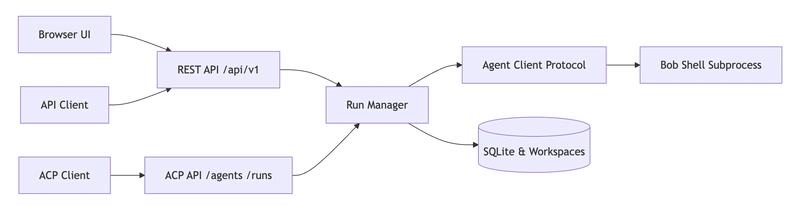
API Overview
REST Endpoints (/api/v1)
All REST endpoints require Authorization: Bearer <TOKEN> and return structured JSON.
| Endpoint                            | Method                   | Purpose                                                      |
| ----------------------------------- | ------------------------ | ------------------------------------------------------------ |
| `/api/v1/capabilities`              | `GET`                    | Retrieve server status, capabilities, and operational limits |
| `/api/v1/threads`                   | `GET`, `POST`            | List, search, or create conversation threads                 |
| `/api/v1/threads/{id}`              | `GET`, `PATCH`, `DELETE` | Inspect, rename, archive, or remove a thread                 |
| `/api/v1/threads/{id}/messages`     | `GET`, `POST`            | Post a prompt (returns run status) or list conversation turns |
| `/api/v1/runs/{id}`                 | `GET`                    | Get run execution status, results, and usage stats           |
| `/api/v1/runs/{id}/events`          | `GET`                    | Stream live run output via Server-Sent Events (SSE)          |
| `/api/v1/runs/{id}/cancel`          | `POST`                   | Cancel an active run execution                               |
| `/api/v1/threads/{id}/files`        | `GET`                    | List files generated in the thread's workspace               |
| `/api/v1/threads/{id}/files/{path}` | `GET`                    | Download a workspace file                                    |
Enter fullscreen mode Exit fullscreen mode
ACP Endpoints (ACP 0.2.0)
Standard Agent Communication Protocol endpoints for multi-agent interoperability:
| Endpoint                | Method          | Purpose                                       |
| ----------------------- | --------------- | --------------------------------------------- |
| `/agents`               | `GET`           | Agent discovery and manifest                  |
| `/runs`                 | `POST`          | Execute an ACP run (sync, async, or streamed) |
| `/runs/{run_id}`        | `GET`           | Get ACP run status and output                 |
| `/runs/{run_id}/events` | `GET`           | Stream ACP run events via SSE                 |
| `/runs/{run_id}/cancel` | `POST`          | Request cancellation of an active run         |
| `/session/{session_id}` | `GET`, `DELETE` | Inspect or terminate an ACP session           |
Enter fullscreen mode Exit fullscreen mode
OpenAPI specifications are available at /api/openapi.json (REST) and /acp/openapi.json (ACP).
Technical Stack and Blocks Required to Create the Same Functionality
Step 1: Prerequisites
Ensure the following are available on your machine:
Tool | Version | When needed |
|---|---|---|
Python | 3.11+ | Always — runs the Streamlit app |
Git | any | Always — to clone this repo |
npm / Node.js | 22+ | Only for Option B (local service) |
IBM Bob Shell | 2.0.4+ | Only for Option B (local service) |
IBM Bob API key | — | Only for Option B (local service) |
IBM Bob Shell installation
If Bob Shell is not installed:
Go to https://bob.ibm.com and sign in with your IBMid.
Download the Bob Shell installer for macOS (arm64 or x64).
Follow the installation instructions.
Generate an Inference-scope API key at Account → API Keys.
Step 2: Connect to the Headless Bob Service
The demo connects to a Headless Bob service via HEADLESS_BOB_URL.
You do not need to run the service locally. Choose the option that suits you:
Option A — Use a shared or remote instance (no local setup)
If your team already has a Headless Bob service running on a server, container, or cloud URL:
# In your .env, point to the remote instance:HEADLESS_BOB_URL=https://your-team-server.example.com
HEADLESS_BOB_TOKEN=the-token-defined-on-that-server
Enter fullscreen mode Exit fullscreen mode
No Node.js, npm, or Bob Shell required on your machine.
Option B — Run the service locally (full local setup)
Requires: Node.js 22+, IBM Bob Shell 2.0.4+, and an IBM Bob API key.
Clone and start the service from the IBM self-serve-assets repository:
# Clone the building blocks repo
git clone https://github.com/ibm-self-serve-assets/building-blocks.git
cd building-blocks/ai/ai-engineering/headless-bob/assets/headlessbob

# Install dependencies
npm ci

# Configure credentialscp .env.example .env
# Edit .env — set these two required fields:#   BOB_API_KEY=<your-bob-inference-api-key>#   AUTH_TOKENS={"owner":"my-demo-token-at-least-24-chars"}## AUTH_TOKENS is a JSON object you invent — the key ("owner") is a label,# the value is the bearer token you will also set as HEADLESS_BOB_TOKEN# in the demo's .env file.  Generate a strong token with:#   python3 -c "import secrets; print(secrets.token_urlsafe(32))"

# Build and start
npm run build
npm start
Enter fullscreen mode Exit fullscreen mode
Verify the service is running:
curl -s http://127.0.0.1:8000/api/v1/capabilities \
     -H "Authorization: Bearer my-demo-token-at-least-24-chars" | jq .
Enter fullscreen mode Exit fullscreen mode
You should see a JSON response with version, bob_version, and capacity info.
🏗 System Architecture
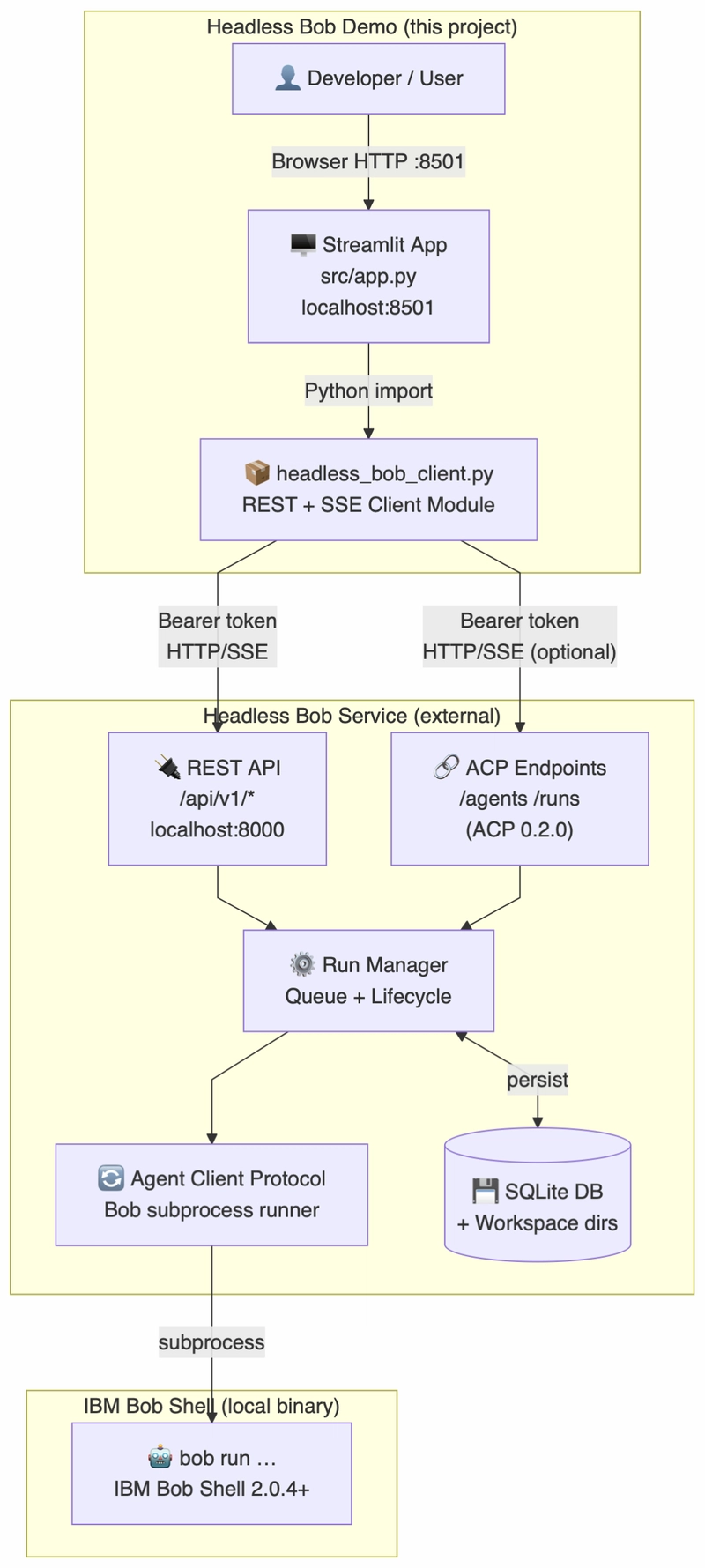
The setup consists of a Streamlit frontend UI connecting through a lightweight, zero-dependency REST/SSE client to an external Headless Bob service, which in turn manages local IBM Bob Shell subprocesses.
High-Level Architecture Diagram
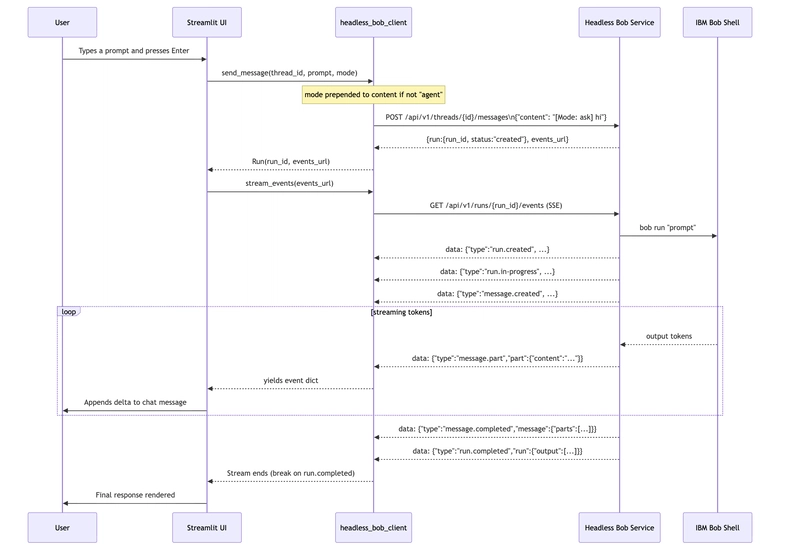
⚡ Data Flow: Event-Driven SSE Streaming
Instead of waiting for a full bob run execution to finish, responses are streamed token-by-token using Server-Sent Events (SSE).
💻 Code Highlights & Implementation Lessons
Zero-Dependency Python REST & SSE Client
Using standard library modules (urllib.request), the client consumes data: streams directly without requiring heavy external dependencies.
def stream_events(events_url: str) -> Generator[dict, None, None]:
    """Consume a Server-Sent Events (SSE) stream from Headless Bob."""
    if events_url.startswith("/"):
        events_url = _base_url() + events_url

    headers = {"Accept": "text/event-stream"}
    headers.update(_auth_header())

    req = urllib.request.Request(events_url, headers=headers, method="GET")

    with urllib.request.urlopen(req, timeout=300) as resp:
        buffer = ""
        for raw_line in resp:
            line = raw_line.decode("utf-8", errors="replace")
            buffer += line

            if "\n\n" in buffer or "\r\n\r\n" in buffer:
                chunks = buffer.replace("\r\n", "\n").split("\n\n")
                buffer = chunks[-1]
                for chunk in chunks[:-1]:
                    event = _parse_sse_chunk(chunk)
                    if event:
                        yield event
Enter fullscreen mode Exit fullscreen mode
Overcoming API Constraints
During development with the live service, a strict schema constraint was identified: POST /api/v1/threads/{id}/messages enforces additionalProperties: false. Passing parameters like mode causes an immediate HTTP 400 Bad Request.
To support custom modes without breaking backend constraints, natural-language mode prefixes are injected directly into the content payload:
def send_message(thread_id: str, prompt: str, mode: str = "") -> Run:
    # API only allows {"content": <string>} — no extra fields accepted.
    # Prepend mode as a natural-language instruction when not default.
    if mode and mode != "agent":
        content = f"[Mode: {mode}] {prompt}"
    else:
        content = prompt

    data = _request("POST", f"/api/v1/threads/{thread_id}/messages", {"content": content})
    run_data = data.get("run", {})
    run_id = run_data.get("run_id", "")
    return Run(
        run_id=run_id,
        status=run_data.get("status", "queued"),
        thread_id=thread_id,
        events_url=data.get("events_url", f"/api/v1/runs/{run_id}/events"),
    )
Enter fullscreen mode Exit fullscreen mode
The main app.py does the rest of the job...
"""
app.py
======
Streamlit web application demonstrating **Headless Bob** integration.

This application provides a chat-style UI that connects to a running
Headless Bob service (https://github.com/ibm-self-serve-assets/building-blocks/
tree/main/ai/ai-engineering/headless-bob) via its REST API.

Features demonstrated:
  - Listing and creating conversation threads (persistent conversation lifecycle)
  - Sending prompts to IBM Bob Shell via REST POST /api/v1/threads/{id}/messages
    Note: the message API only accepts {"content": <string>}.  Extra fields
    (including a ``mode`` parameter) cause a 400 Bad Request.  The selected
    mode is therefore prepended to the prompt as "[Mode: <name>] <prompt>"
    when a non-default mode is chosen.
  - Streaming live SSE output — events are typed as ``message.part``,
    ``message.completed``, ``run.completed``, and ``run.failed``
  - Viewing run metadata (duration, tokens, tool calls)
  - Browsing and downloading workspace files generated by Bob
  - Checking server capabilities

Usage:
    streamlit run src/app.py
"""

import osimport timeimport threadingfrom datetime import datetime, timezonefrom pathlib import Path

import streamlit as stfrom dotenv import load_dotenv

# Load .env from the project root (one directory above src/)
_ROOT = Path(__file__).resolve().parent.parentload_dotenv(_ROOT / ".env")

# Import our Headless Bob client module
import syssys.path.insert(0, str(Path(__file__).resolve().parent))import headless_bob_client as hb

# ---------------------------------------------------------------------------
# Page configuration
# ---------------------------------------------------------------------------
st.set_page_config(
    page_title="Headless Bob Demo",
    page_icon="🤖",
    layout="wide",
    initial_sidebar_state="expanded",)

# ---------------------------------------------------------------------------
# Session state helpers
# ---------------------------------------------------------------------------
def _init_state() -> None:
    """Initialize all Streamlit session state keys on first load."""
    defaults = {
        "active_thread_id": None,
        "active_thread_title": "",
        "threads": [],
        "chat_history": [],   # list of {"role": str, "content": str, "meta": dict}
        "streaming_text": "",
        "run_meta": None,
        "last_error": "",
        "capabilities": None,
        "workspace_files": [],
    }
    for key, value in defaults.items():
        if key not in st.session_state:
            st.session_state[key] = value_init_state()...
Enter fullscreen mode Exit fullscreen mode
🛠 Features Enabled by Headless Bob
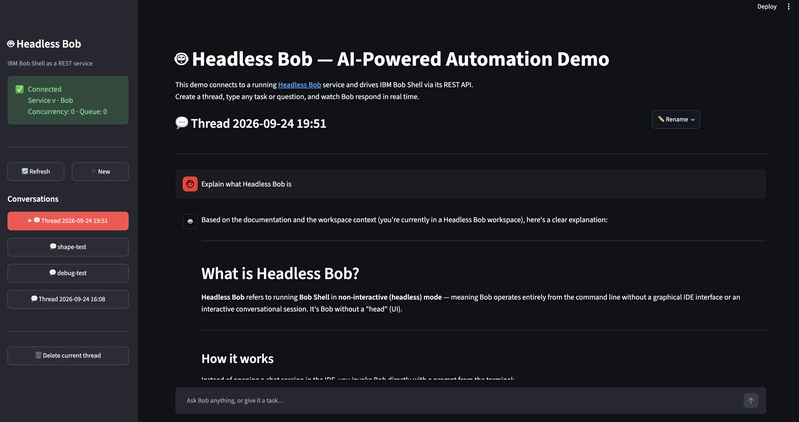
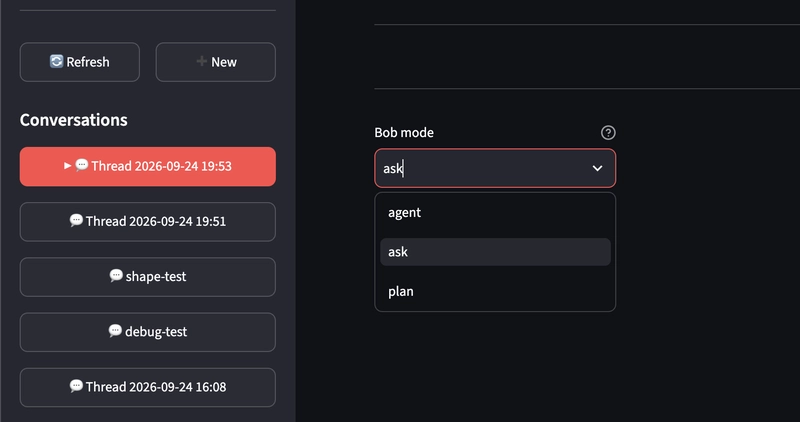
Per-Thread Workspace Isolation: Files created by Bob during a task are constrained to the thread's isolated workspace directory, enabling safe multi-tenant file generation and downloads.
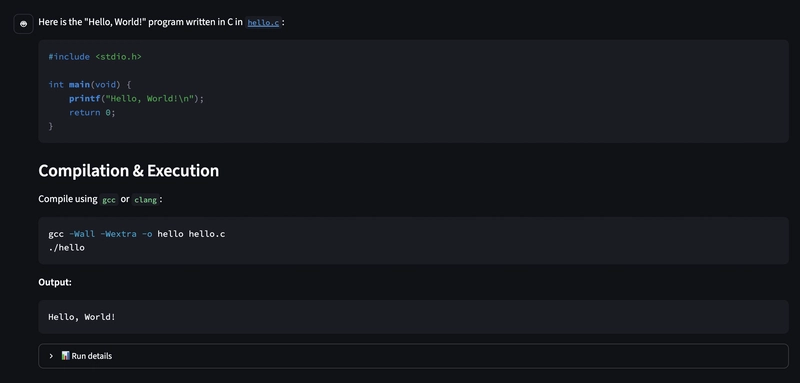
Real-time Stream Rendering: The UI processes
message.partevents dynamically to build a responsive, token-by-token chat interface.
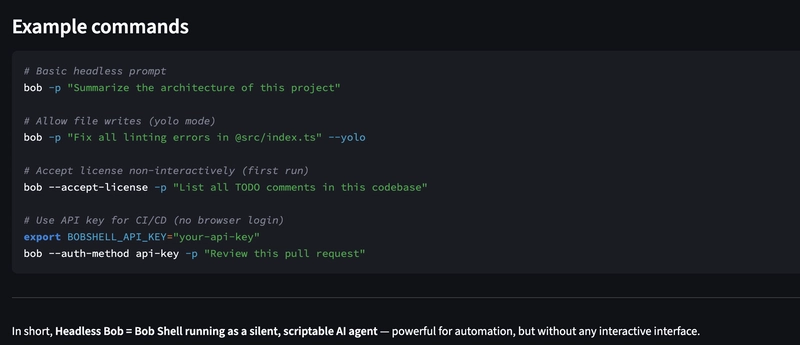
Execution Observability: Run completion metadata exposes detailed metrics including duration, token usage, and tool execution counts.
Conclusion
By decoupling IBM Bob Shell from terminal-bound single executions, the Headless Bob pattern unlocks a scalable foundation for continuous enterprise automation, background code synthesis, and multi-agent workflows. Transforming one-shot CLI tooling into an event-driven, HTTP-accessible service demonstrates how localized developer AI can seamlessly bridge into cloud-native architectures. As agentic AI paradigms continue to evolve, exposing robust REST APIs, isolated thread workspaces, and real-time SSE streams ensures that background execution models remain responsive, performant, and ready for production integration.
Thanks for reading 👨🦲
Links
Code repository for this post: https://github.com/aairom/headless-Bob-101
IBM Open-source Building Blocks: https://github.com/ibm-self-serve-assets/building-blocks
Headless Bob Service Implementation: https://github.com/ibm-self-serve-assets/building-blocks/tree/main/ai/ai-engineering/headless-bob
Headless Agents: Architecting Decoupled AI Systems: https://discuss.google.dev/t/headless-agents-architecting-decoupled-ai-systems/323144
IBM Bob: https://bob.ibm.com/
IBM Bob Documentation: https://bob.ibm.com/docs/ide
Comments (1)
Join the discussion by logging into your account.
Anshu Pathak
Interesting approach. The part that stood out to me is the shift from treating Bob as a CLI tool to treating it as an actual backend capability—with persistent threads, isolated workspaces, queued execution, and SSE streaming. That feels like an important step for agentic tooling: the hard part isn’t just making an agent run a task, but giving other systems a reliable way to start, observe, cancel, and retrieve that work.