
Testing NVIDIA NemoClaw in a Local Sandboxed Environment with Bob
Introduction
For a while, I’ve wanted to test and implement NemoClaw in a sandboxed environment to better understand its capabilities and real-world usage. Safety and isolation are paramount when granting LLMs agency—especially when agents can execute terminal commands, modify local workspaces, or perform egress network requests.
To evaluate its operational stack, I built a test harness and orchestration environment using Bob. In this post, I’ll walk through the fundamentals of NVIDIA NemoClaw, break down its core security architecture, and share an actionable implementation guide so you can spin up your own isolated agent sandbox.
TL;DR: What is NVIDIA NemoClaw?
NemoClaw is an open-source reference stack from NVIDIA designed to execute always-on AI agents safely inside OpenShell sandboxes. It serves as a bridge between high-capability agent runtimes—such as OpenClaw, Hermes, or LangChain Deep Agents—and host system security.
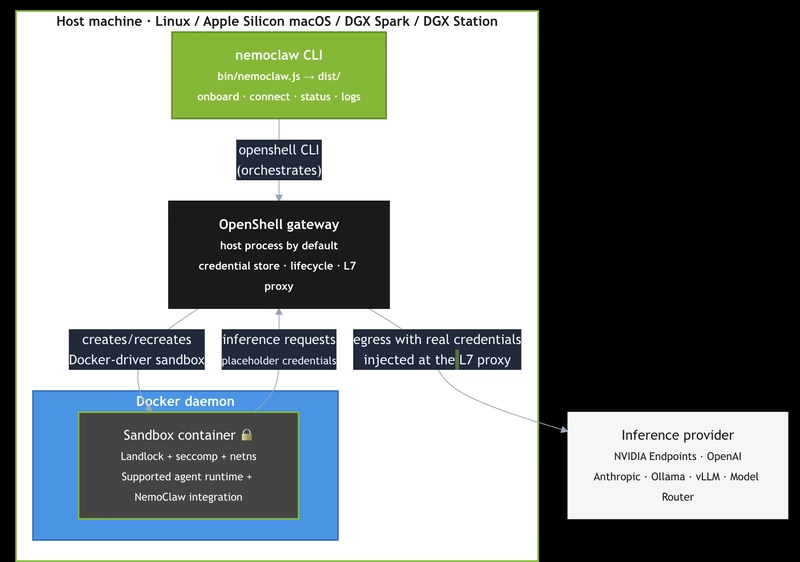
> Image from Nvidia (https://docs.nvidia.com/nemoclaw/user-guide/openclaw/reference/architecture)
+-----------------------------------------------------------------------+
|                              Host Machine                             |
|  +-------------------+  +------------------+  +--------------------+  |
|  | nemoclaw CLI      |  | OpenShell        |  | Host State         |  |
|  | (Node.js CJS)     |  | Gateway Proxy    |  | ~/.nemoclaw/       |  |
|  +---------+---------+  +--------+---------+  +--------------------+  |
+------------|---------------------|------------------------------------+
             | orchestrates        | L7 Proxy & Credentials
             v                     v
+-----------------------------------------------------------------------+
|                    🛡️ Sandbox Container (Podman/Docker)               |
|                    --read-only + tmpfs mounts                          |
|  +-------------------+  +------------------+  +--------------------+  |
|  | AI Agent          |  | NemoClaw         |  | Managed Endpoint   |  |
|  | (OpenClaw/Hermes) |  | In-Process Plugin|  | (inference.local)  |  |
|  +-------------------+  +------------------+  +--------------------+  |
+-----------------------------------------------------------------------+
NVIDIA NemoClaw: Reference Stack for Sandboxed AI Agents in OpenShell (from official Github repository)
_
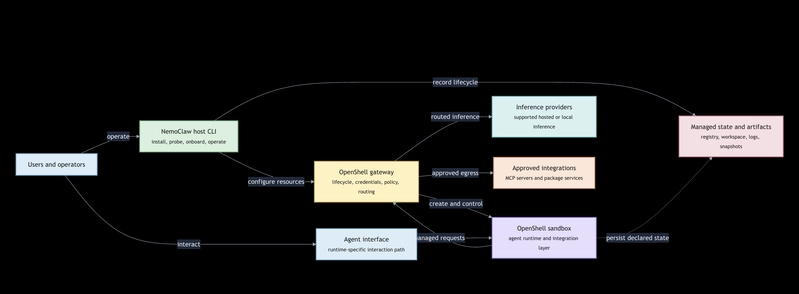
Image from Nvidia (https://docs.nvidia.com/nemoclaw/user-guide/openclaw/reference/architecture)
_

NVIDIA NemoClaw is an open source reference stack for running supported AI agents more safely inside NVIDIA OpenShell sandboxes. It provides guided onboarding, managed inference, network policy, managed integrations, snapshots, and lifecycle operations through the NemoClaw CLI and its agent-specific aliases.
Supported agents:
OpenClaw (default)
Hermes
LangChain Deep Agents Code
Technical Stack of the Local Implementation
Components Stack
The code and project uses the following stacks;
Podman (for provisionning NemoClaw Sandbox)
Ollama (local llm, if not using a model hosted by Nvidia using an API Key for Nvidia. One can use either Ollama or llama.cpp)
LLam.cpp (local llm, if not using a model hosted by Nvidia using an API Key for Nvidia. One can use either Ollama or llama.cpp)
Python Streamlit as the application’s framework
Core Architecture Highlights
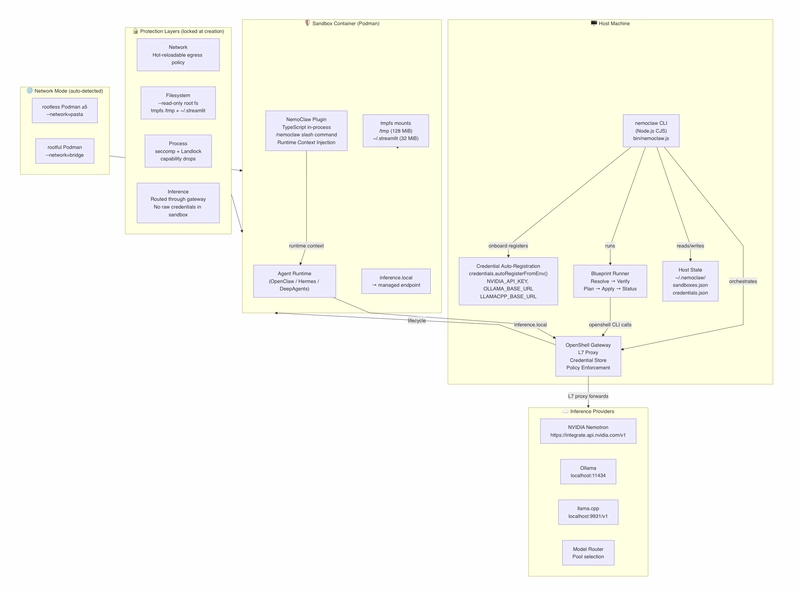
Host & Sandbox Separation: The orchestration logic (
nemoclaw CLI) runs on the host, while the agent executes inside an isolated container namespace (Podman or Docker).No Raw Credentials in Sandbox: Agents make requests to a local proxy (
inference.local). The host-side OpenShell Gateway injects real credentials (such as anNVIDIA_API_KEY) at egress and strips them from incoming responses.Multi-Provider Routed Inference: Out-of-the-box support for switching between cloud endpoints like NVIDIA Nemotron/NIM and local providers like Ollama (
localhost:11434) orllama.cpp(localhost:9931).Strict Containment Policies: Containers launch with immutable root filesystems (
--read-only), capability drops (--cap-drop=all), non-root privilege restrictions, and fine-grained network egress rules.
Implementation Guide And Tests
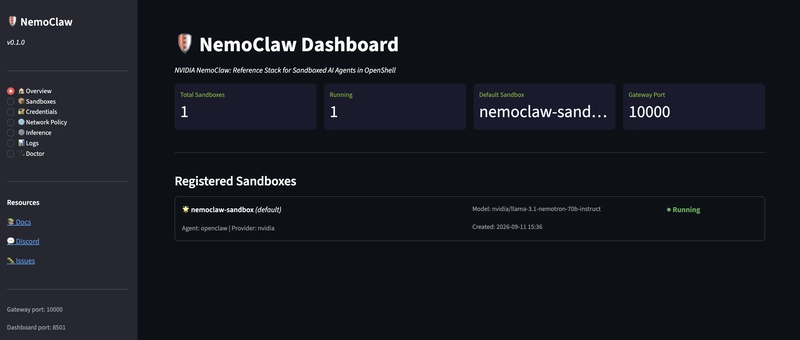
This step-by-step setup guide includes blueprint excerpts and setup scripts.
Environment Setup & Prerequisites
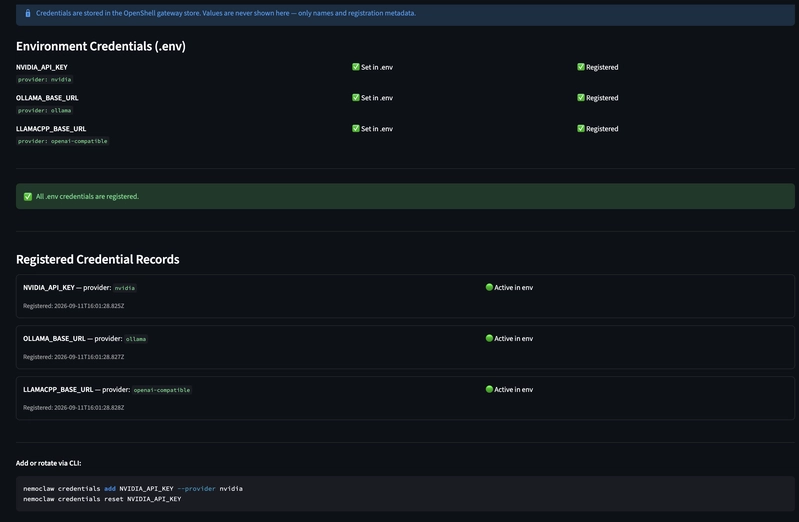
First, define your environment variables in
.envto configure API keys and runtime parameters:
# NemoClaw Environment Configuration
# Copy this file to .env and fill in your values.
# NEVER commit .env to source control.

# ─── Inference Provider ────────────────────────────────────────────────────────
# NVIDIA API key for Nemotron / NIM inference
NVIDIA_API_KEY=your-nvidia-api-key-here

# Default inference model (e.g. nvidia/llama-3.1-nemotron-ultra-253b-v1)
NEMOCLAW_MODEL=nvidia/llama-3.1-nemotron-70b-instruct

# Inference provider: nvidia | ollama | openai-compatible | model-router
NEMOCLAW_INFERENCE_PROVIDER=nvidia

# ─── Ollama (local LLM) ────────────────────────────────────────────────────────
# If using Ollama as inference provider
OLLAMA_BASE_URL=http://localhost:11434

# ─── llama.cpp (local LLM) ────────────────────────────────────────────────────
LLAMACPP_BASE_URL=http://localhost:9931/v1
LLAMACPP_API_KEY=

# ─── OpenShell Gateway ────────────────────────────────────────────────────────
# Port for the OpenShell gateway (default: 10000)
NEMOCLAW_GATEWAY_PORT=10000

# ─── Agent Configuration ──────────────────────────────────────────────────────
# Agent to use: openclaw | hermes | langchain-deepagents-code
NEMOCLAW_AGENT=openclaw

# Sandbox name (1-63 lowercase letters, numbers, internal hyphens)
NEMOCLAW_SANDBOX_NAME=nemoclaw-sandbox

# ─── Dashboard / UI ───────────────────────────────────────────────────────────
# Port for the Streamlit dashboard (avoid 5000 on macOS - reserved for AirDrop)
DASHBOARD_PORT=8501

# ─── Logging ──────────────────────────────────────────────────────────────────
# Log level: debug | info | warn | error
LOG_LEVEL=info

# Log file path (optional, defaults to stdout)
LOG_FILE=

# ─── Network Policy ───────────────────────────────────────────────────────────
# Comma-separated list of allowed egress hosts (beyond defaults)
EXTRA_ALLOWED_HOSTS=

# ─── State / Storage ──────────────────────────────────────────────────────────
NEMOCLAW_STATE_DIR=~/.nemoclaw

# ─── Security ─────────────────────────────────────────────────────────────────
# SSRF validation: strict | permissive
SSRF_VALIDATION_MODE=strict

# ─── MCP Servers ──────────────────────────────────────────────────────────────
# Comma-separated list of MCP server names to enable
MCP_SERVERS=
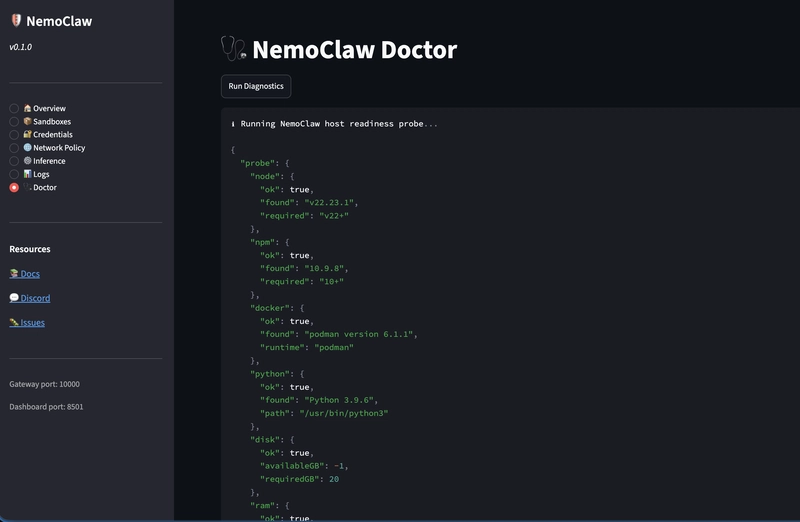
Run the initialization script to bootstrap Node.js dependencies, set up the Python virtual environment, and link the CLI globally:
#!/usr/bin/env bashset -e

echo "=== 1. Installing Node Dependencies & Linking CLI ==="
npm install
cd nemoclaw && npm install && npm run build && cd ..
npm link

echo "=== 2. Setting up Python Environment ==="
python3 -m venv venv
source venv/bin/activate
pip install -r requirements.txt

echo "=== 3. Host Readiness Check ==="
nemoclaw host probe
Architecture & Hardening Configuration
NemoClaw enforces isolation at the container engine layer. The following excerpt shows how
runner.jsprovisions a hardened sandbox using Podman:
// Excerpt: bin/lib/runner.js - Container Launch Configuration
const podmanFlags = [
  'run', '-d',
  '--name', sandboxName,
  '--read-only',                                      // Immutable root filesystem
  '--security-opt', 'no-new-privileges',             // Prevent privilege escalation
  '--cap-drop=all',                                  // Drop all Linux capabilities
  '--tmpfs', '/tmp:rw,noexec,nosuid,size=128m',       // Writable non-executable temp space
  '--tmpfs', '/home/nemoclaw/.streamlit:rw,nosuid,size=32m', // Session cache space
  networkModeFlag,                                   // --network=pasta or --network=bridge
  containerImage
];

// Placeholder: Custom container invocation parameters
// ____________________________________________________
// ____________________________________________________
Network Policy Definition
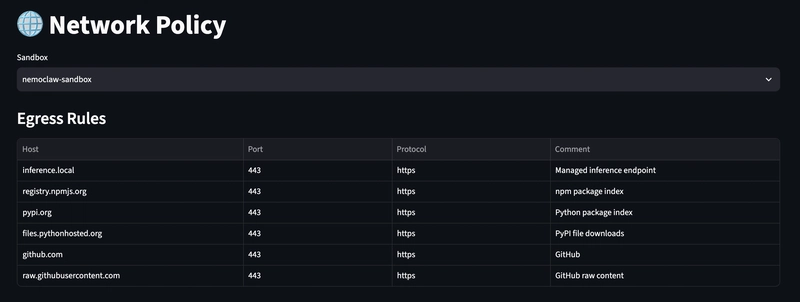
Network egress is restricted to explicitly allowed hostnames. The network policy is defined declaratively using YAML:
# nemoclaw-blueprint/policies/default-policy.yaml
version: "1"
egress:
  - host: inference.local
    port: 443
    protocol: https
    comment: "Managed inference endpoint proxied by Gateway"
  - host: github.com
    port: 443
    protocol: https
    comment: "Repository operations"
  - host: registry.npmjs.org
    port: 443
    protocol: https
    comment: "Package dependencies"
deny: []
You can modify rules dynamically via the CLI without recreating the container:
# Add a custom host rule
nemoclaw policy add ________________________

# Apply a preset policy (e.g., Slack or Discord)
nemoclaw policy add slack
Sandbox Onboarding & Execution
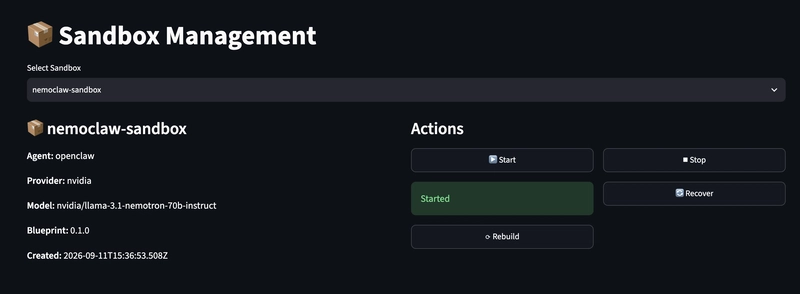
Execute the onboarding sequence to build the image, register credentials from
.env, instantiate the OpenShell Gateway, and start the container runtime:
# Execute onboarding sequence
nemoclaw onboard --agent openclaw --name ________________________

# Verify status and running processes
nemoclaw status

# Stream live container logs
nemoclaw logs --follow
Python State Inspection Test
You can write tests using
unittestorpytestto programmatically inspect sandbox metadata and verify that secrets remain unexposed:
"""Unit tests for the local NemoClaw sandbox demonstration.

The five tests map directly to the scenarios in Docs/NemoClaw-Sandbox-User-Guide.md.
"""

import sysimport unittestfrom pathlib import Path

sys.path.insert(0, str(Path(__file__).parent.parent / "scripts"))

from nemoclaw_sandbox_demo import AgentProfile, Sandbox, SandboxLimits, SandboxTimeoutclass TestNemoClawSandboxScenarios(unittest.TestCase):
    """Validate the sandbox contract without requiring Podman or network access."""

    def setUp(self):
        self.agent = AgentProfile(
            name="agent",
            role="test agent",
            capabilities=frozenset({
                "read_workspace", "write_workspace", "network:inference", "compute", "inter_agent:send",
            }),
        )

    def test_normal_in_sandbox_execution(self):
        """An authorized agent can write and read only its private workspace."""
        with Sandbox() as sandbox:
            sandbox.register_agent(self.agent)
            written = sandbox.run(self.agent, "write_workspace", path="workspace/report.txt", content="pass")
            read = sandbox.run(self.agent, "read_workspace", path="workspace/report.txt")

        self.assertTrue(written.permitted)
        self.assertEqual(read.value, "pass")
        self.assertTrue(sandbox.closed)

    def test_escape_and_network_boundary_are_denied(self):
        """Traversal and non-approved egress are blocked and audited."""
        with Sandbox() as sandbox:
            sandbox.register_agent(self.agent)
            traversal = sandbox.run(self.agent, "read_workspace", path="../../etc/passwd")
            egress = sandbox.run(self.agent, "network_request", host="example.com")

        self.assertFalse(traversal.permitted)
        self.assertIn("filesystem path denied", traversal.error)
        self.assertFalse(egress.permitted)
        self.assertIn("network host denied", egress.error)

    def test_resource_limits_are_enforced(self):
        """Excess memory is rejected and long-running work is terminated."""
        limits = SandboxLimits(memory_limit_mb=8, timeout_seconds=0.1, cpu_limit_seconds=1)
        with Sandbox(limits) as sandbox:
            sandbox.register_agent(self.agent)
            memory = sandbox.run(self.agent, "allocate_memory", megabytes=16)
            timeout = sandbox.run(self.agent, "busy_loop")

        self.assertFalse(memory.permitted)
        self.assertIn("exceeds limit", memory.error)
        self.assertFalse(timeout.permitted)
        self.assertIsInstance(timeout.error, str)
        self.assertIn("timeout", timeout.error)

    def test_inter_agent_communication_stays_inside_sandbox(self):
        """A message can move between registered agents through the local mailbox."""
        sender = self.agent
        receiver = AgentProfile("receiver", "reviewer", frozenset({"inter_agent:receive"}))
        with Sandbox() as sandbox:
            sandbox.register_agent(sender)
            sandbox.register_agent(receiver)
            sent = sandbox.run(sender, "send_message", recipient="receiver", message="approved")
            received = sandbox.run(receiver, "receive_message")

        self.assertTrue(sent.permitted)
        self.assertEqual(received.value, "approved")

    def test_failure_is_reported_and_teardown_is_graceful(self):
        """A denied operation returns a structured error and context is removed."""
        sandbox = Sandbox()
        sandbox.__enter__()
        sandbox.register_agent(self.agent)
        result = sandbox.run(self.agent, "unsupported_operation")
        root = sandbox.root
        sandbox.teardown()

        self.assertFalse(result.permitted)
        self.assertIn("not supported", result.error)
        self.assertTrue(sandbox.closed)
        self.assertFalse(root.exists())
        with self.assertRaises(RuntimeError):
            sandbox.rootif __name__ == "__main__":
    unittest.main()
Test-Case Walkthrough
Now that the application is running, we will validate its behavior under realistic conditions using the following test scenarios.
The test harness exposes five automated test scenarios (test/test_nemoclaw_sandbox.py) that validate allowed behaviors while asserting that policy violations fail predictably.
Normal In-Sandbox Execution (TC-01)
Validates that an authorized agent can write artifacts to its designated workspace and read them back cleanly.
# test/test_nemoclaw_sandbox.py - Scenario 1
def test_normal_in_sandbox_execution(self):
    """An authorized agent can write and read only its private workspace."""
    with Sandbox() as sandbox:
        sandbox.register_agent(self.agent)
        written = sandbox.run(self.agent, "write_workspace", path="workspace/report.txt", content="pass")
        read = sandbox.run(self.agent, "read_workspace", path="workspace/report.txt")

    self.assertTrue(written.permitted)
    self.assertEqual(read.value, "pass")
    self.assertTrue(sandbox.closed)
Scenario 2: Traversal & Egress Violation Defense (TC-02)
Ensures that directory traversal attempts (e.g.,
../../etc/passwd) and unauthorized external network requests (e.g.,example.com) are immediately denied and logged to the audit trail.
# test/test_nemoclaw_sandbox.py - Scenario 2
def test_escape_and_network_boundary_are_denied(self):
    """Traversal and non-approved egress are blocked and audited."""
    with Sandbox() as sandbox:
        sandbox.register_agent(self.agent)
        traversal = sandbox.run(self.agent, "read_workspace", path="../../etc/passwd")
        egress = sandbox.run(self.agent, "network_request", host="example.com")

    self.assertFalse(traversal.permitted)
    self.assertIn("filesystem path denied", traversal.error)
    self.assertFalse(egress.permitted)
    self.assertIn("network host denied", egress.error)
Scenario 3: Resource Limit Enforcement (TC-03)
Proves that attempts to exceed memory quotas are rejected prior to allocation, and long-running operations (such as infinite loops) are terminated by worker process timeouts.
# test/test_nemoclaw_sandbox.py - Scenario 3
def test_resource_limits_are_enforced(self):
    """Excess memory is rejected and long-running work is terminated."""
    limits = SandboxLimits(memory_limit_mb=8, timeout_seconds=0.1, cpu_limit_seconds=1)
    with Sandbox(limits) as sandbox:
        sandbox.register_agent(self.agent)
        memory = sandbox.run(self.agent, "allocate_memory", megabytes=16)
        timeout = sandbox.run(self.agent, "busy_loop")

    self.assertFalse(memory.permitted)
    self.assertIn("exceeds limit", memory.error)
    self.assertFalse(timeout.permitted)
    self.assertIsInstance(timeout.error, str)
    self.assertIn("timeout", timeout.error)
Scenario 4: Inter-Agent Communication Containment (TC-04)
Demonstrates secure inter-agent messaging routed entirely within in-memory mailboxes inside the sandbox, without opening external host ports or network sockets.
# test/test_nemoclaw_sandbox.py - Scenario 4
def test_inter_agent_communication_stays_inside_sandbox(self):
    """A message can move between registered agents through the local mailbox."""
    sender = self.agent
    receiver = AgentProfile("receiver", "reviewer", frozenset({"inter_agent:receive"}))
    with Sandbox() as sandbox:
        sandbox.register_agent(sender)
        sandbox.register_agent(receiver)
        sent = sandbox.run(sender, "send_message", recipient="receiver", message="approved")
        received = sandbox.run(receiver, "receive_message")

    self.assertTrue(sent.permitted)
    self.assertEqual(received.value, "approved")
Scenario 5: Failure Handling & Graceful Teardown (TC-05)
Confirms that when unsupported or illegal operations occur, structured errors are returned to the caller and the temporary workspace directory is unmounted and completely wiped upon teardown.
# test/test_nemoclaw_sandbox.py - Scenario 5
def test_failure_is_reported_and_teardown_is_graceful(self):
    """A denied operation returns a structured error and context is removed."""
    sandbox = Sandbox()
    sandbox.__enter__()
    sandbox.register_agent(self.agent)
    result = sandbox.run(self.agent, "unsupported_operation")
    root = sandbox.root
    sandbox.teardown()

    self.assertFalse(result.permitted)
    self.assertIn("not supported", result.error)
    self.assertTrue(sandbox.closed)
    self.assertFalse(root.exists())
    with self.assertRaises(RuntimeError):
        sandbox.root
Implementation Blueprint & Execution
To run these verification checks directly in your environment, use the provided Python entry points:
Running the Full Test Suite
Running the tests;
  python3 -m unittest discover -s test -p 'test_nemoclaw_sandbox.py' -v
  test_escape_and_network_boundary_are_denied (test_nemoclaw_sandbox.TestNemoClawSandboxScenarios.test_escape_and_network_boundary_are_denied)
  Traversal and non-approved egress are blocked and audited. ... ok
  test_failure_is_reported_and_teardown_is_graceful (test_nemoclaw_sandbox.TestNemoClawSandboxScenarios.test_failure_is_reported_and_teardown_is_graceful)
  A denied operation returns a structured error and context is removed. ... ok
  test_inter_agent_communication_stays_inside_sandbox (test_nemoclaw_sandbox.TestNemoClawSandboxScenarios.test_inter_agent_communication_stays_inside_sandbox)
  A message can move between registered agents through the local mailbox. ... ok
  test_normal_in_sandbox_execution (test_nemoclaw_sandbox.TestNemoClawSandboxScenarios.test_normal_in_sandbox_execution)
  An authorized agent can write and read only its private workspace. ... ok
  test_resource_limits_are_enforced (test_nemoclaw_sandbox.TestNemoClawSandboxScenarios.test_resource_limits_are_enforced)
  Excess memory is rejected and long-running work is terminated. ... ok

  ----------------------------------------------------------------------
  Ran 5 tests in 0.114s
Or... execute the 5 scenario assertions using standard Python unit testing tools:
# Run unit tests verbosely
python -m unittest test/test_nemoclaw_sandbox.py -v
For automated integration pipelines, run the local harness script directly with the
--jsonflag to inspect structured audit trails:
# Generate JSON audit report
python scripts/nemoclaw_sandbox_demo.py --json
Example JSON Output:
  python3 scripts/nemoclaw_sandbox_demo.py --json{
    "results": [
      {
        "operation": "write_workspace",
        "permitted": true,
        "value": "workspace/result.txt",
        "error": null
      },
    {
      "operation": "read_workspace",
      "permitted": true,
      "value": "approved",
      "error": null
    },
    {
      "operation": "network_request",
      "permitted": true,
      "value": {
        "host": "inference.local",
        "status": "routed through inference.local"
      },
      "error": null
    },
    {
      "operation": "network_request",
      "permitted": false,
      "value": null,
      "error": "network host denied: example.com"
    },
    {
      "operation": "read_workspace",
      "permitted": false,
      "value": null,
      "error": "filesystem path denied: ../../etc/passwd"
    },
    {
      "operation": "busy_loop",
      "permitted": false,
      "value": null,
      "error": "operation exceeded 1.0s timeout"
    },
    {
      "operation": "allocate_memory",
      "permitted": false,
      "value": null,
      "error": "memory request 128 MiB exceeds limit 64 MiB"
    },
    {
      "operation": "send_message",
      "permitted": true,
      "value": "message delivered",
      "error": null
    },
    {
      "operation": "receive_message",
      "permitted": true,
      "value": "result ready",
      "error": null
    }],"audit_events": 12,"sandbox_torn_down": true}
Troubleshooting & Production Best Practices
When transitioning from the local Python test harness to standard containerized deployments, refer to this common operational matrix:
Issue / Symptom | Root Cause | Resolution |
|---|---|---|
| The requested path attempts directory traversal outside | Use strictly relative subpaths inside |
| Host is not present on the policy allowlist. MD | Route requests through |
| Agent profile lacks the required permission scope. MD | Grant the minimum required capability to the |
| Task exceeded wall-clock deadline. MD | Optimize worker routines or increase |
| Access attempted before context entry or post-teardown. MD | Ensure work is wrapped within |
Summary Checklist for Deployment
Least-Privilege Capabilities: Start agent profiles with zero capabilities and enable permissions on a strict need-to-have basis.
Egress Boundary Lockdown: Deny external egress by default; route all model traffic through
inference.localmanaged gateways.Secret Isolation: Never store or pass API keys inside prompts, agent workspace files, or sandbox environments.
Guaranteed Teardown: Ensure sandbox contexts cleanly dispose of transient filesystems immediately upon execution completion.
Conclusion
Implementing NVIDIA NemoClaw with Bob demonstrates how modern AI agent orchestration can strike a practical balance between functional flexibility and strict security controls.
Key takeaways from this implementation:
Zero-Trust Credentials inside Sandboxes: By routing agent API calls through
inference.local, raw API keys never enter the sandbox environment.Defense-in-Depth Container Isolation: Combining
--read-onlyfilesystems, capability drops,tmpfsmounts, and network egress policies prevents agents from compromising host resources.Flexible Runtime Operations: Hot-swapping between cloud endpoints (NVIDIA NIM) and local runtimes (Ollama/llama.cpp) allows switching between local offline execution and production-grade models without altering agent business logic.
NemoClaw provides a dependable framework for safely running agentic workflows locally or in automated pipelines.
Thanks for reading 🦀
Links
Nvidia NemoClaw's Documentation: https://docs.nvidia.com/nemoclaw/user-guide/openclaw/home
Github repository for this post: https://github.com/aairom/nemoclaw-implementation-test
NemoClaw Github repository: https://github.com/NVIDIA/NemoClaw
Comments (0)
Login to post a comment.