
Code-First Security: A Practical Implementation of a Go Passkey Manager
Introduction — What are ‘Passkeys’ and why should we use them?
I was asked by a young student asking me about passkeys, why we should use them, so I decided to implement a sample code to make a demonstration. This simple question highlights a major shift in digital security: we are finally moving away from the era of shared secrets. While passwords require us to memorize complex strings — which we inevitably reuse or forget — passkeys leverage asymmetric cryptography to create a login experience that is both more secure and significantly more convenient.
The core advantage of passkeys lies in their phishing resistance. Because a passkey is tied to a specific domain and never leaves your physical device, a malicious website cannot “trick” you into giving up your credentials. Furthermore, passkeys eliminate the risk of server-side data breaches; since the server only stores a public key rather than a password hash, there is no “secret” for a hacker to steal. By replacing manual entry with biometrics like FaceID or TouchID, passkeys offer a seamless “zero-friction” workflow that proves security doesn’t always have to come at the cost of user experience.
Why Passkeys Win: A Quick Comparison
| Feature                 | Traditional Passwords                                | Passkeys (WebAuthn)                                    |
| ----------------------- | ---------------------------------------------------- | ------------------------------------------------------ |
| **Authentication Type** | Knowledge (What you know)                            | Possession + Inherence (What you have + Who you are)   |
| **Phishing Protection** | **Low:** Users can be tricked into typing passwords. | **High:** Cryptographically bound to the real website. |
| **Data Breach Risk**    | **High:** Stolen hashes can be cracked offline.      | **None:** Public keys are useless to an attacker.      |
| **User Experience**     | **Frustrating:** Requires managers or memory.        | **Seamless:** Uses device biometrics or PINs.          |
Enter fullscreen mode Exit fullscreen mode
Sample Application to showcase a practical ‘Passkey’ implementation
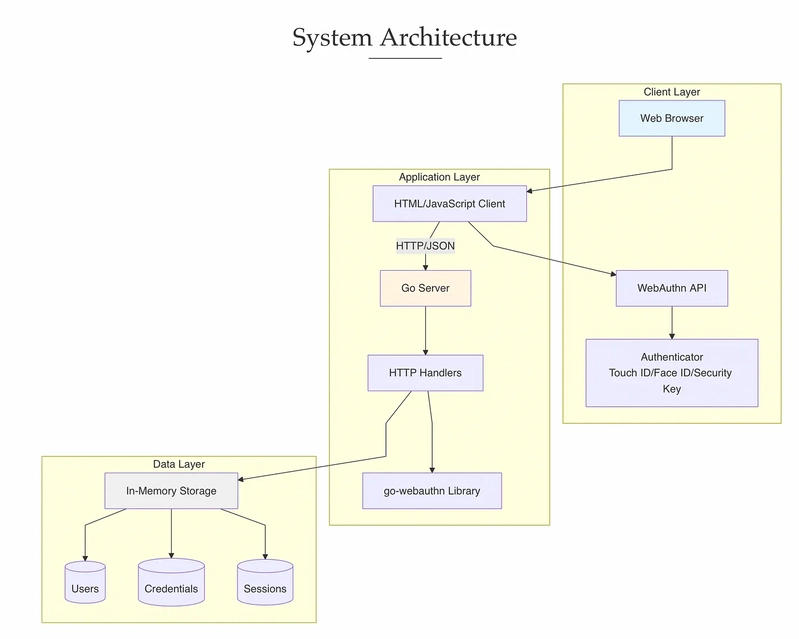
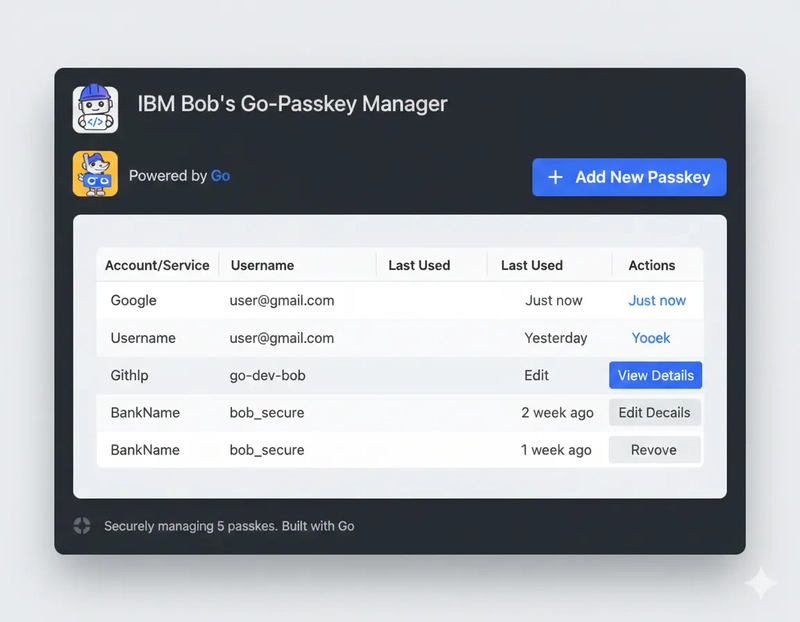
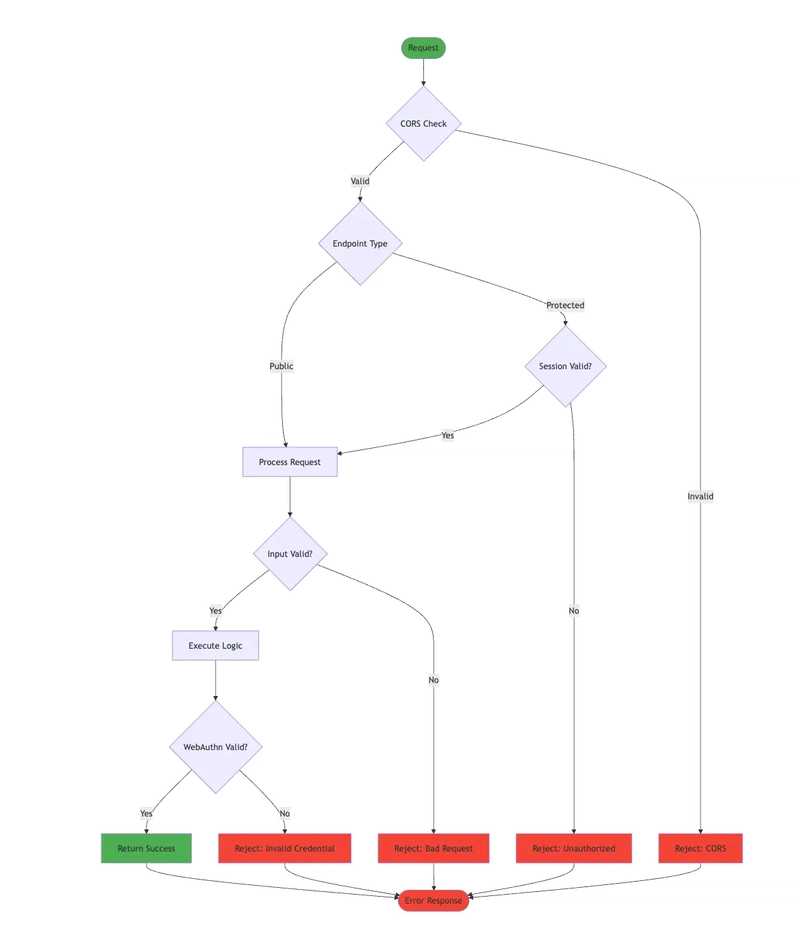
To transform the abstract theory of FIDO2 into a tangible learning tool, I collaborated with IBM Bob to architect a functional passkey demonstration. The system utilizes a robust Go backend to manage the complex WebAuthn handshake, paired with a clean HTML/JavaScript frontend for a transparent user experience. During my testing, the application generated passkeys seamlessly, which I was able to store securely within my Bitwarden manager — proving that these ‘hardware-backed’ credentials integrate perfectly with modern security workflows. For those looking to dive deeper into the ‘how’ and ‘why,’ Bob has produced comprehensive documentation within the project, including a Quick Start Guide and detailed Architecture Diagrams, ensuring the mechanics are as clear as the implementation itself.
Project Breakdown at a Glance
Based on the project files, here is how the educational application is structured:
passkey-demo/
├── server/              # Go backend server
│   ├── main.go          # Server entry point
│   ├── handlers.go      # HTTP handlers
│   ├── storage.go       # In-memory storage
│   ├── go.mod           # Go dependencies
│   └── go.sum           # Dependency checksums
├── client/              # HTML/JavaScript client
│   ├── index.html       # Main page
│   ├── register.html    # Registration page
│   └── login.html       # Login page
├── k8s/                 # Kubernetes manifests
│   ├── namespace.yaml   # Namespace definition
│   ├── configmap.yaml   # Configuration
│   ├── deployment.yaml  # Deployment spec
│   ├── service.yaml     # Service definition
│   ├── ingress.yaml     # Ingress rules
│   ├── hpa.yaml         # Horizontal Pod Autoscaler
│   └── README.md        # K8s deployment guide
├── Dockerfile           # Container image definition
├── .dockerignore        # Docker ignore rules
├── docker-compose.yml   # Docker Compose configuration
├── start.sh             # Start script (detached mode)
├── stop.sh              # Stop script
├── ARCHITECTURE.md      # Architecture diagrams (Mermaid)
├── QUICKSTART.md        # Quick start guide
├── SETUP.md             # Detailed setup instructions
├── API.md               # API documentation
└── PROJECT_OVERVIEW.md  # Comprehensive overview
Enter fullscreen mode Exit fullscreen mode
The Backend (Go): A RESTful API that leverages the go-webauthn library to handle registration and login challenges.
package main

import (
 "log"
 "net/http"
 "os""github.com/go-webauthn/webauthn/webauthn"
 "github.com/gorilla/mux")

func main() {
 // Get configuration from environment or use defaults
 rpID := getEnv("RP_ID", "localhost")
 rpOrigin := getEnv("RP_ORIGIN", "http://localhost:8080")
 port := getEnv("PORT", "8080")// Initialize WebAuthn
 wconfig := &webauthn.Config{RPDisplayName: "Passkey Demo",RPID:          rpID,RPOrigins:     []string{rpOrigin},// Timeout for registration/authentication (in milliseconds)Timeouts: webauthn.TimeoutsConfig{
   Login: webauthn.TimeoutConfig{
    Enforce:    true,
    Timeout:    60000,
    TimeoutUVD: 60000,
   },
   Registration: webauthn.TimeoutConfig{
    Enforce:    true,
    Timeout:    60000,
    TimeoutUVD: 60000,
   },},
 }webAuthn, err := webauthn.New(wconfig)
 if err != nil {log.Fatalf("Failed to create WebAuthn instance: %v", err)
 }// Initialize storage
 storage := NewStorage()// Initialize handlers
 handlers := NewHandlers(webAuthn, storage)// Setup router
 r := mux.NewRouter()// API routes
 api := r.PathPrefix("/api").Subrouter()
 api.HandleFunc("/register/begin", handlers.RegisterBegin).Methods("POST", "OPTIONS")
 api.HandleFunc("/register/finish", handlers.RegisterFinish).Methods("POST", "OPTIONS")
 api.HandleFunc("/login/begin", handlers.LoginBegin).Methods("POST", "OPTIONS")
 api.HandleFunc("/login/finish", handlers.LoginFinish).Methods("POST", "OPTIONS")// Health check endpoint
 r.HandleFunc("/health", func(w http.ResponseWriter, r *http.Request) {w.WriteHeader(http.StatusOK)w.Write([]byte("OK"))
 }).Methods("GET")// Serve static files from client directory
 clientDir := "../client"
 if _, err := os.Stat(clientDir); err == nil {r.PathPrefix("/").Handler(http.FileServer(http.Dir(clientDir)))log.Printf("Serving static files from %s", clientDir)
 } else {log.Printf("Client directory not found at %s, skipping static file serving", clientDir)
 }// Apply middleware
 handler := LoggingMiddleware(EnableCORS(r))// Start server
 log.Printf("Starting server on port %s", port)
 log.Printf("RP ID: %s", rpID)
 log.Printf("RP Origin: %s", rpOrigin)
 log.Printf("API endpoints:")
 log.Printf("  POST /api/register/begin")
 log.Printf("  POST /api/register/finish")
 log.Printf("  POST /api/login/begin")
 log.Printf("  POST /api/login/finish")
 log.Printf("  GET  /health")if err := http.ListenAndServe(":"+port, handler); err != nil {log.Fatalf("Server failed to start: %v", err)
 }}

// getEnv gets an environment variable or returns a default valuefunc getEnv(key, defaultValue string) string {
 value := os.Getenv(key)
 if value == "" {return defaultValue
 }
 return value}

// Made with Bob
Enter fullscreen mode Exit fullscreen mode
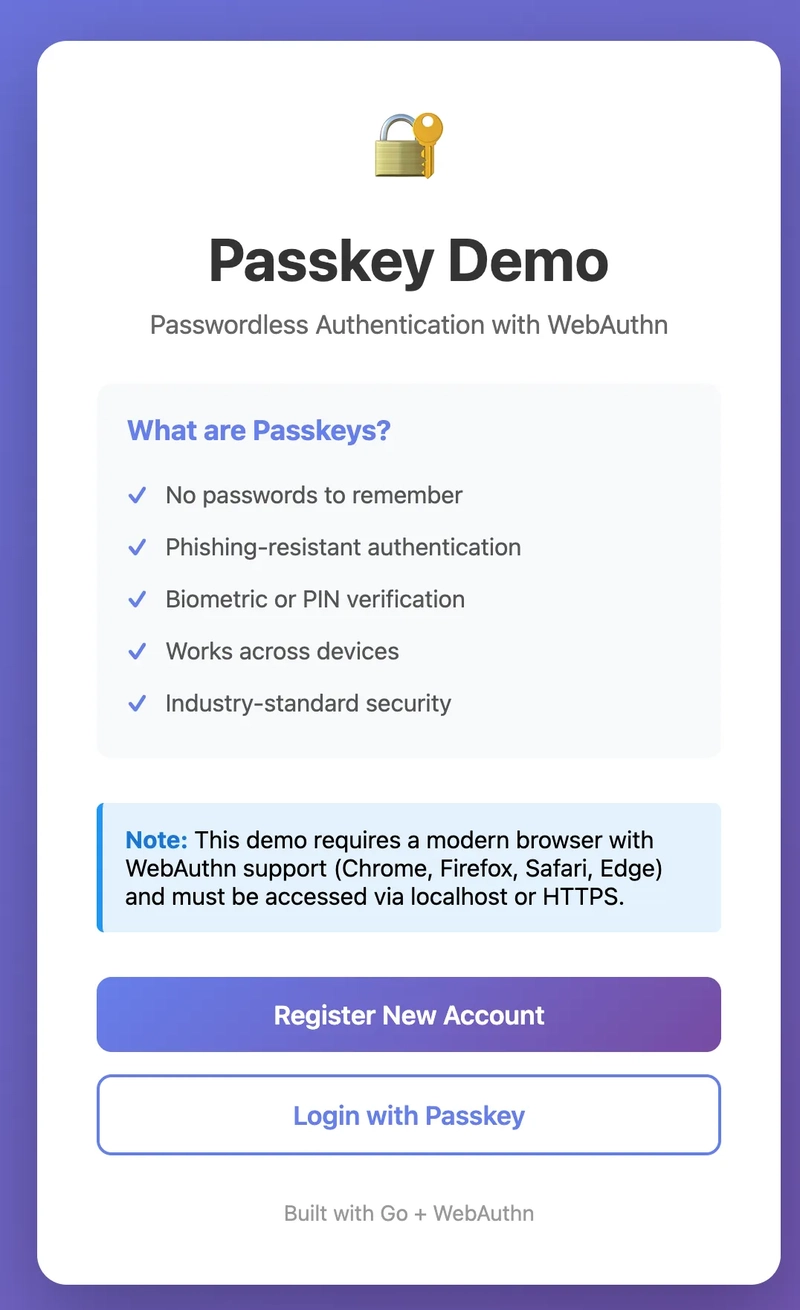
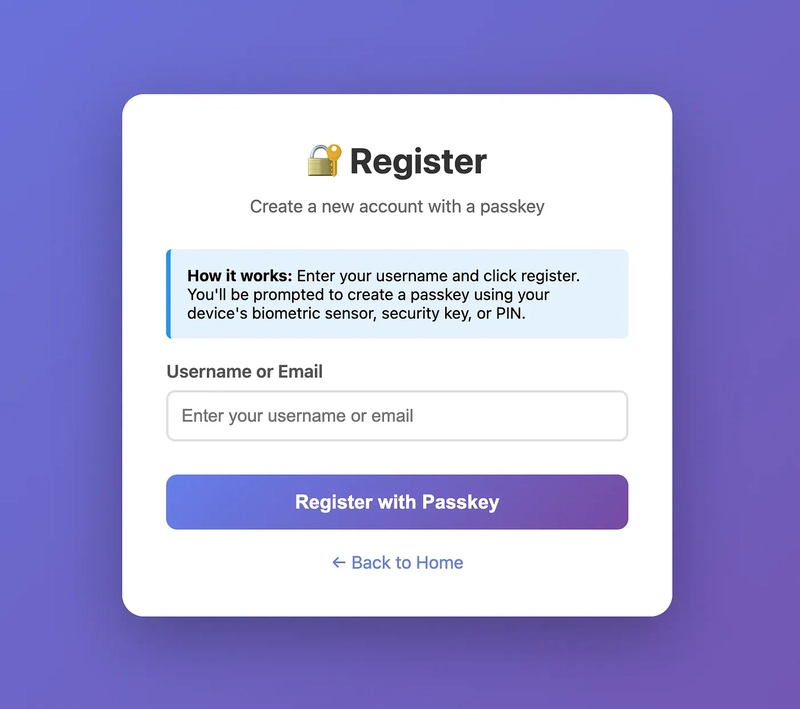
The Frontend (Vanilla JS): Uses the native
navigator.credentialsbrowser API to talk to your biometrics or security keys.
<!DOCTYPE html><html lang="en"><head>
    <meta charset="UTF-8">
    <meta name="viewport" content="width=device-width, initial-scale=1.0">
    <title>Register - Passkey Demo</title>
    <style>
        * {
            margin: 0;
            padding: 0;
            box-sizing: border-box;
        }

        body {
            font-family: -apple-system, BlinkMacSystemFont, 'Segoe UI', Roboto, Oxygen, Ubuntu, Cantarell, sans-serif;
            background: linear-gradient(135deg, #667eea 0%, #764ba2 100%);
            min-height: 100vh;
            display: flex;
            justify-content: center;
            align-items: center;
            padding: 20px;
        }

        .container {
            background: white;
            border-radius: 20px;
            box-shadow: 0 20px 60px rgba(0, 0, 0, 0.3);
            padding: 40px;
            max-width: 500px;
            width: 100%;
        }

        h1 {
            color: #333;
            margin-bottom: 10px;
            text-align: center;
        }

        .subtitle {
            color: #666;
            margin-bottom: 30px;
            text-align: center;
        }

        .form-group {
            margin-bottom: 20px;
        }

        label {
            display: block;
            margin-bottom: 8px;
            color: #555;
            font-weight: 600;
        }

        input {
            width: 100%;
            padding: 12px;
            border: 2px solid #e0e0e0;
            border-radius: 8px;
            font-size: 1em;
            transition: border-color 0.3s;
        }

        input:focus {
            outline: none;
            border-color: #667eea;
        }

        .btn {
            width: 100%;
            padding: 15px;
            font-size: 1.1em;
            border: none;
            border-radius: 10px;
            cursor: pointer;
            transition: all 0.3s ease;
            font-weight: 600;
            margin-top: 10px;
        }

        .btn-primary {
            background: linear-gradient(135deg, #667eea 0%, #764ba2 100%);
            color: white;
        }

        .btn-primary:hover:not(:disabled) {
            transform: translateY(-2px);
            box-shadow: 0 10px 20px rgba(102, 126, 234, 0.4);
        }

        .btn-primary:disabled {
            opacity: 0.6;
            cursor: not-allowed;
        }

        .btn-secondary {
            background: white;
            color: #667eea;
            border: 2px solid #667eea;
        }

        .btn-secondary:hover {
            background: #f5f5f5;
        }

        .message {
            padding: 15px;
            border-radius: 8px;
            margin-bottom: 20px;
            display: none;
        }

        .message.success {
            background: #d4edda;
            color: #155724;
            border: 1px solid #c3e6cb;
        }

        .message.error {
            background: #f8d7da;
            color: #721c24;
            border: 1px solid #f5c6cb;
        }

        .message.info {
            background: #d1ecf1;
            color: #0c5460;
            border: 1px solid #bee5eb;
        }

        .back-link {
            text-align: center;
            margin-top: 20px;
        }

        .back-link a {
            color: #667eea;
            text-decoration: none;
        }

        .back-link a:hover {
            text-decoration: underline;
        }

        .loading {
            display: none;
            text-align: center;
            margin: 20px 0;
        }

        .spinner {
            border: 3px solid #f3f3f3;
            border-top: 3px solid #667eea;
            border-radius: 50%;
            width: 40px;
            height: 40px;
            animation: spin 1s linear infinite;
            margin: 0 auto;
        }

        @keyframes spin {
            0% { transform: rotate(0deg); }
            100% { transform: rotate(360deg); }
        }

        .info-box {
            background: #e3f2fd;
            border-left: 4px solid #2196f3;
            padding: 15px;
            margin-bottom: 20px;
            border-radius: 5px;
            font-size: 0.9em;
        }
    </style></head><body>
    <div class="container">
        <h1>🔐 Register</h1>
        <p class="subtitle">Create a new account with a passkey</p>

        <div id="message" class="message"></div>

        <div class="info-box">
            <strong>How it works:</strong> Enter your username and click register. You'll be prompted to create a passkey using your device's biometric sensor, security key, or PIN.
        </div>

        <form id="registerForm">
            <div class="form-group">
                <label for="username">Username or Email</label>
                <input
                    type="text"
                    id="username"
                    name="username"
                    placeholder="Enter your username or email"
                    required
                    autocomplete="username webauthn"
                >
            </div>

            <button type="submit" class="btn btn-primary" id="registerBtn">
                Register with Passkey
            </button>
        </form>

        <div class="loading" id="loading">
            <div class="spinner"></div>
            <p style="margin-top: 10px; color: #666;">Creating your passkey...</p>
        </div>

        <div class="back-link">
            <a href="index.html">← Back to Home</a>
        </div>
    </div>

    <script>
        const API_BASE = 'http://localhost:8080/api';

        // Helper function to show messages
        function showMessage(text, type) {
            const messageEl = document.getElementById('message');
            messageEl.textContent = text;
            messageEl.className = `message ${type}`;
            messageEl.style.display = 'block';
        }

        // Helper function to hide messages
        function hideMessage() {
            document.getElementById('message').style.display = 'none';
        }

        // Helper function to show/hide loading
        function setLoading(isLoading) {
            document.getElementById('loading').style.display = isLoading ? 'block' : 'none';
            document.getElementById('registerBtn').disabled = isLoading;
            document.getElementById('registerForm').style.display = isLoading ? 'none' : 'block';
        }

        // Convert base64url to ArrayBuffer
        function base64urlToBuffer(base64url) {
            const base64 = base64url.replace(/-/g, '+').replace(/_/g, '/');
            const padLen = (4 - (base64.length % 4)) % 4;
            const padded = base64 + '='.repeat(padLen);
            const binary = atob(padded);
            const bytes = new Uint8Array(binary.length);
            for (let i = 0; i < binary.length; i++) {
                bytes[i] = binary.charCodeAt(i);
            }
            return bytes.buffer;
        }

        // Convert ArrayBuffer to base64url
        function bufferToBase64url(buffer) {
            const bytes = new Uint8Array(buffer);
            let binary = '';
            for (let i = 0; i < bytes.length; i++) {
                binary += String.fromCharCode(bytes[i]);
            }
            const base64 = btoa(binary);
            return base64.replace(/\+/g, '-').replace(/\//g, '_').replace(/=/g, '');
        }

        // Handle registration form submission
        document.getElementById('registerForm').addEventListener('submit', async (e) => {
            e.preventDefault();
            hideMessage();

            const username = document.getElementById('username').value.trim();
            if (!username) {
                showMessage('Please enter a username', 'error');
                return;
            }

            try {
                setLoading(true);

                // Step 1: Begin registration
                const beginResponse = await fetch(`${API_BASE}/register/begin`, {
                    method: 'POST',
                    headers: { 'Content-Type': 'application/json' },
                    body: JSON.stringify({ username })
                });

                if (!beginResponse.ok) {
                    const error = await beginResponse.text();
                    throw new Error(error || 'Failed to begin registration');
                }

                const options = await beginResponse.json();
                console.log('Registration options:', options);

                // Convert base64url strings to ArrayBuffers
                options.publicKey.challenge = base64urlToBuffer(options.publicKey.challenge);
                options.publicKey.user.id = base64urlToBuffer(options.publicKey.user.id);

                if (options.publicKey.excludeCredentials) {
                    options.publicKey.excludeCredentials = options.publicKey.excludeCredentials.map(cred => ({
                        ...cred,
                        id: base64urlToBuffer(cred.id)
                    }));
                }

                // Step 2: Create credential
                showMessage('Please follow your device prompts to create a passkey...', 'info');
                const credential = await navigator.credentials.create(options);
                console.log('Credential created:', credential);

                // Step 3: Finish registration
                const credentialJSON = {
                    id: credential.id,
                    rawId: bufferToBase64url(credential.rawId),
                    type: credential.type,
                    response: {
                        attestationObject: bufferToBase64url(credential.response.attestationObject),
                        clientDataJSON: bufferToBase64url(credential.response.clientDataJSON)
                    }
                };

                const finishResponse = await fetch(`${API_BASE}/register/finish?username=${encodeURIComponent(username)}`, {
                    method: 'POST',
                    headers: { 'Content-Type': 'application/json' },
                    body: JSON.stringify(credentialJSON)
                });

                if (!finishResponse.ok) {
                    const error = await finishResponse.text();
                    throw new Error(error || 'Failed to complete registration');
                }

                const result = await finishResponse.json();
                console.log('Registration result:', result);

                showMessage('Registration successful! Redirecting to login...', 'success');
                setTimeout(() => {
                    window.location.href = 'login.html';
                }, 2000);

            } catch (error) {
                console.error('Registration error:', error);
                showMessage(`Registration failed: ${error.message}`, 'error');
                setLoading(false);
            }
        });

        // Check WebAuthn support
        if (!window.PublicKeyCredential) {
            showMessage('WebAuthn is not supported in this browser. Please use a modern browser.', 'error');
            document.getElementById('registerBtn').disabled = true;
        }
    </script></body></html>
Enter fullscreen mode Exit fullscreen mode
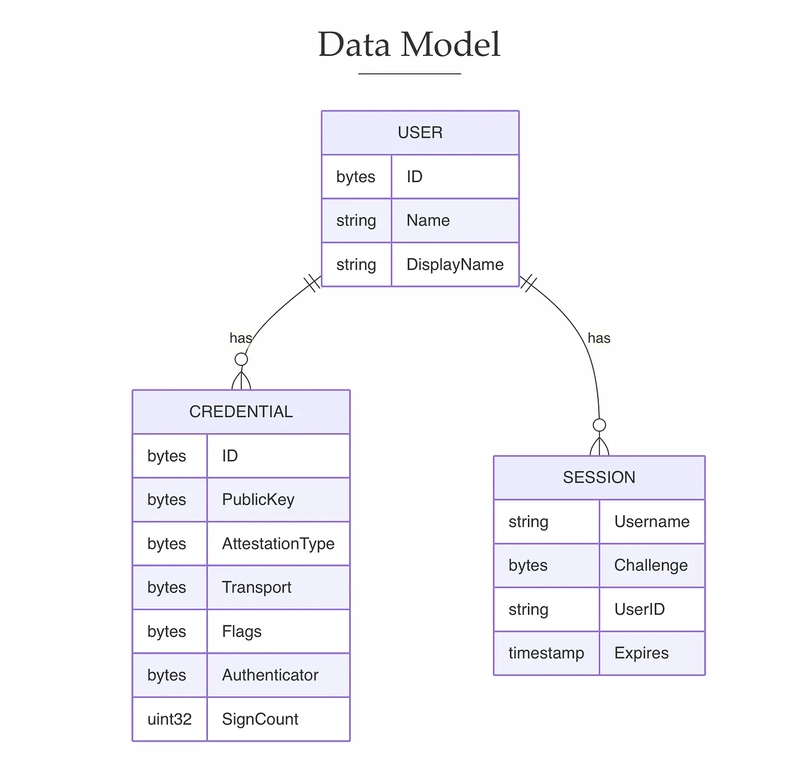
Storage Strategy: Currently uses in-memory storage for simplicity, making it a perfect “sandbox” for students to experiment without database overhead.
Deployment Versatility: Bob has configured the app to run via a simple script (
start.sh), Docker, or even Kubernetes for more advanced learners.
# Multi-stage build for smaller final imageFROM golang:1.21-alpine AS builder

# Install build dependenciesRUN apk add --no-cache git ca-certificates tzdata

# Set working directoryWORKDIR /build

# Copy go mod filesCOPY server/go.mod server/go.sum ./

# Download dependenciesRUN go mod download

# Copy source codeCOPY server/ ./

# Build the applicationRUN CGO_ENABLED=0 GOOS=linux GOARCH=amd64 go build -ldflags="-w -s" -o passkey-demo .

# Final stage - minimal imageFROM alpine:latest

# Install ca-certificates for HTTPSRUN apk --no-cache add ca-certificates tzdata

# Create non-root userRUN addgroup -g 1000 appuser && \
    adduser -D -u 1000 -G appuser appuser

# Set working directoryWORKDIR /app

# Copy binary from builderCOPY --from=builder /build/passkey-demo .

# Copy client filesCOPY client/ ./client/

# Change ownership to non-root userRUN chown -R appuser:appuser /app

# Switch to non-root userUSER appuser

# Expose portEXPOSE 8080

# Health checkHEALTHCHECK --interval=30s --timeout=3s --start-period=5s --retries=3 \
    CMD wget --no-verbose --tries=1 --spider http://localhost:8080/health || exit 1

# Set environment variablesENV RP_ID=localhost \
    RP_ORIGIN=http://localhost:8080 \
    PORT=8080

# Run the applicationCMD ["./passkey-demo"]
Enter fullscreen mode Exit fullscreen mode
apiVersion: apps/v1kind: Deploymentmetadata:name: passkey-demonamespace: passkey-demolabels:
    app: passkey-demospec:replicas: 3selector:
    matchLabels:
      app: passkey-demotemplate:
    metadata:
      labels:
        app: passkey-demo
    spec:
      containers:
      - name: passkey-demo
        image: passkey-demo:latest
        imagePullPolicy: IfNotPresent
        ports:
        - containerPort: 8080
          name: http
          protocol: TCP
        env:
        - name: RP_ID
          valueFrom:
            configMapKeyRef:
              name: passkey-demo-config
              key: RP_ID
        - name: RP_ORIGIN
          valueFrom:
            configMapKeyRef:
              name: passkey-demo-config
              key: RP_ORIGIN
        - name: PORT
          valueFrom:
            configMapKeyRef:
              name: passkey-demo-config
              key: PORT
        resources:
          requests:
            memory: "64Mi"
            cpu: "100m"
          limits:
            memory: "128Mi"
            cpu: "200m"
        livenessProbe:
          httpGet:
            path: /health
            port: 8080
          initialDelaySeconds: 10
          periodSeconds: 30
          timeoutSeconds: 3
          failureThreshold: 3
        readinessProbe:
          httpGet:
            path: /health
            port: 8080
          initialDelaySeconds: 5
          periodSeconds: 10
          timeoutSeconds: 3
          failureThreshold: 3
        securityContext:
          runAsNonRoot: true
          runAsUser: 1000
          allowPrivilegeEscalation: false
          readOnlyRootFilesystem: false
          capabilities:
            drop:
            - ALL

# Made with Bob
Enter fullscreen mode Exit fullscreen mode
Understanding the “Bitwarden” Connection
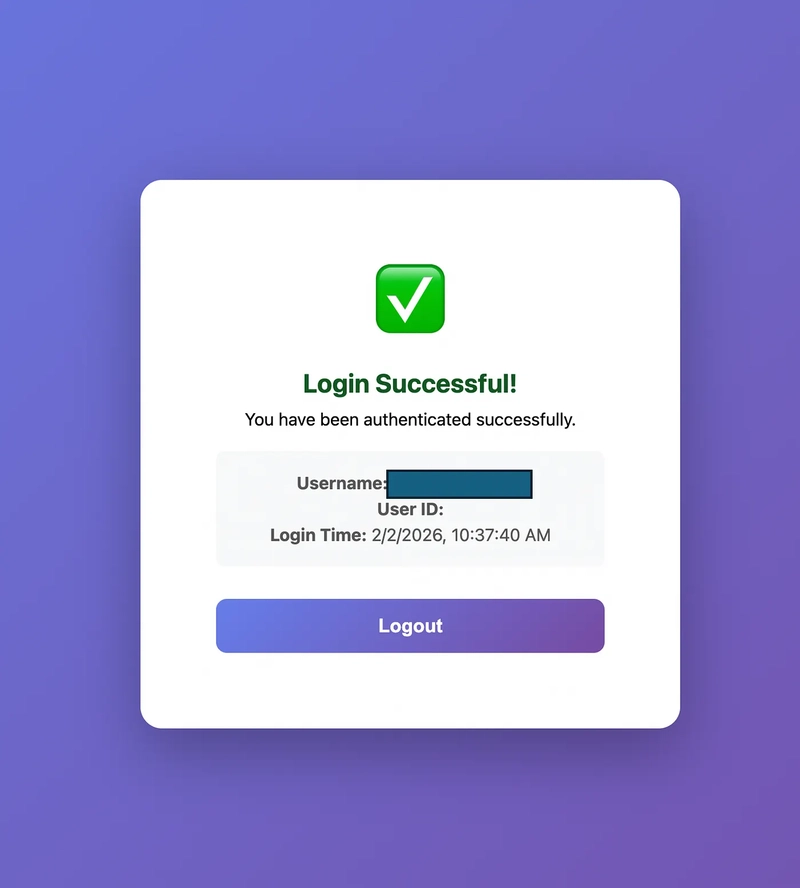
When you store a passkey in Bitwarden during this demo, you are witnessing cross-platform passkey support. The Go server sends a challenge, and instead of your laptop’s local chip (TPM) answering, your Bitwarden browser extension intercepts the request, signs it, and saves the private key.
Conclusion
In conclusion, the fundamental principle of passkeys represents a paradigm shift from “something you know” to “something you have” and “something you are,” replacing vulnerable shared secrets with robust asymmetric cryptography. This demonstration application successfully showcases the efficiency of this transition by distilling a complex security protocol into a frictionless, one-touch experience. By removing the burden of password creation and management while simultaneously neutralizing the threat of phishing and server-side breaches, the project proves that high-level security does not have to compromise user convenience. As users seamlessly generate and store these credentials in tools like Bitwarden, it becomes clear that passkeys are not just a theoretical improvement, but a practical, ready-to-use standard for a more secure digital future.
>>> Thanks for reading 🔐 <<<
Links
Repository of this demonstration: https://github.com/aairom/passkey-demo
Web authentication explananation: https://webauthn.guide/
Fido alliance: https://fidoalliance.org/
Go Webauthnetication Library used: https://github.com/go-webauthn/webauthn
Comments (0)
Login to post a comment.