An international collaborative work 🎌
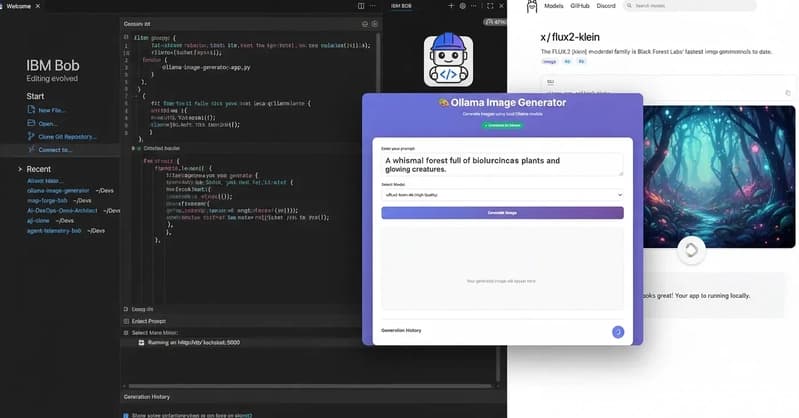
Introduction
At the start of the year, I developed an image generation application using Bob to build a custom interface. The backend integrates the ‘x/flux2-klein’ and ‘x/z-image-turbo’ models alongside Ollama. Recently, the application received significant enhancements thanks to contributions from my colleague, Akira Onishi-san, in Japan.
What’s truly fantastic is the way my colleague transformed the app; by leveraging Bob, he made the architecture modular and much more secure. He also went the extra mile by refining the bash scripts, making the automatic startup and shutdown processes more robust than ever.
So let’s dig into the application’s enhancements.
Implementation
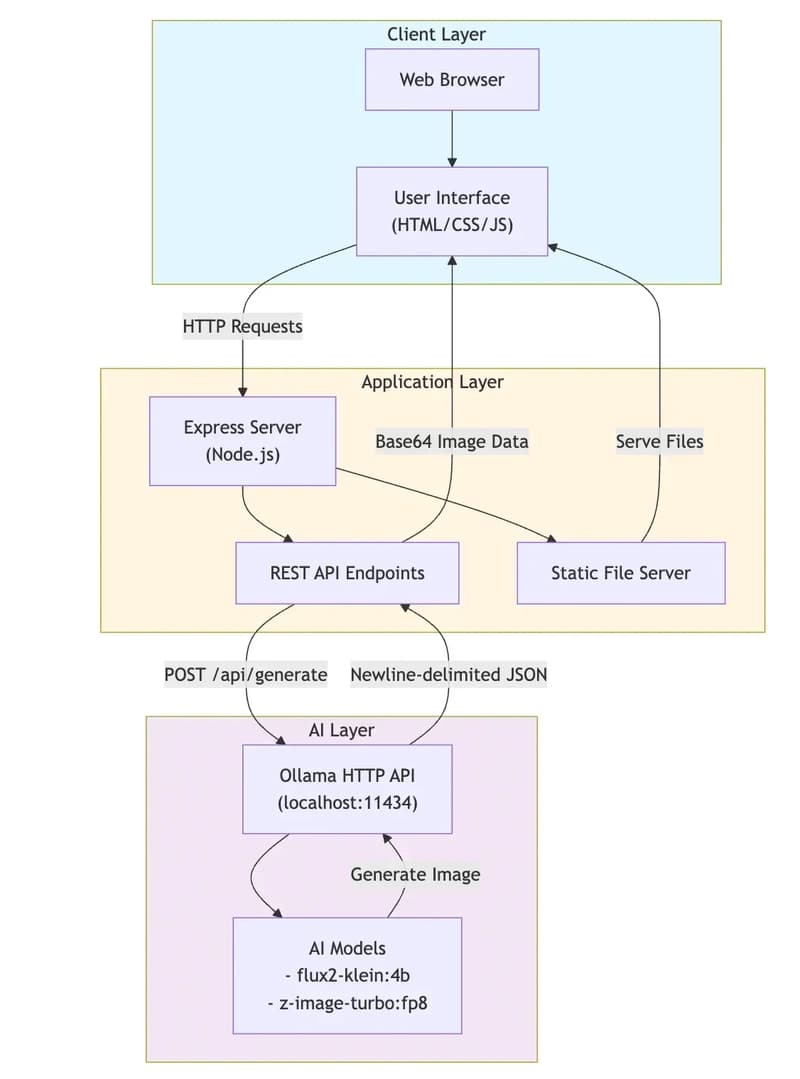
The architecture of the application remains the same, but the main enhanced modules are provided hereafter (the change log is accessible on GitHub)👇
app.js: The latest update to
app.jsintroduces significant hardening and performance tracking. On the security front, we’ve eliminated vulnerabilities by replacinginnerHTMLwith safe DOM manipulation and implementing filename sanitization to prevent directory traversal. Additionally, we’ve integrated memory usage tracking within the history logs and refined the IME composition handling to ensure a seamless experience for Japanese input.
// Application statelet generationHistory = [];

// DOM elementsconst promptInput = document.getElementById('prompt');const modelSelect = document.getElementById('model');const generateBtn = document.getElementById('generateBtn');const resultContainer = document.getElementById('result');const statusDiv = document.getElementById('status');const historyList = document.getElementById('historyList');const btnText = generateBtn.querySelector('.btn-text');const loader = generateBtn.querySelector('.loader');

// Check Ollama connection on loadcheckOllamaConnection();

// Event listenersgenerateBtn.addEventListener('click', generateImage);

// Check if Ollama is runningasync function checkOllamaConnection() {
    statusDiv.textContent = 'Checking connection...';
    statusDiv.className = 'status checking';

    try {
        const response = await fetch('/api/health');
        const data = await response.json();

        if (data.status === 'ok') {
            statusDiv.textContent = '✓ Connected to Ollama';
            statusDiv.className = 'status connected';
        } else {
            statusDiv.textContent = '✗ Ollama not connected';
            statusDiv.className = 'status disconnected';
        }
    } catch (error) {
        statusDiv.textContent = '✗ Cannot connect to server';
        statusDiv.className = 'status disconnected';
    }}

// Generate image functionasync function generateImage() {
    const prompt = promptInput.value.trim();
    const model = modelSelect.value;

    if (!prompt) {
        alert('Please enter a prompt');
        return;
    }

    // Disable button and show loading state
    generateBtn.disabled = true;
    btnText.textContent = 'Generating...';
    loader.style.display = 'block';

    // Clear previous result
    resultContainer.innerHTML = '';
    const placeholder = document.createElement('div');
    placeholder.className = 'placeholder';
    const p = document.createElement('p');
    p.textContent = 'Generating your image...';
    placeholder.appendChild(p);
    resultContainer.appendChild(placeholder);

    try {
        const response = await fetch('/api/generate', {
            method: 'POST',
            headers: {
                'Content-Type': 'application/json'
            },
            body: JSON.stringify({ prompt, model })
        });

        const data = await response.json();

        if (data.success) {
            displayResult(data, prompt, model);
            addToHistory(prompt, model, data.result, data.memoryUsage);
        } else {
            displayError(data.error || 'Failed to generate image');
        }
    } catch (error) {
        displayError('Network error: ' + error.message);
    } finally {
        // Re-enable button
        generateBtn.disabled = false;
        btnText.textContent = 'Generate Image';
        loader.style.display = 'none';
    }}

// Display the resultfunction displayResult(data, prompt, model) {
    const resultContent = document.createElement('div');
    resultContent.className = 'result-content';

    // Check if result contains image data (base64)
    if (data.result && (data.result.startsWith('data:image') || data.result.includes('base64'))) {
        const img = document.createElement('img');
        img.src = data.result;
        img.alt = 'Generated image';
        img.className = 'result-image';
        resultContent.appendChild(img);

        // Add download button
        const downloadBtn = document.createElement('button');
        downloadBtn.className = 'download-btn';
        downloadBtn.textContent = '⬇️ Download Image';
        downloadBtn.onclick = () => downloadImage(data.result, prompt);
        resultContent.appendChild(downloadBtn);
    } else {
        // Display as text if not an image
        const textDiv = document.createElement('div');
        textDiv.className = 'result-text';
        textDiv.textContent = data.result;
        resultContent.appendChild(textDiv);
    }

    // Add info section
    const infoDiv = document.createElement('div');
    infoDiv.className = 'result-info';

    const modelLabel = document.createElement('strong');
    modelLabel.textContent = 'Model:';
    infoDiv.appendChild(modelLabel);
    infoDiv.appendChild(document.createTextNode(' ' + model));
    infoDiv.appendChild(document.createElement('br'));

    const promptLabel = document.createElement('strong');
    promptLabel.textContent = 'Prompt:';
    infoDiv.appendChild(promptLabel);
    infoDiv.appendChild(document.createTextNode(' ' + prompt));

    resultContent.appendChild(infoDiv);

    resultContainer.innerHTML = '';
    resultContainer.appendChild(resultContent);}

// Download image with custom filenamefunction downloadImage(imageDataUrl, defaultPrompt) {
    // Generate a default filename from the prompt (sanitized)
    const sanitizedPrompt = defaultPrompt
        .toLowerCase()
        .replace(/[^a-z0-9\s]/g, '')
        .replace(/\s+/g, '-')
        .substring(0, 50);

    const timestamp = new Date().toISOString().split('T')[0];
    const defaultFilename = `${sanitizedPrompt}-${timestamp}.png`;

    // Prompt user for filename
    const filename = prompt('Enter filename for the image:', defaultFilename);

    // If user cancels, don't download
    if (!filename) return;

    // Remove all path separators to prevent directory traversal
    const sanitizedFilename = filename.replace(/[^a-zA-Z0-9._-]/g, '_');

    // Ensure filename has .png extension
    const finalFilename = sanitizedFilename.endsWith('.png') ? sanitizedFilename : `${sanitizedFilename}.png`;

    // Create a temporary link element and trigger download
    const link = document.createElement('a');
    link.href = imageDataUrl;
    link.download = finalFilename;
    document.body.appendChild(link);
    link.click();
    document.body.removeChild(link);}

// Display error messagefunction displayError(message) {
    const errorDiv = document.createElement('div');
    errorDiv.className = 'error-message';

    const strong = document.createElement('strong');
    strong.textContent = 'Error:';

    const messageText = document.createTextNode(' ' + message);

    const br1 = document.createElement('br');
    const br2 = document.createElement('br');

    const small = document.createElement('small');
    small.textContent = 'Make sure Ollama is running and the models are installed.';

    errorDiv.appendChild(strong);
    errorDiv.appendChild(messageText);
    errorDiv.appendChild(br1);
    errorDiv.appendChild(br2);
    errorDiv.appendChild(small);

    resultContainer.innerHTML = '';
    resultContainer.appendChild(errorDiv);}

// Add to historyfunction addToHistory(prompt, model, result, memoryUsage) {
    const historyItem = {
        prompt,
        model,
        result,
        timestamp: new Date().toLocaleString(),
        memoryUsage: memoryUsage || null
    };

    generationHistory.unshift(historyItem);

    // Keep only last 10 items
    if (generationHistory.length > 10) {
        generationHistory.pop();
    }

    updateHistoryDisplay();}

// Update history displayfunction updateHistoryDisplay() {
    historyList.innerHTML = '';

    if (generationHistory.length === 0) {
        const emptyMessage = document.createElement('p');
        emptyMessage.style.color = '#9ca3af';
        emptyMessage.style.textAlign = 'center';
        emptyMessage.textContent = 'No generation history yet';
        historyList.appendChild(emptyMessage);
        return;
    }

    generationHistory.forEach((item, index) => {
        const historyItemDiv = document.createElement('div');
        historyItemDiv.className = 'history-item';

        const promptDiv = document.createElement('div');
        promptDiv.className = 'history-item-prompt';
        promptDiv.textContent = item.prompt;
        historyItemDiv.appendChild(promptDiv);

        const modelDiv = document.createElement('div');
        modelDiv.className = 'history-item-model';
        modelDiv.textContent = item.model;
        historyItemDiv.appendChild(modelDiv);

        const timeDiv = document.createElement('div');
        timeDiv.className = 'history-item-time';
        timeDiv.textContent = item.timestamp;
        historyItemDiv.appendChild(timeDiv);

        if (item.memoryUsage) {
            const memoryDiv = document.createElement('div');
            memoryDiv.className = 'history-item-memory';
            memoryDiv.textContent = `Memory: RSS +${item.memoryUsage.rssDiff}MB, Heap +${item.memoryUsage.heapUsedDiff}MB`;
            historyItemDiv.appendChild(memoryDiv);
        }

        historyItemDiv.addEventListener('click', () => {
            promptInput.value = item.prompt;
            modelSelect.value = item.model;
            displayResult({ result: item.result }, item.prompt, item.model);
        });

        historyList.appendChild(historyItemDiv);
    });}

// Allow Enter key to submit (with Shift+Enter for new line)// Ignore Enter key during Japanese IME compositionpromptInput.addEventListener('keydown', (e) => {
    if (e.key === 'Enter' && !e.shiftKey && !e.isComposing) {
        e.preventDefault();
        generateImage();
    }});

// Made with Bob
Enter fullscreen mode Exit fullscreen mode
server.js: The
server.jsfile has been completely refactored into a modular, well-documented architecture using helper functions. To improve observability, we integrated c*omprehensive memory tracking* (monitoring RSS, heap, and external usage), alongside centralized configuration constants for easier maintenance. Finally, the service is now more resilient and easier to troubleshoot thanks to enhanced error handling, robust response parsing, and the addition of conditional debug logging.
const express = require('express');const cors = require('cors');const axios = require('axios');const { exec } = require('child_process');const util = require('util');const path = require('path');

const execPromise = util.promisify(exec);

const app = express();const PORT = process.env.PORT || 3000;const OLLAMA_API_URL = 'http://localhost:11434';const MAX_CONTENT_SIZE_BYTES = 50 * 1024 * 1024; // 50MBconst IMAGE_GENERATION_TIMEOUT_MS = 180000; // 3 minutes timeout for image generationconst OLLAMA_REQUEST_CONFIG = {
    timeout: IMAGE_GENERATION_TIMEOUT_MS,
    maxContentLength: MAX_CONTENT_SIZE_BYTES,
    maxBodyLength: MAX_CONTENT_SIZE_BYTES};

app.use(cors());app.use(express.json());app.use(express.static('public'));

// ============================================================================// Helper Functions// ============================================================================

/**
 * Validate request body for image generation
 */function validateRequest(body) {
    const { prompt, model } = body;
    if (!prompt || !model) {
        return { valid: false, error: 'Prompt and model are required' };
    }
    return { valid: true, prompt, model };}

/**
 * Measure current memory usage
 */function measureMemory() {
    return process.memoryUsage();}

/**
 * Calculate and log memory usage difference
 */function logMemoryUsage(memBefore, memAfter) {
    const memDiff = {
        rss: ((memAfter.rss - memBefore.rss) / 1024 / 1024).toFixed(2),
        heapTotal: ((memAfter.heapTotal - memBefore.heapTotal) / 1024 / 1024).toFixed(2),
        heapUsed: ((memAfter.heapUsed - memBefore.heapUsed) / 1024 / 1024).toFixed(2),
        external: ((memAfter.external - memBefore.external) / 1024 / 1024).toFixed(2)
    };

    debugLog('=== Memory Usage Before Generation ===');
    debugLog(`RSS: ${(memBefore.rss / 1024 / 1024).toFixed(2)} MB`);
    debugLog(`Heap Total: ${(memBefore.heapTotal / 1024 / 1024).toFixed(2)} MB`);
    debugLog(`Heap Used: ${(memBefore.heapUsed / 1024 / 1024).toFixed(2)} MB`);
    debugLog(`External: ${(memBefore.external / 1024 / 1024).toFixed(2)} MB`);

    debugLog('=== Memory Usage After Generation ===');
    debugLog(`RSS: ${(memAfter.rss / 1024 / 1024).toFixed(2)} MB (Δ ${memDiff.rss} MB)`);
    debugLog(`Heap Total: ${(memAfter.heapTotal / 1024 / 1024).toFixed(2)} MB (Δ ${memDiff.heapTotal} MB)`);
    debugLog(`Heap Used: ${(memAfter.heapUsed / 1024 / 1024).toFixed(2)} MB (Δ ${memDiff.heapUsed} MB)`);
    debugLog(`External: ${(memAfter.external / 1024 / 1024).toFixed(2)} MB (Δ ${memDiff.external} MB)`);

    return memDiff;}

/**
 * Track memory usage for a generation operation
 */function trackMemoryUsage(beforeMem) {
    const afterMem = measureMemory();
    return logMemoryUsage(beforeMem, afterMem);}

/**
 * Conditional debug logging
 */function debugLog(...args) {
    if (process.env.NODE_ENV === 'development' || process.env.DEBUG === 'true') {
        console.log(...args);
    }}

/**
 * Extract base64 image data from various response formats
 */function extractImageData(data) {
    if (data.image) return `data:image/png;base64,${data.image}`;
    if (data.images?.[0]) return `data:image/png;base64,${data.images[0]}`;
    if (Buffer.isBuffer(data)) return `data:image/png;base64,${data.toString('base64')}`;
    return null;}

/**
 * Parse NDJSON string and return last line as JSON
 */function parseNDJSON(data) {
    const lines = data.trim().split('\n');
    return JSON.parse(lines[lines.length - 1]);}

/**
 * Handle string response (NDJSON format)
 */function parseStringResponse(data, log) {
    log('Response is a string, length:', data.length);

    try {
        const parsed = parseNDJSON(data);
        log('Parsed response keys:', Object.keys(parsed));

        const imageData = extractImageData(parsed);
        if (imageData) {
            log('✓ Found image in parsed response');
            return { imageData, ollamaResponse: '' };
        }

        if (parsed.response) {
            log('Found response field, length:', parsed.response.length);
            return { imageData: null, ollamaResponse: parsed.response };
        }
    } catch (e) {
        log('Failed to parse as JSON:', e.message);
        return { imageData: null, ollamaResponse: data };
    }

    return { imageData: null, ollamaResponse: '' };}

/**
 * Handle object/Buffer response
 */function parseObjectResponse(data, log) {
    const imageData = extractImageData(data);
    if (imageData) {
        log('✓ Found image in response');
        return { imageData, ollamaResponse: '' };
    }

    if (data.response) {
        log('Response length:', data.response.length);
        return { imageData: null, ollamaResponse: data.response };
    }

    return { imageData: null, ollamaResponse: '' };}

/**
 * Parse Ollama API response and extract image/text data
 *
 * CRITICAL: Ollama returns newline-delimited JSON (NDJSON) for image generation
 * Format: Each line is a separate JSON object
 * Example:
 * {"model":"x/flux2-klein:4b","created_at":"...","response":"","done":false}
 * {"model":"x/flux2-klein:4b","created_at":"...","response":"","done":false}
 * {"model":"x/flux2-klein:4b","created_at":"...","done":true,"image":"base64data..."}
 *
 * The LAST line contains the complete image in the 'image' field (singular, not 'images')
 */function parseOllamaResponse(data) {
    debugLog('Ollama API response received');
    debugLog('Response data type:', typeof data);

    if (typeof data === 'object' && !Buffer.isBuffer(data)) {
        debugLog('Response data keys:', Object.keys(data));
    }

    if (typeof data === 'string') {
        return parseStringResponse(data, debugLog);
    }

    if (typeof data === 'object' || Buffer.isBuffer(data)) {
        return parseObjectResponse(data, debugLog);
    }

    debugLog('✗ No image or response data found');
    return { imageData: null, ollamaResponse: '' };}

/**
 * Build API response object
 */function buildResponse({ imageData, ollamaResponse, model, memDiff, responseData }) {
    return {
        success: true,
        result: imageData || ollamaResponse || 'No image generated',
        model,
        hasImage: !!imageData,
        memoryUsage: {
            rssDiff: memDiff.rss,
            heapUsedDiff: memDiff.heapUsed
        },
        debug: {
            responseType: typeof responseData,
            isBuffer: Buffer.isBuffer(responseData),
            responseLength: ollamaResponse.length,
            hasImages: !!(responseData.images)
        }
    };}

/**
 * Generate image using Ollama API
 */async function generateImageWithOllama(model, prompt) {
    return axios.post(
        `${OLLAMA_API_URL}/api/generate`,
        { model, prompt, stream: false },
        OLLAMA_REQUEST_CONFIG
    );}

/**
 * Handle error responses
 */function handleError(error, res) {
    console.error('Error generating image:', error.message);
    if (error.response?.data) {
        console.error('Error details:', error.response.data);
    }
    if (error.stack) {
        console.error('Stack trace:', error.stack);
    }
    res.status(500).json({
        error: 'Failed to generate image',
        details: error.message,
        response: error.response?.data || ''
    });}

// ============================================================================// API Endpoints// ============================================================================

/**
 * Endpoint to generate image using Ollama HTTP API
 * This endpoint handles image generation requests from the frontend
 */app.post('/api/generate', async (req, res) => {
    const { valid, error, prompt, model } = validateRequest(req.body);
    if (!valid) {
        return res.status(400).json({ error });
    }

    try {
        const memBefore = measureMemory();
        debugLog(`Generating image with model: ${model}`);

        const response = await generateImageWithOllama(model, prompt);
        const { imageData, ollamaResponse } = parseOllamaResponse(response.data);
        const memDiff = trackMemoryUsage(memBefore);

        res.json(buildResponse({
            imageData,
            ollamaResponse,
            model,
            memDiff,
            responseData: response.data
        }));

    } catch (error) {
        handleError(error, res);
    }});

// Endpoint to check available modelsapp.get('/api/models', async (req, res) => {
    try {
        const response = await axios.get('http://localhost:11434/api/tags');
        const models = response.data.models || [];

        res.json({
            models: models.map(m => ({ name: m.name }))
        });
    } catch (error) {
        console.error('Error fetching models:', error.message);
        res.status(500).json({
            error: 'Failed to fetch models',
            details: error.message
        });
    }});

// Health check endpointapp.get('/api/health', async (req, res) => {
    try {
        await axios.get('http://localhost:11434/api/tags', { timeout: 5000 });
        res.json({ status: 'ok', ollama: 'connected' });
    } catch (error) {
        res.status(503).json({ status: 'error', ollama: 'disconnected', details: error.message });
    }});

app.listen(PORT, () => {
    console.log(`Server running on http://localhost:${PORT}`);
    console.log(`Using Ollama API for image generation`);
    console.log(`Supported models: x/flux2-klein:4b, x/z-image-turbo:fp8`);});

// Made with Bob
Enter fullscreen mode Exit fullscreen mode
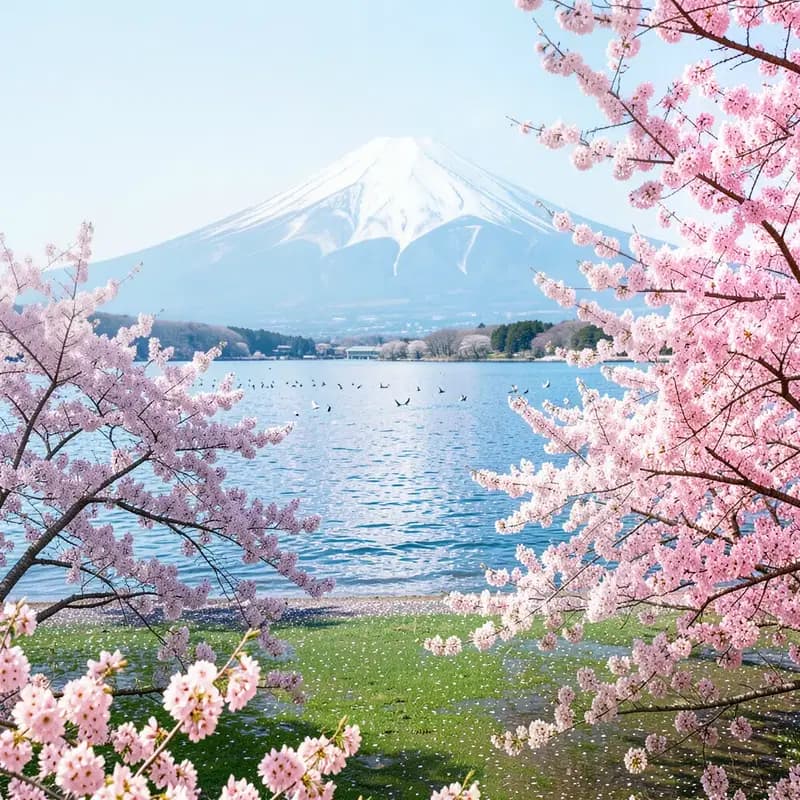
Testing the app: For a prompt like “In Japanese: 春の湖、桜と富士山、遠くに小鳥の群れ (or in French: Un lac de source, des cerisiers en fleurs, le mont Fuji 🗻 et une volée de petits oiseaux au loin)” the result is outstanding 👏
That’s a wrap 💯 ㊗️ 🏯
Conclusion
This project serves as a fantastic testament to the power of the open-source community and modern development workflows. By leveraging Bob to modularize and refine a codebase that was originally built with the same framework, we’ve created a cleaner, more recursive architecture that is both secure and highly maintainable. Perhaps most rewarding, however, was the international collaboration via GitHub; seeing a colleague from Japan contribute such high-level technical enhancements perfectly illustrates why GitHub is the premier platform for global participation. It’s a great example of how developers can unite across borders to turn a personal project into a robust, community-driven application.
>>> Thanks for reading <<<
Links
Code repository: https://github.com/aairom/ollama-image-generator
IBM Bob: https://bob.ibm.com/
Comments(0)
Join the discussion by logging into your account.
No comments yet. Be the first to comment!