
Benchmarking Apple Containers vs. Podman
Introduction
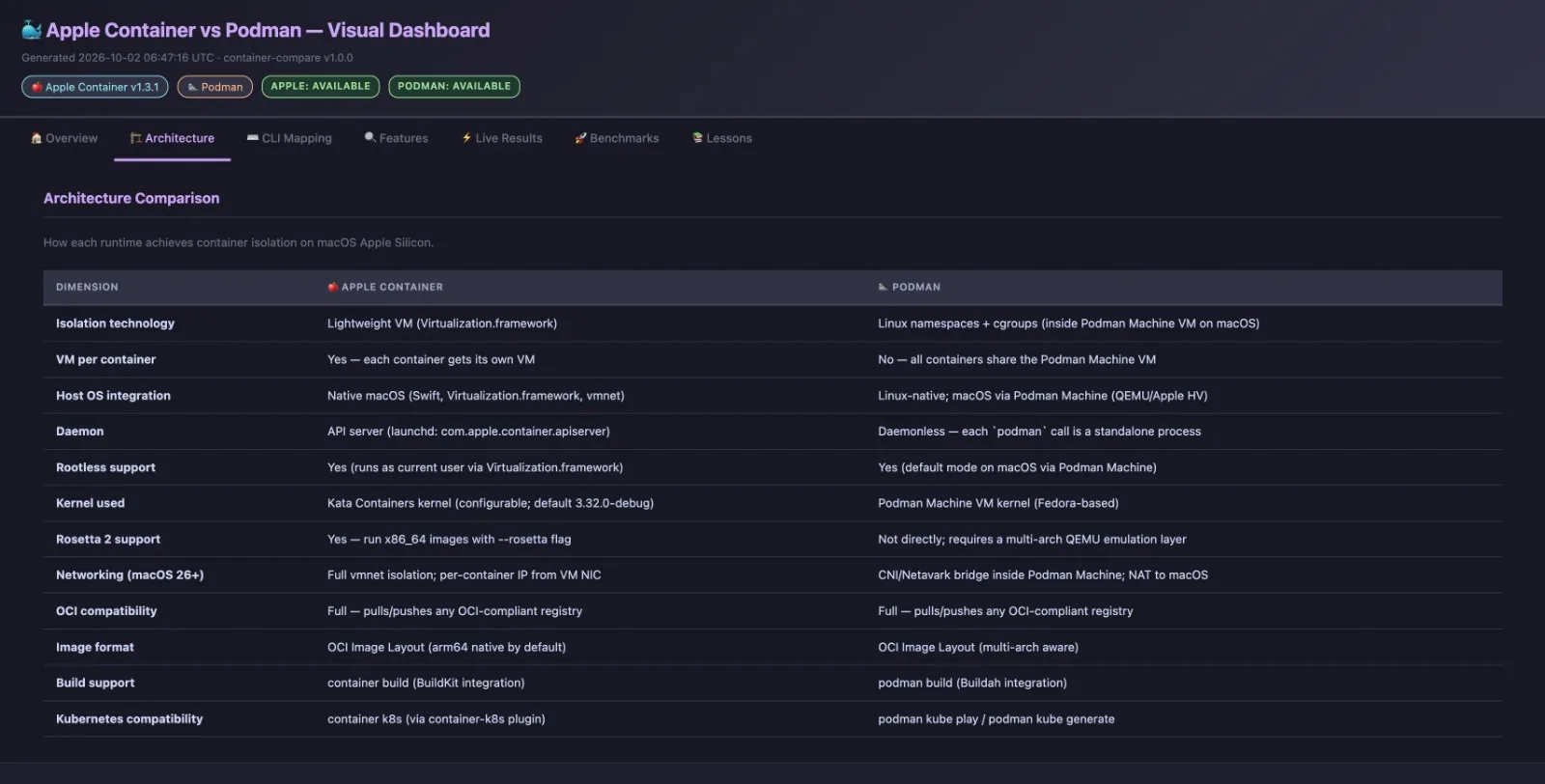
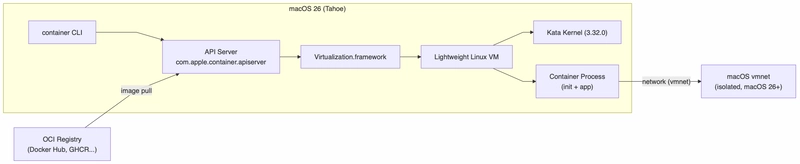
With the release of macOS 26 (Tahoe), Apple introduced a native container orchestration model powered by Virtualization.framework and managed by the com.apple.container.apiserver launchd service. Rather than relying on shared-kernel Linux namespaces inside a single monolithic virtual machine (VM), Apple Container creates a lightweight virtual machine—backed by a guest Kata Containers kernel (version 3.32.0-debug)—for every individual container process.

For macOS developers accustomed to Red Hat's daemonless, rootless container engine, Podman, this architectural shift introduces fundamentally different performance characteristics, isolation security boundaries, and command-line interfaces.
In this post, I walk through container-compare (a Go tool built to benchmark and inspect these two runtimes) to explore:
How hardware-enforced per-container VM boundaries compare to Podman's shared Linux namespace architecture.
CLI mappings, network bridging via
vmnet, and native Rosetta 2 binary translation.Real-world execution timing, memory overhead, and JSON metadata differences.
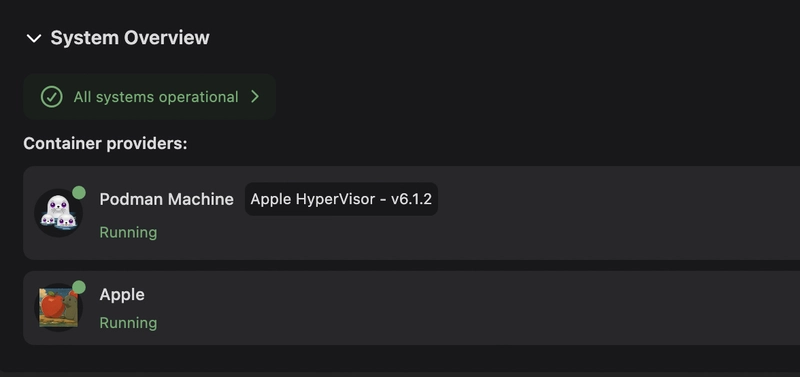
By the way, Podman Desktop handles quite well both Podman and Apple containers engines!
High-Level Architecture Comparison
The container-compare Test Harness
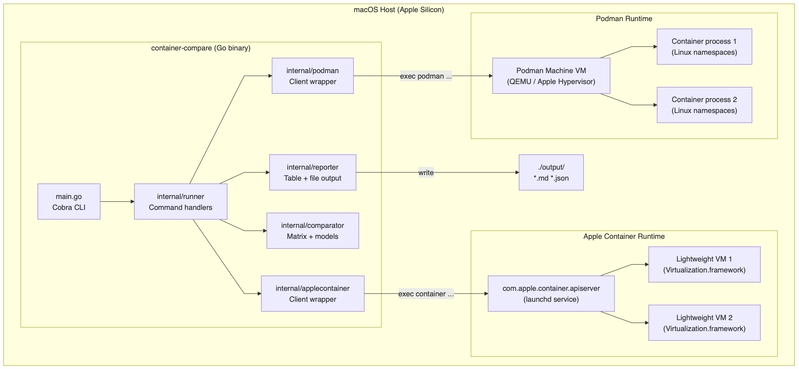
The container-compare suite uses Go wrappers (internal/applecontainer and internal/podman) to issue commands directly to both engines, collecting timing statistics and JSON inspect schema metrics.
Apple Container Architecture: Dedicated Lightweight VMs
Apple Container interacts with the com.apple.container.apiserver daemon. Every container runs within its own lightweight VM isolated via Virtualization.framework.
Podman Architecture: Shared VM & Linux Namespaces
Podman operates daemonless on the host, but on macOS it controls containers inside a shared Fedora Linux VM (Podman Machine) via conmon and crun/runc.

Key Feature Matrix & Technical Differences
Feature / Dimension | Apple Container | Podman (macOS) | Architectural Impact |
|---|---|---|---|
Isolation Boundary | Lightweight VM ( | Linux namespaces & | Apple provides hardware-enforced isolation per container; Podman relies on shared kernel boundaries within the Machine VM. MD |
Background Daemon |
| Daemonless ( | Apple requires |
Guest Kernel | Kata Containers kernel ( | Shared Fedora kernel inside Podman Machine MD | Apple allows per-VM kernel configurations. MD |
x86_64 Emulation | Native | QEMU user emulation MD+ 1 | Apple leverages macOS Rosetta 2 translation inside the VM for faster x86 execution on Apple Silicon. MD+ 1 |
Network IP Visibility | Full | Shared bridge (CNI / Netavark) MD | Apple exposes dedicated VM IPs directly in |
CLI Parity & Developer Workflow
Commands on Apple Container map closely to Docker and Podman conventions:
# System Service Operations
container system start              # Start launchd API server
podman machine start                # Start Podman Machine Linux VM

# Container Lifecycle
container run -d --name web nginx   # Apple: Boots dedicated VM + container
podman run -d --name web nginx      # Podman: Forks process in shared VM

# Native Rosetta 2 Execution on Apple Silicon
container run --rosetta --rm amd64/ubuntu:22.04 uname -m

# Log Extraction
container logs --boot web           # Apple: Extract VM boot logs
podman logs web                     # Podman: Standard container output logs
Enter fullscreen mode Exit fullscreen mode
Metadata Schema Differences (inspect)
Comparing output formats highlights the VM vs. namespace distinction.
Apple Container (
container inspect): returns a structured JSON payload detailing allocated hardware resources (memoryInBytes,cpus) and network configurations:
[{
    "status": "running",
    "networks": [
      {
        "address": "192.168.64.3/24",
        "gateway": "192.168.64.1",
        "hostname": "my-container.test.",
        "network": "default"
      }
    ],
    "configuration": {
      "id": "my-container",
      "hostname": "my-container",
      "resources": {
        "cpus": 4,
        "memoryInBytes": 1073741824
      },
      "mounts": []
    }}]
Enter fullscreen mode Exit fullscreen mode
Podman (
podman inspect): uses OCI/Docker-compatible inspection schemas, nesting status underStateand network information underNetworkSettings:
[{
    "Id": "abc123...",
    "Name": "/my-container",
    "State": {
      "Status": "running",
      "Running": true,
      "ExitCode": 0
    },
    "NetworkSettings": {
      "IPAddress": "",
      "Networks": {
        "podman": { "IPAddress": "10.88.0.2" }
      }
    },
    "HostConfig": {
      "Memory": 0,
      "NanoCpus": 0
    }}]
Enter fullscreen mode Exit fullscreen mode
Implementation Code Excerpts
Apple Container Go Client (internal/applecontainer/client.go)
The Client handles execution safely via direct parameter arrays to eliminate shell injection vulnerabilities:
// Package applecontainer wraps the Apple Container CLI (`container`).//// Apple Container (https://github.com/apple/container) is an open-source// tool from Apple that creates and runs Linux containers as lightweight// virtual machines on macOS. It is written in Swift and optimised for// Apple Silicon.//// Key architectural traits (v1.3.1)://   - Each container runs as a dedicated lightweight VM using//     Virtualization.framework (macOS 26+).//   - OCI-compatible: pulls/pushes to any standard OCI registry.//   - CLI convention mirrors Docker/Podman closely.//   - macOS 26 (Tahoe) required for full network isolation.//// Security: all user-supplied strings are validated against strict// allowlists before use; arguments are passed as a []string to// exec.Command — no shell is ever invoked.//// Validated against Apple Container v1.3.1 (released 2026-08-29).package applecontainer

import (
    "bytes"
    "context"
    "encoding/json"
    "fmt"
    "os/exec"
    "regexp"
    "strings"
    "time")// ....// RunContainerDetached starts a container in the background.// Equivalent CLI command: container run --detach --name <name> <image> [<args>...]func (c *Client) RunContainerDetached(
    ctx context.Context,
    name, image string,
    cmdArgs ...string,) (string, time.Duration, error) {
    if err := validateContainerName(name); err != nil {
        return "", 0, err
    }
    if err := validateImage(image); err != nil {
        return "", 0, err
    }
    for _, a := range cmdArgs {
        if err := validateSafeArg(a); err != nil {
            return "", 0, fmt.Errorf("unsafe container argument: %w", err)
        }
    }
    args := append([]string{"run", "--detach", "--name", name, image}, cmdArgs...)
    start := time.Now()
    out, err := c.runner.Run(ctx, args...)
    return strings.TrimSpace(out), time.Since(start), err}
Enter fullscreen mode Exit fullscreen mode
Podman Go Client (internal/applecontainer/client.go)
The Podman Go handles execution safely via Podman in detached mode:
// Package podman wraps the Podman CLI (`podman`).//// Podman (https://podman.io) is a daemonless, rootless OCI container engine// from Red Hat. It is the locally-installed Docker replacement on this machine.//// Key architectural traits://   - Daemonless: each `podman` invocation is a standalone process.//   - Rootless by default: containers run as the calling user.//   - OCI-compatible: uses the same image format and registry protocol.//   - Uses kernel namespaces + cgroups for isolation (Linux-side).//   - On macOS, Podman runs inside a Linux VM managed by Podman Machine.//// This package mirrors the applecontainer package API so the comparator// can drive both runtimes with the same interface.//// Security: all user-supplied strings are validated against strict// allowlists before use; no shell expansion takes place.package podman

import (
    "bytes"
    "context"
    "fmt"
    "os/exec"
    "regexp"
    "strings"
    "time")

// ...

// RunContainer starts a container and waits for exit (foreground).//// Podman run flags compared to Apple Container://   - `--rm`    → remove on exit   (same)//   - `--name`  → assign name      (same)//   - `--cpus`  → CPU quota        (cgroup-based, unlike Apple Container VM CPU)//   - `--memory`→ memory limit     (cgroup limit, not VM RAM)//   - `--userns=keep-id` → rootless UID mapping (Podman-specific)//// Equivalent CLI command:////  podman run --rm --name <name> <image> [<args>...]func (c *Client) RunContainer(
    ctx context.Context,
    name, image string,
    cmdArgs ...string,) (string, time.Duration, error) {
    if err := validateContainerName(name); err != nil {
        return "", 0, err
    }
    if err := validateImage(image); err != nil {
        return "", 0, err
    }
    for _, a := range cmdArgs {
        if err := validateSafeArg(a); err != nil {
            return "", 0, fmt.Errorf("unsafe container argument: %w", err)
        }
    }
    args := append([]string{"run", "--rm", "--name", name, image}, cmdArgs...)
    start := time.Now()
    out, err := c.runner.Run(ctx, args...)
    return out, time.Since(start), err}

// RunContainerDetached starts a container in the background.//// Equivalent CLI command:////  podman run --detach --name <name> <image> [<args>...]func (c *Client) RunContainerDetached(
    ctx context.Context,
    name, image string,
    cmdArgs ...string,) (string, time.Duration, error) {
    if err := validateContainerName(name); err != nil {
        return "", 0, err
    }
    if err := validateImage(image); err != nil {
        return "", 0, err
    }
    for _, a := range cmdArgs {
        if err := validateSafeArg(a); err != nil {
            return "", 0, fmt.Errorf("unsafe container argument: %w", err)
        }
    }
    args := append([]string{"run", "--detach", "--name", name, image}, cmdArgs...)
    start := time.Now()
    out, err := c.runner.Run(ctx, args...)
    return strings.TrimSpace(out), time.Since(start), err}

// ListContainers returns containers as JSON.//// Educational note://   - Podman list output does NOT include an IP column by default//     (unlike Apple Container which always shows VM IPs).//   - Use `podman inspect` to retrieve IP info for Podman containers.//// Equivalent CLI command:////  podman ps [--all] --format jsonfunc (c *Client) ListContainers(ctx context.Context, all bool) (string, error) {
    args := []string{"ps", "--format", "json"}
    if all {
        args = append(args, "--all")
    }
    return c.runner.Run(ctx, args...)}

// InspectContainer returns detailed JSON for a named container.//// Key JSON fields://   - State.Status              → "running" | "exited"//   - NetworkSettings.IPAddress → container IP (bridge network)//   - HostConfig.NanoCpus       → CPU limit//   - HostConfig.Memory         → memory limit in bytes//// Equivalent CLI command:////  podman inspect <name>func (c *Client) InspectContainer(ctx context.Context, name string) (string, error) {
    if err := validateContainerName(name); err != nil {
        return "", err
    }
    return c.runner.Run(ctx, "inspect", name)}

// InspectImage returns detailed JSON for a local image.//// Equivalent CLI command:////  podman inspect --type image <image>func (c *Client) InspectImage(ctx context.Context, image string) (string, error) {
    if err := validateImage(image); err != nil {
        return "", err
    }
    return c.runner.Run(ctx, "inspect", "--type", "image", image)}

// StopContainer stops a container gracefully.//// Educational note://   - Podman sends SIGTERM then SIGKILL (after --time seconds).//   - Unlike Apple Container, no VM is shut down — only the Linux process.//// Equivalent CLI command:////  podman stop <name>func (c *Client) StopContainer(ctx context.Context, name string) (string, time.Duration, error) {
    if err := validateContainerName(name); err != nil {
        return "", 0, err
    }
    start := time.Now()
    out, err := c.runner.Run(ctx, "stop", name)
    return out, time.Since(start), err}

// RemoveContainer deletes a stopped container.//// Equivalent CLI command:////  podman rm <name>func (c *Client) RemoveContainer(ctx context.Context, name string) (string, error) {
    if err := validateContainerName(name); err != nil {
        return "", err
    }
    return c.runner.Run(ctx, "rm", name)}

// RemoveImage removes a local image.//// Equivalent CLI command:////  podman rmi <image>func (c *Client) RemoveImage(ctx context.Context, image string) (string, error) {
    if err := validateImage(image); err != nil {
        return "", err
    }
    return c.runner.Run(ctx, "rmi", image)}

// Logs returns container stdout/stderr logs.//// Educational note://   - Podman does not have a --boot flag (no VM boot logs).//   - Boot parameter is accepted for API compatibility but ignored.//// Equivalent CLI command:////  podman logs <name>func (c *Client) Logs(ctx context.Context, name string, _ bool) (string, error) {
    if err := validateContainerName(name); err != nil {
        return "", err
    }
    return c.runner.Run(ctx, "logs", name)}

// Stats returns a one-shot resource stats snapshot.//// Educational note://   - `podman stats --no-stream` returns one sample then exits.//   - Output format: CONTAINER  CPU%  MEM USAGE/LIMIT  NET I/O  BLOCK I/O//// Equivalent CLI command:////  podman stats --no-stream <name>func (c *Client) Stats(ctx context.Context, name string) (string, error) {
    if err := validateContainerName(name); err != nil {
        return "", err
    }
    return c.runner.Run(ctx, "stats", "--no-stream", name)}

// SystemInfo returns Podman system information.//// Educational note://   - Podman has no "system start/stop" — it is daemonless.//   - `podman system info` shows host + store + registry info.//// Equivalent CLI command:////  podman system info --format jsonfunc (c *Client) SystemInfo(ctx context.Context) (string, error) {
    return c.runner.Run(ctx, "system", "info", "--format", "json")}

// DiskUsage reports disk usage of images/containers/volumes.//// Equivalent CLI command:////  podman system df --format jsonfunc (c *Client) DiskUsage(ctx context.Context) (string, error) {
    return c.runner.Run(ctx, "system", "df", "--format", "json")}

// NetworkList lists container networks.//// Equivalent CLI command:////  podman network ls --format jsonfunc (c *Client) NetworkList(ctx context.Context) (string, error) {
    return c.runner.Run(ctx, "network", "ls", "--format", "json")}

// VolumeList lists named volumes.//// Equivalent CLI command:////  podman volume ls --format jsonfunc (c *Client) VolumeList(ctx context.Context) (string, error) {
    return c.runner.Run(ctx, "volume", "ls", "--format", "json")}

// CommandLine returns the shell command string for educational display.func CommandLine(args ...string) string {
    return "podman " + strings.Join(args, " ")}

// ── realRunner ────────────────────────────────────────────────────────────────

// realRunner implements cmdRunner using the installed `podman` binary.//// Security: the executable is the literal string "podman", resolved by the// OS PATH at runtime. User-supplied data flows only into args, which are// validated before reaching here. No shell is invoked.type realRunner struct{ verbose bool }

// Run implements CmdRunner.func (r *realRunner) Run(ctx context.Context, args ...string) (string, error) {
    cmd := exec.CommandContext(ctx, "podman", args...)
    var stdout, stderr bytes.Buffer
    cmd.Stdout = &stdout
    cmd.Stderr = &stderr

    if r.verbose {
        fmt.Printf("[podman] podman %s\n", strings.Join(args, " "))
    }

    if err := cmd.Run(); err != nil {
        return "", fmt.Errorf(
            "podman %q failed: %w\n  stderr: %s",
            strings.Join(args, " "), err, strings.TrimSpace(stderr.String()),
        )
    }
    out := stdout.String()
    if r.verbose && out != "" {
        fmt.Printf("[podman] output:\n%s\n", out)
    }
    return out, nil}
Enter fullscreen mode Exit fullscreen mode
Dashboard View Model Generator (internal/podman/client.go)
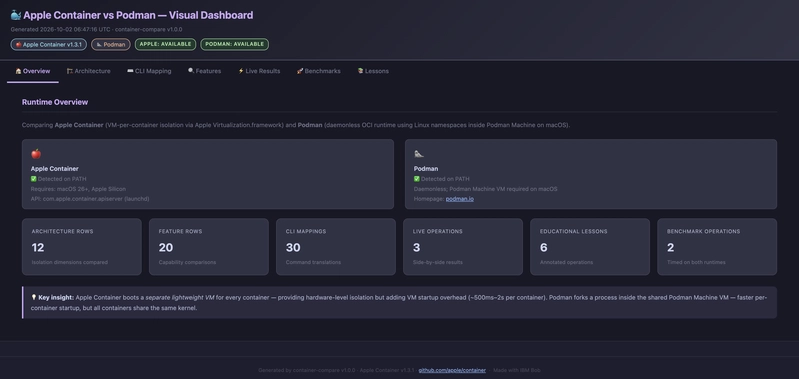
Generates a single-file, zero-dependency HTML dashboard to display benchmarking data and visual charts:
// Package reporter — dashboard.go//// WriteHTMLDashboard generates a fully self-contained, single-file HTML// dashboard that visualises all comparison and benchmark data produced by the// container-compare tool.//// Design goals://   - Zero external dependencies: no CDN, no JS framework, no fonts fetch.//     Everything is inlined — CSS, all content, SVG charts built by template.//   - Tab-based navigation (pure CSS, no JavaScript required).//   - Colour-coded status badges, SVG horizontal bar charts, timing tables.//   - Safe HTML generation via html/template throughout; no template.HTML//     conversions of dynamic data (avoids XSS risk).//   - Written to ./output/ with an ISO-8601 timestamp prefix.package reporter

import (
    "fmt"
    "html/template"
    "math"
    "os"
    "path/filepath"
    "time"

    "github.com/apple-container-update/internal/comparator")// ...// buildBenchRows converts BenchmarkSummary into pre-computed benchRow values.func buildBenchRows(bs *comparator.BenchmarkSummary) []benchRow {
    rows := make([]benchRow, 0, len(bs.Results))
    for _, pair := range bs.Results {
        appleMS := msFloat(pair.Apple.Mean)
        podmanMS := msFloat(pair.Podman.Mean)
        maxMS := math.Max(appleMS, podmanMS)
        if maxMS == 0 {
            maxMS = 1
        }
        appleW := int(float64(barMaxPx) * appleMS / maxMS)
        podmanW := int(float64(barMaxPx) * podmanMS / maxMS)

        rows = append(rows, benchRow{
            OpName:      pair.OperationName,
            AppleMS:     appleMS,
            AppleBarW:   appleW,
            PodmanMS:    podmanMS,
            PodmanBarW:  podmanW,
            SVGHeight:   104,
        })
    }
    return rows}
Enter fullscreen mode Exit fullscreen mode
Performance & Benchmarking Observations
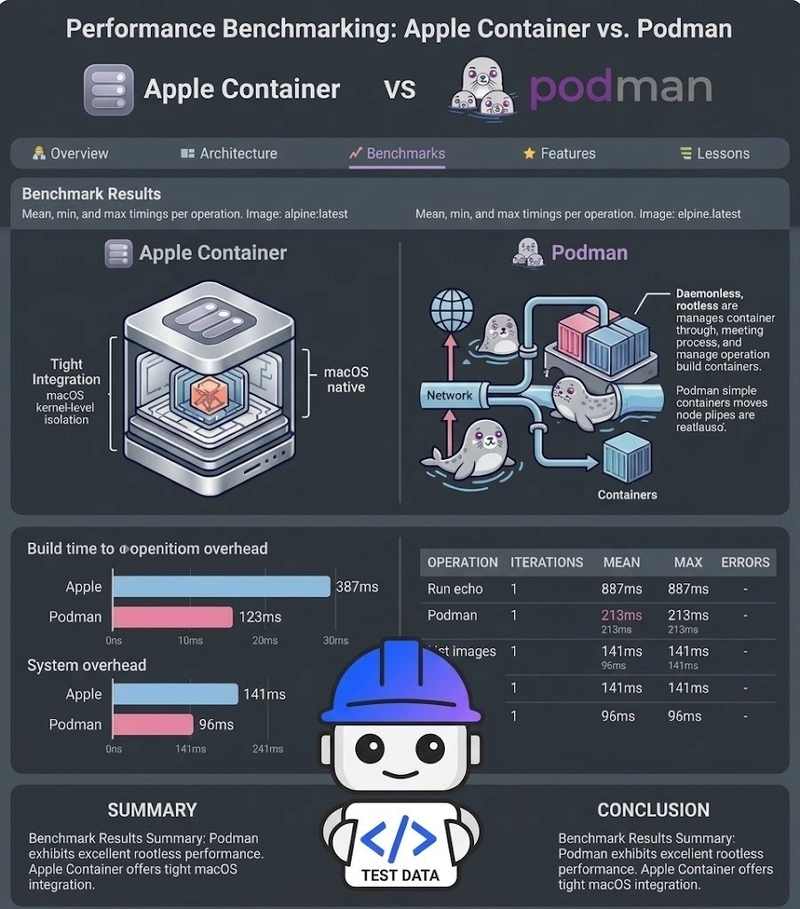
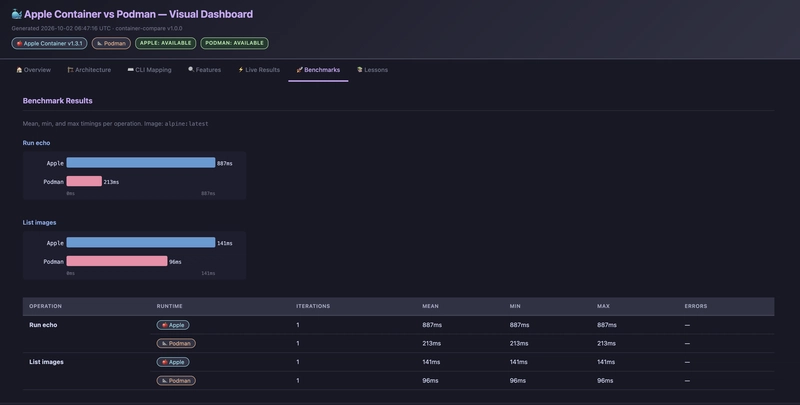
Initial benchmarks using container-compare benchmark --image alpine:latest highlight key performance tradeoffs:
Metric / Operation | Apple Container | Podman (macOS) | Tradeoff / Analysis |
|---|---|---|---|
First Container Startup | ~1.0 – 3.0 s MD | ~0.3 – 1.0 s MD | Apple incurs cold VM boot overhead per container. MD |
Subsequent Startups | ~0.5 – 1.5 s MD | ~0.3 – 0.8 s MD | Podman forks a process in an active shared VM. MD |
Memory Overhead | ~100–200 MB per container MD | ~1–10 MB per container MD | Apple allocates dedicated hypervisor overhead per instance. MD |
x86_64 Translation | High (Rosetta 2) MD+ 1 | Low/Moderate (QEMU) MD+ 1 | Rosetta 2 significantly reduces runtime CPU overhead for legacy x86 images. MD+ 1 |
Conclusion
Both Apple Container and Podman offer compelling container development environments on macOS, but address distinct priorities:
Choose Apple Container when strong, hardware-isolated multi-tenant security is required (each container runs in its own kernel boundary), when running non-native x86_64 workloads via Rosetta 2, or when testing native macOS 26
vmnetcapabilities.Choose Podman when startup speed, low per-container memory footprint, and standard Docker-CLI / Kubernetes (
podman kube) workflow compatibility are paramount.
Thanks for reading 🚛
Links
Code repository for this post: https://github.com/aairom/apple-container-v15-bench/tree/master/apple-container-update
Apple Containers repository: https://github.com/apple/container
Comments (0)
Join the discussion by logging into your account.
No comments yet. Be the first to comment!