

There is a reason Phil Karlton's 1990s quip — that the two hardest problems in computer science are cache invalidation and naming things — still surfaces in every engineering conversation. Caching is simple in theory and genuinely difficult in practice. Get it right and your API responds in single-digit milliseconds under load. Get it wrong and you ship corrupted data, stale reads, or a cache stampede that takes down your database at peak traffic.
This guide cuts through the noise. You will learn the five core caching patterns, when to reach for each one, how eviction policies work, how to approach the invalidation problem, and what not to cache. Every section includes working code you can apply today.
Why Caching Matters: The Numbers
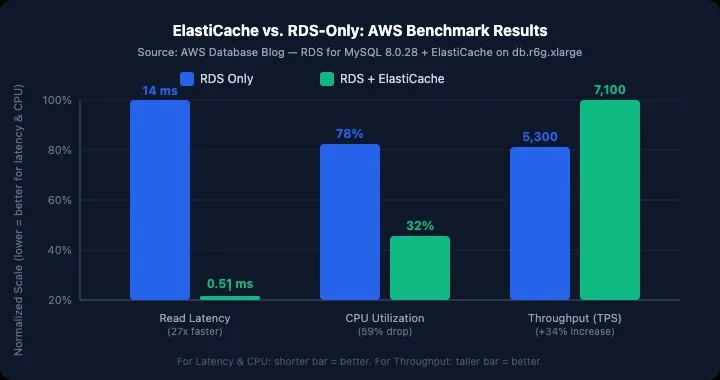
The performance gap between a database read and a cache read is not incremental — it is categorical. AWS benchmarks on RDS for MySQL 8.0 paired with ElastiCache show average read latency dropping from 14 ms to 0.51 ms — a 27x improvement — with RDS CPU utilization falling from 78% to 32% and throughput increasing 34% simultaneously. A single Redis instance, per Redis's own benchmark documentation, can sustain over 1.8 million GET operations per second with pipelining enabled. The database cannot compete with RAM on raw throughput.
The impact at scale is equally stark. Facebook's Memcached deployment, documented at USENIX NSDI '13, handles billions of requests per second across trillions of cached items — an architecture where the cache, not the database, is the primary read path for the world's largest social network. AWS benchmarks further show caching RDS workloads can reduce infrastructure costs by up to 55%, because fewer read replicas are needed.
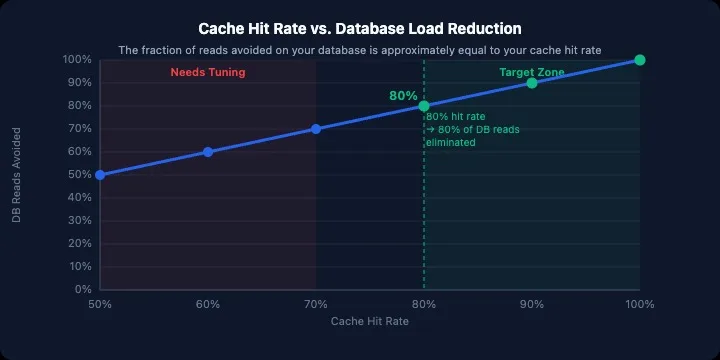
The relationship between hit rate and database load is direct: at an 80% cache hit rate, 80% of your database reads are eliminated. The chart below shows how this scales:
The point is not that caching always helps — the sections below explain when it actively hurts. It is that ignoring it, at any meaningful scale, almost always leaves significant performance and cost on the table.
Core Terminology
Get these four concepts locked in before the patterns.
Cache hit / cache miss — A hit means the requested key exists in cache and is returned directly. A miss means it does not; the application must fetch from the source of truth (usually the database).
TTL (Time to Live) — How long a cached entry lives before it expires automatically. Too short and you get high miss rates; too long and you risk serving stale data. The right TTL is almost always workload-specific and discovered through measurement, not intuition.
Eviction policy — What happens when the cache runs out of memory. The cache must remove something to make room. Your policy choice determines what gets removed (covered in its own section below).
Cache stampede (thundering herd) — What happens when many requests simultaneously miss a key that just expired, all racing to repopulate it from the database at once. This is one of the most common ways caching makes an outage worse rather than better.
Quick Decision Framework
Before the deep dives, here is the pattern-selection map. Jump to whichever section applies:
Is data read frequently and written infrequently?
  └─ Yes → Cache-Aside (default) or Read-Through

Is data consistency critical on every write?
  └─ Yes → Write-Through
  └─ No, and writes are very frequent → Write-Behind (with durable queue)

Are hot keys causing stampedes on expiry?
  └─ Yes → Refresh-Ahead

Can you tolerate eventual consistency (minutes)?
  └─ Yes → TTL-based invalidation is sufficient

Must every read see the latest write immediately?
  └─ Yes → Do not cache this data
The Five Core Caching Patterns
1. Cache-Aside (Lazy Loading)
The most common pattern. The application owns all cache interaction logic. On a read, it checks the cache first. On a miss, it queries the database, stores the result in cache, and returns it to the caller.
Read request
     │
     ▼
  Cache hit? ──Yes──▶ Return cached value
     │
     No
     │
     ▼
  Query database
     │
     ▼
  Store in cache (with TTL)
     │
     ▼
  Return value
Node.js / Redis example:
import { createClient } from 'redis';

const redis = createClient({ url: process.env.REDIS_URL });
await redis.connect();

async function getUserById(userId) {
  const cacheKey = `user:${userId}`;

  // 1. Check cache first
  const cached = await redis.get(cacheKey);
  if (cached) {
    return JSON.parse(cached); // cache hit
  }

  // 2. Miss — fetch from database
  const user = await db.query('SELECT * FROM users WHERE id = $1', [userId]);
  if (!user) return null;

  // 3. Populate cache with a 10-minute TTL
  await redis.setEx(cacheKey, 600, JSON.stringify(user));

  return user;
}
Python equivalent:
import json
import os
import redis

r = redis.Redis.from_url(os.getenv("REDIS_URL"))

def get_user_by_id(user_id: int):
    cache_key = f"user:{user_id}"

    cached = r.get(cache_key)
    if cached:
        return json.loads(cached)

    user = db.execute("SELECT * FROM users WHERE id = %s", (user_id,)).fetchone()
    if not user:
        return None

    r.setex(cache_key, 600, json.dumps(dict(user)))
    return user
When to use it: Read-heavy workloads where data changes infrequently. The cache only populates on demand, so you never pre-warm stale entries. It is resilient to cache failures — if Redis goes down, the application still works (slower, but correctly).
Trade-off: The first request after a cache miss (or expiry) always hits the database. Under high concurrency this becomes the stampede problem. Add a distributed lock or use the refresh-ahead pattern to mitigate.
2. Read-Through
Similar to cache-aside, but the cache itself fetches from the database on a miss, rather than the application. The application only ever talks to the cache.
// The cache client is configured with a loader function
const cache = new CacheClient({
  loader: async (key) => {
    const userId = key.split(':')[1];
    return db.query('SELECT * FROM users WHERE id = $1', [userId]);
  },
  ttl: 600,
});

// Application code is now clean:
async function getUserById(userId) {
  return cache.get(`user:${userId}`); // miss handled internally
}
When to use it: When you want to keep cache interaction logic in one place and out of business code. Works well with managed caching services that support loader callbacks (e.g., Momento, AWS ElastiCache with data tiering).
Trade-off: Slightly less flexible than cache-aside — you cannot customize the miss flow per call site. The first-request miss penalty is identical.
3. Write-Through
Every write goes to the cache and the database simultaneously, synchronously, before returning to the caller.
async function updateUser(userId, data) {
  const cacheKey = `user:${userId}`;

  // Write to database first (or transactionally with cache)
  const updated = await db.query(
    'UPDATE users SET name = $1, email = $2 WHERE id = $3 RETURNING *',
    [data.name, data.email, userId]
  );

  // Immediately update cache
  await redis.setEx(cacheKey, 600, JSON.stringify(updated));

  return updated;
}
When to use it: When data consistency is critical and writes are not extremely frequent. The cache is always warm and always fresh. Read performance is excellent because entries exist immediately after a write — no cold-start miss.
Trade-off: Every write requires two round-trips (database + cache) before returning. For write-heavy workloads this compounds at scale. You also cache data that might never be read, wasting memory.
4. Write-Behind (Write-Back)
The application writes to the cache only, and a background process flushes dirty entries to the database asynchronously. The write returns immediately after the cache is updated.
// Simplified write-behind with a queue
async function updateUserAsync(userId, data) {
  const cacheKey = `user:${userId}`;

  // Write to cache immediately — caller gets fast response
  await redis.setEx(cacheKey, 600, JSON.stringify({ ...data, id: userId }));

  // Queue the database write for background processing
  await redis.lPush('db:write-queue', JSON.stringify({
    table: 'users',
    id: userId,
    data,
    timestamp: Date.now(),
  }));
}

// Background worker (runs separately)
async function processWriteQueue() {
  while (true) {
    const item = await redis.brPop('db:write-queue', 0); // blocking pop
    const { table, id, data } = JSON.parse(item.element);
    await db.query(`UPDATE ${table} SET name=$1, email=$2 WHERE id=$3`, [data.name, data.email, id]);
  }
}
When to use it: High write-throughput scenarios where sub-millisecond write latency is required and you can tolerate a small window of data loss. Session stores, analytics event pipelines, activity feeds.
Trade-off: Risk of data loss. If the cache node fails between the write and the flush, the database never gets updated. Always pair write-behind with Redis persistence (AOF or RDB) and durable queue infrastructure (e.g., Kafka, SQS) in production.
5. Refresh-Ahead (Proactive Refresh)
The cache predicts which entries are about to expire and refreshes them in the background before they go cold — so the caller never experiences a miss.
const REFRESH_THRESHOLD = 0.2; // refresh when 20% of TTL remains

async function getUserWithRefreshAhead(userId) {
  const cacheKey = `user:${userId}`;

  const [cached, ttlRemaining] = await Promise.all([
    redis.get(cacheKey),
    redis.ttl(cacheKey),
  ]);

  if (cached) {
    const fullTtl = 600; // your configured TTL
    const shouldRefresh = ttlRemaining < fullTtl * REFRESH_THRESHOLD;

    if (shouldRefresh) {
      // Trigger background refresh without blocking the caller
      refreshUserCache(userId).catch(console.error);
    }

    return JSON.parse(cached);
  }

  // Full miss — blocking refresh
  return refreshUserCache(userId);
}

async function refreshUserCache(userId) {
  const user = await db.query('SELECT * FROM users WHERE id = $1', [userId]);
  await redis.setEx(`user:${userId}`, 600, JSON.stringify(user));
  return user;
}
When to use it: Frequently accessed, expensive-to-compute data where cache miss latency is unacceptable. Home page aggregations, pricing data, leaderboards. Eliminates the stampede problem entirely for hot keys.
Trade-off: You may refresh data that was never requested after its refresh — wasted compute. Requires good observability to tune the threshold correctly.
Eviction Policies: What Gets Dropped When Memory Is Full
Policy | Full Name | How It Works | Best For |
|---|---|---|---|
LRU | Least Recently Used | Evicts the entry accessed least recently | General-purpose; good default |
LFU | Least Frequently Used | Evicts the entry accessed least often overall | Workloads with stable hot-key distribution |
FIFO | First In First Out | Evicts oldest entry regardless of access | Simple queues; less common |
TTL | Time-based | Evicts based on expiry time | All workloads; complements LRU/LFU |
Random | — | Evicts a random entry | Rarely the right choice in production |
Redis default is noeviction — it throws an error when memory is full rather than silently dropping data. Switch to allkeys-lru for most production workloads:
# In redis.conf or via CONFIG SET
maxmemory 2gb
maxmemory-policy allkeys-lru
For workloads with clear hot-key skew (e.g., celebrity social media posts), allkeys-lfu tends to outperform LRU because frequency is a better predictor of future access than recency. USENIX NSDI '18 research shows that hit rate increases logarithmically as a function of cache capacity — meaning the eviction policy becomes more important than raw memory size as you scale.
Cache Invalidation: The Hard Part
Phil Karlton was right. Cache invalidation is hard because the cache and the source of truth can diverge, and the application must detect and resolve that divergence without serving incorrect data or generating excessive database load.
The three practical strategies:
TTL-based expiry
Let entries expire automatically after a configured duration. Simple, predictable, eventually consistent.
await redis.setEx('product:123:price', 300, JSON.stringify(price)); // 5 min
Risk: Stale reads for up to the full TTL window. For pricing data, a 5-minute stale price may be acceptable. For account balances, it is not.
Event-driven invalidation
Invalidate (delete) a cache entry the moment the underlying data changes, rather than waiting for TTL expiry.
// In your update endpoint
async function updateProduct(productId, data) {
  await db.query('UPDATE products SET price = $1 WHERE id = $2', [data.price, productId]);

  // Immediately purge — next read will miss and repopulate
  await redis.del(`product:${productId}:price`);

  // Or pattern-delete all keys related to this product
  const keys = await redis.keys(`product:${productId}:*`);
  if (keys.length > 0) await redis.del(keys);
}
Risk: Delete-before-repopulate creates a brief window where all in-flight requests hit the database simultaneously. For high-traffic keys, use cache-aside with a distributed lock, or write-through instead.
Versioned keys
Append a version number or hash to the cache key. Updates increment the version, making the old key unreachable without requiring an explicit delete.
// Store the current version
await redis.set('product:123:version', 'v5');

// Cache key includes version
const version = await redis.get('product:123:version');
const cacheKey = `product:123:price:${version}`;

// On update: bump version (old key becomes unreachable)
await redis.incr('product:123:version');
This is the safest approach for multi-region or distributed caches where explicit delete propagation is unreliable. Old entries age out via TTL naturally.
Redis vs. Memcached: Which One?
This question comes up in every architecture discussion. The short answer for new projects: use Redis.
Redis | Memcached | |
|---|---|---|
Data types | Strings, hashes, lists, sets, sorted sets, streams | Strings only |
Persistence | RDB snapshots + AOF log | None |
Replication | Built-in primary/replica | External only |
Pub/Sub | Yes | No |
Lua scripting | Yes | No |
Max value size | 512 MB | 1 MB |
Multithreading | Multi-threaded I/O (Redis 6+) | Multi-threaded |
Best for | Nearly all production use cases | Pure key/value, ultra-simple workloads |
Memcached's one genuine advantage is slightly lower memory overhead for pure string storage at extreme scale. Unless you are operating at hundreds of terabytes of cache data, this rarely matters. Redis's richer data types, persistence options, and Lua scripting make it the clear default.
The benchmark comparison below is from real AWS infrastructure measurements — not synthetic lab tests:
What NOT to Cache
Caching is not universally beneficial. These are situations where it actively causes harm:
Highly volatile data. If a value changes more often than your TTL, you will serve stale data constantly while paying cache infrastructure overhead for essentially no hits. Financial ticker prices and live sports scores are common examples where a direct database or streaming feed is the right answer.
Unbounded key spaces. If your cache key includes a user-supplied parameter with high cardinality (e.g., search query strings), you will generate millions of cache keys that each get accessed once. This consumes memory, produces near-zero hit rates, and degrades eviction efficiency. Apply caching only to keys with stable, bounded spaces.
Data that is cheaper to recompute than to cache. Simple arithmetic or deterministic in-memory transformations have effectively zero cost. Routing them through a network call to Redis adds latency.
Data requiring real-time consistency. If the application contract requires that every read reflects every write with zero lag — shopping cart totals, bank balances, inventory counts during flash sales — a cache introduces a consistency lag that your users will experience as bugs.
Personally identifiable information you do not need to cache. Every cached PII record is an additional attack surface. If the TTL benefits do not justify the exposure, leave it out of the cache.
Preventing the Cache Stampede
When a hot key expires under heavy traffic, every concurrent request races to repopulate it. This is the stampede. Three proven defenses:
Probabilistic early expiry — Each process individually decides whether to refresh before expiry, with probability increasing as expiry approaches. Simple to implement with no coordination overhead.
function shouldEarlyRefresh(ttlRemaining, fullTtl, beta = 1) {
  // Higher beta = more aggressive early refresh
  return ttlRemaining <= fullTtl * beta * Math.random();
}
Distributed lock — Only one process is permitted to repopulate the key at a time. All others wait or return a stale value.
const lock = await redis.set(
  `lock:user:${userId}`,
  '1',
  { NX: true, EX: 10 } // only set if not exists, expire in 10s
);

if (lock) {
  // We won the lock — repopulate
  const user = await db.query('SELECT * FROM users WHERE id = $1', [userId]);
  await redis.setEx(`user:${userId}`, 600, JSON.stringify(user));
  await redis.del(`lock:user:${userId}`);
  return user;
} else {
  // Lost the lock — wait briefly and retry, or return a slightly stale value
  await sleep(50);
  return getUserById(userId);
}
Background refresh with stale-while-revalidate — Serve the stale value immediately while a single background process refreshes asynchronously. This is the refresh-ahead pattern applied reactively.
Monitoring Cache Health
A cache you cannot observe is a cache you cannot trust. Track these four metrics in production:
Metric | What It Tells You | Action Threshold |
|---|---|---|
Hit rate | Fraction of reads served from cache | Investigate below 80% |
Miss rate | Fraction of reads falling through to DB | Spikes indicate TTL or eviction issues |
Eviction rate | Keys dropped due to memory pressure | Any eviction = consider memory increase |
Latency (p99) | 99th percentile cache round-trip | Above 1 ms warrants investigation |
// Instrument your cache-aside reads
async function getUserById(userId) {
  const start = Date.now();
  const cacheKey = `user:${userId}`;
  const cached = await redis.get(cacheKey);

  if (cached) {
    metrics.increment('cache.hit', { key_type: 'user' });
    metrics.histogram('cache.latency_ms', Date.now() - start);
    return JSON.parse(cached);
  }

  metrics.increment('cache.miss', { key_type: 'user' });
  const user = await db.query('SELECT * FROM users WHERE id = $1', [userId]);
  await redis.setEx(cacheKey, 600, JSON.stringify(user));
  return user;
}
Summary
Caching is one of the highest-leverage tools in backend engineering. The five core patterns map cleanly to distinct use cases:
Cache-Aside — the safe, flexible default for read-heavy workloads
Read-Through — same as cache-aside but encapsulated inside the cache layer
Write-Through — strong consistency on writes, acceptable write latency
Write-Behind — maximum write throughput, requires durable queuing
Refresh-Ahead — eliminates miss latency for predictable hot keys
Master cache invalidation — TTL, event-driven delete, and versioned keys — before worrying about exotic patterns. Most real-world caching problems come down to stale data or stampedes, and both have well-understood solutions.
Start with Redis, instrument hit rate from day one, and set allkeys-lru as your eviction policy. Everything else you can tune iteratively as traffic grows.
FAQ
What is a good cache hit rate? In most production workloads, a hit rate above 80% is the practical target. At 80% hit rate, roughly 80% of your database reads are eliminated. Below 70%, TTL tuning and key design should be revisited. Note that hit rate increases logarithmically with cache capacity — so the eviction policy and key design matter more than raw memory at scale.
Should I use Redis or a CDN for caching? CDNs (Cloudflare, Fastly) cache at the network edge — ideal for static assets and API responses that are identical across users. Redis caches at the application layer — ideal for user-specific or frequently updated data. They are complementary, not alternatives.
How do I invalidate cache entries across multiple services in a microservices architecture? Use an event bus (Kafka, RabbitMQ, or Redis Pub/Sub). The service that owns the data publishes an invalidation event when it writes; all services that cache that data subscribe and delete their local entries. This is the event-driven invalidation pattern applied at scale.
Can caching make my application slower? Yes, in two scenarios: cache miss rate is so high that you are adding a network round-trip to every database call (net negative), or cache lookup latency exceeds the database query you were trying to skip (rare, but happens with misconfigured Redis in high-latency networks). Monitor before deploying caching and measure after.
What is a cold start / cold cache problem? When your cache is empty — after a deployment, a restart, or provisioning a new node — all requests miss until entries are populated. For critical keys, pre-warm the cache at startup by reading from the database and populating keys before traffic is admitted.
Comments(1)
Join the discussion by logging into your account.
Igor Ganapolsky
Solid breakdown. One thing that saved me a lot of pain: for cache-aside, add a short negative-cache TTL (30-60s) for misses, otherwise a hot missing key turns every request into a DB hit. And on invalidation, delete the key instead of writing the new value from the request path - concurrent writers can otherwise leave a stale value that never expires. Jittered TTLs (base + random 10%) also stop whole key groups from expiring in the same second after a deploy. Curious which eviction policy you settled on for your hot-key workloads?