

Ask "how does wind move through a house?" and you get two kinds of answers. Grandma's feng shui rule, or a CFD tutorial that opens with "first, install this 4 GB license-locked software and learn meshing."
I wanted the thing in between: draw a floor plan, spin a wind dial, watch the air go. Couldn't find it. So I spent a weekend building it.
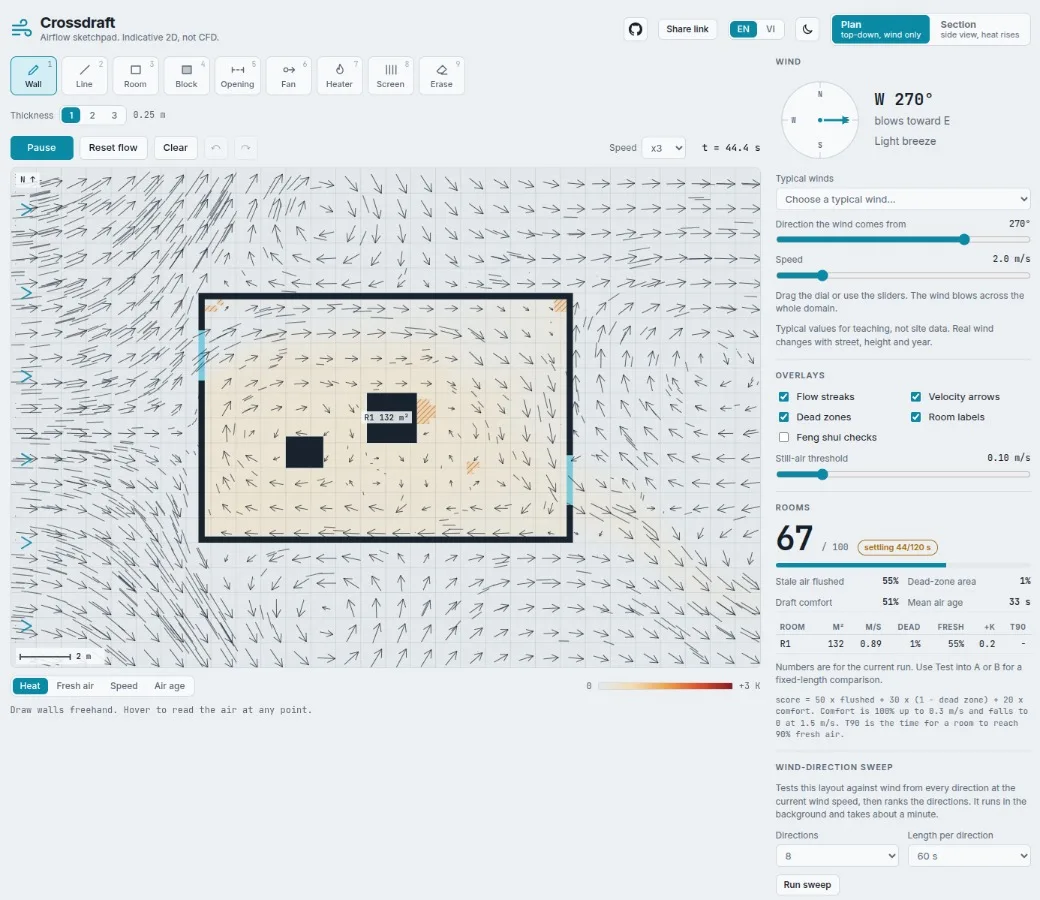
Crossdraft is a free browser sketchpad for airflow. Draw walls, cut windows, set the wind, and watch which rooms get fresh air and which ones just sit there being stuffy. It's for comparing layouts, not certifying them.
I'm an AI/ML engineer in Vietnam (my day job), and this is another of my weekend builds. Not a startup. Not a product. A toy that turned out to be weirdly useful.
TL;DR
Runs 100% in your browser. No server, no install, Apache 2.0, on GitHub.
A real fluid solver (stable fluids) in plain TypeScript, scoring each layout 0 to 100.
Best example: 81. Worst: 22. One apartment has two bedrooms getting exactly 0.00 fresh air.
It's 2D. Air never goes over the roof. Use it to compare, not to sign off.
The fun part: drawing with wind
Pick a tool, draw a wall, punch a window in it, hit start. Little streaks and arrows start flowing through your rooms like ants on a mission.
Nine tools: wall, line, room, block, opening, fan, heater, screen, erase.
Plan view is top-down, wind only.
Section view is the side cut, where warm air actually rises.
My favourite feature isn't the score. It's the sentence. Once a room settles, Crossdraft tells you what's wrong in plain words:
"R2 stays stale: it has only one opening, so air has no way to flow through. Add an opening on another wall."
A student learns more from that one line than from any number.
Wait, a fluid sim with no server?
Yep. It's plain TypeScript running in your tab.
Your drawing becomes a grid of 0.25 m cells. Each cell tracks air velocity, pressure, and three passengers: fresh air, air age, and temperature.
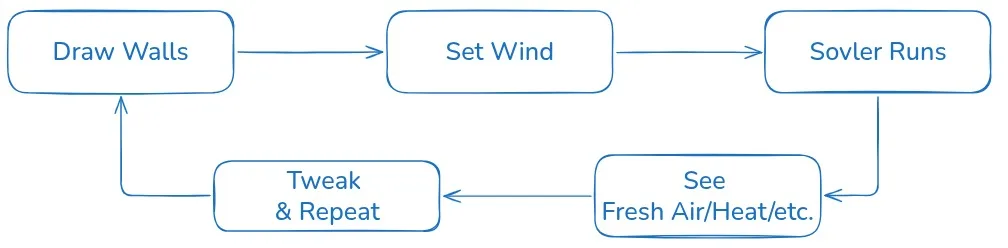
The engine is Jos Stam's Stable Fluids, the classic trick from game physics. I picked it because it never explodes, whatever wind you throw at it. Every step runs this loop:
flowchart LR
    A["Forces<br/>fans, heaters, warm air rises"] --> B["Advect<br/>air carries itself along"]
    B --> C["Project<br/>un-squish the air (pressure solve)"]
    C --> D["Scalars<br/>move fresh air, age, heat"]
    D --> A
Then Crossdraft reads the result. A flood fill finds the rooms, and each room gets a score:
score = 50 × flushed + 30 × (1 − dead zone) + 20 × comfortComfort drops off above 0.3 m/s, because a hurricane in your bedroom isn't good ventilation. Simple rules then turn those numbers into the sentence ("only one opening", "sealed room").
Same drawing, same wind, same numbers, every time. That's why every table here is reproducible.
So which houses can breathe?
I threw the nine bundled examples at a 2 m/s westerly wind for 60 simulated seconds (120×80 grid, 0.25 m cells):
Example | Score | Fresh air per room |
|---|---|---|
Windows on one side only | 22 | R1 0.04 |
Apartment, bedrooms behind the living room | 27 | R1 0.11, R2 0.00, R3 0.00 |
One side only, plus a fan | 57 | R1 0.32 |
Studio behind a neighbour | 63 | R1 0.35 |
Courtyard house | 64 | R1 0.71, R2 0.12, R3 0.71 |
Cross-ventilated studio | 69 | R1 0.63 |
Two rooms and a door | 71 | R1 0.53, R2 0.57 |
Tube house with a light well | 81 | R1 1.00, R2 1.00, R3 0.98 |
Aligned windows with a screen | 81 | R1 0.78 |
(60 s isn't fully settled, so compare rows with each other, not with a building code.)
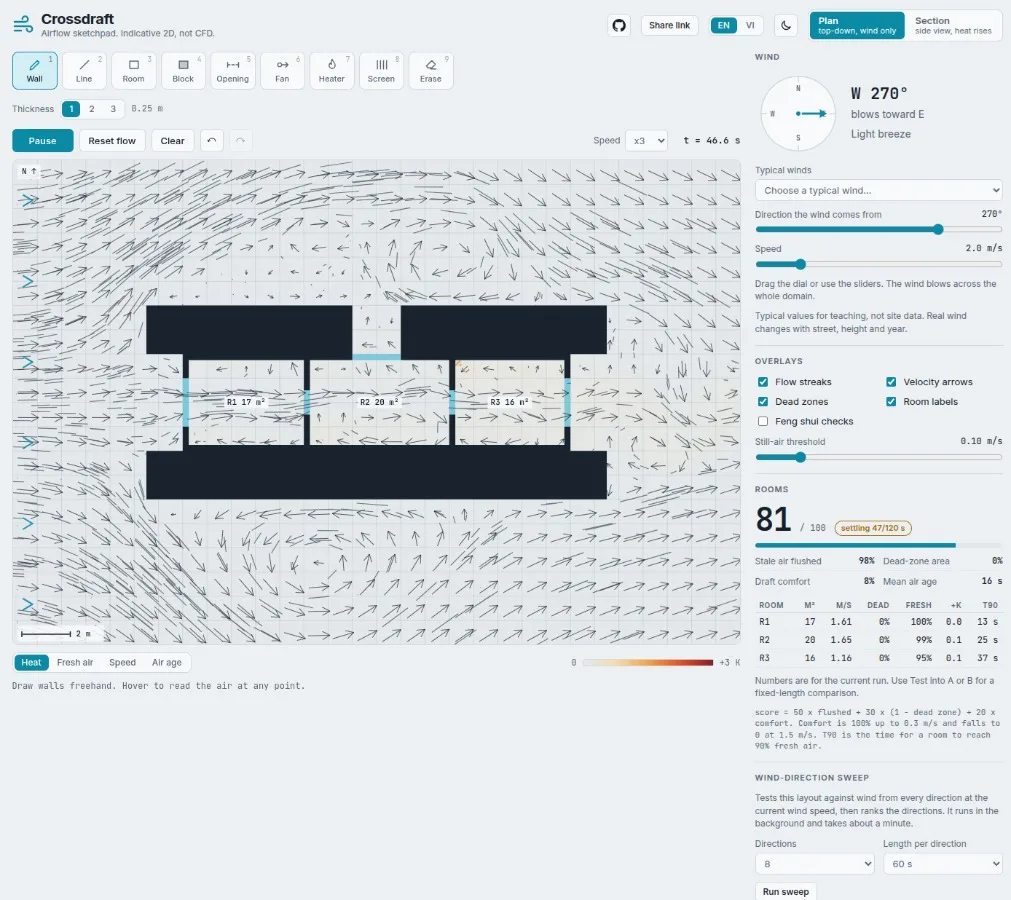
This is the tub house with a light well
Two stories jump out:
The apartment. Two bedrooms, zero fresh air. Every breath has to queue through the living room first. Sounds like a normal apartment. Scores 27.
The tube house. The classic Vietnamese narrow house, plus a light well, tops the chart at 81. Old-school design, quietly winning.
Does wind direction even matter?
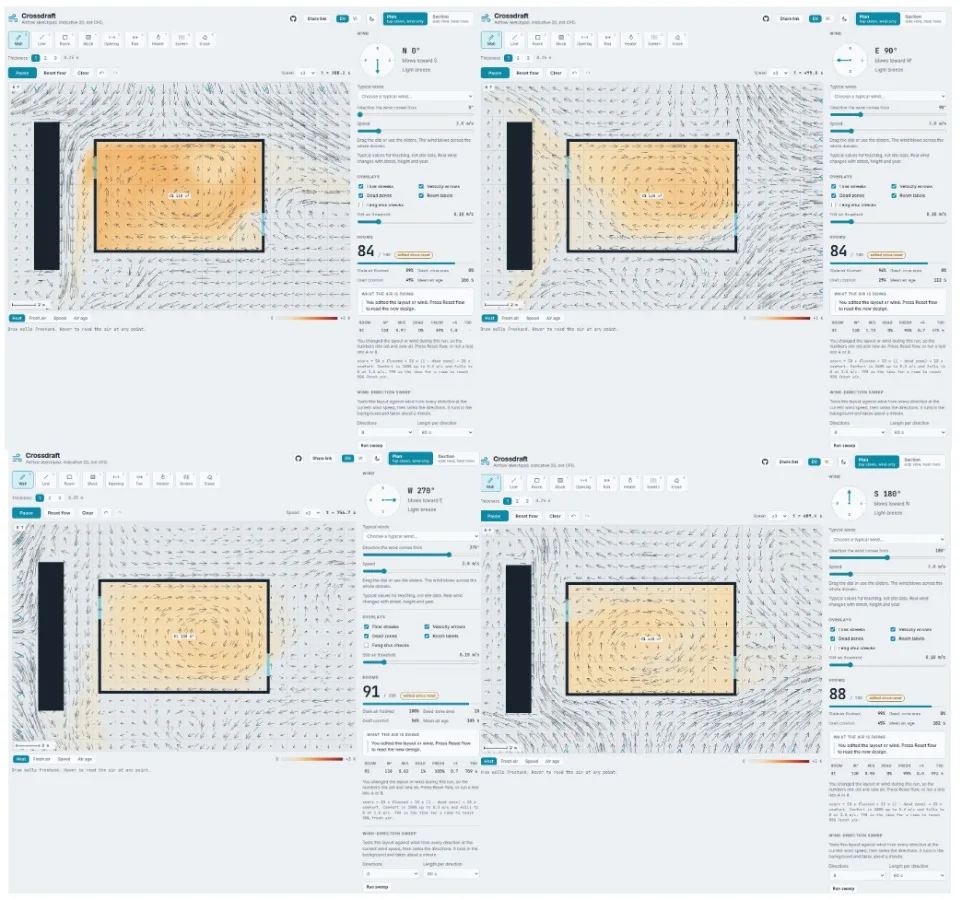
The studio behind a neighbor
I spun the wind through 8 directions on the studio:
Wind from (°) | Score | Fresh air | Dead-zone share |
|---|---|---|---|
0 | 67 | 0.51 | 0.02 |
45 | 58 | 0.56 | 0.00 |
90 | 69 | 0.63 | 0.00 |
135 | 66 | 0.69 | 0.00 |
180 | 64 | 0.49 | 0.02 |
225 | 59 | 0.57 | 0.00 |
270 | 69 | 0.63 | 0.00 |
315 | 67 | 0.69 | 0.00 |
Studio: shrugs. Only 11 points between best and worst. The apartment, though: 27 from the west, 45 from the north. Same house, different wind, very different nap quality.
Things that blew up (literally, numerically)
The over-eager solver. Pressure uses successive over-relaxation. Crank the factor to 1.95 and it explodes. More iterations didn't help either, because the leftover error comes from the grid itself. Settled on 1.8 and 16 iterations. Boring. Works.
The one cell that ruined everything. The time step follows the fastest air on the grid. A single corner cell next to a wall would spike way above the wind speed, and the whole sim slowed to a crawl because of one drama-queen cell. Fix: cap the estimate at 2.5× the free-stream speed.
How much should you trust it?
Honestly? Trust the comparison, not the number.
It's 2D, so no air over the roof, and indoor speeds come out too high. Wall heat-loss values are plausible, not measured. If you're building a real house, get a real CFD run or a real measurement.
But if layout A scores 27 and layout B scores 81 under the same wind? That second window is doing real work. That's the whole point.
Play with it
Option 1: try it in your browser (30 seconds)
Nothing to install and no sign-up. The solver runs on your own machine, so nothing gets uploaded.
A quick first run to get a feel for it:
Load a bundled example. Start with “Windows on one side only” and press start. Watch the air barely move (it scores 22).
Fix it. Pick the opening tool and cut a window in the opposite wall. Run it again and watch the streaks flush straight through.
Spin the wind dial. Same layout, different wind direction. Some plans don’t care; the apartment jumps from 27 to 45.
Read the sentence. Once a room settles, the panel tells you why it’s stale and what to change.
Switch to section view. Drop in a heater and watch the warm air rise.
Draw your own place. Your room, your dorm, your parents’ house. Then find out which bedroom is quietly scoring 0.00.
Option 2: run it locally
You need Node.js (I used 22.12) and npm.
git clone https://github.com/MinLee0210/crossdraft
cd crossdraft
npm install
npm run dev
Open the local URL the terminal prints. Everything runs client-side, so the full sim works offline once it has loaded.
What this weekend taught me
Show the sentence, not just the score. Humans read words.
Put the limits next to the number, not buried in a footer.
Test the "obvious" stuff. A layout that sounds totally fine can score 27.
Go break it. Draw your own house, your dorm, your dream café. If your bedroom scores 0.00, I'm sorry, but at least now you know.
Comments(0)
Join the discussion by logging into your account.
No comments yet. Be the first to comment!