

WP Bones 3.0 is out. It is a major release, and the theme is a single question: what does the framework do when your plugin says nothing? In 2.x the answer was usually "the convenient thing". In 3.0 it is the safe thing, and when you want the convenient one, you say so.
Migrations run once per site
In 2.x every migration, and every seeder, ran again on each activation and on each update made from the dashboard, inside the request that installed the update, with the old code still in memory. An update by ZIP, FTP, git or Composer never ran them at all.
In 3.0 each migration runs once per site, in file-name order, and its name is recorded in an option. The pending ones run when the plugin is activated, on the first request after its Version header changes, however the update arrived, or when you run php bones migrate. A lock keeps two requests from running them at once, and a failure stops the run and tells the administrators until it runs. Seeders are gone: seed data is a migration now.
This design came out of a long thread on GitHub issue #40 with @balazsnasz, who pushed for a real record of what ran. Thank you.
What declares nothing is for administrators
A page in config/routes.php or pages/, or a menu in config/menus.php, that declares no capability now needs manage_options. A REST route without a permission_callback refuses every request with WordPress's own rest_forbidden. If a page is meant for every logged-in user, or a route is public on purpose, say so: 'capability' => 'read', 'permission_callback' => '__return_true'.
Requests that change something carry a nonce
In 2.x a form on another site could post to a WP Bones admin page with an administrator's cookies, and the page would run its controller. In 3.0 every request to an admin page that is not a GET carries the plugin's nonce: your forms print it with $plugin->csrfField(), and the check runs before any load callback or controller method. Logged-in Ajax actions need a $nonceHash, and make:ajax now sets one for you.
Generated files leave the plugin folder
Compiled Blade views and log files used to live inside the plugin folder, which the web server serves. They now go to wp-content/uploads/wpbones/<your plugin>/, behind an .htaccess, and the log files carry a name keyed with your site's salt, so they cannot be guessed on servers that ignore .htaccess.
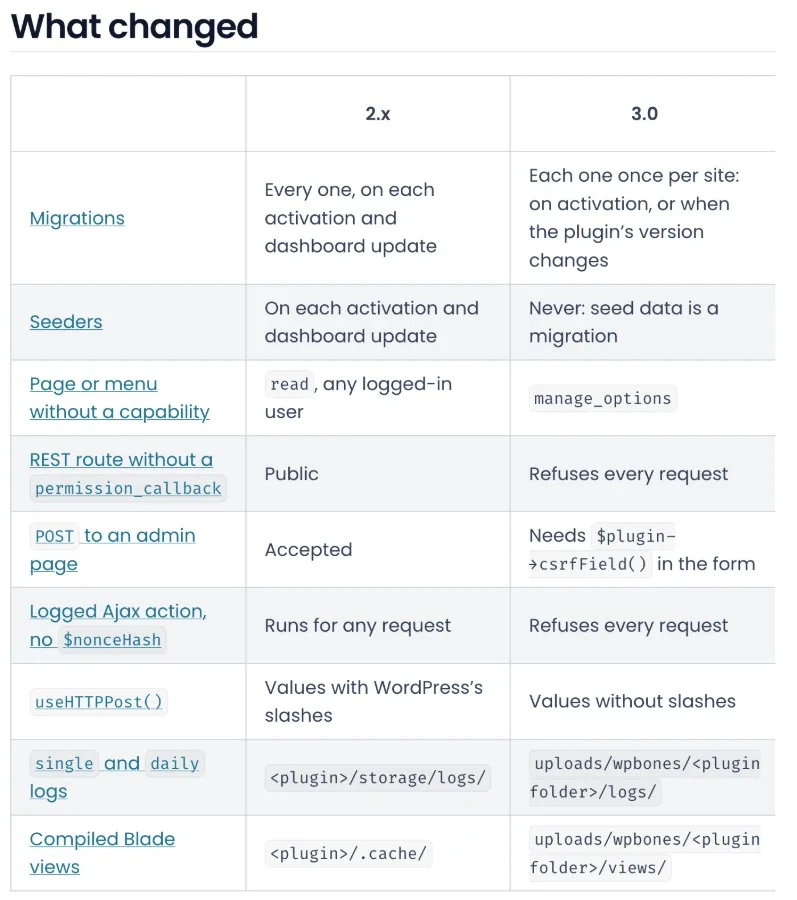
The "What changed" table of the WP Bones 3.0 upgrade guide: migrations, seeders, pages and menus, REST routes, POST to an admin page, logged Ajax actions, useHTTPPost(), logs and compiled Blade views, each with its 2.x and 3.0 behaviour
One command to start
php bones migrate:to-v3 converts your migrations and seeders, then lists what it leaves to you: every page, menu and REST route that declares nothing, every POST form without the nonce, every Ajax provider without one. It rewrites nothing on that list: who may open a page is your decision.
Upgrading
Read the upgrade guide first, then composer require "wpbones/wpbones:^3.0" and php bones migrate:to-v3. A plugin that stays on ^2 keeps receiving 2.1.3. PHP stays at 8.1+, React stays at 18, and the build does not change. The 14 boilerplates and their Playground demos are already on 3.0, the suite has 350 tests, and the full notes are on GitHub.
WP Bones is free and open source (LGPL-3.0), runs on PHP 8.1+, and installs with Composer.
Website: wpbones.com
Docs: https://wpbones.com/docs
Comments (2)
Join the discussion by logging into your account.
Igor Ganapolsky
Defaulting an undeclared page to manage_options, and an undeclared REST route to rest_forbidden, is the change I would keep even if nothing else landed. In 2.x a missing field meant a cookie was enough, or that the REST route was open. Requiring an explicit capability of read, or a permission_callback that returns true, when you actually want that is the same rule WordPress uses for a missing permission_callback. The migration side matches it: once per site, filename order, and only after the Version header changes, so a ZIP, git, or Composer update is not a silent skip. The sharp edge is a failed migration. If the filename is written to the option before the schema change commits, the next request treats a half-applied file as done. The lock stops two requests overlapping. It does not by itself make that write atomic with the SQL.