

There is a particular kind of thing on your network that Netfox could never show you, and it was not a gap in the feature list. It was structural.
Netfox found devices by listening. Some things announce themselves; others give themselves away by exchanging a packet with something. Between the two, most of a home network turns up. But a device that is switched on, quiet, and has never had a reason to talk to your Mac produces neither signal — so it was not merely hard to find, it was unreachable by construction. A printer asleep. A camera that only ever phones its own cloud. Something you set up months ago and stopped thinking about.
Now it can ask
Give Netfox a range of addresses and it sends one small question to each. Whatever answers turns up as an ordinary device — its identity, its history, its alerts, all of it — because the sweep does not create a parallel list, it feeds the one you already have.
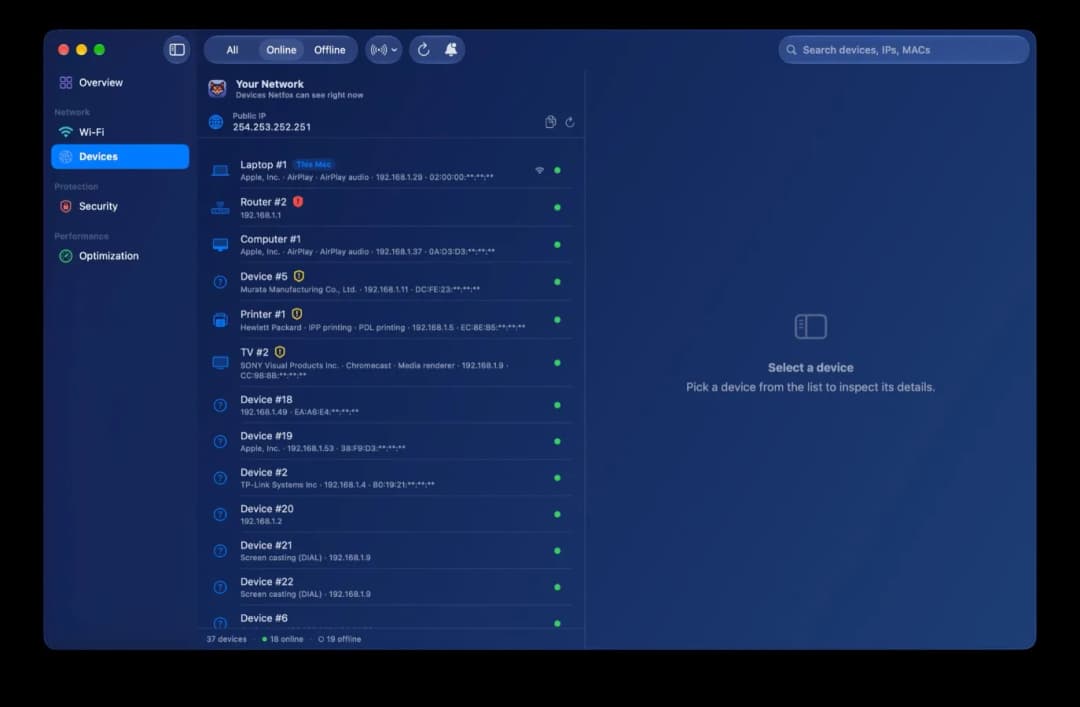
It stays inside your own subnet, needs no password and installs nothing. A range that reaches outside is refused rather than trimmed to fit, because a trimmed range asks about a different set of addresses than the one you typed, and nothing on screen would tell you.
The range is also a filter, and that is the important half
Set it to two addresses and the list shows those two devices. Nothing else.
This started as a way to bound how long a sweep takes and turned out to be the thing that makes the feature trustworthy: you can see what it found. Set a narrow range, look, and know. While a range is active the control that set it says so and offers to clear it, and the footer carries both numbers — 2 in range · 33 on the network — because a filter you have forgotten looks exactly like a network that has lost thirty devices, and nothing else on screen would disagree with it.
Who is holding that port on your own Mac
Open the Ports tab for your own machine and each row now names what holds the port: the process, the user it runs as, its ID. A click deeper says how it is managed, and whether closing it can be undone.
That last one is worth dwelling on, because it is the difference between a decision and a one-way door. Netfox asks your Mac rather than guessing, and the honest answer is usually no: most services, once you stop them, stay stopped until something asks for them again. On the machine this was measured on, only 2 of 36 running services were set to restart themselves. A tool that told you "it'll come back" would have been wrong about the other 34.
Smaller things you will notice
Inspecting a port that has closed since the last scan no longer keeps you waiting. A refusal is an answer, and it arrives in about a millisecond — it was being read as a silence, so every inspection sat out its full timeout behind a spinner, on something you had just clicked.
And two things on the Overview stopped moving about: the summary cards now reach the right edge of the window instead of leaving an empty column beside them, and the line under the Wi-Fi figures keeps one height whether the rate is holding, has just renegotiated, or has not been measured twice yet. A fast radio drifting between 864 Mb/s and 1.4 Gb/s was resizing the whole card every couple of seconds.
Netfox is free, a universal binary (Apple Silicon + Intel), runs on macOS 15.6+, and is signed and notarized.
Netfox for macOS — Website: https://netfox.app · Download: https://netfox.app/download
Comments(0)
Join the discussion by logging into your account.
No comments yet. Be the first to comment!