
For the last four posts, I've been using phrases like "fast," "slow," "grows with the size," and "thousands of times faster." Big-O is the proper name for that whole idea. It has a reputation for being scary math. It isn't. It's mostly counting and noticing patterns, and this post is core, because it explains a lot about AI systems: why vector search needs special indexes, why long prompts get expensive, and why batching helps.
No calculus, no proofs. Just growth.
The question Big-O answers
Big-O doesn't answer "how many seconds does this take?" That depends on your computer, your Python version, and what else is running. It answers a different question:
As the input gets bigger, how much slower does my code get?
That's the important question, because code that's fine on 100 items can be unusable on 100 million. Here's a way to feel it. Imagine a party where every person shakes hands with every other person. How many handshakes?
People | Handshakes |
|---|---|
10 | 45 |
100 | 4,950 |
1,000 | 499,500 |
Ten times more people means about a hundred times more handshakes. The work grows with the square of the number of people. That "everyone with everyone" shape shows up constantly in code, and it's the one that bites hardest.
The common growth rates
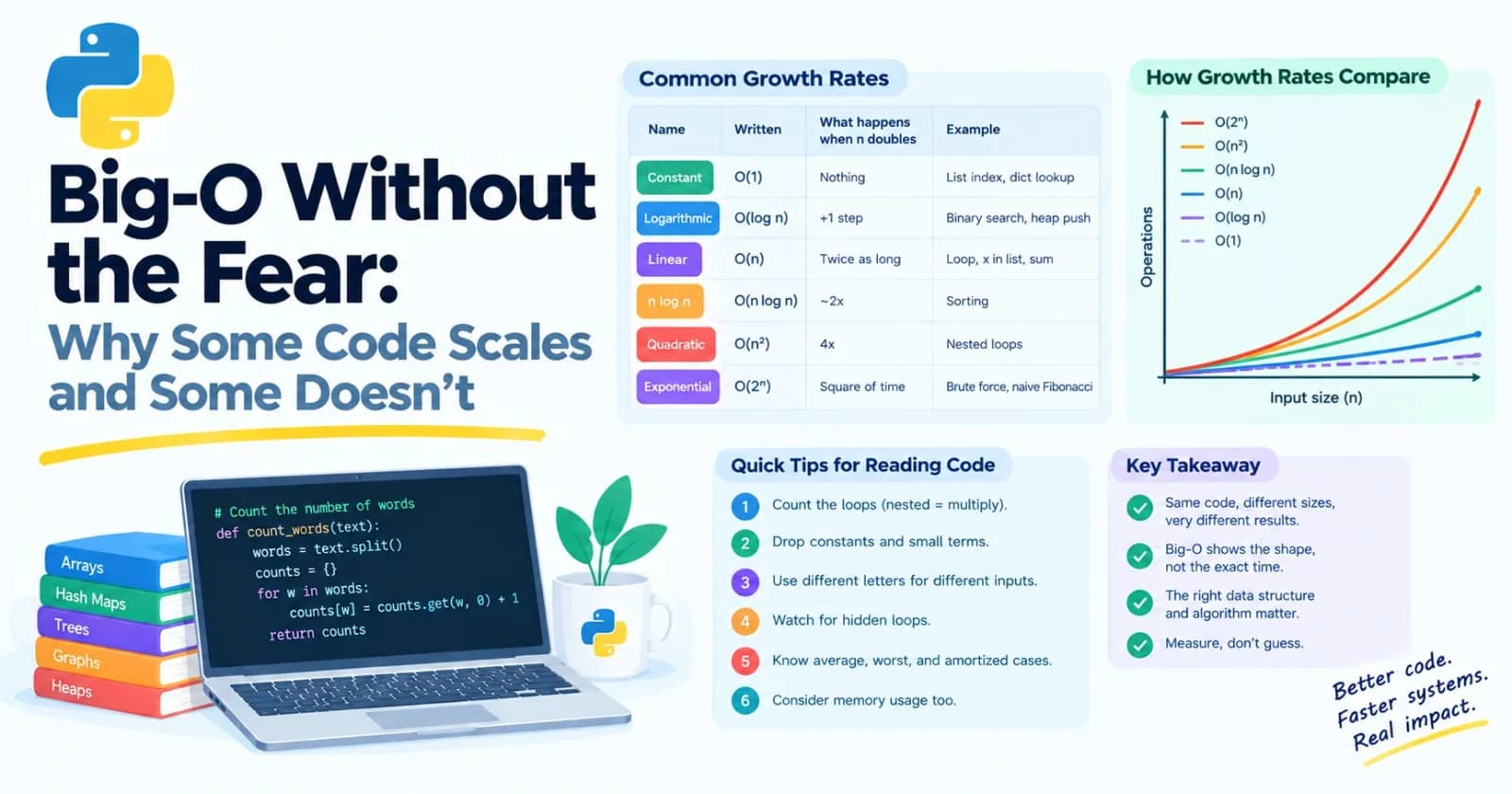
Programmers use the letter n for the size of the input, and write the growth rate as O(something). Here are the ones you'll meet, in order from gentlest to scariest:
Name | Written | What happens when the input doubles | Typical example |
|---|---|---|---|
Constant | O(1) | Nothing. Same time. | Getting |
Logarithmic | O(log n) | One extra step | Binary search, a heap push |
Linear | O(n) | Takes twice as long | One loop over the data, |
"n log n" | O(n log n) | A bit more than twice | Sorting |
Quadratic | O(n²) | Takes four times as long | A loop inside a loop, comparing every pair |
Exponential | O(2ⁿ) | Takes the square of the time | Trying every subset, the naive Fibonacci from Post 17 |
Here's what those look like in actual numbers of steps:
n | log n | n | n log n | n² | 2ⁿ |
|---|---|---|---|---|---|
10 | 3 | 10 | 33 | 100 | 1,024 |
100 | 7 | 100 | 664 | 10,000 | about 1.3 × 10³⁰ |
1,000 | 10 | 1,000 | 9,966 | 1,000,000 | about 10³⁰¹ |
1,000,000 | 20 | 1,000,000 | about 20 million | 1,000,000,000,000 | (don't ask) |
Look at the bottom row. For a million items, a log n method needs about 20 steps. A linear one needs a million. A quadratic one needs a trillion. If a computer could do 100 million simple steps per second, a trillion steps would take nearly three hours. And an exponential method wouldn't finish before the sun burns out.
That's the whole reason this topic matters. Small inputs hide the difference. Big inputs make it impossible to ignore.
How to read the Big-O of your code
You can estimate it by looking at the code. Here are the rules I actually use.
1. Count the loops. One loop over n items is O(n). A loop inside a loop over the same data is O(n²). Steps that happen one after another add, and steps nested inside each other multiply.
def has_duplicates_slow(data):
    for i in range(len(data)):
        for j in range(i + 1, len(data)):    # a loop inside a loop: O(n²)
            if data[i] == data[j]:
                return True
    return False


def has_duplicates_fast(data):
    return len(set(data)) != len(data)       # one pass to build a set: O(n)
Both functions answer the same question. One is a handshake problem, and the other makes a single pass.
2. Drop the constants and the small terms. If your code does 2n steps, or n + 50, it's still O(n). If it does n² + n steps, that's O(n²), because once n is large, the n² part swamps everything. Big-O describes the shape of the growth, not the exact count. (Constants do matter in real life, as we saw in Post 15. They just don't change the shape.)
3. Different inputs get different letters. If you compare 20 queries against 2,000 documents, that's O(q × d), not O(n²). Use a separate letter for each independent size. In the vector search from Post 15, the work was queries × documents × dimensions.
4. Watch for hidden loops. Python hides work inside innocent-looking lines:
x in some_listwalks the list: O(n).list.insert(0, x)andlist.pop(0)shift every item: O(n).sorted(data)is O(n log n).data[a:b]copies the slice, so it costs the size of the slice.max,min,sum, andlist.indexeach walk the data: O(n).
The nastiest bugs are a hidden O(n) inside an explicit loop. This looks like one loop but is actually two:
for item in items:              # O(n)
    if item in other_list:      # hidden O(m) every time
        ...
That's O(n × m). Turn other_list into a set first, and it becomes O(n + m).
5. Average, worst, and amortized. Some costs depend on the situation. A dictionary lookup is O(1) on average, though a freakishly unlucky case can be slower. A list append is O(1) amortized: usually instant, occasionally slow when the list has to grow, but cheap when averaged out (Post 16). When people say "O(1)" about these, that's what they mean.
6. Memory counts too. Big-O also describes how much extra memory you use. A list of a million items is O(n) memory, and the generator version from Post 7 is O(1). Time and memory often trade against each other, such as when a cache spends memory to save time.
Seeing it for yourself: the doubling test
You can measure growth. Time your code on an input of size n, then on 2n, then 4n, then 8n, and look at how the time changes each time you double. Here's the rule of thumb:
Time barely changes: O(1) or O(log n).
Time doubles: O(n).
Time slightly more than doubles: O(n log n).
Time quadruples: O(n²).
We'll build a little tool that does this in the mini project. First, let's look at the places where all this matters in AI.
Big-O in AI systems
1. Vector search
Remember from Post 15 that finding the closest stored embeddings to a query means comparing the query to every stored vector. The cost of that brute-force approach is about N × d multiply-adds per query, where N is the number of vectors and d is the number of dimensions. Let's use d = 768, a common size:
Stored vectors (N) | Multiply-adds per query | Memory (float32) |
|---|---|---|
10,000 | about 7.7 million | about 31 MB |
1,000,000 | about 768 million | about 3 GB |
100,000,000 | about 77 billion | about 307 GB |
It grows linearly with N. Fine at ten thousand, painful at a hundred million, especially when many users search at once. That's why large systems use approximate indexes, such as the graph-based HNSW we met in Post 16. In practice, a good index looks at a tiny slice of the data for each query and behaves much more like O(log N) than O(N). The trade-off is extra memory, build time, and the chance of occasionally missing the true best match. We'll open that box in Post 52, and now you know the problem it's solving.
2. Attention and long prompts
In a standard transformer (Post 44), each token looks at every other token. So the number of token pairs grows with the square of the sequence length:
Tokens in the prompt | Token pairs |
|---|---|
1,000 | 1 million |
10,000 | 100 million |
100,000 | 10 billion |
Other parts of the model grow only linearly with length, so for short inputs the quadratic part isn't the main cost. As inputs get long, it takes over. That's one reason long context windows are expensive, and why researchers work hard on cheaper variants of attention. (Post 48 digs in.)
3. The conversation that quietly goes quadratic
This one affects the apps you'll build yourself. Say your chatbot sends the entire history to the model on every turn, which is the simplest way to give it memory. Pretend each message is 200 tokens. Turn 1 sends 200 tokens, turn 2 sends 400, turn 3 sends 600, and so on. After 50 turns, you've sent:
200 × (1 + 2 + 3 + ... + 50) = 255,000 tokens
If you had sent only the latest message each time, it would be 10,000. The total cost grows with the square of the number of turns, even though each turn only adds a little. (Some providers offer caching for repeated prompt prefixes, which softens this, but the sizes still matter.) The fix is to cap the history: keep a sliding window with deque(maxlen=...) from Post 16, or summarize the old parts.
4. Batching
Every call to an API has a fixed cost (network round trip, setup) plus a per-item cost. A simple model:
time = overhead + (per-item cost × items)
Suppose each call has 0.2 seconds of overhead and each item takes 2 milliseconds, and you have 1,000 items:
Batch size | Total time |
|---|---|
1 (one at a time) | 202 seconds |
10 | 22 seconds |
100 | 4 seconds |
1,000 | 2.2 seconds |
Batching spreads the fixed cost across many items. It's the same "amortizing" idea as the list append. The made-up numbers don't matter, but the shape does: big gains at first, then smaller ones as the overhead stops being the main cost. Real services limit how big a batch can be, and GPUs have memory limits, which is where the "find the largest batch that fits" trick from Post 17 helps. Note that this is a different win from the concurrency in Post 14, which overlaps the waiting instead of cutting the number of calls.
5. De-duplicating a big dataset
Comparing every document against every other to find duplicates is O(n²). For a million documents, that's about 500 billion comparisons. Hashing each document (Post 16) turns exact duplicates into an O(n) job. Finding near-duplicates takes cleverer techniques, but they exist for the same reason: n² doesn't scale.
When Big-O misleads
Big-O is a guide, not a verdict. A few honest caveats:
Constants matter. An O(n) approach with a huge constant can lose to an O(n²) approach with a tiny one, until n gets large enough. For a list of 20 items, nothing here matters. Don't build a trie for 20 phrases.
Real hardware has quirks. Memory access patterns and caches change timings. In my own tests, a set-based duplicate check (linear) took more than twice as long when the data doubled, because bigger data fits worse in the computer's fast memory.
Libraries change the picture. A vectorized NumPy O(n²) job (Post 15) can beat a pure-Python O(n log n) one for a surprisingly wide range of sizes.
So the workflow is the one from Post 15: use Big-O to avoid choosing a design that can't scale, then measure and profile to find what's slow in practice.
A cheat sheet for Python operations
Operation | Cost |
|---|---|
| O(1) |
| O(1) amortized |
| O(n) |
| O(n) |
| O(n log n) |
| O(n) |
| O(1) on average |
Building a | O(n) |
| O(1) |
| O(log n) |
| about O(n log k) |
| O(log n) |
| O(n), because inserting shifts items |
| O(total length) |
Repeating | Avoid. Use |
Mini project: a complexity detector
Let's build the doubling test as a tool. It times a function at four sizes, each double the last, and guesses its growth. Create complexity_detector.py:
import bisect
import random
import time


def best_time(func, data, inner=1, repeats=5):
    """Fastest of several runs, which reduces noise from a busy computer."""
    times = []
    for _ in range(repeats):
        start = time.perf_counter()
        for _ in range(inner):
            func(data)
        times.append(time.perf_counter() - start)
    return min(times)


def guess(ratio):
    if ratio < 1.5:
        return "about O(1) or O(log n)"
    if ratio < 3:
        return "about O(n) or O(n log n)"
    return "about O(n squared) or worse"


def measure_growth(name, func, make_input, sizes, inner=1):
    times = [best_time(func, make_input(n), inner) for n in sizes]
    ratios = [later / earlier for earlier, later in zip(times, times[1:])]
    average = sum(ratios) / len(ratios)
    row = " ".join(f"{t * 1000:9.3f}" for t in times)
    print(f"{name:<22}{row}   x{average:.1f} per doubling: {guess(average)}")


def make_list(n):
    return list(range(n))


def make_shuffled(n):
    data = list(range(n))
    random.shuffle(data)
    return data


def make_set(n):
    return set(range(n))


def count_pairs(data):
    count = 0
    for i in range(len(data)):
        for j in range(i + 1, len(data)):
            count += 1
    return count


def has_duplicates_slow(data):
    for i in range(len(data)):
        for j in range(i + 1, len(data)):
            if data[i] == data[j]:
                return True
    return False


def has_duplicates_fast(data):
    return len(set(data)) != len(data)


BIG = [100_000, 200_000, 400_000, 800_000]
SMALL = [500, 1_000, 2_000, 4_000]

print("Milliseconds taken at four sizes, each double the one before.")
print(f"BIG sizes: {BIG[0]:,} to {BIG[-1]:,}.  SMALL sizes: {SMALL[0]:,} to {SMALL[-1]:,}.\n")

measure_growth("first item", lambda d: d[0], make_list, BIG, inner=100_000)
measure_growth("binary search", lambda d: bisect.bisect_left(d, -1), make_list, BIG, inner=100_000)
measure_growth("x in set", lambda s: -1 in s, make_set, BIG, inner=100_000)
measure_growth("sum", sum, make_list, BIG)
measure_growth("x in list (missing)", lambda d: -1 in d, make_list, BIG)
measure_growth("sorted (shuffled)", sorted, make_shuffled, BIG)
measure_growth("count pairs", count_pairs, make_list, SMALL)
measure_growth("duplicates, nested", has_duplicates_slow, make_list, SMALL)
measure_growth("duplicates, set", has_duplicates_fast, make_list, BIG)
Run it. It takes a few seconds, and the exact numbers will differ on your computer. This is what I got:
Milliseconds taken at four sizes, each double the one before.
BIG sizes: 100,000 to 800,000.  SMALL sizes: 500 to 4,000.

first item                4.675     4.836     4.577     4.473   x1.0 per doubling: about O(1) or O(log n)
binary search            35.696    26.679    19.976    20.270   x0.8 per doubling: about O(1) or O(log n)
x in set                  4.863     4.847     4.844     4.882   x1.0 per doubling: about O(1) or O(log n)
sum                       0.798     1.721     3.587     6.920   x2.1 per doubling: about O(n) or O(n log n)
x in list (missing)       0.708     1.540     3.309     6.817   x2.1 per doubling: about O(n) or O(n log n)
sorted (shuffled)        19.503    53.132   135.465   281.282   x2.5 per doubling: about O(n) or O(n log n)
count pairs               3.803    15.583    62.990   246.770   x4.0 per doubling: about O(n squared) or worse
duplicates, nested        3.465    14.702    60.221   259.424   x4.2 per doubling: about O(n squared) or worse
duplicates, set           2.662     6.362    12.600    37.671   x2.5 per doubling: about O(n) or O(n log n)
The pattern is clear. Read each row from left to right as the input doubles:
First item, binary search, and set lookup stay flat. That's O(1) and O(log n).
Sum and
in listdouble each time. That's O(n).Sorting grows a bit faster than doubling. That's O(n log n).
Count pairs and the nested duplicate check quadruple each time. That's O(n²), and notice that these use much smaller sizes (500 to 4,000, versus 100,000 to 800,000). Quadratic code runs out of road fast.
Duplicates with a set does the same job as the nested version, scaling gently, so we could test it at the big sizes.
A few honest details about reading the results:
Measuring is noisy. The binary search row shows "x0.8": it appears to get faster with more data. That's not real. The first measurement was inflated by warm-up. This is why the code takes the best of five runs, and why you should never trust one measurement.
Memory effects add a little. The set-based duplicate check should be a clean 2.0, and I got 2.5. Bigger data fits less well in the computer's fast memory, so it slows down a bit more than the pure counting suggests.
The tool can't tell O(1) from O(log n), or O(n) from O(n log n). The differences are too small to see from a few doublings. It's a rough guide, and it's good at the big distinction: flat, doubling, or quadrupling.
The fast ones run 100,000 times per measurement (that's the
inner=100_000setting). A single lookup takes far too little time to measure reliably.
Make it yours
Add
list.insert(0, x)anddeque.appendleft(x)as new rows. Predict the results first.Test functions you wrote earlier, such as
count_wordsfrom Post 12 orunique_words_slowfrom Post 15.Replace the guess with a number. If doubling the input multiplies the time by
r, then the "exponent" islog2(r): about 1 for linear and about 2 for quadratic. Print it.Use
heapq.nlargest(10, data)againstsorted(data)[:10]and see how they differ.Add a test, using Post 13, that checks the quadratic function is correctly labeled as quadratic. Be careful to make it robust to noise.
Practice
About 20 minutes of real effort on each before asking for help.
Say the Big-O of each of these, and explain why:
for x in data:                   # a
    print(x)

for x in data:                   # b
    for y in data:
        print(x, y)

middle = data[len(data) // 2]    # c

while n > 1:                     # d
    n //= 2

smallest = sorted(data)[0]       # e

for x in a:                      # f
    if x in b_list:
        print(x)
Run the complexity detector on your own functions from earlier posts, and see if the results match your expectations.
Predict, then measure: calling
list.insert(0, x)n times, againstdeque.appendleft(x)n times.How many handshakes would 10,000 people need? If each handshake took a second, how long would it take?
Make up your own batching cost model with an overhead and a per-item cost. If the API limits batches to 256 items, what's the best batch size, and why?
Rewrite a nested-loop duplicate check using a set, and confirm the improvement using the detector.
In your own words, explain why a chatbot that resends the entire history every turn grows quadratically. Describe two ways to cap the cost.
Then ask an AI tutor to review your answers, and don't let it rewrite them.
What to take away
Big-O describes how work grows as the input grows, not how many seconds something takes.
The rates to know are O(1), O(log n), O(n), O(n log n), O(n²), and exponential. Small inputs hide the difference, and big inputs expose it.
To estimate: count nested loops, drop constants, give each independent size its own letter, and watch for hidden loops like
inon a list.You can measure growth by doubling the input and watching the time.
In AI, it explains why brute-force vector search needs indexes, why attention gets expensive on long inputs, why resending history goes quadratic, and why batching pays off.
Big-O is a guide. Profile and measure before you spend effort fixing something.
Previous: Post 17, Algorithms You'll Actually Use
Next in the series: Post 19, How Computers Work, where we look at CPU versus GPU, the memory hierarchy, processes, and the OS basics that explain a lot of the "why" behind everything so far.
Comments(0)
Join the discussion by logging into your account.
No comments yet. Be the first to comment!