
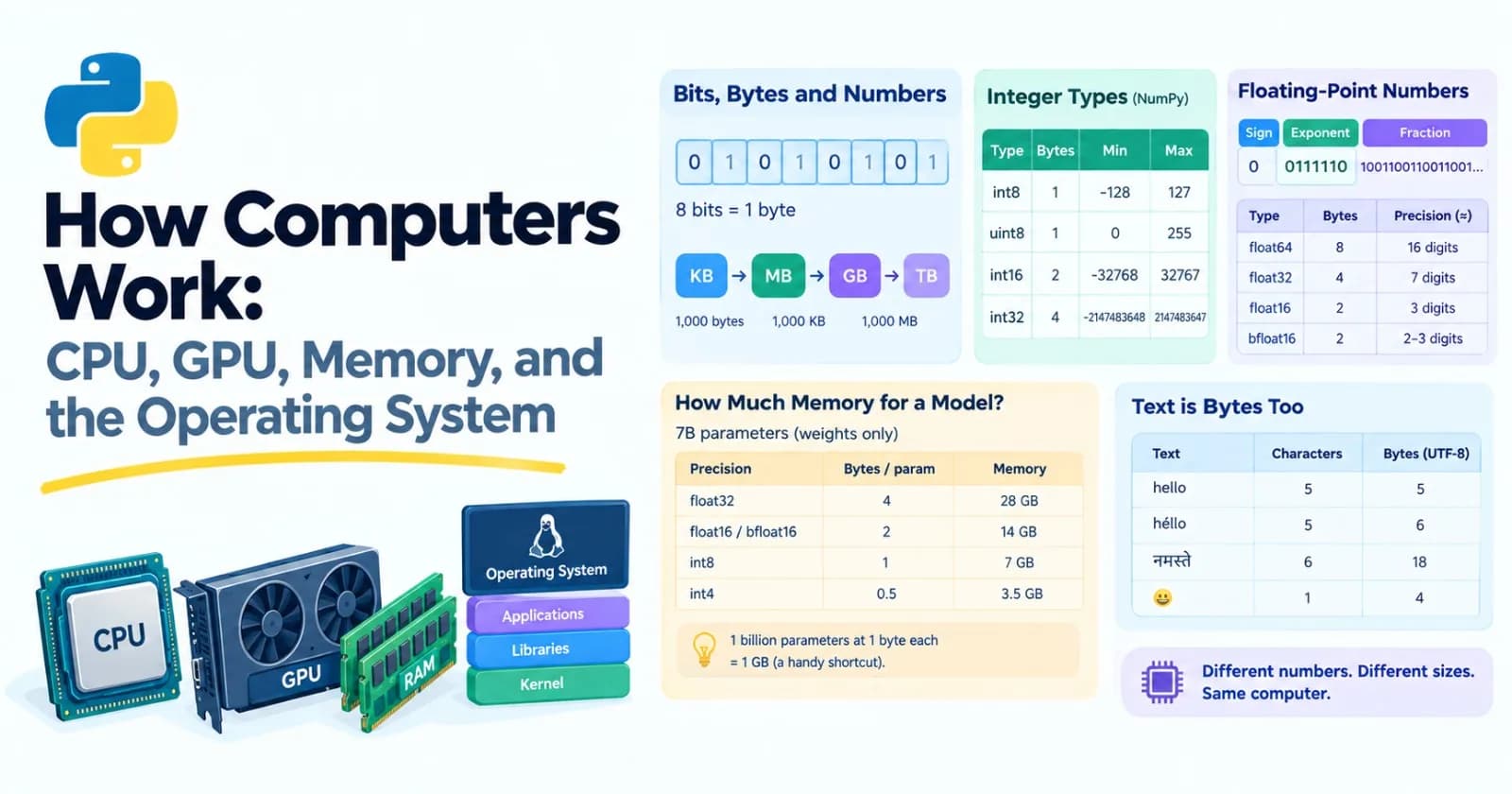
Up to now we've treated the computer as a box that runs our code. This post opens the box a little. It's core, and I'll explain why it matters in AI work: nearly every confusing thing about GPUs, "out of memory" errors, slow data loading, quantized models, and Docker containers makes sense once you have a simple picture of what's inside a computer and who's in charge of it.
We'll keep it practical. By the end you should be able to answer questions like "will this model fit on my GPU?" and "why did my program just say Killed?"
Bits, bytes, and numbers
Everything in a computer is stored as bits, which are tiny switches that are either 0 or 1. Eight bits make a byte. A kilobyte is about a thousand bytes, a megabyte about a million, and a gigabyte about a billion.
You can see numbers in binary right in Python:
print(bin(5))                # 0b101
print(format(5, "08b"))      # 00000101
print(int("1010", 2))        # 10
Fixed-size integers
Python integers can grow as large as you like (2 ** 100 works fine). But the computer's hardware works with numbers of a fixed size, and NumPy and PyTorch use those. An 8-bit integer has only 256 possible values:
import numpy as np

for t in (np.int8, np.uint8, np.int16, np.int32):
    info = np.iinfo(t)
    print(t.__name__, info.min, info.max)

# int8 -128 127
# uint8 0 255
# int16 -32768 32767
# int32 -2147483648 2147483647
And when a number goes past the edge, it can quietly wrap around:
a = np.array([127], dtype=np.int8)
print(a + 1)    # [-128]
No error. The answer is just wrong. It's worth remembering whenever you work with small number types, such as 8-bit image pixels.
Floating-point numbers
Decimals are stored in a format called floating point: a sign, a size (the exponent), and the digits (the fraction). You met its side effect in Post 4, when 0.1 + 0.2 gave 0.30000000000000004. Now we can see why. Ask Python for the exact value that's stored when you type 0.1:
from decimal import Decimal

print(Decimal(0.1))
# 0.1000000000000000055511151231257827021181583404541015625
The computer can't store 0.1 exactly in binary, just like we can't write 1/3 exactly in decimal. It stores the nearest value it can.
The number of bits you spend on each number is a trade-off between precision and size. These are the ones that matter in AI:
Type | Bytes | Roughly how many digits of precision | Notes |
|---|---|---|---|
| 8 | about 16 | Python's default |
| 4 | about 7 | Long the standard for deep learning |
| 2 | about 3 | Half the size, but a small range |
| 2 | about 2 to 3 | Same range as |
You can see the limits yourself:
print(float(np.float32(0.1)))     # 0.10000000149011612
print(float(np.float16(0.1)))     # 0.0999755859375
print(np.finfo(np.float16).max)   # 65504.0
print(np.float16(70000))          # inf  (NumPy also warns about an overflow)
float16 can't even hold the number 70,000. It turns into inf, which is infinity. That's the kind of thing that makes a training run blow up, and it's why bfloat16 exists: it keeps the wide range of float32 and gives up digits instead. (NumPy doesn't have bfloat16, but PyTorch does, and we'll meet it in Post 40.)
One curious detail: in float32, 0.1 + 0.2 == 0.3 comes out True, while in float64 it's False. That doesn't mean float32 is more accurate. It's less precise, so the tiny difference gets rounded away. Don't rely on it either way. Compare floats with a tolerance (math.isclose), not with ==.
How big is a model?
Here's where this pays off. A language model is mostly a huge pile of numbers called parameters, or weights. The memory it needs is simply:
number of parameters × bytes per parameter
A model with 7 billion parameters ("7B"), stored at different precisions:
Precision | Bytes per parameter | Memory for the weights |
|---|---|---|
| 4 | 28 GB |
| 2 | 14 GB |
8-bit integers ( | 1 | 7 GB |
4-bit integers ( | 0.5 | 3.5 GB |
(A handy shortcut: a billion parameters at one byte each is exactly one gigabyte.)
This is why you hear about quantization: storing weights with fewer bits so the model fits on cheaper hardware. It's a trade-off, since fewer bits means a little less accuracy, and we'll cover it in Post 69. And it explains why a "7B model" and a "70B model" are such different things to run: the 70B one needs ten times the memory.
These numbers are for the weights only. Running a model needs extra memory on top, for the working calculations and for a cache of the conversation so far (Post 48), and training needs a lot more. We'll build a calculator in the mini project.
Text is bytes too
When you send text to a model, or save it to a file, it's turned into bytes, usually with an encoding called UTF-8. English letters take one byte each. Other characters take more:
for text in ["hello", "héllo", "नमस्ते", "😀"]:
    print(repr(text), "characters:", len(text), "bytes:", len(text.encode("utf-8")))

# 'hello' characters: 5 bytes: 5
# 'héllo' characters: 5 bytes: 6
# 'नमस्ते' characters: 6 bytes: 18
# '😀' characters: 1 bytes: 4
So characters, bytes, and the tokens a model uses (Post 43) are three different ways to measure the same text, and they don't line up. A Hindi sentence has far more bytes than characters, and many tokenizers also split non-English text into more tokens than English text of the same meaning. That's worth keeping in mind when you estimate cost.
The CPU
The CPU (central processing unit) is the computer's general-purpose brain. It follows a list of tiny instructions, billions per second: add these two numbers, compare these, jump to that instruction, fetch this from memory.
Modern CPUs have several cores, and each core can follow its own list of instructions at the same time. That's the "several chefs" from Post 14. It's why processes can run in parallel on multiple cores, and why one Python thread can only use one core's worth of Python work at a time (the GIL).
You can ask Python how many cores you have:
import os

print(os.cpu_count())
A CPU is designed to be good at anything, and especially at finishing one task quickly: lots of branching, unpredictable decisions, a bit of everything. Keep that in mind, because the GPU is built on a very different idea.
The memory hierarchy
Here's a surprising fact: for many programs, the CPU isn't limited by how fast it can calculate. It's limited by how fast it can get the data to calculate with. Memory comes in layers, and each layer is bigger, but slower, than the one above it:
Layer | Typical size | Roughly how long to get data |
|---|---|---|
Registers and L1 cache | tens of KB | about 1 nanosecond |
L2 and L3 cache | MBs to tens of MBs | a few to tens of nanoseconds |
RAM (main memory) | GBs to hundreds of GBs | about 100 nanoseconds |
SSD | hundreds of GBs to TBs | about 100,000 nanoseconds (0.1 ms) |
Hard disk | TBs | about 10,000,000 nanoseconds (10 ms) |
Network (same data center) | unlimited | about 500,000 nanoseconds (0.5 ms) |
Network (across an ocean) | unlimited | about 150,000,000 nanoseconds (150 ms) |
These are rough, ballpark numbers, and they vary by hardware. What matters is the ratio between them. Nanoseconds are hard to feel, so let's scale it to human time. If getting something from the fastest cache took 1 second, then:
Layer | Scaled to human time |
|---|---|
L2 cache | 4 seconds |
RAM | about 1.7 minutes |
SSD | about 1.2 days |
Hard disk | about 4 months |
Network, across an ocean | about 5 years |
That's why reading a file for every item in a loop is so painful, why you load data once and keep it in memory, why caching helps, and why Post 14's concurrency matters when you wait on the network.
Locality: why access order matters
The CPU doesn't fetch one number at a time from RAM. It grabs a chunk, typically 64 bytes, and keeps it in cache, betting that you'll want the neighbors next. So reading memory in order is cheap, and jumping around is costly. You can feel the difference in NumPy. We'll pick up the same numbers from an array two ways, in order and shuffled:
import time

import numpy as np


def best_time(func, repeats=5):
    times = []
    for _ in range(repeats):
        start = time.perf_counter()
        func()
        times.append(time.perf_counter() - start)
    return min(times)


rng = np.random.default_rng(0)

for n in (50_000, 1_000_000, 10_000_000):
    data = rng.random(n)
    in_order = np.arange(n)
    shuffled = rng.permutation(n)
    t_ordered = best_time(lambda: data[in_order])
    t_shuffled = best_time(lambda: data[shuffled])
    print(f"{n:>10,} floats: in order {t_ordered * 1000:7.2f} ms, "
          f"shuffled {t_shuffled * 1000:7.2f} ms, {t_shuffled / t_ordered:.1f}x slower")
Here's what I saw (yours will differ, and ten million floats needs about 80 MB of memory, so lower the size if yours is tight):
50,000 floats: in order    0.16 ms, shuffled    0.23 ms, 1.5x slower
 1,000,000 floats: in order    2.72 ms, shuffled   13.73 ms, 5.1x slower
10,000,000 floats: in order   40.21 ms, shuffled  162.11 ms, 4.0x slower
Both versions read the same numbers and do the same amount of work. Only the order differs. With 50,000 floats, everything fits in the fast cache, so the order barely matters. Once the data is too big for the cache, jumping around gets several times slower. This is part of why NumPy arrays beat Python lists (Post 15): their numbers sit side by side in one block of memory.
RAM versus GPU memory
One more layer to know about. A GPU has its own memory, called VRAM. It's much faster than normal RAM, but much smaller, and moving data between RAM and the GPU is slow compared with working on data that's already there. So a lot of GPU programming comes down to two rules: keep the data on the GPU, and make sure the model's weights fit in VRAM. We'll come back to this in Post 70.
CPU versus GPU
A GPU (graphics processing unit) was invented to draw video game graphics, which means doing the same small calculation for millions of pixels at once. It turns out that's exactly the shape of work that neural networks need.
Here's the difference, in kitchen terms again:
A CPU is a handful of expert chefs. Each can cook anything, make tricky decisions, and finish a single dish fast.
A GPU is an enormous team of line cooks, thousands of them, each with simple skills. Nobody is individually impressive, but if the job is "chop ten thousand onions," the team finishes far sooner.
CPUs are built for low latency (finish one thing quickly). GPUs are built for high throughput (finish a huge amount of identical work overall).
Neural networks are mostly matrix multiplication: giant grids of numbers multiplied and added together, with each result independent of the others. You've already seen the idea in Post 15, where one matrix operation replaced thousands of loop iterations. A GPU takes that further, doing thousands of these multiply-adds simultaneously.
Let's measure how my CPU handles matrix multiplication. Multiplying two n × n matrices takes about 2n³ operations (n³ multiplications and n³ additions):
n = 2048
x = rng.random((n, n), dtype=np.float32)
y = rng.random((n, n), dtype=np.float32)

t = best_time(lambda: x @ y, repeats=3)
flops = 2 * n ** 3
print(f"{t:.3f} s, {flops / t / 1e9:.0f} GFLOPS")
"FLOPS" means floating-point operations per second, and a GFLOPS is a billion of them. On my small test machine, with a single core, this took about 0.15 seconds, which is roughly 116 GFLOPS. With float64 instead, it took twice as long. Half the bytes means half the memory traffic and room for twice as many numbers in each step, so smaller number types often run faster as well as fitting in less memory.
Notice the 2n³ too. Matrix multiplication is O(n³), and by the logic of Post 18, doubling n makes it eight times more work. That's a lot of work, and it's why this operation is worth building special hardware for.
A current data-center GPU does matrix math at rates measured in trillions of operations per second, hundreds of times what my little machine managed. That's the core reason deep learning took off when GPUs became available. Other accelerators exist too, such as Google's TPUs, built on the same principle.
GPUs aren't magic, though. They don't help much when:
The job is small, so the time spent sending data to the GPU outweighs the savings.
The code is full of branching and decisions, which is CPU territory.
The data doesn't fit in VRAM.
Memory-bound or compute-bound?
A task is compute-bound when the chip's math speed is the limit, and memory-bound when the limit is how fast data can be moved in from memory. This matters, because the fix is different for each.
Here's a surprising fact about chatbots. When a language model writes a reply for one user, one token at a time, it has to read essentially all of its weights out of memory to produce each single token. The math per token is small compared with the amount of data moved. So generation speed is often limited by memory bandwidth (how many GB per second the memory can deliver), not by raw calculation speed.
That gives a back-of-the-envelope ceiling:
tokens per second ≈ memory bandwidth ÷ size of the model in memory
If a GPU can read 1,000 GB per second, and a model takes 14 GB (the 7B model at 16 bits), the ceiling is about 71 tokens per second. Quantize it to 4 bits (3.5 GB), and the ceiling rises to about 286. That's an upper bound, not a promise, since real systems have other overheads, and serving many users at once changes the picture. But it explains something that otherwise seems odd: shrinking a model makes it both fit on smaller hardware and run faster.
The operating system
Between your program and the hardware sits the operating system: Windows, macOS, Linux. Its job is to share the machine among everything that's running. It decides which program gets which CPU core and when, hands out memory, manages files, and controls access to the network and devices. Your programs don't touch the hardware directly. They ask the OS to do it for them, through requests called system calls.
Processes
A running program is a process. Each process gets its own private slice of memory and a number called its process ID. Threads (Post 14) live inside a process and share its memory, and that's why they can trip over each other, while separate processes can't.
You can start a new process from Python and see this for yourself:
import os
import subprocess
import sys

result = subprocess.run(
    [sys.executable, "-c", "import os; print(os.getpid(), os.getppid())"],
    capture_output=True,
    text=True,
)
child_pid, child_parent = map(int, result.stdout.split())

print("the child's parent is this process:", child_parent == os.getpid())    # True
print("the child has its own process ID:", child_pid != os.getpid())          # True
The new Python is a separate process, with its own ID and its own memory. And it knows who started it.
Virtual memory, swapping, and "Killed"
Each process is told it has a big, private block of memory all to itself. That's an illusion called virtual memory, and the OS keeps track of where everything really lives. When the real RAM fills up, the OS can push less-used data out to the disk (called swapping). That keeps programs alive, but it's brutally slow. Remember the human-time scale above: RAM is minutes, and disk is days. A machine that's swapping heavily can become almost unusable.
And if memory runs out completely, on Linux the OS may simply kill a process to save the system. You just see a terse Killed message, with no Python traceback, because Python never gets the chance to say anything. If you've ever loaded a model that was too big for your machine and the program vanished, that's likely what happened. The fix is the arithmetic from earlier: work out the memory before you load.
Standard output, standard error, and pipes
Every process starts with three connections to the outside world: standard input (where it reads from), standard output (where print writes), and standard error (a second output channel meant for errors and diagnostics). Here's something that surprises people. Python's logging writes to standard error by default, not standard output:
import subprocess
import sys

script = '''
import logging, sys
logging.basicConfig(level=logging.INFO, format="%(levelname)s: %(message)s")
print("this is normal output")
logging.info("this is a log line")
'''

r = subprocess.run([sys.executable, "-c", script], capture_output=True, text=True)
print("STDOUT:", repr(r.stdout))    # 'this is normal output\n'
print("STDERR:", repr(r.stderr))    # 'INFO: this is a log line\n'
Having two channels is useful. A program's real output can flow into another program, while its chatter goes somewhere you can read it. In a terminal, you redirect them separately:
python my_script.py > results.txt 2> errors.logAnd a pipe (|) connects one program's output straight to another's input. You used one back in Post 12 with echo "the dog and the cat" | textkit. Here's a longer chain of small tools:
echo 'the cat the dog' | tr ' ' '\n' | sort | uniq -c | sort -rn | head -2
#       2 the
#       1 dog
That pattern of small programs connected by pipes is how a lot of data work gets done.
Environment variables and exit codes
A process inherits a copy of its parent's environment variables. That's how the MODEL_API_KEY trick from Post 12 works, and it's also how a child process can be given a different environment than the parent's:
env = dict(os.environ, MODEL_API_KEY="demo-key")
r = subprocess.run(
    [sys.executable, "-c", "import os; print(os.environ.get('MODEL_API_KEY'))"],
    env=env, capture_output=True, text=True,
)
print(r.stdout.strip())    # demo-key
When a process ends, it hands back an exit code: a number where 0 means success and anything else means failure. sys.exit(3) exits with code 3, and an uncaught exception exits with code 1:
r = subprocess.run([sys.executable, "-c", "raise ValueError('boom')"], capture_output=True)
print(r.returncode)    # 1
Tools like CI systems (Post 28) and shell scripts rely on exit codes to decide whether to carry on or stop. That's what turns a failing test into a red build.
Signals
When you press Ctrl+C, the OS sends your process a signal called SIGINT. Python turns that into the KeyboardInterrupt exception, which is why a bare except: that swallows everything (Post 11) can make a program refuse to stop.
Containers
You'll meet Docker in Post 23. Here's a preview that depends on what you just learned. On Linux, a container isn't a miniature computer. It's an ordinary process (or a group of them) that the OS has isolated, so it sees its own files, its own process list, and limited resources. It shares the machine's operating system kernel instead of running its own. That's why containers start in a moment and use far less than a full virtual machine.
Mini project: will it fit?
Let's turn the memory arithmetic into a small tool you'll genuinely use. Create will_it_fit.py:
BYTES_PER_PARAM = {
    "float32": 4,
    "float16": 2,
    "bfloat16": 2,
    "int8": 1,
    "int4": 0.5,
}

OVERHEAD = 1.2    # a rough allowance for activations, caches, and framework overhead


def weights_gb(params_billions, precision):
    """1 billion parameters at 1 byte each is 1 GB, so this is a simple product."""
    return params_billions * BYTES_PER_PARAM[precision]


def check_fit(name, params_billions, precision, memory_gb):
    needed = weights_gb(params_billions, precision) * OVERHEAD
    verdict = "fits" if needed <= memory_gb else "does NOT fit"
    print(f"{name:<12}{precision:<10}{needed:7.1f} GB needed vs {memory_gb:>3} GB: {verdict}")


def max_tokens_per_second(params_billions, precision, bandwidth_gb_per_s):
    """Rough ceiling for one-at-a-time generation: every token reads all the weights once."""
    return bandwidth_gb_per_s / weights_gb(params_billions, precision)


scenarios = [
    ("7B model", 7, "float16", 16),
    ("7B model", 7, "int8", 16),
    ("7B model", 7, "int4", 16),
    ("13B model", 13, "float16", 24),
    ("13B model", 13, "int4", 24),
    ("70B model", 70, "float16", 80),
    ("70B model", 70, "int4", 80),
]

print("Does it fit in GPU memory?")
for name, params, precision, memory in scenarios:
    check_fit(name, params, precision, memory)

print("\nRough ceiling on tokens per second, with 1,000 GB/s of memory bandwidth:")
for precision in ("float16", "int8", "int4"):
    rate = max_tokens_per_second(7, precision, 1000)
    print(f"7B model, {precision:<8}about {rate:5.0f} tokens per second")
You should see:
Does it fit in GPU memory?
7B model    float16      16.8 GB needed vs  16 GB: does NOT fit
7B model    int8          8.4 GB needed vs  16 GB: fits
7B model    int4          4.2 GB needed vs  16 GB: fits
13B model   float16      31.2 GB needed vs  24 GB: does NOT fit
13B model   int4          7.8 GB needed vs  24 GB: fits
70B model   float16     168.0 GB needed vs  80 GB: does NOT fit
70B model   int4         42.0 GB needed vs  80 GB: fits

Rough ceiling on tokens per second, with 1,000 GB/s of memory bandwidth:
7B model, float16 about    71 tokens per second
7B model, int8    about   143 tokens per second
7B model, int4    about   286 tokens per second
A few things worth noticing:
The first line is the instructive one. A 7B model at 16 bits has 14 GB of weights, and it looks like it would fit in 16 GB. But once you leave a margin for everything else, it doesn't. Memory problems usually show up as "just barely not enough."
The 1.2 overhead is a rough guess, not a law. Real overhead depends on how long your prompts are and how many requests you run at once. Treat this tool as a quick sanity check before you download something large, not as a guarantee.
The bandwidth figure is made up. I picked 1,000 GB/s to make the arithmetic easy. Look up the real number for the hardware you're considering.
Quantization buys two things at once: it fits the model on smaller hardware, and it raises the speed ceiling.
Make it yours
Add a function for training memory. A commonly quoted rule of thumb for mixed-precision training with the Adam optimizer is about 16 bytes per parameter in total, since it keeps weights, gradients, and optimizer state. Find out how much a 7B model would need.
Read the actual memory of your own machine or GPU, and add it as a scenario.
Support multiple GPUs by splitting the weights across them.
Look up the memory and bandwidth of two real GPUs, and compare the ceilings for a model you care about.
Add the KV cache once you've read Post 48.
Practice
About 20 minutes of real effort on each before asking for help.
Write the numbers 5, 100, and 255 in binary by hand, then check them with
format(n, "08b"). What's the range of a 16-bit unsigned integer?Compute
0.1 + 0.2infloat64and infloat32, and print how each is stored usingDecimal. Explain in your own words why==is a bad way to compare floats.Run the locality experiment with array sizes between 10,000 and 20,000,000. Where does the gap start to appear on your machine?
Work out the memory for a 3B model at
float16and atint4, and decide whether each fits in 8 GB.Use
subprocessto start a child Python process and print both process IDs. Then make the child exit with a code of your choice and read it back.Write a script that both prints and logs. Run it with
>and2>redirects and check which output went to which file.Look up the
psutillibrary, and use it to print how much memory your Python process is using before and after creating a big list.For a hypothetical GPU with a bandwidth of your choosing, estimate the tokens-per-second ceiling for a 13B model at 8 bits.
Then ask an AI tutor to review your answers, and don't let it rewrite them.
What to take away
Everything is bits. Fixed-size number types can overflow quietly, and floats can't store most decimals exactly.
The number type you choose sets the memory:
float32is 4 bytes,float16andbfloat16are 2, and quantized weights are 1 or even half a byte.Model memory = parameters × bytes per parameter, plus overhead. Do this arithmetic before you load anything big.
Memory comes in layers, and each is bigger but much slower. Reading data in order is cheaper than jumping around.
CPUs are a few flexible cores. GPUs are thousands of simple ones, and neural networks are mostly the matrix math they're good at.
Generating text for one user is often limited by memory bandwidth, so smaller models are faster as well as smaller.
The OS shares the machine. Processes have private memory,
Killedusually means you ran out of it,printand logging use different output channels, and exit codes tell other tools whether you succeeded.
Previous: Post 18, Big-O Without the Fear
Next in the series: Post 20, Networking & the Web, covering HTTP, REST, WebSockets, and Server-Sent Events, which is how streaming from a model really works.
Comments(0)
Join the discussion by logging into your account.
No comments yet. Be the first to comment!