
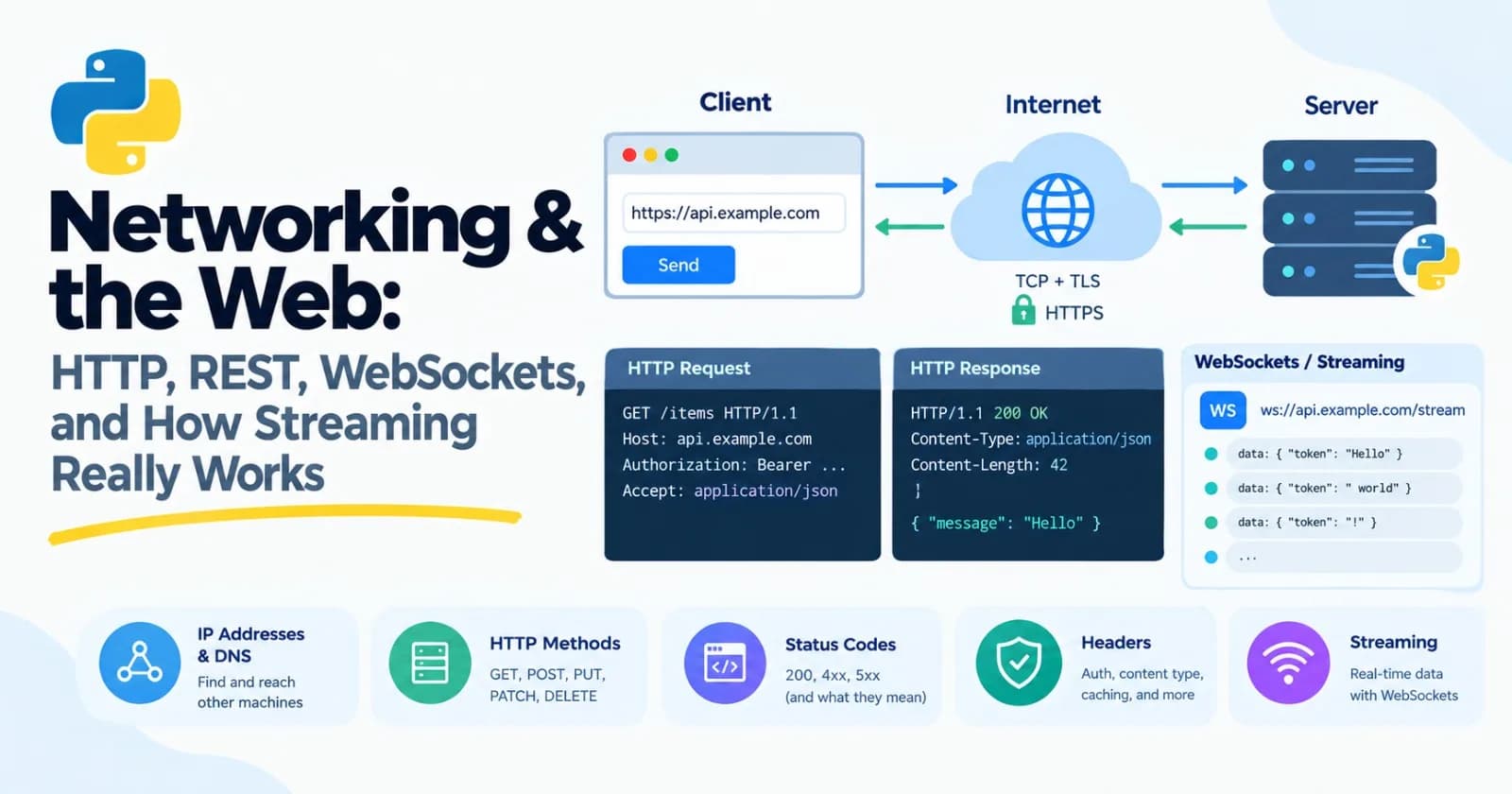
Every time your code talks to a language model, it sends a message across a network and waits for an answer. Every time a reply appears word by word, a specific piece of web machinery is working. Every error code you'll see, from 401 to 429 to 503, has a meaning. This post is core, because once you understand what's actually happening on the wire, those things stop being mysterious, and you'll debug API problems in minutes instead of hours.
We'll build a small web server and a client in this post, using nothing exotic, so you can see all of it with your own eyes.
How computers find and talk to each other
Four ideas will carry you a long way.
IP addresses. Every machine on a network has an address, like 192.168.1.20. Your own computer can always reach itself at the special address 127.0.0.1, which is also called localhost. That's where we'll run our practice server.
import socket

print(socket.gethostbyname("localhost"))    # 127.0.0.1
DNS. People prefer names like example.com over numbers. DNS, the domain name system, is the phone book that turns a name into an address. When a request is slow before anything else happens, DNS is sometimes the culprit.
Ports. An address finds a machine. A port finds the program on that machine, like an apartment number in a building. Web servers traditionally use 80 for plain HTTP and 443 for HTTPS, and during development you'll see 8000, 8080, and 5000. We'll use 8000. If you ever see "address already in use," another program is already listening on that port.
TCP and TLS. TCP is the layer that turns a messy network into a reliable, ordered stream of bytes: nothing lost, nothing out of order. TLS sits on top and encrypts it. HTTP over TLS is HTTPS, the padlock in your browser. For anything real, and for every model API, you use HTTPS.
HTTP: the language of the web
HTTP is a simple conversation. The client sends a request. The server sends back a response. That's it. And underneath, it's just text over a TCP connection.
Here's a real request, written out by hand:
GET /health HTTP/1.1
Host: localhost
Connection: close
It has a method (GET), a path (/health), and some headers (extra information as Name: value lines). A blank line ends the headers. And here's the response that came back from the server we'll build later in this post:
HTTP/1.1 200 OK
Server: BaseHTTP/0.6 Python/3.12.3
Date: Fri, 30 Oct 2026 09:27:30 GMT
Content-Type: application/json
Content-Length: 16

{"status": "ok"}
A status line (200 OK), more headers, a blank line, then the body. You can send that request yourself with a few lines of Python, no libraries at all:
import socket

with socket.create_connection(("localhost", 8000)) as sock:
    sock.sendall(b"GET /health HTTP/1.1\r\nHost: localhost\r\nConnection: close\r\n\r\n")
    chunks = []
    while chunk := sock.recv(4096):
        chunks.append(chunk)

print(b"".join(chunks).decode())
(Run it once you have the server from the mini project going.) The point isn't to write HTTP by hand. It's to see that there's no magic: a request is text, a response is text, and every library you'll ever use is just a friendlier way to produce and read it.
Methods
The method says what you want to do:
Method | Meaning | Example |
|---|---|---|
| Read something | Fetch a page, list items |
| Send data to be processed or created | Ask a model a question, create an item |
| Replace something | Overwrite a whole record |
| Change part of something | Update one field |
| Remove something | Delete an item |
An important idea is idempotent, meaning doing it twice has the same effect as doing it once. GET, PUT, and DELETE are idempotent. POST generally isn't. It matters for retries (Post 11): if a request times out, you don't know if the server got it. Retrying a GET is harmless. Retrying a POST that creates an order or sends an email could do it twice. Asking a model a question is a POST, and retrying is usually fine apart from the extra cost. But when your agent calls a tool that does something, such as sending a message, think about it first. Some APIs offer an "idempotency key" so retries are safe.
Status codes
The first number in the response tells you how it went. They're grouped by their first digit:
Code | Name | What it means | Retry? |
|---|---|---|---|
200 | OK | It worked | n/a |
201 | Created | It worked, and something new exists | n/a |
400 | Bad Request | Your request was malformed | No, fix it |
401 | Unauthorized | Missing or invalid credentials, like a wrong API key | No, fix it |
403 | Forbidden | You're known, but not allowed | No |
404 | Not Found | No such path | No |
422 | Unprocessable | The format was fine, but the content failed validation | No, fix it |
429 | Too Many Requests | You've hit a rate limit | Yes, after waiting |
500 | Internal Server Error | The server crashed on your request | Maybe |
502, 503, 504 | Bad Gateway, Unavailable, Gateway Timeout | The server or something in front of it is overloaded or down | Yes, with backoff |
The rule from Post 11 applies directly: retry the temporary ones (429, 502, 503, 504, and timeouts) and don't retry the 4xx errors that say you made a mistake, because repeating the same mistake gets the same answer.
Headers
Headers carry the details. A handful you'll meet constantly:
Content-Type: what the body is, such asapplication/json.Authorization: your credentials, usuallyBearer your-api-key. This is a secret. Never print it, log it, or commit it (Post 11 and Post 12).Accept: what kind of response you'd like back.Retry-After: sent with a 429 or 503, it tells you how long to wait. When it's there, honor it.
HTTP has no memory
Here's a fact with real consequences. HTTP is stateless: every request stands alone, and the server doesn't remember the last one. That's exactly why chat APIs make you send the whole conversation again on every turn, and why in Post 18 the cost of an ever-growing history added up quadratically. The model isn't remembering your chat. You are, and you resend it each time.
Making requests in Python
Python's standard library can make requests, but almost everyone uses the requests library:
pip install requestsA GET request, with a query string built for you:
import requests

response = requests.get(
    "http://localhost:8000/search",
    params={"q": "hello world", "page": 2},
    timeout=5,
)
The params become ?q=hello+world&page=2 on the end of the URL, with special characters encoded properly. And there's one argument you should treat as mandatory: timeout. By default, requests will wait forever for a server that never answers, and your program hangs with no error. Always set one.
The response object has what you need:
response = requests.get("http://localhost:8000/health", timeout=5)

print(response.status_code)               # 200
print(response.headers["Content-Type"])   # application/json
print(response.json())                    # {'status': 'ok'}
print(response.ok)                        # True for any status below 400
Sending JSON is just as easy. The json= argument converts your dictionary, and sets the Content-Type header for you:
response = requests.post(
    "http://localhost:8000/ask",
    json={"question": "What is HTTP?"},
    timeout=5,
)
response.raise_for_status()
print(response.json()["answer"])
raise_for_status() turns a 4xx or 5xx response into a Python exception (requests.HTTPError), so errors don't slip by silently. Without it, a failed request just gives you a response object that you might treat as success.
Three different ways a request fails
They look similar, but they're different problems:
import requests

try:
    response = requests.get(url, timeout=5)
    response.raise_for_status()
except requests.exceptions.ConnectionError:
    ...    # couldn't reach the server at all: wrong address, server down, no network
except requests.exceptions.Timeout:
    ...    # connected, but it took too long
except requests.HTTPError:
    ...    # the server answered, with an error status code
I tried each of these against my own machine. Asking for a port with nothing listening raised ConnectionError. Asking a server that accepted the connection but never answered raised ReadTimeout after the 0.5 seconds I'd allowed. And a 422 response became an HTTPError once raise_for_status() ran.
Sessions
Opening a new connection for every request is wasteful. A Session keeps connections open and reuses them, which is noticeably faster when you make many calls to the same server:
with requests.Session() as session:
    for _ in range(3):
        session.get("http://localhost:8000/health", timeout=5)
If you're calling a model API many times, use a session.
The async option
requests is blocking: while it waits, your program does nothing, which is the situation from Post 14. For many requests at once, a modern library called httpx has the same style with an async version:
import asyncio

import httpx


async def main():
    async with httpx.AsyncClient(timeout=10) as client:
        responses = await asyncio.gather(
            *(client.get("http://localhost:8000/health") for _ in range(5))
        )
        print([r.status_code for r in responses])


asyncio.run(main())
(I wasn't able to run the httpx example in my test environment, so check it against its documentation when you try it. The shape matches the asyncio.gather pattern from Post 14.)
REST and JSON APIs
REST is a style for designing web APIs around things, with URLs naming the things and HTTP methods saying what to do with them:
Request | Meaning |
|---|---|
| List the courses |
| Get course number 7 |
| Create a course |
| Update part of course 7 |
| Delete course 7 |
Data is almost always exchanged as JSON, which maps directly onto Python dictionaries and lists. You'll also see version numbers in the path (/v1/courses) so the API can change without breaking old users, pagination (asking for results a page at a time), and an API key sent in the Authorization header.
Model APIs are a little different. Instead of lots of resource URLs, they usually have one main endpoint that you POST to, with a JSON body describing what you want. Roughly:
payload = {
    "model": "some-model-name",
    "messages": [
        {"role": "user", "content": "What is HTTP?"},
    ],
    "max_tokens": 200,
}
response = requests.post(
    "https://api.example.com/v1/chat",
    json=payload,
    headers={"Authorization": f"Bearer {api_key}"},
    timeout=60,
)
(That URL and those field names are made up. Every provider's details differ, so read their documentation. The shape is what matters: a POST with a JSON body, a JSON response, and your key in a header.) Notice the list of messages, the same shape you used in Post 5 and Post 9, resent with every call.
Rate limits and retrying politely
Services limit how fast you can call them. When you go over, you get a 429, often with a Retry-After header saying how many seconds to wait. Here's a helper that handles it, and that retries on temporary server errors too:
import time

import requests


def get_with_retries(url, attempts=4):
    for attempt in range(1, attempts + 1):
        response = requests.get(url, timeout=5)
        if response.status_code == 429 or response.status_code >= 500:
            wait = float(response.headers.get("Retry-After", 0.1 * 2 ** attempt))
            print(f"Attempt {attempt}: got {response.status_code}, waiting {wait:.1f} s")
            time.sleep(wait)
            continue
        response.raise_for_status()
        return response.json()
    raise RuntimeError(f"{url} still failing after {attempts} attempts")
If the server says how long to wait, we believe it. If not, we back off, waiting longer after each failure (0.2, 0.4, 0.8 seconds). Real code would also add a little random "jitter" to the wait, so that many clients that failed together don't all retry at the same instant. Note this simple version reads Retry-After as a number of seconds, though the header can also be a date.
Streaming: how replies arrive word by word
Now to the question we started with. A model generates text one token at a time, and a long answer can take many seconds. If your app waited for the whole thing before showing anything, it would feel broken. So instead, the server sends each piece as soon as it exists, and the client shows it right away. That's streaming.
Two measurements matter here. Time to first token is how long until the first piece appears, and it decides how fast the app feels. Total time is how long until the end. A streamed reply can feel instant even when the total is long.
How it works: chunked responses
A normal response announces its size up front with a Content-Length header, so the client knows when it's finished. A streamed response doesn't know its size yet, because the model is still writing. So it uses Transfer-Encoding: chunked: the response arrives as a series of chunks, each prefixed with its size, ending with a chunk of size zero.
Here's what that looks like on the wire, from the streaming endpoint we'll build (I've made the line breaks visible):
HTTP/1.1 200 OK\r\n
Content-Type: text/event-stream\r\n
Cache-Control: no-cache\r\n
Transfer-Encoding: chunked\r\n
\r\n
19\r\n
data: {"token": "one "}

\r\n
19\r\n
data: {"token": "two "}

\r\n
E\r\n
data: [DONE]

\r\n
0\r\n
\r\n
Each chunk starts with its length in hexadecimal (19 is 25 bytes, E is 14) and a line break, then the content, then another line break. The final 0 says "that's all." The connection stays open the whole time, and each piece goes out as soon as it's ready.
Server-Sent Events
Chunking is the transport. On top of it, most model APIs use a simple format called Server-Sent Events, or SSE. The content type is text/event-stream, and the body is a series of events. Each event is one or more lines starting with data:, and a blank line ends the event:
data: {"token": "one "}

data: {"token": "two "}

data: [DONE]
That's the whole format, apart from a few optional extras (event: to name an event type, id: for resuming, and lines starting with a colon, which are comments that servers use as heartbeats). The [DONE] at the end is a convention some APIs use to signal "finished", and others signal it differently, so check the documentation.
SSE only flows one way, from the server to the client. For streaming a reply, that's exactly what you need.
Reading a stream in Python
Here's where Post 7 pays off. We can write the client as a generator that yields each token the moment it arrives:
import json

import requests


def stream_tokens(text):
    """Yield tokens as the server sends them."""
    with requests.post(
        "http://localhost:8000/stream", json={"text": text}, stream=True, timeout=10
    ) as response:
        response.raise_for_status()
        response.encoding = "utf-8"    # event streams are UTF-8
        for line in response.iter_lines(decode_unicode=True):
            if not line.startswith("data: "):
                continue
            payload = line[len("data: "):]
            if payload == "[DONE]":
                return
            yield json.loads(payload)["token"]
The key is stream=True. Without it, requests downloads the entire response before handing it back, and you'd lose the point of streaming. With it, iter_lines() gives you each line as it arrives. We skip blank lines and anything that isn't a data: line, stop at [DONE], and decode each payload from JSON. Using it looks exactly like the fake streaming loop from Post 7:
for token in stream_tokens("Streaming makes replies feel faster"):
    print(token, end="", flush=True)
A buffering bug I hit
This is worth telling, because it's the most common streaming problem there is. In my first version of the test server, I sent the events without chunked encoding. The client code was identical to the above, and the output looked right, but when I timed it, the first token arrived after a full second, at the same moment as the last one. Nothing was streaming. Everything arrived at the end.
The cause was buffering. The client was waiting to fill up a read buffer before handing anything over, and a server that doesn't use proper chunks gives it no reason to hand over early. Two fixes worked. Sending proper chunks, as above, brought the first token down to nearly instant. For a server that can't be changed, passing chunk_size=1 to iter_lines() also forced it to hand over data immediately, at the cost of efficiency.
This isn't just a client problem. Anything between the server and the user can buffer a stream: a reverse proxy, a load balancer, a CDN, even a framework's compression layer. If your deployed app streams fine locally but delivers everything at once in production, suspect a proxy in the middle, and always measure time to first token rather than trusting that it "looks fine."
Things that behave differently when streaming
Errors arrive late. The server sends
200 OKas soon as it starts. If something fails halfway through, the status code is already sent, so the error has to travel inside the stream as an event, and your client must watch for it. A stream can also simply stop, so handle a dropped connection.Closing the connection ends it. If a user navigates away, the client disconnecting is how the server learns to stop generating.
Browsers have a catch. The browser's built-in
EventSourcecan only makeGETrequests and can't set custom headers likeAuthorization. So web apps usually read the stream withfetchinstead, or put a small server of their own in between.
WebSockets
SSE is one-way. What if both sides need to talk at any time? A WebSocket is a long-lived, two-way connection. It begins as an ordinary HTTP request that asks to "upgrade", the server answers with status 101 Switching Protocols, and from then on both sides can send messages whenever they like, in either direction, with no new request needed. The addresses start with ws:// or wss:// (the secure version).
Here's a minimal echo server and client with the websockets library (pip install websockets):
# server
import asyncio

import websockets


async def handler(websocket):
    async for message in websocket:
        await websocket.send(f"echo: {message}")


async def main():
    async with websockets.serve(handler, "localhost", 8765):
        await asyncio.Future()    # run forever


asyncio.run(main())
# client
import asyncio
import websockets
async def main():
async with websockets.connect("ws://localhost:8765") as websocket:
await websocket.send("hello")
print(await websocket.recv()) # echo: hello
asyncio.run(main())(As with httpx, I couldn't run this one in my test environment, and the websockets library has changed its interface between versions, so treat it as a sketch and check the current documentation.)
Notice how naturally it uses async for and await from Post 14. WebSockets fit the async style perfectly.
When do you want one? When the conversation is truly two-way and live: a voice assistant, where audio flows from the microphone to the server while synthesized speech flows back at the same time (Post 58), a collaborative editor, or a live agent dashboard. The price is more complexity. You manage the connection yourself, including heartbeats to detect dead connections and reconnecting after drops. SSE gives you simpler plumbing, so use it when one-way is enough.
Other patterns you'll meet
Polling. The client asks "is it done yet?" every few seconds. Simple, a bit wasteful, and common for long-running jobs, such as a batch of documents being processed.
Webhooks. The reverse: when something finishes, the server calls a URL you gave it. Efficient, but you need a server that's reachable from the internet.
Here's how to choose:
Pattern | Direction | Best for |
|---|---|---|
Plain request and response | Client asks, server answers once | Most API calls |
SSE (streaming) | Server pushes many messages to the client | Streaming a model's reply |
WebSocket | Both directions, at any time | Real-time voice, live collaboration |
Polling | Client keeps asking | Simple status checks on long jobs |
Webhook | Server calls you when done | Notifying you that a long job finished |
Security basics
A few habits that will save you grief:
Use HTTPS for anything real.
Never put API keys in browser code or in a URL. Anything in front-end JavaScript can be read by any visitor. Your model calls should come from your server, which holds the key, and the browser should talk to your server.
Don't log secrets. That includes the
Authorizationheader (Post 11).Know about CORS. Browsers stop a web page from reading responses from a different website unless that site's server explicitly allows it. It only affects code running in a browser, and it's why a front-end call to your API can fail with a confusing error even though the same call works in Python.
Always set timeouts, as above.
Tools for looking at the wire
curl is a command-line tool for making requests, and it's the first thing to reach for when debugging. A few commands (on Windows PowerShell, quoting works a little differently):
curl -i http://localhost:8000/health
curl -i -X POST http://localhost:8000/ask -H "Content-Type: application/json" -d '{"question": "hi"}'
curl -N -X POST http://localhost:8000/stream -d '{"text": "one two three"}'
-i shows the response headers along with the body, -X sets the method, -H adds a header, -d sends a body, and -N turns off curl's own buffering so you can watch a stream arrive.
Your browser's developer tools (usually F12, then the Network tab) show every request a web page makes, with its headers, status, timing, and body. For debugging a web app, it's invaluable.
Mini project: a local API with a streaming endpoint
Let's build the whole picture on your own machine. First, a server that uses only Python's standard library. It's a teaching tool, and for real services we'll use FastAPI in Post 28. Create server.py:
import json
import time
from http.server import BaseHTTPRequestHandler, ThreadingHTTPServer

flaky_calls = {"count": 0}


class Handler(BaseHTTPRequestHandler):
    protocol_version = "HTTP/1.1"

    def send_json(self, status, payload, extra_headers=None):
        body = json.dumps(payload).encode("utf-8")
        self.send_response(status)
        self.send_header("Content-Type", "application/json")
        self.send_header("Content-Length", str(len(body)))
        for name, value in (extra_headers or {}).items():
            self.send_header(name, value)
        self.end_headers()
        self.wfile.write(body)

    def read_json(self):
        length = int(self.headers.get("Content-Length", 0))
        return json.loads(self.rfile.read(length) or b"{}")

    def do_GET(self):
        if self.path == "/health":
            self.send_json(200, {"status": "ok"})
        elif self.path == "/flaky":
            flaky_calls["count"] += 1
            if flaky_calls["count"] <= 2:
                self.send_json(429, {"error": "slow down"}, {"Retry-After": "1"})
            else:
                self.send_json(200, {"status": "finally worked", "calls": flaky_calls["count"]})
        else:
            self.send_json(404, {"error": f"no such path: {self.path}"})

    def do_POST(self):
        try:
            data = self.read_json()
        except json.JSONDecodeError:
            self.send_json(400, {"error": "body must be valid JSON"})
            return

        if self.path == "/ask":
            question = data.get("question")
            if not question:
                self.send_json(422, {"error": "missing 'question'"})
                return
            self.send_json(200, {"answer": f"You asked: {question}"})
        elif self.path == "/stream":
            self.stream(data.get("text", "Hello from the streaming endpoint"))
        else:
            self.send_json(404, {"error": f"no such path: {self.path}"})

    def send_chunk(self, text):
        data = text.encode("utf-8")
        self.wfile.write(f"{len(data):X}\r\n".encode("ascii") + data + b"\r\n")
        self.wfile.flush()

    def stream(self, text):
        self.send_response(200)
        self.send_header("Content-Type", "text/event-stream")
        self.send_header("Cache-Control", "no-cache")
        self.send_header("Transfer-Encoding", "chunked")
        self.end_headers()
        for word in text.split():
            self.send_chunk(f"data: {json.dumps({'token': word + ' '})}\n\n")
            time.sleep(0.2)
        self.send_chunk("data: [DONE]\n\n")
        self.wfile.write(b"0\r\n\r\n")    # a zero-length chunk ends the response
        self.wfile.flush()


if __name__ == "__main__":
    server = ThreadingHTTPServer(("localhost", 8000), Handler)
    print("Listening on http://localhost:8000")
    server.serve_forever()
Read through it. It's a fake model server with four behaviors:
GET /healthreturns a small JSON status.POST /askchecks its input (a 400 for invalid JSON, a 422 for a missing question) and returns a JSON answer.POST /streamsends an SSE stream, one word every 0.2 seconds, in chunks.GET /flakyreturns a 429 withRetry-After: 1the first two times, and succeeds on the third, so we can test retry code.
Start it in one terminal:
python server.pyLeave it running. (Press Ctrl+C to stop it later, which sends the interrupt signal from Post 19.) Now try it with curl in a second terminal. The -i flag shows the status and headers:
curl -i http://localhost:8000/health
curl -i -X POST http://localhost:8000/ask -H "Content-Type: application/json" -d '{"question": "hi"}'
curl -N -X POST http://localhost:8000/stream -d '{"text": "one two three"}'
The last one prints each data: line one at a time, as it's sent. Back in the server's terminal, you'll see a log line for each request, such as "POST /ask HTTP/1.1" 200 -.
Now the client. Create client.py:
import json
import time

import requests

BASE = "http://localhost:8000"


def ask(question):
    response = requests.post(f"{BASE}/ask", json={"question": question}, timeout=5)
    response.raise_for_status()
    return response.json()["answer"]


def stream_tokens(text):
    """Yield tokens as the server sends them."""
    with requests.post(f"{BASE}/stream", json={"text": text}, stream=True, timeout=10) as response:
        response.raise_for_status()
        response.encoding = "utf-8"    # event streams are UTF-8
        for line in response.iter_lines(decode_unicode=True):
            if not line.startswith("data: "):
                continue
            payload = line[len("data: "):]
            if payload == "[DONE]":
                return
            yield json.loads(payload)["token"]


def get_with_retries(path, attempts=4):
    for attempt in range(1, attempts + 1):
        response = requests.get(f"{BASE}{path}", timeout=5)
        if response.status_code == 429 or response.status_code >= 500:
            wait = float(response.headers.get("Retry-After", 0.1 * 2 ** attempt))
            print(f"Attempt {attempt}: got {response.status_code}, waiting {wait:.1f} s")
            time.sleep(wait)
            continue
        response.raise_for_status()
        return response.json()
    raise RuntimeError(f"{path} still failing after {attempts} attempts")


if __name__ == "__main__":
    print(ask("What is HTTP?"))

    start = time.perf_counter()
    first = None
    for token in stream_tokens("Streaming makes replies feel faster"):
        if first is None:
            first = time.perf_counter() - start
        print(token, end="", flush=True)
    total = time.perf_counter() - start
    print(f"\nfirst token after {first:.2f} s, finished after {total:.2f} s")

    print(get_with_retries("/flaky"))

    response = requests.post(f"{BASE}/ask", json={}, timeout=5)
    print(response.status_code, response.json())
    try:
        response.raise_for_status()
    except requests.HTTPError as error:
        print("raise_for_status raised:", type(error).__name__)
With the server running, run python client.py. You should see:
You asked: What is HTTP?
Streaming makes replies feel faster
first token after 0.00 s, finished after 1.00 s
Attempt 1: got 429, waiting 1.0 s
Attempt 2: got 429, waiting 1.0 s
{'status': 'finally worked', 'calls': 3}
422 {'error': "missing 'question'"}
raise_for_status raised: HTTPError
(The /flaky endpoint only fails on its first two calls, so restart the server before you run the client again.)
Look at the line with the timings: the first token arrived at about 0.00 seconds, and the whole reply took 1.00 second. That's streaming. The words appeared one by one as the server produced them, instead of all at once after a second. Then the retry helper read Retry-After, waited, and succeeded on the third try. And the last two lines show the difference between getting a 422 response, which is a normal response you can read, and raise_for_status() turning it into an exception.
Make it yours
Add an
Authorizationcheck to the server. Return401unless the request hasAuthorization: Bearer secret, and make the client send it.Add a
GET /coursesandPOST /coursespair that store items in a Python list, so you have a tiny REST API.Use a
requests.Sessionin the client, and measure whether it speeds up 100 calls to/health.Add random jitter to the retry wait.
Make the server occasionally close the stream halfway through, and have the client detect and handle the dropped connection.
Write tests for the client using the fake-server ideas from Post 13, with
Mockreplacingrequests.post.
Practice
About 20 minutes of real effort on each before asking for help.
Use
curl -iagainst a public JSON API of your choice and read the status line and every header. What do you recognize?Write a retry function that retries on 429 and on 5xx errors, but not on other 4xx errors, and test it against
/flaky.Write your own SSE parser that handles
event:lines and events whose data spans severaldata:lines.Set separate connect and read timeouts, by passing a tuple like
timeout=(3, 10), and explain what each number controls.Validate the
/askrequest body with a Pydantic model (Post 10) instead of a manual check.Measure time to first token against total time while changing the server's delay between words.
Make the server return a 503 at random, and confirm your client recovers.
In your own words, explain why HTTP being stateless is the reason chat APIs need the whole conversation on every call.
Then ask an AI tutor to review your answers, and don't let it rewrite them.
What to take away
A request finds a machine with an IP address and DNS, finds a program with a port, and travels over TCP, encrypted with TLS for HTTPS.
HTTP is text: a request has a method, path, headers, and body, and a response has a status code, headers, and body.
Retry 429 and 5xx errors, and timeouts, with backoff. Don't retry 4xx mistakes. Honor
Retry-After.Always set a
timeout. Useraise_for_status(). Use aSessionfor many calls.HTTP is stateless, so a model API only knows what you send in that request.
Streaming uses chunked responses, and SSE is a simple format on top of them. Read it with a generator and
stream=True.Measure time to first token, because buffering anywhere in the chain can quietly ruin streaming.
WebSockets are two-way and suit real-time voice and live collaboration, but they cost more complexity.
Keep API keys on the server, never in the browser, and never in logs.
Previous: Post 19, How Computers Work
Next in the series: Post 21, Databases in Depth, covering SQL, indexes, transactions, Postgres, and when something other than SQL makes sense.
Comments(0)
Join the discussion by logging into your account.
No comments yet. Be the first to comment!