
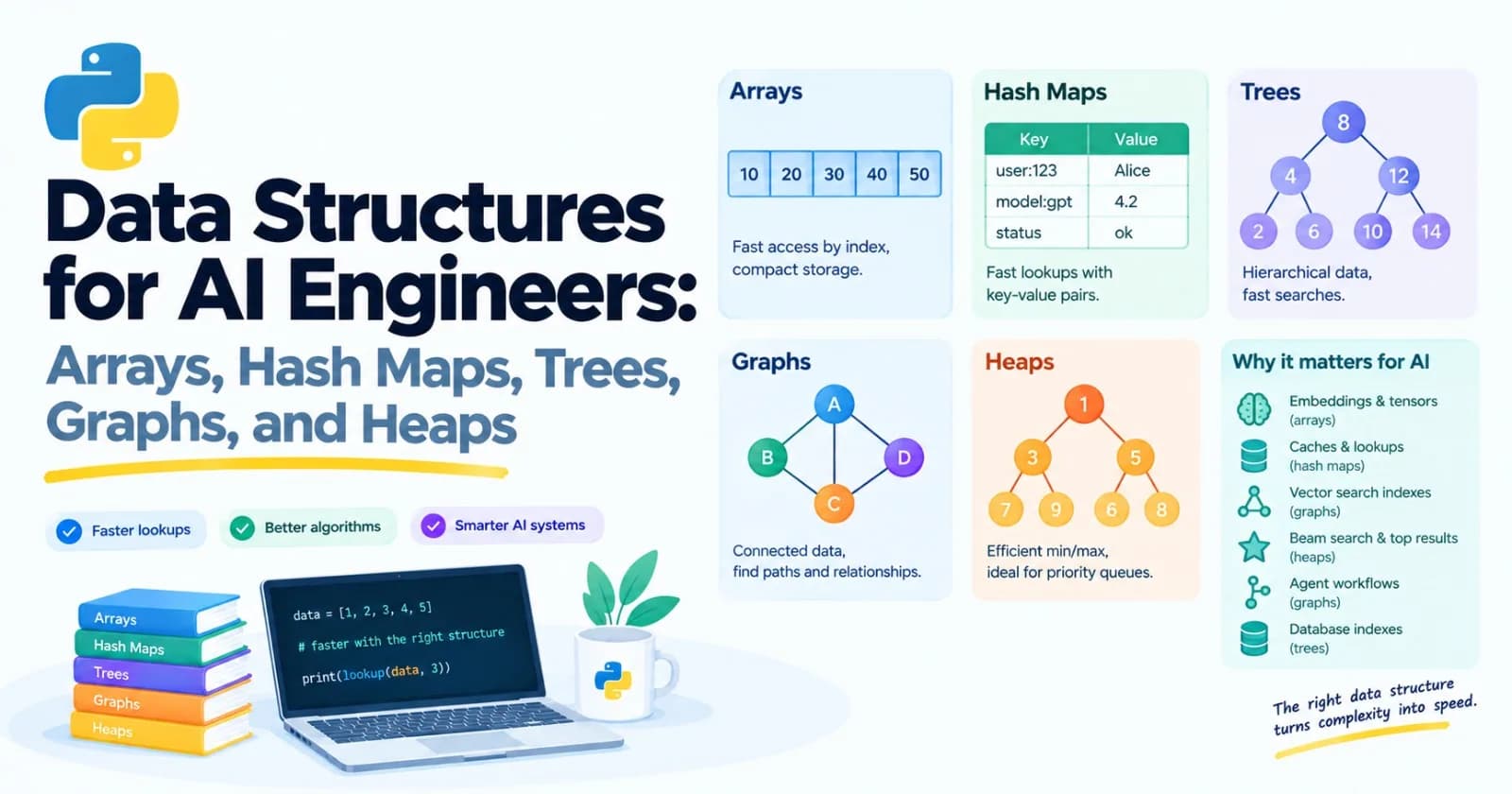
Welcome to Track B, the computer science fundamentals. In Post 15 we saw that picking the right data structure can make code thousands of times faster, and nothing else we tried came close. This post is about building a real mental toolbox of them.
In Post 5 we used Python's built-in containers. Here we look at what's inside them, and at the structures Python doesn't hand you directly: stacks, queues, trees, heaps, and graphs.
This post is skippable if you already know your data structures. Here's a test. What does this print?
from collections import deque
import heapq

queue = deque([1, 2, 3])
queue.append(4)
print(queue.popleft())

heap = []
for n in [5, 2, 8, 3]:
    heapq.heappush(heap, n)
print(heapq.heappop(heap))
If you said 1 and then 2, and you could explain why a deque beats a list for the first job and what a heap gives you that a sorted list doesn't, skip to Post 17. Otherwise, let's go.
Why this matters for AI work
You won't be implementing red-black trees on the job. But these ideas show up constantly, often hidden inside tools you use:
Embeddings and tensors are arrays.
Caches and lookups are hash maps.
Vector search indexes like HNSW are graphs.
Beam search and "top results" lists use heaps.
Agent workflows and data pipelines are graphs of steps that depend on each other.
Database indexes are trees.
Tokenizers use prefix-matching tricks that look a lot like tries.
Knowing the shapes lets you pick the right tool, and read the documentation of the libraries you'll meet later without feeling lost.
Arrays
An array stores items one after another in a block of memory. Because every slot is the same size and the slots sit side by side, the computer can jump straight to position 5,000 without walking past the first 4,999. Getting an item by position is instant.
Python's list is a dynamic array. It's a block of pointers (remember from Post 15 that the items themselves are separate objects), and it can grow. Growing is interesting. When the block fills up, Python allocates a bigger one and copies everything over. To avoid doing that on every append, it grabs more room than it needs:
import sys

items = []
last = sys.getsizeof(items)
print("len 0 ->", last, "bytes")

for i in range(1, 30):
    items.append(i)
    size = sys.getsizeof(items)
    if size != last:
        print(f"len {i} -> {size} bytes")
        last = size
On my Python 3.12, the size jumps only at lengths 1, 5, 9, 17, and 25. In between, appends cost nothing extra because there's spare room. That's why append is fast on average, even though a rare append triggers a copy. (Your exact byte counts may differ between versions.)
What's slow in an array? Anything that makes items shift. Inserting or removing at the front of a list moves every other item over by one. Searching with in walks the list item by item.
NumPy arrays go one step further and store the raw numbers themselves, packed tightly, which is why they're so fast and compact (Post 15). When you work with embeddings, token IDs, or batches, you're working with arrays.
Hash maps
A hash map is what a Python dict and a set are built on. It answers "what's the value for this key?" in roughly the same time whether it holds ten items or ten million.
Here's how it works in plain words. A hash function turns a key into a number. Python uses that number to decide where in its internal table to put the item, and later, where to look for it. No searching required. Two different keys sometimes land on the same spot (a collision), and the table has rules for resolving that. You don't have to manage any of it.
That explains something from Post 5: dictionary keys must be hashable, meaning their hash can't change. Strings, numbers, and tuples qualify. Lists don't, because you could change them after storing them, and the item would be stored in the wrong place:
{[1, 2]: "x"} # TypeError: unhashable type: 'list'Your own objects can be keys too, as long as they're hashable. A frozen dataclass from Post 9 is:
from dataclasses import dataclass


@dataclass(frozen=True)
class Point:
    x: int
    y: int


seen = {Point(1, 2): "a"}
print(seen[Point(1, 2)])    # a
A surprise: Python's hash changes between runs
Run this twice in separate terminals:
print(hash("hello"))You'll get a different number each time. Python deliberately randomizes string hashes every time it starts, as a security measure. So never save hash() values to a file or use them as IDs that must stay the same tomorrow.
When you need a stable fingerprint, use the hashlib module:
import hashlib

print(hashlib.sha256("hello".encode()).hexdigest())
# 2cf24dba5fb0a30e26e83b2ac5b9e29e1b161e5c1fa7425e73043362938b9824
The same text always gives the same result, on any computer, forever. In AI apps this is useful all the time: de-duplicating documents by content, or caching model answers using a key built from the prompt:
def cache_key(prompt: str) -> str:
    return hashlib.sha256(prompt.encode("utf-8")).hexdigest()[:12]
Two handy dictionary helpers
defaultdict creates missing values automatically, which is perfect for grouping:
from collections import defaultdict

groups = defaultdict(list)
for word in ["apple", "avocado", "banana", "blueberry", "cherry"]:
    groups[word[0]].append(word)

print(dict(groups))
# {'a': ['apple', 'avocado'], 'b': ['banana', 'blueberry'], 'c': ['cherry']}
Counter counts things, which is the pattern from the word counter in Post 5, ready-made:
from collections import Counter

print(Counter("banana").most_common(2))    # [('a', 3), ('n', 2)]
Stacks and queues
These two are about order.
A stack is last in, first out, like a pile of plates. You add to the top and take from the top. In Python, a plain list works perfectly: append to push, pop to take the top.
Here's a classic stack job: checking that brackets match, which is handy for checking whether a model's JSON-like output is at least well-formed:
def is_balanced(text):
    pairs = {")": "(", "]": "[", "}": "{"}
    stack = []
    for ch in text:
        if ch in "([{":
            stack.append(ch)
        elif ch in pairs:
            if not stack or stack.pop() != pairs[ch]:
                return False
    return not stack


print(is_balanced('{"a": [1, 2, (3)]}'))    # True
print(is_balanced('{"a": [1, 2}'))          # False
Here's something nice to notice. The traceback from Post 11 is a stack. Each function call is pushed on when it starts and popped off when it finishes, and the traceback is that stack printed out.
A queue is first in, first out, like a line at a shop. You can't use a list for this, because removing from the front of a list shifts everything. Use collections.deque (say "deck"), which is fast at both ends:
from collections import deque

queue = deque([1, 2, 3])
queue.append(4)
print(queue.popleft())    # 1
How much faster? Removing 100,000 items one by one from the front took about 0.95 seconds with a list and about 0.004 seconds with a deque on my machine. That's over 200 times faster, for the same job.
A deque can also have a maximum length, and it throws away the oldest items when new ones come in. That's a ready-made "sliding window", ideal for keeping only the last few chat messages:
history = deque(maxlen=3)
for msg in ["m1", "m2", "m3", "m4", "m5"]:
    history.append(msg)

print(list(history))    # ['m3', 'm4', 'm5']
(For work handed between threads or async tasks, Python also has queue.Queue and asyncio.Queue. They're the building block for "one part produces jobs, another part processes them," a pattern that fits batch jobs like the one we built in Post 14.)
Linked lists
A linked list is a chain of small objects, each holding a value and a pointer to the next one:
class Node:
    def __init__(self, value, next=None):
        self.value = value
        self.next = next


head = Node("a", Node("b", Node("c")))

current = head
while current:
    print(current.value)
    current = current.next
Adding or removing right at a spot you already hold is instant, because you only change a pointer. But reaching the 500th item means walking past 499 others. In Python you'll rarely write one, since list and deque cover most needs. They're worth knowing mainly because they're a favorite interview topic, and because they introduce an idea that the next structures build on: objects that point at other objects.
Trees
Take a linked list and let every node point to several others, and you get a tree. There's one root at the top, each node has children, and nodes with no children are leaves. Trees are everywhere: folders on your computer, HTML pages, JSON, and the decision trees we'll train in Post 38.
A binary search tree
In a binary search tree, every node has at most two children, with a rule: smaller values go to the left, bigger values go to the right. That rule makes searching quick, because each step lets you ignore half of what's left.
class TreeNode:
    def __init__(self, value):
        self.value = value
        self.left = None
        self.right = None


def insert(node, value):
    if node is None:
        return TreeNode(value)
    if value < node.value:
        node.left = insert(node.left, value)
    else:
        node.right = insert(node.right, value)
    return node


def contains(node, value):
    if node is None:
        return False
    if value == node.value:
        return True
    if value < node.value:
        return contains(node.left, value)
    return contains(node.right, value)


root = None
for v in [50, 30, 70, 20, 40, 60, 80]:
    root = insert(root, v)

print(contains(root, 60))    # True
print(contains(root, 65))    # False
These functions call themselves. That's called recursion, and it's the natural way to work with trees, because each subtree is itself a tree. A recursive function always needs a base case where it stops (here, reaching None). We'll dig into recursion in Post 17.
Walking through the nodes in a clever order gives you sorted output for free:
def in_order(node):
    if node is not None:
        yield from in_order(node.left)
        yield node.value
        yield from in_order(node.right)


print(list(in_order(root)))    # [20, 30, 40, 50, 60, 70, 80]
(That's a generator from Post 7, calling itself with yield from.)
There's a catch. The speed depends on the tree being balanced. Insert the numbers 1 to 7 in order, and every node only has a right child. The tree collapses into a linked list, with a depth of 7 instead of 3, and you lose the whole benefit. Real systems use self-balancing versions. Database indexes, which we'll meet in Post 21, are commonly built on balanced trees.
Walking a tree you meet every day: nested JSON
Model replies and API responses are trees of dictionaries and lists. A small recursive function can list every value and where it lives:
def walk(data, path=""):
    if isinstance(data, dict):
        for key, value in data.items():
            yield from walk(value, f"{path}.{key}" if path else key)
    elif isinstance(data, list):
        for i, value in enumerate(data):
            yield from walk(value, f"{path}[{i}]")
    else:
        yield path, data


reply = {"title": "Intro", "course": {"level": "beginner", "topics": ["loops", "functions"]}}

for path, value in walk(reply):
    print(path, "=", value)

# title = Intro
# course.level = beginner
# course.topics[0] = loops
# course.topics[1] = functions
A trie: a tree for text
A trie (said like "try") stores words one letter at a time, so words that share a start share a path. It's a tree built for prefix questions: "what words begin with un?" or "what's the longest known piece that matches the start of this text?"
That second question is exactly what some tokenizers do. We'll build a real tokenizer in Post 43, but here's a taste, with a tiny vocabulary:
class Trie:
    END = "<end>"

    def __init__(self):
        self.root = {}

    def insert(self, word):
        node = self.root
        for ch in word:
            node = node.setdefault(ch, {})
        node[self.END] = True

    def longest_match(self, text):
        node = self.root
        best = ""
        for i, ch in enumerate(text):
            if ch not in node:
                break
            node = node[ch]
            if self.END in node:
                best = text[: i + 1]
        return best


trie = Trie()
for token in ["u", "un", "unh", "unhappy", "ha", "happy", "day"]:
    trie.insert(token)

print(repr(trie.longest_match("unhappy day")))    # 'unhappy'
print(repr(trie.longest_match("happier")))        # 'ha'
For "happier", the trie follows h, a, p, p, then gets stuck, so the best complete match it saw was "ha". The nested dictionaries are the tree.
Heaps
A heap (also called a priority queue) answers one question fast: "what's the smallest item right now?" You can add items in any order, and the smallest is always ready at the front. Adding and removing both cost very little, and peeking at the smallest is instant. Python's heapq module turns a plain list into a min-heap:
import heapq

tasks = []
heapq.heappush(tasks, (2, "send report"))
heapq.heappush(tasks, (1, "fix outage"))
heapq.heappush(tasks, (3, "tidy notes"))

while tasks:
    priority, name = heapq.heappop(tasks)
    print(priority, name)

# 1 fix outage
# 2 send report
# 3 tidy notes
Items come out smallest first, no matter what order they went in. We used tuples, and Python compares them left to right, so the priority decides the order. heapq only gives you the smallest. For the largest, a common trick is to store negative numbers.
The killer use: top-k
Suppose you've scored a million documents against a question and want the 5 best. You could sort all million scores, which is wasteful. A heap of size 5 does better: stream through the scores, and keep only the best 5 seen so far.
def top_k(stream, k):
    heap = []
    for score, item in stream:
        if len(heap) < k:
            heapq.heappush(heap, (score, item))
        else:
            heapq.heappushpop(heap, (score, item))
    return sorted(heap, reverse=True)


stream = [(0.31, "doc_a"), (0.92, "doc_b"), (0.55, "doc_c"),
          (0.78, "doc_d"), (0.12, "doc_e"), (0.88, "doc_f")]

print(top_k(stream, 3))
# [(0.92, 'doc_b'), (0.88, 'doc_f'), (0.78, 'doc_d')]
The heap holds the current best 3, with the weakest of them sitting at the front. When a new score arrives, heappushpop adds it and kicks out the weakest. Memory stays tiny, and you never sort the whole list.
You rarely need to write this yourself, because Python has it built in:
print(heapq.nlargest(3, stream))
print(heapq.nsmallest(2, stream))
This pattern is everywhere in AI. Retrieving the top results from a search is top-k. Beam search, which we'll meet when we study how models generate text, keeps only the best few candidate sentences at each step, and that's top-k again.
Graphs
A graph is a set of things (nodes) and the connections between them (edges). Edges can point one way (directed) or both ways, and can carry weights. Social networks, road maps, and "which topic leads to which" are all graphs. Trees are really just a special kind of graph with no loops.
The simplest and most useful way to store one in Python is a dictionary that maps each node to a list of its neighbors, called an adjacency list. Here's a small "learning path" graph, where an arrow means "leads to":
graph = {
    "python": ["numpy", "pytorch"],
    "numpy": ["pytorch", "embeddings"],
    "pytorch": ["transformers"],
    "embeddings": ["rag"],
    "transformers": ["llm apps"],
    "rag": ["llm apps"],
    "llm apps": [],
}
Breadth-first search: the shortest path
To find the fewest steps from one node to another, explore outward in rings: all neighbors first, then their neighbors, and so on. That's breadth-first search (BFS), and its natural helper is a queue:
from collections import deque


def shortest_path(graph, start, goal):
    queue = deque([[start]])
    visited = {start}
    while queue:
        path = queue.popleft()
        node = path[-1]
        if node == goal:
            return path
        for neighbor in graph[node]:
            if neighbor not in visited:
                visited.add(neighbor)
                queue.append(path + [neighbor])
    return None


print(shortest_path(graph, "python", "llm apps"))
# ['python', 'pytorch', 'transformers', 'llm apps']

print(shortest_path(graph, "rag", "python"))
# None   (no way to get there)
The visited set matters. Without it, a graph with a loop would send your program around in circles forever.
Depth-first search: everything reachable
To find everything you can get to from a starting point, you can go deep first, using a stack instead of a queue:
def reachable(graph, start):
    seen = set()
    stack = [start]
    while stack:
        node = stack.pop()
        if node in seen:
            continue
        seen.add(node)
        stack.extend(graph[node])
    return seen


print(sorted(reachable(graph, "numpy")))
# ['embeddings', 'llm apps', 'numpy', 'pytorch', 'rag', 'transformers']
Notice how BFS and DFS are nearly the same code. Swap the queue for a stack, and you've changed one into the other.
Putting steps in order: topological sort
Here's a graph problem you'll meet in real AI work. You have pipeline steps that depend on each other, and you need an order that respects those dependencies. Python's standard library solves this one directly with graphlib. In the dictionary, each step maps to the steps it depends on:
from graphlib import TopologicalSorter

steps = {
    "fetch": [],
    "clean": ["fetch"],
    "embed": ["clean"],
    "index": ["embed"],
    "report": ["index", "clean"],
}

print(list(TopologicalSorter(steps).static_order()))
# ['fetch', 'clean', 'embed', 'index', 'report']
If the dependencies contain a loop, such as A needs B and B needs A, there's no valid order, and Python raises a CycleError to tell you. Agent frameworks and workflow tools do exactly this kind of ordering behind the scenes.
Graphs also hide inside tools you'll use. PyTorch builds a graph of the operations you do, so it can work out gradients (Post 40). And many vector search systems use graph-based indexes such as HNSW, where finding a similar document means hopping from node to node, always toward neighbors closer to your query. When you reach Post 52, that idea will already be familiar.
For heavier graph work, a library called networkx exists, but the dictionary approach covers a surprising amount.
Choosing the right one
You need... | Reach for... |
|---|---|
Items in order, access by position |
|
Lookup by key |
|
Uniqueness or fast "is it in here?" |
|
First in, first out |
|
Last in, first out | a |
A sliding window of recent items |
|
The smallest, largest, or top-k |
|
Prefix lookups or autocomplete | a trie |
A hierarchy | nested dictionaries or classes |
Relationships, dependencies, paths | a dictionary of lists (a graph) |
And a rough summary of speeds. The details are for Post 18, but this is a good reference to keep nearby:
Operation | Typical cost |
|---|---|
List: get by position, append at end | Fast |
List: insert or remove at the front, or search with | Slow (grows with size) |
Dict or set: get, add, check membership | Fast (on average) |
Deque: add or remove at either end | Fast |
Heap: push or pop | Small (grows slowly with size) |
Heap: peek at the smallest | Instant |
Balanced tree: search | Small (grows slowly with size) |
Graph search (BFS or DFS) | Grows with nodes plus edges |
Mini project: a prompt autocomplete
Let's combine three structures in one useful tool: a trie to find phrases by prefix, a dictionary inside it to hold counts, a stack to explore the trie, and a heap to pick the most popular suggestions. Think of the "suggested searches" you see when typing into a search box, here for prompts people use often.
Create autocomplete.py:
import heapq

COUNT = "<count>"


class Autocomplete:
    def __init__(self):
        self.root = {}

    def add(self, phrase, count=1):
        node = self.root
        for ch in phrase:
            node = node.setdefault(ch, {})
        node[COUNT] = node.get(COUNT, 0) + count

    def _phrases_below(self, node, prefix):
        stack = [(node, prefix)]
        while stack:
            current, text = stack.pop()
            for key, child in current.items():
                if key == COUNT:
                    yield text, child
                else:
                    stack.append((child, text + key))

    def suggest(self, prefix, k=3):
        node = self.root
        for ch in prefix:
            if ch not in node:
                return []
            node = node[ch]
        return heapq.nlargest(k, self._phrases_below(node, prefix), key=lambda pair: pair[1])


box = Autocomplete()
for phrase, count in [
    ("explain python generators", 80),
    ("explain python decorators", 50),
    ("explain python", 20),
    ("write a python script", 90),
    ("write a cover letter", 60),
    ("write a poem", 30),
    ("what is rag", 70),
]:
    box.add(phrase, count)

print(box.suggest("explain", 2))
print(box.suggest("write a", 3))
print(box.suggest("zzz"))
You should see:
[('explain python generators', 80), ('explain python decorators', 50)]
[('write a python script', 90), ('write a cover letter', 60), ('write a poem', 30)]
[]
Here's how the pieces work together:
addwalks down the trie one letter at a time, creating nodes as needed, and stores the phrase's count at the end. (COUNTis a key longer than one character, so it can never clash with a real letter.)suggestfirst walks down to the node for the prefix. If a letter is missing, nobody has typed that prefix, and it returns an empty list immediately._phrases_belowis a generator (Post 7) that explores everything under that node using a stack, yielding each full phrase it finds with its count.heapq.nlargestpulls the topkfrom that stream, without ever sorting all of them.
Notice also that "explain python" is both a complete phrase and the start of two longer ones. That works because a node can hold its own count and still have children.
Is it worth it?
Honestly, for a short list, a plain loop with startswith is simpler, and simple wins. This is where Post 15's advice applies: measure. In a test I ran with 100,000 random phrases, building the trie took about 3 seconds. After that, a short-prefix lookup took roughly half a millisecond, against about 7 milliseconds for scanning every phrase. A long prefix like "abcde" took a few microseconds, versus the same 7 milliseconds for the scan. The trie also uses more memory. So it pays off when you build it once and answer many lookups, and it doesn't when you only search a few times. (Your numbers will differ.)
Make it yours
Write the naive version using
startswithand compare both against 100,000 phrases. Find the point where the trie starts to win.Make suggestions case-insensitive.
Add a
remove(phrase)method.Save the phrases and counts to a JSON file and load them back.
Try the
bisectmodule with a sorted list of phrases as an alternative way to find all phrases with a given prefix.
Practice
About 20 minutes of real effort on each before asking for help.
Extend
is_balancedso it ignores brackets inside quoted strings.Use
deque(maxlen=3)to keep the last three messages of a chat, and print them after each new message.Compare
top_kusing a heap againstsorted(...)[:k]on a million random numbers. Time them both.Write a function that counts how many values (not keys) are inside any nested JSON structure.
Make a graph of course prerequisites and use
graphlibto print a valid order to take them in.Use BFS to find the shortest path between two nodes in a small graph that you invent.
Build a binary search tree from sorted numbers, measure its depth, and explain in your own words why it behaves like a linked list.
Then ask an AI tutor to review your answers, and don't let it rewrite them.
What to take away
Arrays give instant access by position. A Python
listis a dynamic array, and it's slow at the front.Hash maps (
dictandset) give fast lookups by key. Keys must be hashable, and Python's built-inhash()changes between runs, so usehashlibfor stable fingerprints.Stacks are last in, first out, and queues are first in, first out. Use
dequefor queues.Trees are hierarchies, and recursion is the natural way to walk them. A trie is a tree for prefixes.
Heaps keep the smallest item ready, and they make top-k cheap.
Graphs model relationships. BFS finds shortest paths, DFS finds everything reachable, and a topological sort orders dependencies.
The right structure often beats cleverness. Measure to be sure.
Previous: Post 15, Performance & Memory
Next in the series: Post 17, Algorithms You'll Actually Use, covering sorting, searching, recursion, dynamic programming, top-k, and beam search. It's skippable if you already know them.
Comments(0)
Join the discussion by logging into your account.
No comments yet. Be the first to comment!