
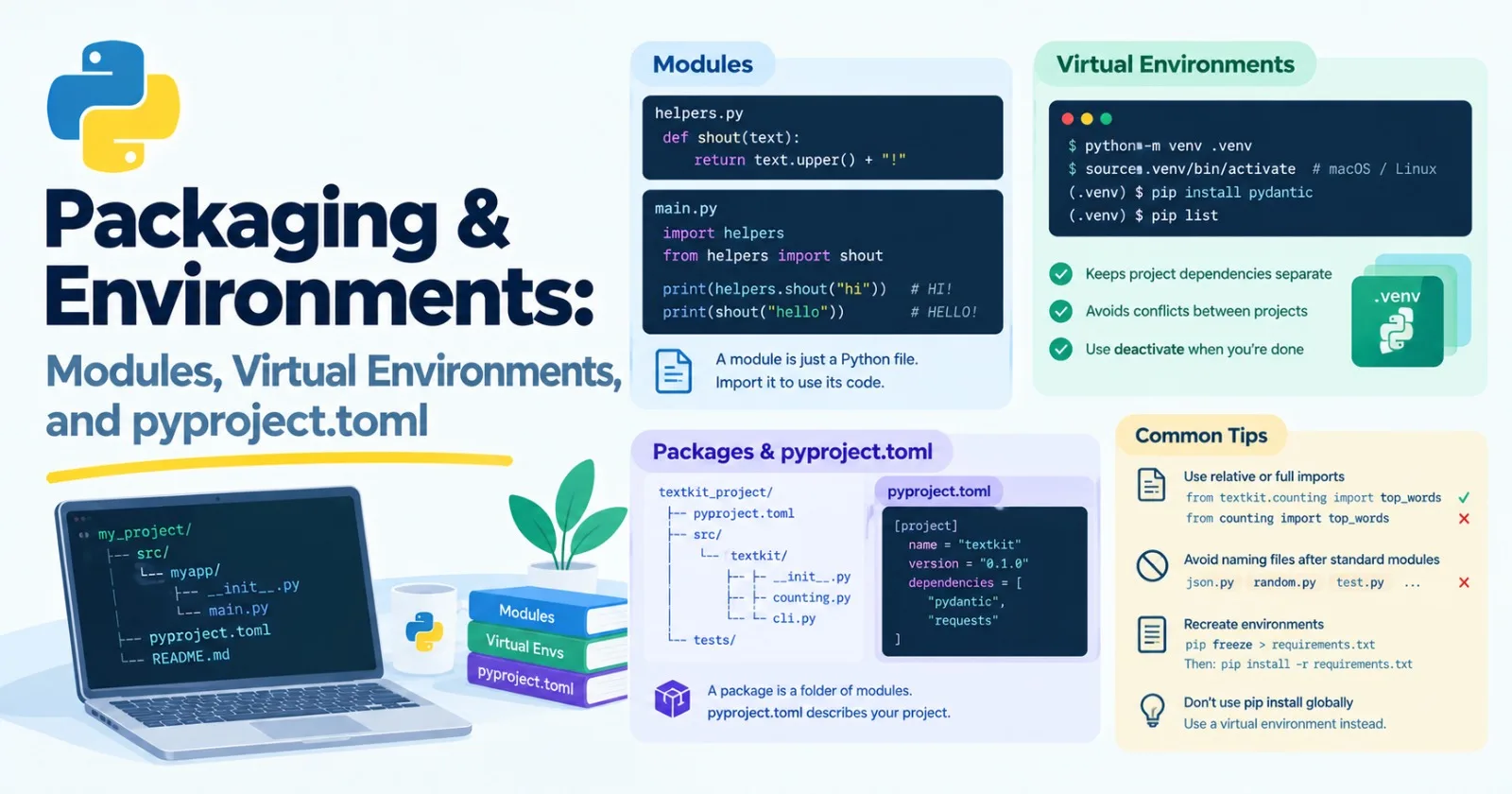
Every programmer eventually says the same sentence: "But it works on my machine." Usually it means two computers have different versions of Python, or different libraries installed, or both.
This post is about fixing that, and it's one of the least glamorous and most useful things you'll learn. It's core. By the end you'll know how to split code into files, keep each project's libraries separate, and describe a project so anyone can install it. We'll also fix the habit from Post 10, where I told you to just run pip install and promised a tidier way later. This is the tidier way.
Modules: a file is a module
A module is just a Python file. When one file uses code from another, it imports it. You've been doing this with built-in modules like time and logging already. Now let's do it with your own.
Make a file called helpers.py:
def shout(text):
    return text.upper() + "!"
And another called main.py in the same folder:
import helpers
from helpers import shout

print(helpers.shout("hi"))    # HI!
print(shout("hello"))         # HELLO!
There are two ways to import. import helpers brings in the whole module, and you use helpers.shout. from helpers import shout brings in just that one name. Both are fine. Many people also shorten long names with as, like import numpy as np, which you'll see everywhere later.
A habit worth building: don't write from something import *. It dumps every name from the module into your file, and then nobody, including you, can tell where a name came from.
The __name__ trick
Here's a pattern you'll see at the bottom of almost every script:
def shout(text):
    return text.upper() + "!"

if __name__ == "__main__":
    print(shout("testing"))
Every module has a built-in variable called __name__. When you run a file directly with python helpers.py, Python sets it to "__main__". When another file imports it, it's set to the module's name instead, which is "helpers".
So the if block runs when you run the file, and stays quiet when someone imports it. That's how one file can be both a reusable module and a runnable script.
A mistake that confuses everyone once
Python looks for imports in your current folder first. So if you name your own file after a standard library module, yours wins, and things break in confusing ways.
Say you save a file as json.py, then in another file in the same folder you write import json and call json.dumps(...):
AttributeError: module 'json' has no attribute 'dumps'It's importing your file, not Python's. Don't name files json.py, random.py, test.py, email.py, and so on. If you ever see this kind of error and the code looks right, check your filenames.
Packages: a folder of modules
When a project grows, you group modules into a folder. A folder of modules that can be imported is called a package. A tidy layout looks like this:
textkit_project/
├── pyproject.toml
├── README.md
├── src/
│   └── textkit/
│       ├── __init__.py
│       ├── counting.py
│       └── cli.py
└── tests/
A few notes on that layout:
__init__.pymarks the folder as a package, and it runs when the package is imported. It's often short, and just re-exports the main names so users can writefrom textkit import count_words.Putting the package inside
src/is a common choice. It stops you from accidentally importing the local folder instead of the properly installed package, which hides bugs.tests/is where your tests go. That's Post 13.
Inside a package, import from your own modules using the full name, like from textkit.counting import top_words.
The problem environments solve
Now the bigger issue. When you run pip install something, it puts the library into the Python you're using. Do that for every project, and soon:
Project A needs version 1 of a library, and Project B needs version 2. You can only have one installed.
You can't tell which libraries each project really needs.
You break something on your computer's own Python that other programs depend on.
That last one is real. On many Linux systems and some Macs, installing into the system Python gets you an "externally managed environment" error. Python is protecting itself. Don't fight it with a scary flag. Use a virtual environment, which is the proper fix.
Virtual environments: one box per project
A virtual environment is a private folder holding its own Python and its own installed libraries. Each project gets one, so they never interfere.
Create one inside your project folder:
python -m venv .venvThat makes a folder called .venv. Now activate it, which tells your terminal to use that Python:
# macOS and Linux
source .venv/bin/activate

# Windows (PowerShell)
.venv\Scripts\Activate.ps1
Your prompt will usually change to show (.venv). You can double-check which Python you're using:
which python # macOS and Linux (on Windows: where python)It should point inside .venv. Now anything you install goes only into this box:
pip install pydantic
pip list
When you're done, type deactivate.
A few things that help:
Reproduce an environment.
pip freeze > requirements.txtsaves a list of what's installed, with versions. Someone else (or you, next year) can rebuild it withpip install -r requirements.txt.Never commit
.venvto Git. It's big and it's specific to your machine. Add.venv/to your.gitignorefile.Tell your editor. In VS Code, open the command palette and choose "Python: Select Interpreter," then pick the one inside
.venv. Otherwise your editor will underline imports as missing even though they work.Wrong environment is the most common cause of
ModuleNotFoundError. You installed the library in one place and ran your code in another. Check which Python is active before anything else.
uv: the modern way
The tools above work, and you should understand them. But there's a newer tool called uv that does the same jobs far faster and in one place: it creates environments, installs libraries, manages Python versions, and keeps a lock file. Many Python projects use it now, and I'd suggest you do too.
You can install it with pip install uv, or use the standalone installer from its official site (docs.astral.sh/uv). Tools in this area change quickly, so if a command here doesn't match what you see, check the official docs.
Starting a new project:
uv init my_app
cd my_app
That creates a small project: a pyproject.toml, a README.md, a main.py, a .python-version file that says which Python to use, and a .gitignore that already excludes .venv. (The exact files vary a little between versions. It also sets up a Git repository for you.)
Adding a library:
uv add pydanticThat does three things at once: it creates the virtual environment if there isn't one, installs the library, and records it in pyproject.toml. It also writes a uv.lock file that pins the exact versions of everything. Run your code with:
uv run main.pyuv run always uses the project's environment, so you never have to remember to activate anything. If a friend clones your project, one command, uv sync, rebuilds the exact same environment.
Here's how the two approaches compare:
Job | pip and venv | uv |
|---|---|---|
Create an environment |
| automatic |
Activate it |
| not needed with |
Add a library |
|
|
Record dependencies |
| automatic in |
Rebuild on another machine |
|
|
Which should you use? Whichever your team or tutorial uses. If you're free to choose, pick uv. This series will show the simplest version of each command, and the ideas are identical either way.
pyproject.toml: the project's ID card
pyproject.toml is a single file that describes your project. Nearly every modern Python tool reads it. Here's the one for the small project we'll build below:
[project]
name = "textkit"
version = "0.1.0"
description = "Small tools for counting words in text"
readme = "README.md"
requires-python = ">=3.11"
dependencies = []

[project.optional-dependencies]
dev = ["pytest>=8.0"]

[project.scripts]
textkit = "textkit.cli:main"

[build-system]
requires = ["setuptools>=68"]
build-backend = "setuptools.build_meta"
The format is called TOML. It's plain text with sections in square brackets. What each part does:
[project]has the basics: the name, the version, a description, and the oldest Python it supports.dependencieslists the libraries your project needs to run. Ours is empty because it only uses Python itself.[project.optional-dependencies]lists extras. Here,pytestis only needed by people working on the project, not by people using it, so it goes in adevgroup.[project.scripts]turns a function into a command. The line says: create a command calledtextkitthat runs themainfunction intextkit/cli.py. After installing, you can typetextkitin your terminal.[build-system]says which tool turns your folder into an installable package. setuptools is the long-standing choice. Others, like hatchling, work too, and you'll see them in plenty of projects. You rarely need to care which.
Many other tools, such as test runners and code formatters, also read settings from the same file, which keeps your project in one place.
Versions and lock files
Dependencies usually come with a version rule:
Written as | Meaning |
|---|---|
| Version 2.0 or newer |
| Exactly this version |
| 2.5 or newer, but below 3.0 |
| At least 2.0, but below 3 |
Loose rules in pyproject.toml say what your project can work with. A lock file (uv.lock, or a pinned requirements.txt) records the exact versions you actually tested, including libraries your libraries depend on. Together they give you flexibility on paper and reliability in practice.
A quick word on trust. Installing a library runs other people's code on your computer. Before you install something, check that you've spelled the name right (fake packages with near-identical names do exist), and that it's a real, maintained project. It takes ten seconds and avoids a lot of trouble.
Another kind of environment: environment variables
AI work adds one more thing. You'll use API keys, which are like passwords for model services. They must never appear in your code or in Git.
The standard solution is an environment variable, a setting that lives outside your code:
import os

api_key = os.environ.get("MODEL_API_KEY")
if api_key is None:
    raise RuntimeError("Set the MODEL_API_KEY environment variable first")
For local work, people keep their variables in a file called .env:
MODEL_API_KEY=your-key-goes-hereThen they load it at startup with a library like python-dotenv (load_dotenv()). The rules:
Add
.envto.gitignoreso it never gets uploaded.Commit a
.env.examplefile with the names but fake values, so others know what to set.If a key ever does leak, treat it as stolen: revoke it and make a new one.
Mini project: your first package
Let's turn the word counter from Post 5 into a real package you can install, with its own command. Build the folder layout shown earlier. First, src/textkit/counting.py:
def count_words(text: str) -> dict[str, int]:
    """Count how often each word appears in a piece of text."""
    words = text.lower().replace(".", "").replace(",", "").split()
    counts: dict[str, int] = {}
    for word in words:
        counts[word] = counts.get(word, 0) + 1
    return counts


def top_words(text: str, n: int = 5) -> list[tuple[str, int]]:
    """Return the n most common words with their counts."""
    counts = count_words(text)
    ranked = sorted(counts, key=counts.get, reverse=True)
    return [(word, counts[word]) for word in ranked[:n]]
Then src/textkit/__init__.py:
from textkit.counting import count_words, top_words

__all__ = ["count_words", "top_words"]
And src/textkit/cli.py:
import sys

from textkit.counting import top_words


def main() -> None:
    text = " ".join(sys.argv[1:]) or sys.stdin.read()
    for word, count in top_words(text):
        print(f"{word}: {count}")


if __name__ == "__main__":
    main()
Add the pyproject.toml from above, and a README.md containing a title. Now create an environment and install your package in editable mode, which means changes to your code take effect immediately without reinstalling:
python -m venv .venv
source .venv/bin/activate        # on Windows, use the activate line from earlier
pip install -e .
(With uv, the equivalent is uv pip install -e . inside a project, or you can structure it as a uv project from the start with uv init --lib.)
Now try it from any folder:
python -c "import textkit; print(textkit.top_words('The cat sat on the mat. The dog sat on the log.', n=3))"
# [('the', 4), ('sat', 2), ('on', 2)]

textkit the cat sat on the mat
# the: 2
# cat: 1
# sat: 1
# on: 1
# mat: 1

echo "the dog and the cat" | textkit
# the: 2
# dog: 1
# and: 1
# cat: 1
Take a moment to appreciate that. You typed textkit in a terminal, and your own code ran. It's no longer a script in a folder. It's a package, with a name, a version, and a command.
Notice, too, that pip list now shows textkit with the path of your folder next to it. That's what "editable" means.
Make it yours
Add a
clean.pymodule with a function that removes punctuation more thoroughly, and use it fromcounting.py.Add a real dependency, such as
richfor colored output, and see how it shows up inpyproject.toml.Add a
--top 10option to the command. (Look upargparsein the Python docs.)Repeat the whole thing with uv, and compare the steps.
Practice
About 20 minutes of real effort on each before asking for help.
Create a virtual environment, install a library, and confirm it with
pip list. Then delete the environment and rebuild it from arequirements.txtfile.Make two environments. Install
requestsin only one of them. Show thatimport requestsworks in one and fails in the other.Break things on purpose: create a file called
json.py, and watch what happens to a script that importsjson.Write a module that behaves differently when it's imported than when it's run directly, using
if __name__ == "__main__":.Write a
.gitignorefor the project above and explain each line in your own words.Find a small open-source Python project on GitHub, open its
pyproject.toml, and list its dependencies.
Then ask an AI tutor to review your answers, and don't let it rewrite them.
What to take away
A module is a Python file, and a package is a folder of modules.
if __name__ == "__main__":lets a file work both as a script and as an importable module.Never name your files after standard library modules.
A virtual environment gives each project its own libraries, so projects can't interfere with each other.
uv does everything pip and venv do, faster and in one tool, but the ideas are the same.
pyproject.tomldescribes your project: its name, Python version, dependencies, and commands.Lock files pin exact versions so every machine gets the same setup.
API keys belong in environment variables, never in code or Git.
Previous: Post 11, Errors, Logging & Debugging
Next in the series: Post 13, Testing with pytest, where we write tests, mock model calls, and stop worrying about breaking things.
Comments(0)
Join the discussion by logging into your account.
No comments yet. Be the first to comment!