
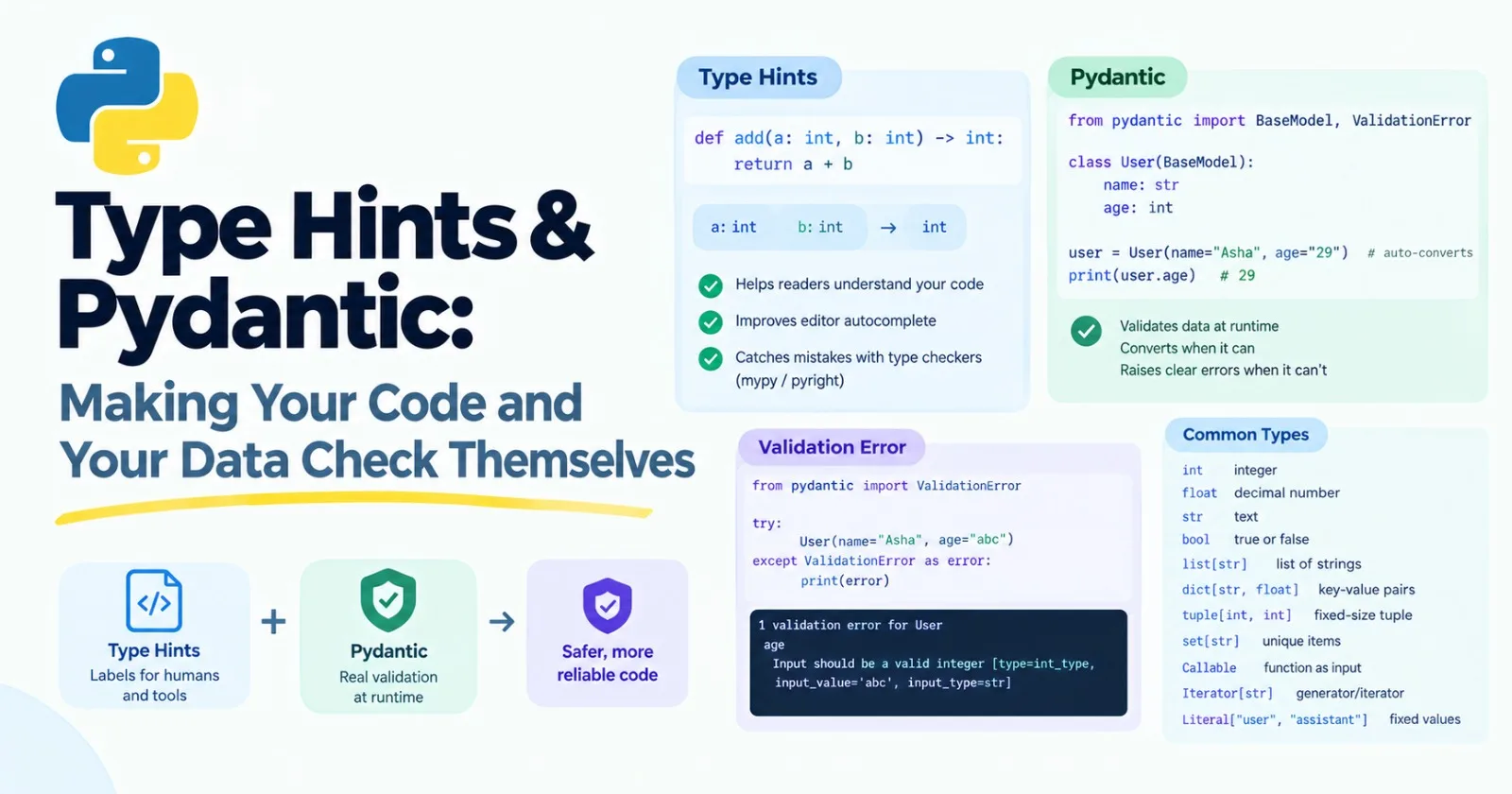
In the last post you saw lines like role: str and -> str, and I asked you to treat them as labels. This post explains them properly. It's core, because modern AI code is full of them, and because the second half, a library called Pydantic, is how you turn a model's messy text reply into clean, reliable data.
There are two halves, and the difference between them is the whole lesson:
Type hints are labels that help humans and tools. Python ignores them when your program runs.
Pydantic actually checks your data while the program runs.
Type hints: labels, not rules
A type hint says what kind of value something should be:
def add(a: int, b: int) -> int:
    return a + b
Read it as "add takes two integers and gives back an integer." Now watch what happens when we ignore that:
print(add(2, 3))        # 5
print(add("x", "y"))    # xy
Python happily ran it. The hints didn't stop anything. They're just notes attached to the function.
So what are they good for? Three things.
Readers. Anyone looking at the function knows what goes in and what comes out, without hunting through the code.
Your editor. It uses hints for autocomplete and for the little popups that show what a function expects. That alone saves a lot of time.
Type checkers. Tools like mypy and pyright read your hints and find mistakes before you run anything. Given the call
add("x", "y"), a checker would report something likeArgument 1 to "add" has incompatible type "str"; expected "int". Catching that bug at your desk beats finding it in production.
The hints you'll use most
For basic values, use the type names you already know: int, float, str, bool. For collections, say what's inside the brackets:
count: int = 0
names: list[str] = ["a", "b"]
scores: dict[str, float] = {"a": 0.5}
point: tuple[int, int] = (3, 4)
tags: set[str] = {"x"}
The : int after a variable name works just like it does on a function parameter.
For "this or that", use the pipe symbol |:
def find_user(user_id: int) -> str | None:
    users = {1: "Asha"}
    return users.get(user_id)
str | None means "a string, or nothing." You'll write that one constantly, since lots of functions sometimes find nothing. It also works for other combinations, like int | str.
(If you read older tutorials, you'll see Optional[str] and List[str] imported from typing. That's the old style. In modern Python, the versions above are simpler.)
Three more that matter for AI code:
A function as an input, using Callable. The first part in brackets is the list of inputs, and the second is the output:
from typing import Callable

def apply(func: Callable[[int], int], value: int) -> int:
    return func(value)

print(apply(lambda n: n * 2, 21))    # 42
A generator, using Iterator. Remember read_lines from Post 7? A function with yield hands back a stream of values, so the hint describes what each value is:
from typing import Iterator

def read_lines(path: str) -> Iterator[str]:
    ...
A fixed set of allowed values, using Literal:
from typing import Literal

def set_role(role: Literal["user", "assistant"]) -> str:
    return f"role={role}"
A type checker will complain if you pass "robot". And in a minute you'll see how Pydantic uses the very same idea for real checking.
How much should you use?
Don't try to annotate every single variable. A good starting rule: put hints on function parameters and return values, and on the fields of data classes. That's where they help most. Python can usually work out the types of ordinary local variables on its own.
The gap: hints don't check real data
Here's the problem hints can't solve. Data from outside your program is untrusted. A web request. A file. A user typing something. And especially a language model's reply. You can write age: int, but if the JSON coming in says "age": "banana", Python won't object until something breaks three functions later.
We saw this in the last post too: a dataclass with role: str accepted Message(1, 2) without complaint.
That's where Pydantic comes in.
Pydantic: data that checks itself
Pydantic is a library that reads your type hints and enforces them. It's one of the most widely used libraries in modern Python, and it sits underneath many AI tools and web frameworks. Install it with:
pip install pydantic(Post 12 explains virtual environments, which is the tidier way to install things. For now, this is fine.)
This post uses Pydantic version 2, the current major version. If you find tutorials using .dict() and .json(), they're written for version 1, and the methods below have newer names.
Here's a model:
from pydantic import BaseModel

class User(BaseModel):
    name: str
    age: int
You create one the same way as a dataclass:
user = User(name="Asha", age=29)
print(user.name, user.age)    # Asha 29
Now the useful part. Pydantic converts values when it sensibly can:
user = User(name="Asha", age="29")
print(user.age)           # 29   (it became a real integer)
And it refuses values it can't make sense of:
from pydantic import ValidationError

try:
    User(name="Asha", age="abc")
except ValidationError as error:
    print(error)
The message looks something like this (shortened):
1 validation error for User
age
  Input should be a valid integer, unable to parse string as an integer [type=int_parsing, input_value='abc', input_type=str]
Look how clear that is. It tells you which field, what was wrong, and what value it received. That readability is a big reason people love it.
A missing field is caught too:
User(name="Asha") # ValidationError: age, Field requiredAdding rules with Field
You can add limits using Field:
from pydantic import BaseModel, Field

class ModelSettings(BaseModel):
    name: str
    temperature: float = Field(default=0.7, ge=0, le=2)
    max_tokens: int = Field(default=500, gt=0)
ge means "greater than or equal to," le means "less than or equal to," and gt means "greater than." Try ModelSettings(name="x", temperature=5) and you'll get an error saying the input should be less than or equal to 2.
Optional fields, lists, and nested models
Models can be built from other models, which is how you describe real-world data:
class Item(BaseModel):
    name: str
    qty: int = 1

class Order(BaseModel):
    order_id: int
    items: list[Item]
    note: str | None = None

order = Order(order_id=7, items=[{"name": "pen", "qty": 2}, {"name": "book"}])
print(order.items[0].name)    # pen
print(order.items[1].qty)     # 1  (the default)
Notice that we passed plain dictionaries for the items, and Pydantic turned them into Item objects for us.
Your own checks
When a built-in rule isn't enough, write a validator. It's a decorator on a method:
from pydantic import BaseModel, field_validator

class Tag(BaseModel):
    label: str

    @field_validator("label")
    @classmethod
    def clean_label(cls, value):
        value = value.strip().lower()
        if not value:
            raise ValueError("label can't be empty")
        return value

print(Tag(label="  Python ").label)    # python
Yes, that's two decorators stacked, plus @classmethod from the last post. By now, you've seen every piece of it.
Getting data out
user = User(name="Asha", age=29)

print(user.model_dump())         # {'name': 'Asha', 'age': 29}
print(user.model_dump_json())    # {"name":"Asha","age":29}
And going the other way, from a dictionary or a JSON string:
User.model_validate({"name": "Asha", "age": 29})
User.model_validate_json('{"name": "Asha", "age": 29}')
Why this matters so much for LLM apps
A language model produces text. But your app usually wants data: a title, a category, a list of steps, an amount. If the model writes a friendly paragraph and your code needs a field called category, you're stuck.
The standard solution is structured output:
You describe the shape you want, as a Pydantic model.
You hand the model that shape. Pydantic can turn any model into a JSON Schema, which is a standard way of describing JSON, using
Course.model_json_schema(). Several model libraries also accept the Pydantic class directly.The model replies with JSON that follows the shape.
You validate the reply with
model_validate_json, so the rest of your code receives clean, checked data.
Step 4 is the one beginners skip, and it's the one that saves you. Even with a schema, models sometimes produce a value that's missing, misspelled, or out of range. Validation catches that in one place, with a clear message. One more honest note: validation checks the shape of the data, not whether it's true. A reply can be perfectly valid and still be wrong. We'll deal with that in the evals posts.
You'll also meet Pydantic in FastAPI, which uses it to check incoming requests. We'll use that in Post 28.
Dataclass or Pydantic?
Dataclass | Pydantic model | |
|---|---|---|
Checks types when created | No | Yes |
Converts values (like | No | Yes |
Reads and writes JSON | Not built in | Built in |
Part of Python itself | Yes | No, you install it |
Best for | Simple internal data you control | Data coming from outside, like APIs and model replies |
A good rule: use a dataclass for data you create yourself inside your program. Use Pydantic for data that comes from outside it.
Mini project: a reply checker with feedback
Let's build the core of a structured-output loop, using fake model replies so you don't need an API key. The first reply has a mistake, and the second is correct. We'll show the error message that you'd send back to the model so it can fix itself.
Create reply_checker.py:
from typing import Literal

from pydantic import BaseModel, Field, ValidationError


class Course(BaseModel):
    title: str
    difficulty: Literal["beginner", "intermediate", "advanced"]
    hours: float = Field(gt=0)
    topics: list[str] = Field(default_factory=list)


replies = [
    '{"title": "Intro to Python", "difficulty": "easy", "hours": 3.5}',
    '{"title": "Intro to Python", "difficulty": "beginner", "hours": 3.5, "topics": ["variables", "loops"]}',
]

for attempt, raw in enumerate(replies, start=1):
    try:
        course = Course.model_validate_json(raw)
    except ValidationError as error:
        print(f"Attempt {attempt} failed. Feedback for the model:")
        print(error)
        continue

    print(f"Attempt {attempt} worked: {course.title} ({course.difficulty}, {course.hours} hours)")
    break
Run it. On the first attempt, "easy" isn't one of the allowed difficulty levels, so you'll see an error along the lines of "Input should be 'beginner', 'intermediate' or 'advanced'." The second reply passes, and you'll see:
Attempt 2 worked: Intro to Python (beginner, 3.5 hours)In a real app, the loop would send that error text back to the model with a message like "your last reply had these problems, please fix them," and ask again. That pattern (validate, show the model what went wrong, retry) is one of the most useful tricks in AI engineering. It also reuses the retry idea from Posts 6 and 8.
Also try print(Course.model_json_schema()) to see the schema that you'd hand to a model.
Make it yours
Add a
summaryfield that must be at most 200 characters (look upmax_lengthin the Pydantic docs).Write a validator that strips extra spaces and capitalizes the title.
Add a third reply that's invalid JSON (for example, with a missing quote) and see what error you get.
Turn the loop into a function
get_course(replies, max_attempts=3)that returns aCourseor raises an error after too many failures.
Practice
About 20 minutes of real effort on each before asking for help.
Add type hints to three functions you wrote in earlier posts, such as
retry,batches, andmake_multiplier.Write a function that takes a
Callable[[str], str]and a list of strings, and returns the list with the function applied.Create a
PersonPydantic model with a name, an age that can't be negative, and an optional email. Test it with good and bad data.Add a
field_validatortoPersonthat makes sure the name isn't empty.Parse this JSON string into a model with a nested model:
{"order_id": 7, "items": [{"name": "pen", "qty": 2}]}.
Then ask an AI tutor to review your code, not rewrite it.
What to take away
Type hints are labels. Python ignores them when running, but your editor and type checkers use them to help you and catch bugs early.
Put hints on function parameters, return values, and data fields, and don't worry about the rest.
str | None,list[str],Callable,Iterator, andLiteralcover most of what you'll need.Pydantic enforces your types at runtime, converts values when it sensibly can, and gives clear errors when it can't.
Structured outputs depend on this: describe the shape, ask for it, then validate what comes back.
Use dataclasses for data you control, and Pydantic for data that comes from outside.
Previous: Post 9, OOP the Practical Way
Next in the series: Post 11, Errors, Logging & Debugging, where we learn to handle failures, read stack traces, and find bugs faster.
Comments(0)
Join the discussion by logging into your account.
No comments yet. Be the first to comment!