
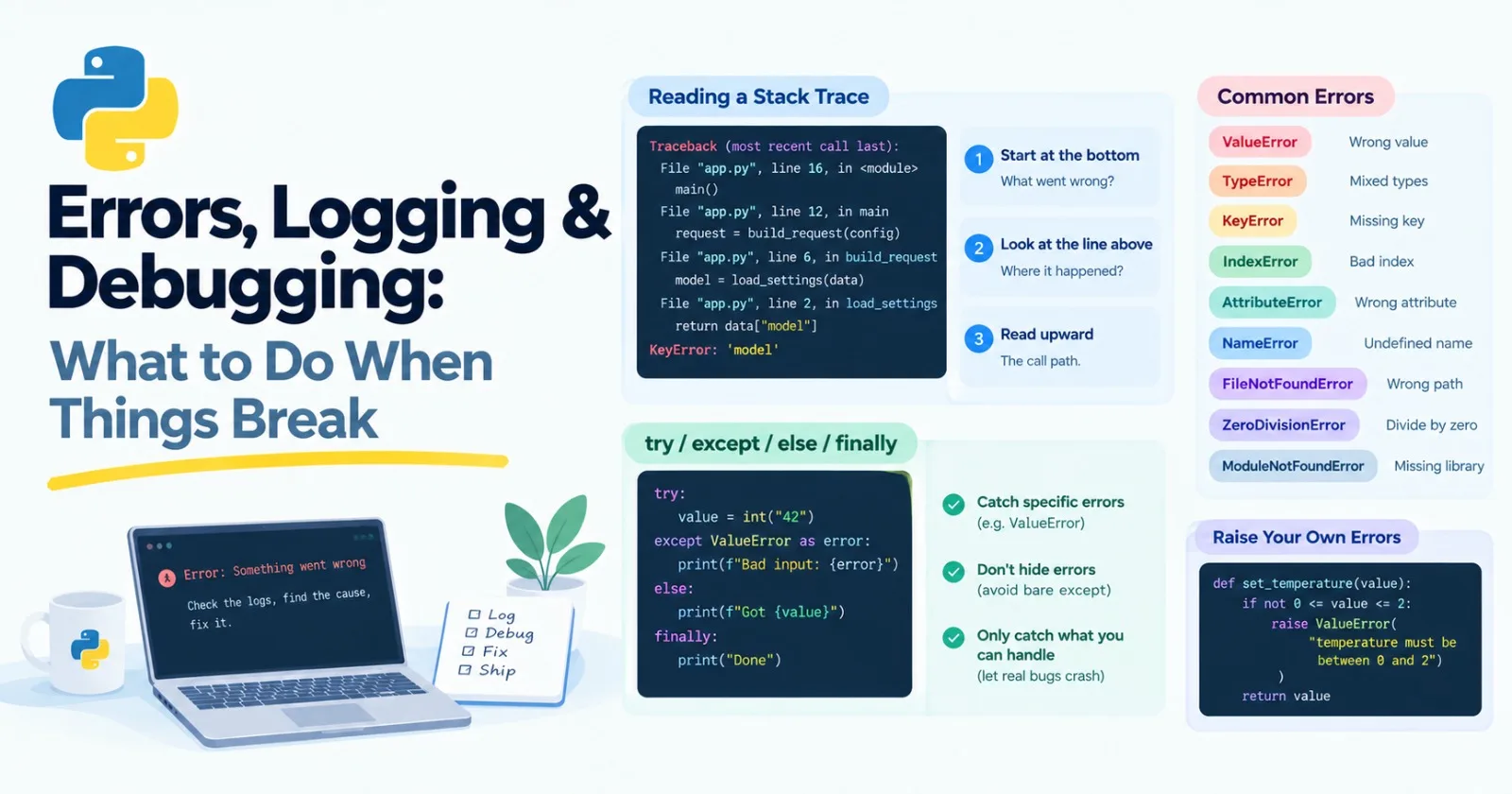
Things break. That's not a sign you're doing it wrong. It's what programs do. And in AI apps they break in more creative ways than usual: the network drops, a service rate-limits you, a file is missing, or a model sends back something your code didn't expect.
Good engineers aren't the ones whose code never fails. They're the ones who handle the failures they can predict, and find the surprising ones fast. This post is core, and it's about both.
Reading a stack trace
When Python crashes, it prints a traceback. Beginners often treat it as a wall of scary text. It's actually a map, once you know how to read it.
Here's a small program with a bug. Save it as app.py:
def load_settings(data):
    return data["model"]


def build_request(data):
    model = load_settings(data)
    return {"model": model, "prompt": "Hi"}


def main():
    config = {"temperature": 0.7}
    request = build_request(config)
    print(request)


main()
Run it and you'll get something like this:
Traceback (most recent call last):
  File "app.py", line 16, in <module>
    main()
  File "app.py", line 12, in main
    request = build_request(config)
              ^^^^^^^^^^^^^^^^^^^^^
  File "app.py", line 6, in build_request
    model = load_settings(data)
            ^^^^^^^^^^^^^^^^^^^
  File "app.py", line 2, in load_settings
    return data["model"]
           ~~~~^^^^^^^^^
KeyError: 'model'
(Yours may look slightly different depending on your Python version and file path.)
Here's how to read it:
Start at the bottom. The last line says what went wrong: a
KeyErrorfor the key'model'. Something asked a dictionary for a key it doesn't have.Look at the line just above it. That's where it happened: line 2, inside
load_settings.Then read upward. Each block above is the function that called the one below it. It's the path the program took:
maincalledbuild_request, which calledload_settings.
The crash happened in load_settings, but is that where the bug is? Not really. load_settings did exactly what it was told. The real problem is higher up: main created a config with no "model" in it. The line where something crashes and the line where the mistake was made aren't always the same. The traceback shows you the trail so you can follow it.
Common errors, and what they usually mean
You'll see the same handful of errors again and again:
Error | Example message | Usual cause |
|---|---|---|
|
| Right type, wrong value |
|
| Mixing types that don't go together |
|
| Asked a dictionary for a key that isn't there |
|
| Asked for a position that doesn't exist |
|
| Used |
|
| A typo, or using a variable before creating it |
|
| Wrong path or filename |
|
| Dividing by zero, often an empty list |
|
| A library isn't installed |
The AttributeError about NoneType deserves a special mention. It's probably the most common error in real projects. It nearly always means a function returned None when you expected something else, so the real question is "why did it give me nothing?"
Handling errors with try and except
Sometimes you can predict a failure and do something sensible about it:
user_input = "abc"

try:
    number = int(user_input)
except ValueError:
    print("Please type a whole number")
Python tries the code in try. If a ValueError happens, it jumps to the except block. Otherwise, it skips it.
The full version has four parts:
try:
    value = int("42")
except ValueError as error:
    print(f"Bad input: {error}")
else:
    print(f"Got {value}")
finally:
    print("Done")

# Got 42
# Donetry: the code that might fail.except: what to do if it fails.as errorgives you the error to look at.else: runs only if nothing went wrong.finally: runs no matter what. It's the same idea as the cleanup in Post 8.
Some rules that save you pain
Catch specific errors. Say except ValueError, not just except. A bare except: catches everything, including you pressing Ctrl+C to stop the program, and it hides real bugs.
Never swallow errors silently. This is the worst pattern in Python:
try:
    do_something_risky()
except:
    pass
If this hides a problem, you'll spend hours wondering why nothing works and no error appears.
Only catch what you can actually handle. If you can't do anything useful about an error, let it crash with a clear message. A loud failure is easier to fix than a quiet wrong answer.
Raising your own errors
You can raise errors yourself when something is wrong:
def set_temperature(value):
    if not 0 <= value <= 2:
        raise ValueError("temperature must be between 0 and 2")
    return value
You can also define your own error types. They're just short classes (Post 9):
class ModelError(Exception):
    """Raised when the model returns something we can't use."""
A custom type lets other parts of your code catch exactly that problem. And when you catch one error and raise a clearer one, use from to keep the original attached:
def parse_score(text):
    try:
        return int(text)
    except ValueError as error:
raise ModelError(f"Expected a number, got {text!r}") from error({text!r} shows the value with quotes, so an empty string or stray spaces are easy to spot.) If this fails, the traceback shows both errors, with a line saying the first was "the direct cause" of the second. That's a gift when you're debugging.
Which errors should you retry?
Back in Posts 6 and 8 we built a retry helper that retried everything. In real code, that's a mistake. Some failures are temporary, and some are permanent.
Worth retrying: a timeout, a dropped connection, a "too many requests" response. Try again in a moment and it may work.
Not worth retrying: a bad request, a missing API key, a response that fails validation. Trying again just repeats the same mistake. You need to fix your code or your input.
So retry only the first kind. You'll see exactly how in the mini project below.
Logging instead of print
Print statements work for quick checks, but they get messy. There's no timestamp, no way to switch them off, and no way to tell a minor note from an emergency. Python's built-in logging module fixes all of that.
import logging

logging.basicConfig(
    level=logging.INFO,
    format="%(asctime)s %(levelname)s %(name)s: %(message)s",
)
logger = logging.getLogger(__name__)

logger.debug("Sending request")
logger.info("Request sent")
logger.warning("Rate limit close")
logger.error("Request failed")
Output:
2026-10-18 11:21:24,619 INFO __main__: Request sent
2026-10-18 11:21:24,619 WARNING __main__: Rate limit close
2026-10-18 11:21:24,619 ERROR __main__: Request failed
(Your timestamps will differ.) Notice the debug message didn't appear. There are five levels, from quietest to loudest: DEBUG, INFO, WARNING, ERROR, and CRITICAL. Setting level=logging.INFO means "show INFO and above." While you're hunting a bug, switch to DEBUG and everything shows up. In production, you might use WARNING to keep things calm. You change one line instead of deleting prints all over your code.
Inside an except block, logger.exception(...) logs your message and the full traceback:
try:
    1 / 0
except ZeroDivisionError:
    logger.exception("Math went wrong")
Two bits of advice about what to log. First, log the useful things in an AI app: which model you called, how long it took, how many tokens it used, and, when it's safe, the prompt and reply. When something goes wrong later, you'll be glad you did. Second, never log secrets such as API keys, and be careful with personal data in prompts. Logs get stored and shared more widely than people expect.
Debugging: a method, not a mood
When code misbehaves, it's tempting to change things at random and hope. It's slow, and it often creates new bugs. Try this instead:
Reproduce it. Find a small input that makes the bug happen every time.
Read the error. Properly, from the bottom up, like we did above.
Guess what's wrong. Form a specific idea, like "this list is empty when it shouldn't be."
Test the guess. Print the value, log it, or inspect it in a debugger.
Change one thing at a time. Then run it again.
Lock it in. Once it's fixed, write a test so it can't come back. That's in Post 13.
If you're stuck, shrink the problem. Delete or comment out half the code, and see whether the bug survives. Repeat. It's like searching a phone book by splitting it in half again and again.
Print debugging, but nicer
There's a tiny trick that makes print debugging faster. Put = inside an f-string and Python prints the name and the value:
x = 5
name = "Asha"
print(f"{x=}", f"{name=}")    # x=5 name='Asha'
The debugger
A debugger lets you pause the program mid-run and look around. Python has one built in, called pdb. Add breakpoint() where you want to stop:
def average(numbers):
    total = sum(numbers)
    breakpoint()
    return total / len(numbers)

average([])
When you run it, the program freezes at that line and gives you a prompt:
> dbg.py(4)average()
-> return total / len(numbers)
(Pdb) p total
0
(Pdb) p numbers
[]
(Pdb) q
You type commands, and it answers. The ones worth learning:
Command | What it does |
|---|---|
| Print a value or expression |
| Run the next line |
| Step into a function call |
| Continue until the next breakpoint |
| Show the code around where you are |
| Show where you are in the call stack |
| Quit |
We learned in two commands that numbers is empty. That's the bug. It would have taken a lot longer to find by guessing.
If you use VS Code, there's a friendlier version of the same thing. Click to the left of a line number to set a breakpoint, then run your file with the debugger (the F5 key). It pauses at that spot, and you can hover over variables to see their values. Many people prefer this to typing pdb commands.
Debugging AI apps is different
Here's the catch with language models: often, there's no error at all. The model just gives a bad answer. A few habits help a lot:
Log the exact prompt and the exact reply for every call. Most "model bugs" turn out to be a prompt that didn't contain what you thought it did.
Reproduce with the same input. Turn the temperature down so the answer is more consistent while you investigate.
Save the bad cases. Every failure you collect is a free test for later. In Post 60, those saved examples become the start of an evaluation set.
Mini project: a resilient model call
Let's put it all together with a fake model that sometimes fails. Create resilient.py:
import logging
import random
import time

logging.basicConfig(level=logging.INFO, format="%(levelname)s: %(message)s")
logger = logging.getLogger("model_client")


class ModelError(Exception):
    """Base class for our model errors."""


class RateLimitError(ModelError):
    """Too many requests. Worth retrying."""


class BadRequestError(ModelError):
    """Something is wrong with our request. Retrying won't help."""


def fake_model_call(prompt):
    if not prompt.strip():
        raise BadRequestError("Prompt is empty")
    if random.random() < 0.5:
        raise RateLimitError("Slow down")
    return f"Answer to: {prompt}"


def call_with_retries(prompt, attempts=4, delay=0.1):
    for attempt in range(1, attempts + 1):
        try:
            return fake_model_call(prompt)
        except RateLimitError as error:
            logger.warning("Attempt %d/%d hit a rate limit: %s", attempt, attempts, error)
            if attempt == attempts:
                logger.error("Giving up after %d attempts", attempts)
                raise
            time.sleep(delay * attempt)
        except BadRequestError:
            logger.exception("Bad request, not retrying")
            raise


for prompt in ["What is logging?", "   "]:
    try:
        print(call_with_retries(prompt))
    except ModelError as error:
        print(f"Could not answer {prompt!r}: {error}")
Because the rate limit is random, your output will vary. One run might look like this:
WARNING: Attempt 1/4 hit a rate limit: Slow down
Answer to: What is logging?
ERROR: Bad request, not retrying
Traceback (most recent call last):
  ...
BadRequestError: Prompt is empty
Could not answer '   ': Prompt is empty
Here's what's worth noticing:
An error family.
RateLimitErrorandBadRequestErrorboth inherit fromModelError(inheritance, Post 9). So the loop at the bottom can catch both with a singleexcept ModelError, while the retry code treats them differently.Targeted retries. Only
RateLimitErrortriggers a retry. A bad request fails immediately, because trying again can't help.Growing waits.
delay * attemptmakes each wait a bit longer than the last, which is kinder to a busy service.Logging with levels. Warnings for each retry, an error when giving up, and
logger.exceptionto capture the traceback for the bad request.A friendly ending. The outer
tryturns errors into a clear message instead of a crash.
The raise on its own line, with nothing after it, re-raises the same error. It lets this function log the problem and still pass it up to whoever called it.
Make it yours
Add a
TimeoutErrorcase that's also worth retrying.Give up if the total time spent retrying passes a limit you choose.
Send the log output to a file by adding
filename="app.log"tobasicConfig.Rewrite it as a
@retrydecorator from Post 8 that takes the error types to retry as an argument.
Practice
About 20 minutes of real effort on each before asking for help.
Write
safe_int(text, default=0)that returns the number, or the default if the text isn't a valid integer.Cause each of five common errors on purpose, and read the message carefully for each.
Here's a function that crashes on an empty list. Use
breakpoint()to confirm why, then fix it. Decide for yourself whether it should return 0 or raise a clearer error, and be ready to explain your choice.
def average_length(words):
    total = 0
    for word in words:
        total += len(word)
    return total / len(words)

print(average_length([]))
Take one of your earlier projects, such as the token estimator or the pipeline, and replace the
printcalls withlogging.Write a custom exception class, and use
raise ... fromto wrap a lower-level error with it.
Then ask an AI tutor to review your answers, and don't let it rewrite them.
What to take away
Read a traceback from the bottom up. The last line is what, the line above is where, and the rest is how it got there.
Catch specific errors, never hide them silently, and only handle what you can actually fix.
Retry temporary failures, not permanent ones.
Use
logginginstead ofprint, with levels, and never log secrets.Debug with a method: reproduce, read, guess, test, change one thing, and then lock it in with a test.
With AI apps there's often no error, so log every prompt and reply, and save the bad cases.
Previous: Post 10, Type Hints & Pydantic
Next in the series: Post 12, Packaging & Environments, covering modules, virtual environments, pyproject.toml, and uv.
Comments(0)
Join the discussion by logging into your account.
No comments yet. Be the first to comment!