
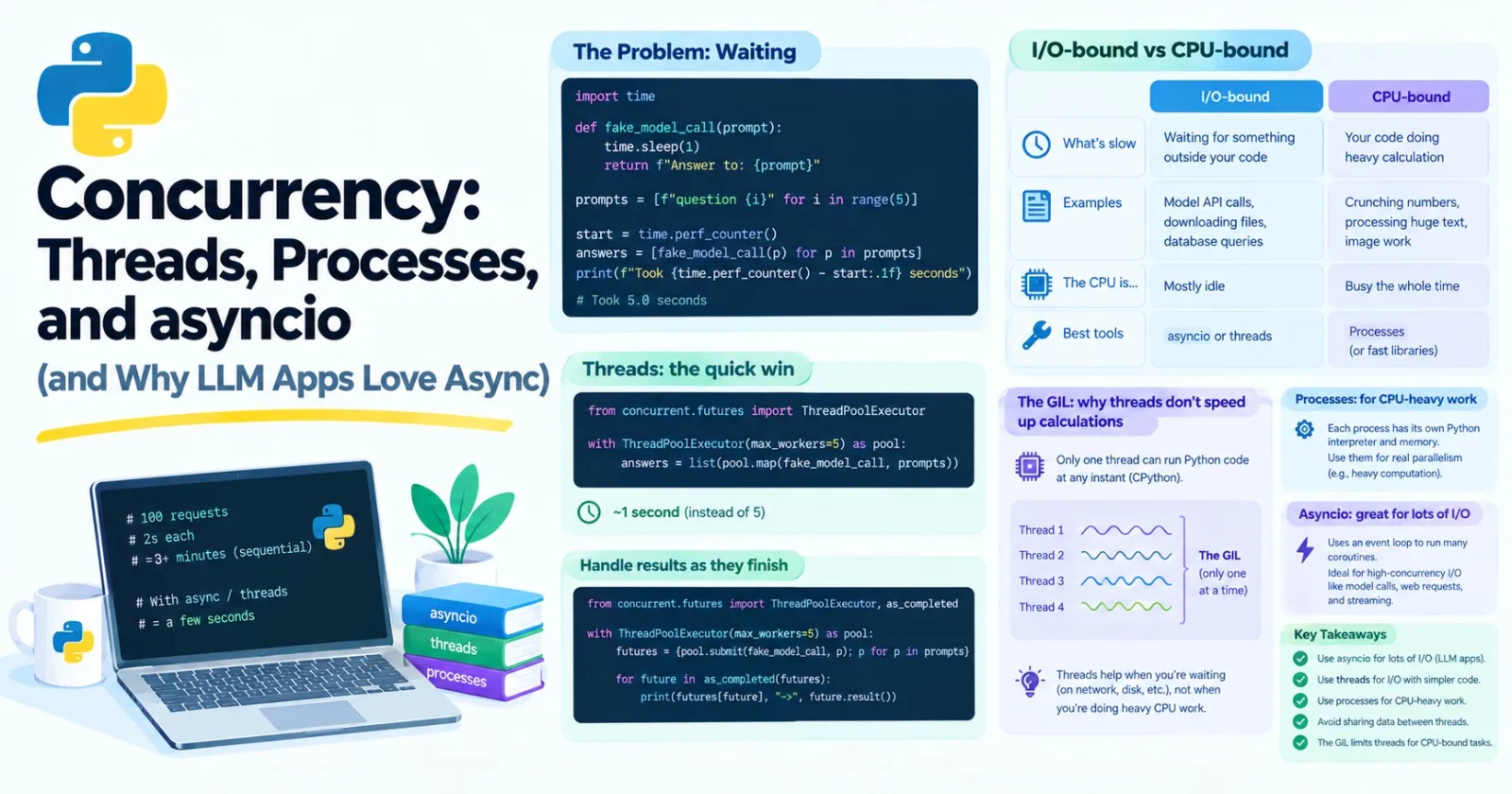
Imagine you need to ask a language model 100 questions. Each answer takes about two seconds to come back. If you ask them one at a time, that's over three minutes of your program mostly sitting still and waiting.
Now imagine sending all 100 questions at once, and collecting the answers as they arrive. Same work, a few seconds. That difference is what this post is about. It's core, because AI apps spend a huge share of their time waiting on networks and models, and the right tool turns that waiting into speed.
It's also a topic with a lot of jargon, so we'll go slowly and measure everything.
The problem: waiting
Here's a fake model call. The time.sleep(1) pretends we're waiting a second for a reply:
import time


def fake_model_call(prompt):
    time.sleep(1)
    return f"Answer to: {prompt}"


prompts = [f"question {i}" for i in range(5)]

start = time.perf_counter()
answers = [fake_model_call(p) for p in prompts]
print(f"Took {time.perf_counter() - start:.1f} seconds")    # Took 5.0 seconds
Five calls, five seconds. And notice what the computer is doing during all that time: nothing. It's waiting. We can do better.
Two kinds of slow
Programs are slow for two very different reasons, and the fix depends on which one you have.
I/O-bound | CPU-bound | |
|---|---|---|
What's slow | Waiting for something outside your code | Your code doing heavy calculation |
Examples | Model API calls, downloading files, database queries | Crunching numbers, processing huge text by hand, image work |
The CPU is... | Mostly idle | Busy the whole time |
Best tools |
| Processes (or fast libraries) |
Most of what you do in AI engineering around model APIs is I/O-bound. Heavy math is usually CPU-bound, but it normally happens inside libraries like NumPy and PyTorch, which are built for it.
Two more words you'll hear. Concurrency means managing several tasks so they all make progress during the same stretch of time. Parallelism means literally running several things at the same instant, on different CPU cores.
Back to the kitchen from Post 1. A single chef who starts a pot boiling, chops vegetables while it heats, and checks the oven in between is being concurrent. Three chefs each cooking a dish at the same moment are being parallel. For waiting problems, one clever chef is enough.
Threads: the quick win
A thread is a separate line of execution inside your program. The easiest way to use threads is ThreadPoolExecutor, which keeps a small crew of workers ready:
from concurrent.futures import ThreadPoolExecutor

with ThreadPoolExecutor(max_workers=5) as pool:
    answers = list(pool.map(fake_model_call, prompts))
Time it, and those five calls now finish in about 1 second instead of 5. pool.map works like the map from Post 6, except the calls run on different threads, and the answers come back in the original order. (The with block, from Post 8, makes sure the crew is cleaned up at the end.)
Sometimes you'd rather handle each result as soon as it's ready, instead of waiting for all of them. For that, use submit and as_completed:
from concurrent.futures import ThreadPoolExecutor, as_completed

with ThreadPoolExecutor(max_workers=5) as pool:
    futures = {pool.submit(fake_model_call, p): p for p in prompts}
    for future in as_completed(futures):
        print(futures[future], "->", future.result())
submit starts a task and gives you back a future, a placeholder for a result that isn't ready yet. Calling .result() gives you the value, and if the task raised an error, .result() raises it again at that point. So wrap it in try/except when failures are possible. The results print in whatever order they finish, so your output can look shuffled.
The catch: threads share memory
All threads in a program see the same variables. That's convenient and dangerous. If two threads change the same value at the same moment, they can overwrite each other's work, which is called a race condition. These bugs are infuriating because they appear only sometimes.
The best fix is to avoid sharing: let each task return its result, and gather results in one place, like we did above. When you really must share something that changes, protect it with a lock:
import threading


class SafeCounter:
    def __init__(self):
        self.value = 0
        self._lock = threading.Lock()

    def increment(self):
        with self._lock:
            self.value += 1
Only one thread at a time can be inside the with self._lock: block, so the updates can't collide. You can run ten threads that each call increment() a thousand times and get exactly 10,000.
The GIL: why threads don't speed up calculations
You might think: if threads work so well, let's use them for everything. Try it on a CPU-bound task:
def count_down(n):
    while n > 0:
        n -= 1
Run it four times, one after another, and then in four threads. On a standard Python install, the threaded version takes about as long as the plain version. Sometimes longer. Why?
Because of the GIL, the Global Interpreter Lock. In the standard version of Python (CPython), only one thread can run Python code at any instant. Think of it as one microphone that the threads must pass around.
But there's a twist that makes threads useful after all: a thread lets go of the lock while it's waiting on something, such as the network, a file, or a sleep. So when most of the time is spent waiting, threads overlap beautifully. When the time is spent computing in Python, they take turns and gain nothing.
Two details worth knowing. Heavy libraries like NumPy and PyTorch often release the lock while they do their native work, so threads can help there. And newer versions of Python offer an optional "free-threaded" build without the GIL. The standard build most people use still has it, and the ideas in this post hold either way.
Processes: real parallelism
To use several CPU cores for Python code, you need separate processes. Each one is its own Python, with its own memory and its own lock, so they genuinely run at the same time. ProcessPoolExecutor has the same shape as the thread version:
from concurrent.futures import ProcessPoolExecutor

if __name__ == "__main__":
    with ProcessPoolExecutor(max_workers=4) as pool:
        list(pool.map(count_down, [10_000_000] * 4))
See the if __name__ == "__main__": line? That's the guard from Post 12, and here it's not optional. On Windows and macOS, a new process starts by importing your file again, and without the guard it would keep launching new processes in a loop. It's a good habit everywhere.
On a computer with several cores, this can be several times faster than the single-threaded version. (How much depends on your core count. On a machine with only one core, there's nothing to spread across, and it'll even be a bit slower.)
Processes have costs, too:
Starting one takes time, so they only pay off for chunky tasks.
Data going in and out is copied between processes, so it must be something Python can serialize, and big data gets slow.
No shared variables, which is safer but means more plumbing.
A good rule: reach for processes only when you have CPU-heavy Python code that you can't hand to a faster library.
asyncio: one thread, many tasks
Now the star of AI engineering. asyncio runs many tasks on a single thread by letting each task politely pause whenever it's waiting, so another can run. No lock fights, no race conditions between threads, and it can handle thousands of waiting tasks cheaply.
Here's the fake call again, written as async:
import asyncio


async def fake_model_call(prompt):
    await asyncio.sleep(1)
    return f"Answer to: {prompt}"


async def main():
    answers = await asyncio.gather(*(fake_model_call(p) for p in prompts))
    print(answers)


asyncio.run(main())
About 1 second again. Let's unpack the new pieces.
async defdefines a coroutine function, a function that can pause.awaitis where it pauses. It means "I'm waiting on this, so go run something else meanwhile, and come back when it's done." You can only useawaitinside anasync def.asyncio.gatherruns several coroutines at once and gives back their results in order. (The*spreads a generator out into separate arguments, as in Post 6.)asyncio.run(main())starts the whole thing. You call it once, at the top of your program.
Behind it all is the event loop, a little scheduler that decides which waiting task to resume next.
Two mistakes everyone makes
Mistake 1: forgetting await. Calling an async function doesn't run it. It hands you back a coroutine object, a to-do note that nobody has acted on yet:
async def main():
    fake_model_call("hi")    # no await!
RuntimeWarning: coroutine 'fake_model_call' was never awaitedWhen you see that warning, you forgot an await.
Mistake 2: blocking the loop. Everything in asyncio runs on one thread, so if one task does something slow without awaiting, every other task freezes. The classic example is time.sleep:
async def blocking_version(prompt):
    time.sleep(1)    # blocks everything!
    return f"Answer to: {prompt}"
Run five of these with gather and they take 5 seconds, not 1, because each one holds up the line. Use await asyncio.sleep(1) instead, which pauses politely.
That's easy to fix when you're writing the sleep yourself. But what about a slow function from a library that isn't async, such as an older SDK or a file operation? Hand it to a thread:
answers = await asyncio.gather(
    *(asyncio.to_thread(blocking_call, p) for p in prompts)
)
asyncio.to_thread runs the blocking function on a worker thread and lets you await the result. That brings the five calls back to about 1 second. It's a handy bridge between the two worlds.
TaskGroup: the tidier way
Newer versions of Python (3.11 and up) have a more careful alternative to gather:
async with asyncio.TaskGroup() as tg:
    tasks = [tg.create_task(fake_model_call(p)) for p in prompts]

answers = [task.result() for task in tasks]
The async with block waits until all the tasks finish. If one fails, the rest are cancelled instead of being left running in the background, and you get an ExceptionGroup that bundles the errors. (You handle those with a special except* syntax, which is worth looking up when you need it.) For new code, this is often the safer choice.
Don't fire everything at once: limit concurrency
This is where beginners get into trouble. Sending 1,000 requests at the same instant is a quick way to hit a service's rate limit, get errors, or even get blocked. You want controlled concurrency: many at a time, but not unlimited.
A Semaphore is like a set of tickets. Only a certain number of tasks can hold one at the same time:
async def run_all(prompts, limit=5):
    semaphore = asyncio.Semaphore(limit)

    async def limited_call(prompt):
        async with semaphore:
            return await fake_model_call(prompt)

    return await asyncio.gather(*(limited_call(p) for p in prompts))
With 20 prompts of one second each and a limit of 5, this takes about 4 seconds: four waves of five. With threads, the same control comes from max_workers.
Timeouts and errors
A call that hangs forever is worse than one that fails. asyncio.timeout puts a time limit on a block:
try:
    async with asyncio.timeout(0.5):
        await fake_model_call("slow")
except TimeoutError:
    print("Took too long")
And what if one of many tasks fails? By default, gather raises the first error it sees. If you'd rather collect everything, successes and failures together, pass return_exceptions=True:
results = await asyncio.gather(*tasks, return_exceptions=True)
# [0, ValueError('boom'), 2]
Failures come back as error objects in the list, so you can check each one. This is perfect for batches where one bad item shouldn't ruin the rest.
Async streams
Remember generators from Post 7, and the streaming reply that arrived word by word? The async version is an async generator. It uses async def with yield, and you loop over it with async for:
async def fake_stream(text):
    for word in text.split():
        await asyncio.sleep(0.1)
        yield word + " "


async def main():
    async for chunk in fake_stream("Streaming works with async too"):
        print(chunk, end="", flush=True)
    print()
Most model libraries offer exactly this: you loop over the reply as it streams in, and between chunks your program is free to serve other users.
Why LLM apps are so async
Put the pieces together, and the reason is clear.
Waiting dominates. A model call takes seconds. Your code spends nearly all of that time idle, which is the perfect case for
asyncio.Servers handle many users. A web backend with 500 people connected shouldn't freeze all of them while it waits for one person's model reply. Async frameworks like FastAPI, which we'll use in Post 28, are built for this.
Streaming is natural. Async generators fit streamed replies perfectly.
Agents do several things at once. An agent might call three tools in parallel, then combine the results.
Libraries support it. Most model SDKs ship an async version of their client alongside the regular one.
Which tool when?
Your situation | Reach for |
|---|---|
Lots of waiting on networks, and async libraries are available |
|
Waiting on I/O, but the library is blocking, or it's a quick script | Threads ( |
Heavy pure-Python calculation | Processes ( |
Heavy numeric work | NumPy or PyTorch, which handle it for you |
One thing at a time is fast enough | Plain code. Don't add concurrency you don't need. |
That last row matters. Concurrency makes code harder to write, read, and debug. Measure first (we'll learn profiling in Post 15), and add it where the waiting actually is.
Also know that async is a bit contagious. You can only await inside an async def, so once one function is async, whatever calls it usually has to be async too, all the way up to asyncio.run.
One more gotcha: in a Jupyter notebook, an event loop is already running, so asyncio.run(...) fails with asyncio.run() cannot be called from a running event loop. In a notebook, just write await main() in a cell instead.
Mini project: an async batch caller
Let's build the tool that this whole post has been heading toward: a function that sends many prompts to a model at once, with a limit on how many run together, a timeout on each, retries on temporary failures, and a clear result for every prompt. We'll use a fake model that's slow and sometimes rate-limits us. Create batch_caller.py:
import asyncio
import random
import time


class RateLimitError(Exception):
    pass


async def fake_model_call(prompt: str) -> str:
    await asyncio.sleep(random.uniform(0.2, 0.6))
    if random.random() < 0.2:
        raise RateLimitError("Slow down")
    return f"Answer to: {prompt}"


async def call_with_retries(prompt, attempts=3, delay=0.1):
    for attempt in range(1, attempts + 1):
        try:
            return await fake_model_call(prompt)
        except RateLimitError:
            if attempt == attempts:
                raise
            await asyncio.sleep(delay * attempt)


async def run_batch(prompts, limit=5, timeout=2.0):
    semaphore = asyncio.Semaphore(limit)

    async def worker(prompt):
        async with semaphore:
            try:
                async with asyncio.timeout(timeout):
                    return await call_with_retries(prompt)
            except (RateLimitError, TimeoutError) as error:
                return f"FAILED ({type(error).__name__}): {prompt}"

    return await asyncio.gather(*(worker(p) for p in prompts))


async def main():
    prompts = [f"question {i}" for i in range(20)]

    start = time.perf_counter()
    results = await run_batch(prompts)
    elapsed = time.perf_counter() - start

    failures = sum(1 for result in results if result.startswith("FAILED"))
    print(f"{len(results)} prompts, {failures} failed, {elapsed:.1f} s")
    for result in results[:3]:
        print(result)


asyncio.run(main())
Run it a few times. Because the delays and failures are random, the numbers change, but you'll typically see something like:
20 prompts, 0 failed, 2.7 s
Answer to: question 0
Answer to: question 1
Answer to: question 2
Doing these 20 calls one at a time would take roughly 8 to 10 seconds. With five at a time, it takes around 2 to 3.
There's a lot of good stuff in this little program:
A concurrency limit. The semaphore means at most five calls are in flight at any moment.
A timeout per prompt. A call that hangs can't hold up the batch forever.
Retries that only cover temporary failures. A
RateLimitErrortriggers a retry with a growing pause, usingawait asyncio.sleep, so the pause doesn't block the other tasks. This is the same idea as Posts 6, 8, and 11, now in async form.A result for every prompt. Failures are turned into readable messages instead of crashing the batch, and
gatherreturns results in the same order as the prompts, even though the calls finished in a different order.
Try changing limit to 1, 5, and 20 and watching the total time. With a limit of 1 it takes around 11 seconds, with 5 about 2, and with 20 around 1.7. Notice the shrinking returns: past a certain point, more concurrency barely helps, and it risks hitting rate limits.
Make it yours
Print progress as tasks finish, using
asyncio.as_completed.Return structured results, such as a dataclass with
prompt,answer,error, andseconds.Write the same tool using
ThreadPoolExecutorand compare the two.Switch to a
TaskGroupand see what happens when a task raises an error.Add a test for it using the fake-model techniques from Post 13.
Practice
About 20 minutes of real effort on each before asking for help.
Time ten fake calls (0.5 seconds each) done sequentially and then with a
ThreadPoolExecutor. How close is the speedup to what you'd expect?Run
count_downfour times with threads and then with processes. Compare the timings, and check how many CPU cores you have withos.cpu_count().Write an async function that "fetches" three fake pages concurrently and returns a dictionary of results.
Put a
time.sleepinside async code, measure the damage, and then fix it withasyncio.sleepand again withasyncio.to_thread.Add a timeout to a slow call, and handle the
TimeoutError.Write an async generator that yields the numbers 1 to 5 with a 0.2-second pause between them, and consume it with
async for.
Then ask an AI tutor to review your code, not rewrite it.
What to take away
AI apps are mostly I/O-bound, so overlapping the waiting gives big speedups.
Concurrency means juggling tasks. Parallelism means running at the same instant on multiple cores.
Threads are easy and good for waiting, but share memory, so prefer returning results to modifying shared data.
The GIL means threads don't speed up Python calculations. Processes do, at a cost.
asyncioruns many tasks on one thread. Useawaitfor anything slow, and never block the loop.Limit concurrency with a semaphore, set timeouts, and decide what to do with failures.
Async generators with
async forare how streamed model replies work.Don't add concurrency until you've measured where the time goes.
Previous: Post 13, Testing with pytest
Next in the series: Post 15, Performance & Memory, where we learn to profile code, vectorize with NumPy, and see how Python manages memory.
Comments(0)
Join the discussion by logging into your account.
No comments yet. Be the first to comment!